Dave-H
Content Type
Profiles
Forums
Events
Everything posted by Dave-H
-

ProxHTTPSProxy and HTTPSProxy in Windows XP for future use
Dave-H replied to AstroSkipper's topic in Windows XP
Just the fact that TLS 1.3 support can't be added to HTTPSProxy, except possibly by its original author presumably. -
ProxHTTPSProxy and HTTPSProxy in Windows XP for future use
Dave-H replied to AstroSkipper's topic in Windows XP
That's a shame, but doesn't surprise me. -
ProxHTTPSProxy and HTTPSProxy in Windows XP for future use
Dave-H replied to AstroSkipper's topic in Windows XP
I have to say that it would be great to get TLS 1.3 support in HTTPSProxy. I guess the necessary data can't be easily transferred across from ProxHTTPSProxyMII Rev3e though. If if were possible to get HTTPSProxy's launcher working with ProxHTTPSProxyMII that would do the job, but I guess it's not possible as they are too integrated. -
Well I haven't got it unblocked, and it all works fine. My only relevant Firewall exemption is for HTTPSProxy. 🙂
-
We've had a bit of a discussion about this recently in the moderators' section, and post bumping too. I agree that responses which just say "It doesn't work, what do I do now" are rather less than helpful, but I keep telling myself that a lot of members do not have English as their first language, and therefore may not be particularly confident about posting complex messages. I do agree that this can be very frustrating if you're trying to help someone though, and if they don't respond more helpfully even after much prompting, there's not much you can do!
-
I had that too, and @NotHereToPlayGames told me how to fix it here. HTH.
-
I seem to remember that I had to manually create that registry key as well. Try creating it and reboot and see if it populates itself.
-
There are a huge number of post-SP2 updates for Office 2010. It will take a very long time for Microsoft Update to find them and install them. Leave it overnight and see how far it gets.
-
I second that @Drugwash, great to see you posting again!
-
My Browser Builds (Part 3)
Dave-H replied to roytam1's topic in Browsers working on Older NT-Family OSes
As long as their sites work in the latest versions of Edge and Google Chrome (and Safari for Macs), that's all the authors of a lot of sites care about now. -
Mine is the regular version. Do you think it might be simply an automatic check for program updates? It stops as soon as you actually load a web page.
-
My Browser Builds (Part 3)
Dave-H replied to roytam1's topic in Browsers working on Older NT-Family OSes
I would hope that nobody would be banned for discussing donations, subject to the normal forum rules being observed of course.. I would state that as far as I'm concerned "political rants" are not "running amok" here. They have been and will be shut down very quickly if they come to the attention of the moderators, either by their monitoring or by members' reports. They are not permitted according to a very specific forum rule, certainly not in technical threads. I do agree that a breakdown of the costs of maintaining this forum would be a good thing to see, but that is up to @xper as to whether he feels that he needs to provide that information. I don't think that anyone would not agree that this forum is a very valuable resource, and to keep it online with the high level forum software that it uses, and the costs of its server space, is not going to come cheap. I suspect that advertising revenue is low and a very small part of the necessary income, leaving subscriptions and donations as the only thing keeping it alive. Anyway, back on topic here please. Any further observations regarding donations please post here. -
My Browser Builds (Part 3)
Dave-H replied to roytam1's topic in Browsers working on Older NT-Family OSes
Another member in Turkey messaged me by coincidence just before the first donation request message went up saying he wanted to donate but PayPal is not usable in Turkey, something to do with a dispute with the government. I did bring this to the attention of @xper who said that he would look into offering alternatives methods of paying donations. AFAIK you don't have to have an actual PayPal account to pay through PayPal using a debit or credit card, but I know that there are people who don't like using PayPal anyway on principle. -
I'm certain it was doing it before I installed any extensions. It certainly still does it if all the extensions are disabled. I did wonder if it was some sort of automatic program update check. There is a manual update check button on the "About" window, which doesn't find any updates.
-
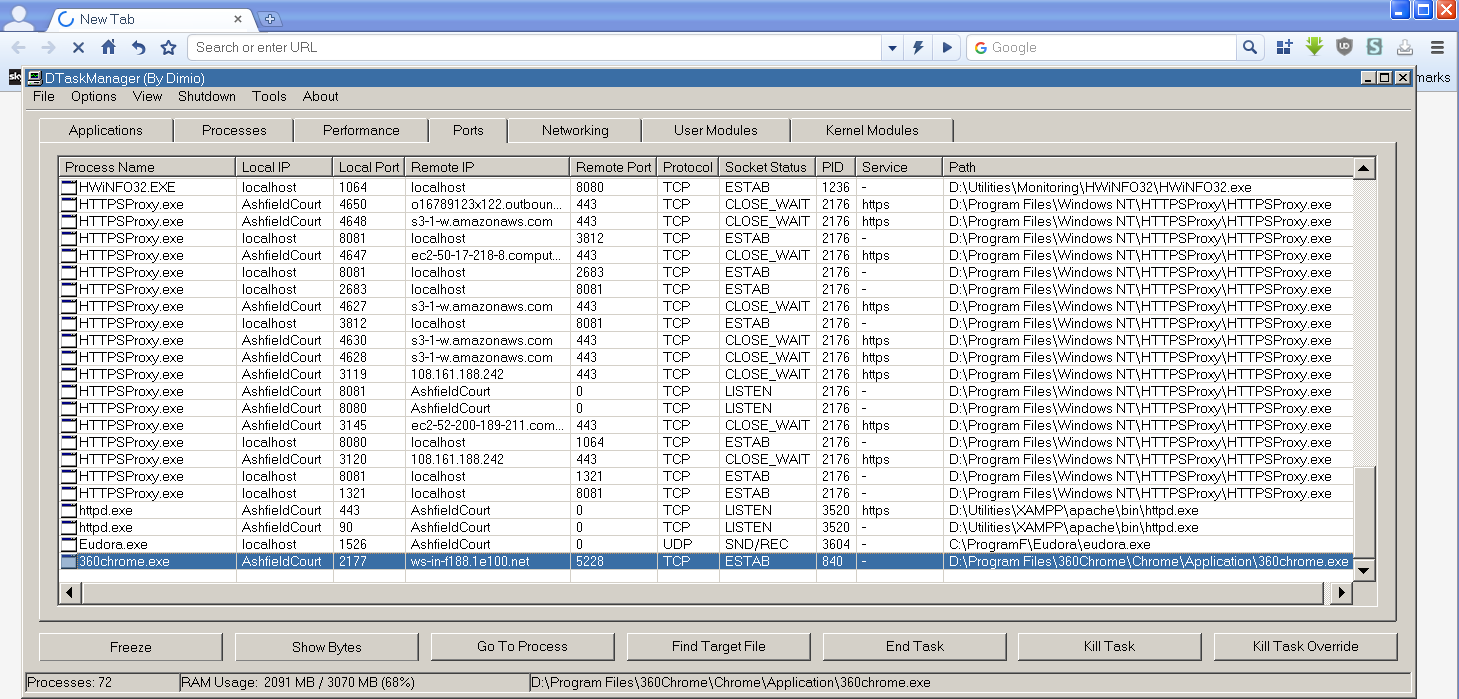
@NotHereToPlayGames Hi again! Do you remember when I started using your 360Chrome 13.5 I queried that it seemed to be searching for something when the first tab was opened when the program started? I've just checked on this again, and found this when the program is first run and there is a progress animation (which never ends) in the first tab. The domain ws-in-f188.1e100.net appears to be a Google domain. Any idea why the program should be trying (presumably unsuccessfully) to contact it when it runs, and should I block it?

-
@NotHereToPlayGames I mentioned this on another thread, but just thought I'd ask here. I'm using your version of 360Chrome 13.5, and I've now noticed that the mute icon at the bottom right in the status bar does not work. The icon changes to mute, but the sound is not muted. Not a big deal as the mute buttons on the individual tabs still work fine, but I just wondered if this was a known issue.
-
My Browser Builds (Part 3)
Dave-H replied to roytam1's topic in Browsers working on Older NT-Family OSes
Just a gentle reminder that political discussions are not appropriate here, and are in fact against the rules of what is after all a technical forum. FWIW xper has said that with recent donations the site will be OK now for another couple of months, but people do need to keep helping if they can to keep it online. -
360 Extreme Explorer Modified Version
Dave-H replied to Humming Owl's topic in Browsers working on Older NT-Family OSes
On my installation of ArcticFoxie's 360Chrome 13.5, the mute button on the status bar doesn't crash the browser, but it doesn't work either! The icon changes, but the sound is not muted. The mute icons on the tabs do work. -
Auto-Patcher For Windows 98se (English)
Dave-H replied to soporific's topic in Windows 9x Member Projects
That December 2007 version is the last full version. There was a subsequent update in December 2008, which was the final version. You need the full version installed first in order to be able to use it. Here it is for anyone who wants it. AutoPatcher for Windows 98SE December 2008 Update.exe -
And of course the other reason we've been trying to get Windows/Microsoft Update working again, is because we can! OK, it's pretty useless now to anyone who has a fully up to date and patched system, but that still doesn't mean that it hasn't been fun to unexpectedly see it working again. We all know that Microsoft could shut the whole thing down at any time with no notice, and that will be an end to it, in fact I'm surprised the websites still work now, but let's enjoy the achievement of getting the system up and running again!
-
Enable AHCI mode on laptop with no AHCI switch in BIOS
Dave-H replied to we3fan's topic in Windows XP
Yes, I did say it was a long shot! I agree that unless you solve the fundamental problem of your SATA controller not being ACHI compatible, or at least not being in AHCI mode, this will never work. It could be that the hardware just isn't capable of doing what you want it to do. -
Well if the new method will work in more setups then yes. I think I'll leave mine as it is though!
-
Is that the same thing that @maile3241has been posting about?
-
That's right, I can use that version of wsusscn2.cab in WUMT using offline mode, but no later versions work, including the July 2020 version which should. Online scans always fail or never complete.
-
Ah thanks, I didn't realise that you had to keep the two stores separate or one would over-write the other. I must remember that! The last version of wsusscn2.cab that I can get to work offline with WUMT is the version from November 2019. The next version, from July 2020, which is supposed to be the last SHA-1 signed version, just throws an error message, something like "no signature found". I know some people have had that version working, and I never determined why it didn't work for me.