.jpg.bbb502e72058b7d7551487c4faf30b96.jpg)
genieautravail
Content Type
Profiles
Forums
Events
Everything posted by genieautravail
-
.thumb.jpg.e861836bb05fe824ad8ec1930061ee43.jpg) Thanks !
Thanks ! -
NVIDIA Optimus and AMD Switchable Graphic with XP
genieautravail replied to genieautravail's topic in Windows XP
@Dietmar Nice ! I will wait too, no problems for testing the "acpipatcher" as soon it will be avalaible. -
NVIDIA Optimus and AMD Switchable Graphic with XP
genieautravail replied to genieautravail's topic in Windows XP
Ok, thanks ! -
Hello everyone, In my large stock of hardware, there is three laptops with two graphic cards that use the NVIDIA Optimus or AMD Switchable Graphic technology : Dell Vostro 3550 (Intel Core i5-2430M with Intel/AMD Radeon HD 6630M) HP Pavilion dv7-6b70ef (Intel Core i7-2670QM with Intel/AMD Radeon HD 6490M) Dell XPS L502X (Intel Core i7-2630QM with Intel/NVIDIA GeForce GT 540M) Is there a solution to switch by default to the AMD Radeon or NVIDIA graphics card instead of the Intel graphics card ? Always in my hardware stock, there is some laptops from the professional series of Dell that use two graphic cards too (Intel/NVIDIA). But in the BIOS there is a setting that let me to switch on the NVIDIA card (only the NVIDIA graphic card is visible in the devices manager). Regards
-
@TheLeftOldComputer Other possibility: @K4sum1 is developing Eclipse r3dfox, a browser based on Firefox. The browser can works on XP with One-Core API: https://github.com/Eclipse-Community/r3dfox/issues/129 Perhaps can you slipstream One-Core API directly into the browser ? A guy was doing that on the My Digital Life forum. Regards
-
You are Incredible guys! @TheLeftOldComputer, perhaps can you rewrite on your free time the framework of the universe in the Matrix style and give the power to XP forever ? Otherwise and more seriously, you can for example ask to @Zorba the Geek if he need help for his project of KernelEx for Windows XP. Regards
-
@dmiranda Just set the name of the folder as a variable: FOR /f "tokens=*" %%a in ('DIR "yourpathto\Chrome\1*" /a:d /b') do SET FOLDER=%%a ECHO %FOLDER% Regards
-
I confirm, only the firewall edition. About the Antivirus, I don't know.
-
@AstroSkipper Here a link for Comodo Internet Security 10.2.0.6514 (x86 and x64 MSI files): https://ufile.io/r22o4iyi You can use some switches for installation: msiexec /I cis_setup_x86.msi INSTALLANTIVIRUS=1 INSTALLFIREWALL=1 According to the changelog of CIS, this release isn't the last of the 10.2.x series. Here the link for CIS 10.2.0.6526: https://ufile.io/a50ue4oq In the archive you will find 3 files: CIS 10.2.0.6526 Comodo Cleanup tool 2.0.0.3 x86 and x64 (both versions from 2018) Regards
-
@AstroSkipper I have uploaded CIS 10.1.0.6476 offline installer here: https://ufile.io/kjqc4x2h Please, don't ask me where I found it. Regards
-
OFF-TOPIC! @NotHereToPlayGames I fully agree with you, my XP installation (15 years old) is fully tweaked and optimized. And I have hundreds of scripts that do the job for me. Regards
-
If I remeber well, it was starting only when it wanted.
-
Try Comodo Cleaning Essentials: https://help.comodo.com/topic-119-1-328-3523-.html The last time I had used this program was in 2018 (version 10.0.0.6111) and it was a little capricious under XP but working. About version 11.0, I don't know. Let us know.
-
@AstroSkipper Be careful with SUPERAntiSpyware Free Edition 10.0.1254. After installation, at launch I have many issues: DLL can't be initialized Can't create a file that already exist ... I can't access to the interface of the software. I think that for XP it's game over since long time for a new install. Regards
-
@AstroSkipper Thanks for the link. Regards
-
@AstroSkipper SUPERAntiSpyware isn't anymore compatible with XP. If I run the setup of the free edition, I get an error message saying that the setup is not a valid Win32 application. Same thing with previous versions downloaded by Internet Archive. Which version do you use ? Do you have a setup of the free edition compatible with XP ? Regards
-
Latest Version of Software Running on XP
genieautravail replied to pointertovoid's topic in Windows XP
@LordGarfio OK ! But are you the creator of the files ? Regards -
Latest Version of Software Running on XP
genieautravail replied to pointertovoid's topic in Windows XP
@LordGarfio Thank you for the links. But, please, don't use NitroFlare for files uploading. It's a pain to download the files from this site. You can use PixelDrain by example. Do you are the creator of these mods ? Regards -
Latest Version of Software Running on XP
genieautravail replied to pointertovoid's topic in Windows XP
The latest version of Honeyview doesn't works anymore with XP. https://en.bandisoft.com/honeyview/ The last version working with XP is 5.50. -
@reboot12 Thank you very much for the trick. Regards
-
@UCyborg Is there a way to install the UMDF 1.0 and the mtp driver without WMP11 ? Regards
-
[TOOL] ListDisk - Detailed Physical Disks Info in CMD
genieautravail replied to George King's topic in Windows XP
I think you must exclude volumes with a size of 0. Regards -
[TOOL] ListDisk - Detailed Physical Disks Info in CMD
genieautravail replied to George King's topic in Windows XP
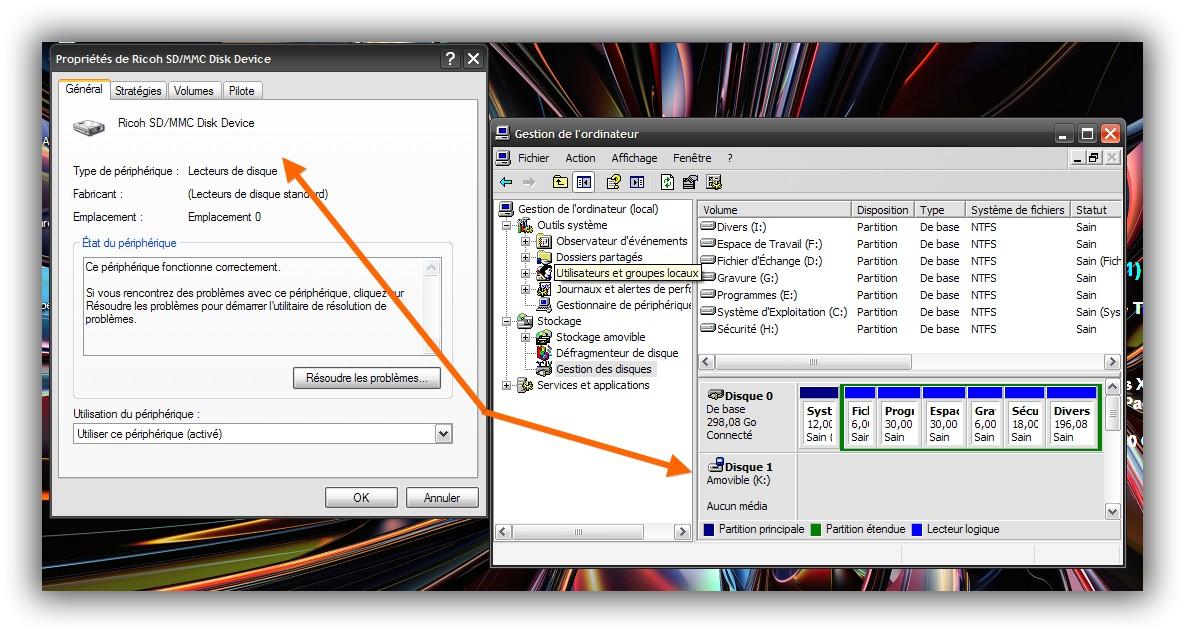
Yes, I can confirm that the disk 1 is the Ricoh SD/MMC Disk Device: ID of the Ricoh SD/MMC Host Controller : PCI\VEN_1180&DEV_0843&SUBSYS_1521103C&REV_14\4&3A88E1E&0&32F0 Regards
-
[TOOL] ListDisk - Detailed Physical Disks Info in CMD
genieautravail replied to George King's topic in Windows XP
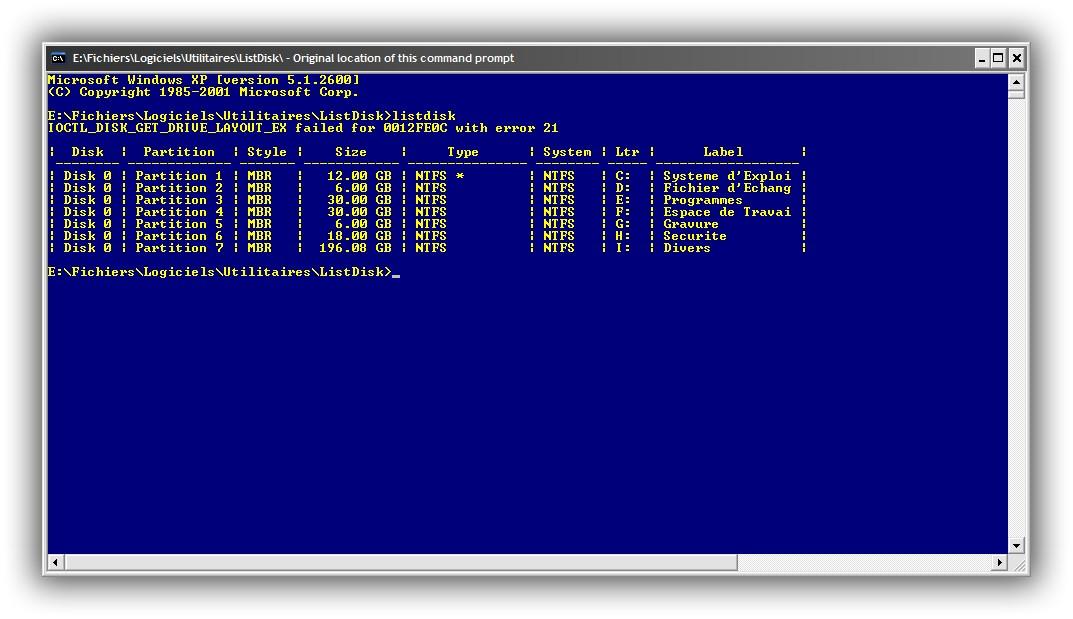
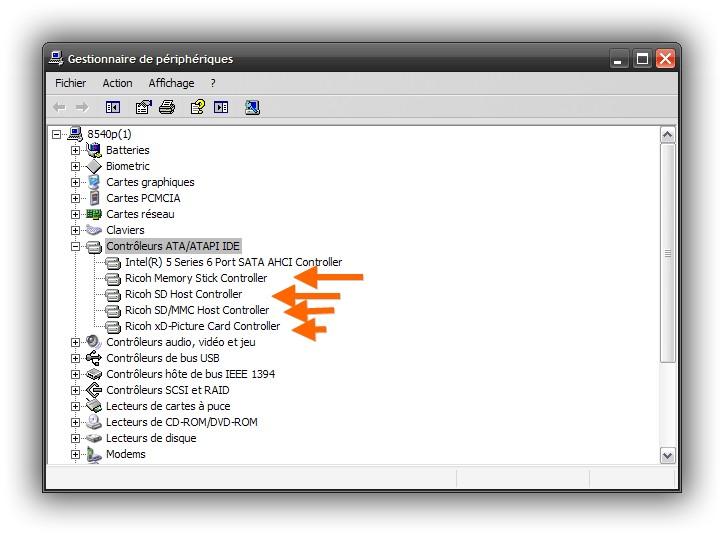
@George King The issue is specific to two HP laptops. On a Dell Laptop, no error message, all is OK. This afternoon, I will test ListDisk on a desktop computer and post the result. I don't know what is specific to the HP laptops... Even with only the internal HDD, I get the message: Perhaps one idea, in the devices manager the SD card-reader is with IDE devices, not with USB devices: Regards
-
[TOOL] ListDisk - Detailed Physical Disks Info in CMD
genieautravail replied to George King's topic in Windows XP
Incredible and impressive! Do you have try to code with ChatGPT a modern ACPI driver for XP ? @Dietmar would be probably very interested. Joke apart, I'm not a programmer too... Perhaps can you ask to ChatGPT what the error can means ? Nevertheless, congrats,for your work with ChatGPT! I think it would be a good idea to add to the first post of this thread that the main developer is ChatGPT and that the software is release as is it, without support. @Dave-H I ask myself if this is the first program coded by ChatGPT to be release on the forum ? Regards