.jpg.bbb502e72058b7d7551487c4faf30b96.jpg)
genieautravail
Content Type
Profiles
Forums
Events
Everything posted by genieautravail
-
.thumb.jpg.e861836bb05fe824ad8ec1930061ee43.jpg)
MyPal 68
genieautravail replied to Jody Thornton's topic in Browsers working on Older NT-Family OSes
Just happy to see that @feodor2 is alive and healthy ! -
Thank you for the informations. and YES, the virus signature database is updated and works. Below a link for downloading the command line scanner with the updated virus signature database. These files are included in the installation folder of ESET NOD32 Antivirus 8.0.319.1. This command line tool is free to use (don't require a licence key): https://buzzheavier.com/u1kpplyt2fh0
-
MyPal 68
genieautravail replied to Jody Thornton's topic in Browsers working on Older NT-Family OSes
Probably a stupid question but if someone can answer. Does the 64-bit version of Mypal work normally or are there specific bugs compared to the 32-bit version ? Regards -
@ED_Sln Just to confirm that the flags works with the latest Ungoogled Chromium (144.0.7559.133). Regards
-
I will try these flags today. Thank you for the tip. Regards
-
Yes, I use the loader of 360 Chrome browser. Works very well with Supermium and Thorium too. Regards
-
@ED_Sln Please, as I don't have a GitHub account, can you ask to the developper to remove the code that delete all extensions when you move the portable versions of Chromium and Ungoogled Chromium from one computer to another. It's a horrible feature added by Google... I'm not sure about that but it seems that even some settings are restored by default with the move. Tested with Chromium 146.0.7656.0 and Ungoogled Chromium 144.0.7559.59. Regards
-
@Reino I Tried libcrypto-3.dll and libssl-3.dll 3.5.0 and 3.5.2 with Pop Peeper and they works perfectly under XP. Pop Peeper itself is fully compatible with XP but since release 5.5, it use the official OpenSSL libraries for TLS 1.3 that are not compatibles with XP. Regards
-
Latest Version of Software Running on XP
genieautravail replied to pointertovoid's topic in Windows XP
From MDL forums: Telegram 5.6.3 for XP https://forum.ixbt.com/topic.cgi?id=24:50247:313#313 Regards -
Latest Version of Software Running on XP
genieautravail replied to pointertovoid's topic in Windows XP
XYplorer Version 27.10 is the last 32-bit version, the next one will be 64-bit. -
Latest Version of Software Running on XP
genieautravail replied to pointertovoid's topic in Windows XP
The GUI version (PAKKA) doesn't works on XP. You can launch the program, but when you try to add or extract files from an archive an error message is displayed about a missing entry _mkgmtime32 in msvcrt.dll. -
VT Hash Check - XP compatibility restored
genieautravail replied to genieautravail's topic in Windows XP
@Multibooter With the Windows Classic theme and my new release, are the section titles displayed correctly ? Edit: OK, I have checked by myself on one of my computers. -
VT Hash Check - XP compatibility restored
genieautravail replied to genieautravail's topic in Windows XP
Yes , you have right, the issue is linked to the Windows theme chosen. The two versions are available, use the one of your choice. Regards -
VT Hash Check - XP compatibility restored
genieautravail replied to genieautravail's topic in Windows XP
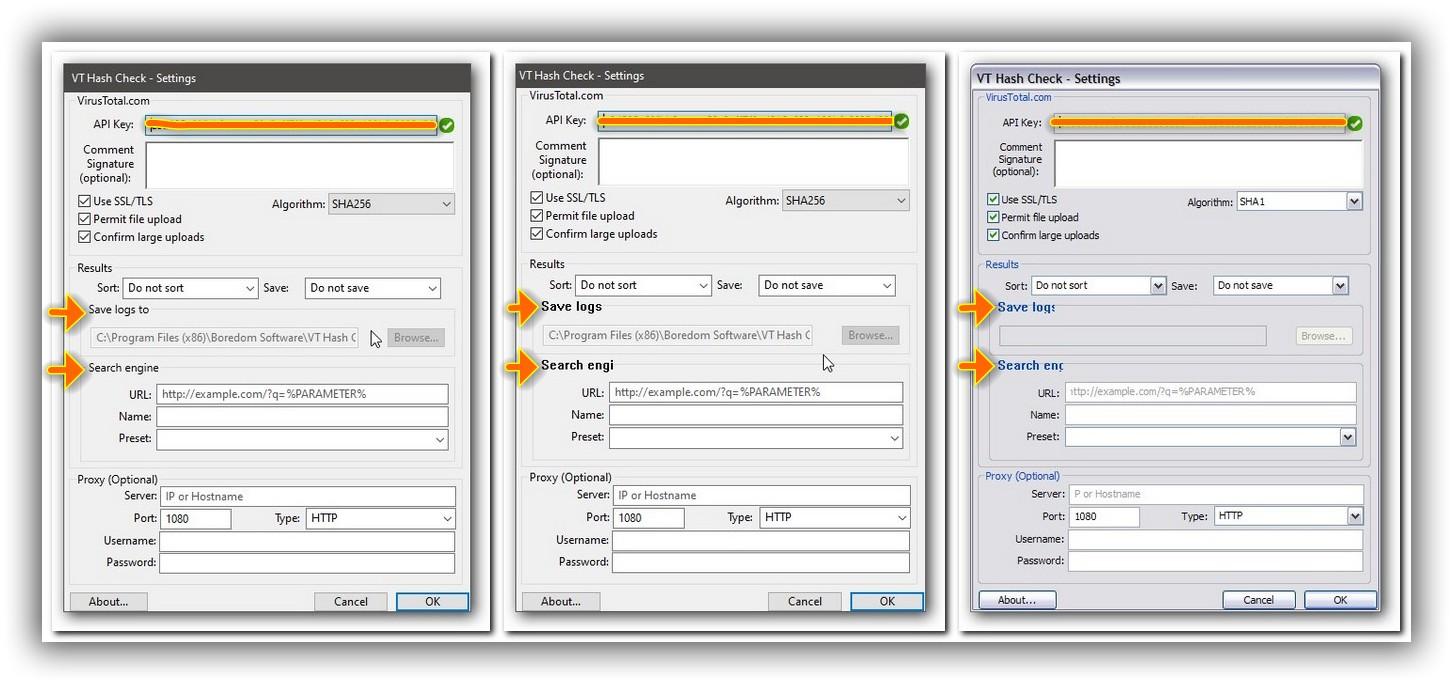
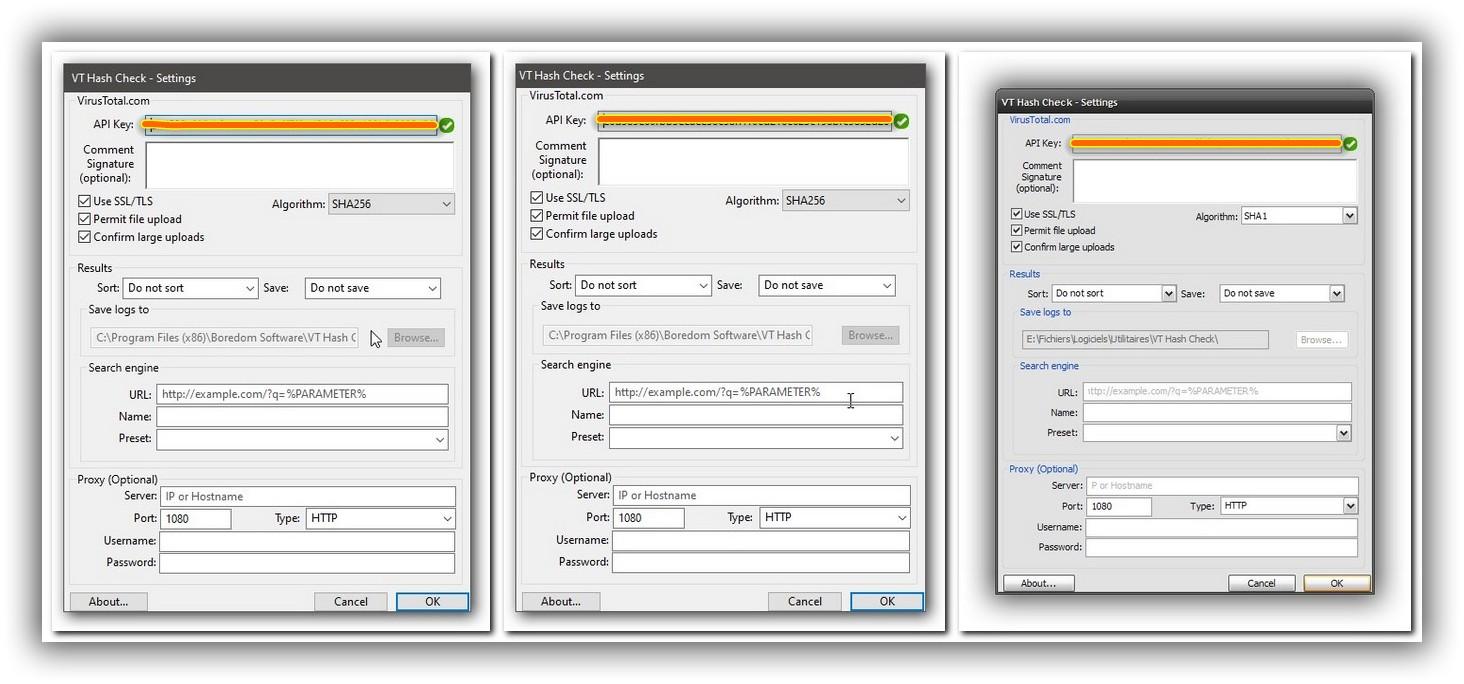
Hello, I have release a new version of VT Hash Check 1.67 for XP that fix an esthetic/visual issue in the window of the settings. On the screenshots below, you can compare the difference. Before: On the left, the official/original release on Windows 10 On the center, my previous release on Windows 10 On the right, my previous release on Windows XP After: On the left, the official/original release on Windows 10 On the center, my new release on Windows 10 On the right, my new release on Windows XP The download link can be found in the first message of the topic. The mod is now complete. Regards
-
MyPal 68
genieautravail replied to Jody Thornton's topic in Browsers working on Older NT-Family OSes
Have you tried uBlock Origin ? https://addons.mozilla.org/en-US/firefox/addon/ublock-origin/versions/ I'm using version 1.57.2 with the latest release of Mypal. Very strange, nothing like this on my computers... On what OS are you running Mypal ? How many memory do you have on your computer ? Regards -
MyPal 68
genieautravail replied to Jody Thornton's topic in Browsers working on Older NT-Family OSes
@feodor2 I can confirm that the issue with Amazon FRANCE website is fixed with Mypal 68.14.8b. Regards -
VT Hash Check - XP compatibility restored
genieautravail replied to genieautravail's topic in Windows XP
YES! I use this program since 2013, already 12 years. It's already an old project, 16 years old. I discovered it on Wilders Security Forums: https://www.wilderssecurity.com/threads/vt-hash-check-auto-scan-downloads.333350/ The original website is now nearly empty, the developer has migrate to Github: https://www.boredomsoft.org/ But the webpage with the old changelog is always available: https://web.archive.org/web/20191223155757/http://www.boredomsoft.org/vt-hash-check.bs Regards -
VT Hash Check - XP compatibility restored
genieautravail replied to genieautravail's topic in Windows XP
OK, you are not concerned by the problem as your CPU is more recent. Yes, the config file size is growing a little with changes made to the settings. Perhaps that there is even duplicates in the file. Long time ago, the config file of VT Hash Check was in plain text. It was easy to edit it without having to launch the program. Regards -
VT Hash Check - XP compatibility restored
genieautravail replied to genieautravail's topic in Windows XP
On my oldest desktop computer, the hidden window appear too if I launch Explorer. So, this is the same problem. That confirm what I has written above about the architecture of the CPU. It's not the first time I see something like this. Regards -
VT Hash Check - XP compatibility restored
genieautravail replied to genieautravail's topic in Windows XP
@AstroSkipper @Multibooter What is the processor model on your computers? Fortunately, I have a lot of computers at my disposal. I have dug the subject of the hidden window. I installed VT Hash Check on my oldest desktop computer (Sempron 2800+ Socket A release in 2004). By a double-click on the main executable, the configuration window is displayed. But only the first time, as long as the configuration file "%Appdata%\Boredom Software\VT hash\Config.dat" is not created. Afterwards, by a double-click on the main executable, a process is created but no window. If I delete, move or rename the configuration file, a double-click on the main executable works again but only once. Once the configuration file is created, you have to use the parameter --prefs to access the configuration window. Can you confirm this? I also installed the software on a fourth laptop (Core 2 Duo P8600 release in 2008) On this laptop, the window of the settings is not hidden like on the laptops with Core i5 from the first (2010) and second (2011) generation that I'm using for testing VT Hash Check. The problem doesn't exist with CPUs from 2006/2007 and up. I can't do anything for that, the problem is linked to the architecture of the CPU. Regards -
VT Hash Check - XP compatibility restored
genieautravail replied to genieautravail's topic in Windows XP
@Multibooter The size limit for a file is 650mb. If you want to remove this warning, just disable the "Confirm large uploads" option in the settings. -
@AstroSkipper Just a question a little out of subject. In the YTBatch package, where did you find Window.exe ? Regards
-
VT Hash Check - XP compatibility restored
genieautravail replied to genieautravail's topic in Windows XP
@Multibooter it seems that the software is always available but the archive is protected by a password. https://www.miclog.com/download-old-version/ Your example is a very particular case. Try with an archive not protected by a password. Regards -
VT Hash Check - XP compatibility restored
genieautravail replied to genieautravail's topic in Windows XP
Yes, nothing more normal. https://stackoverflow.com/questions/2463243/dll-search-on-windows Regards -
VT Hash Check - XP compatibility restored
genieautravail replied to genieautravail's topic in Windows XP
@Multibooter In Process Explorer, if you click on properties in the contextual menu, you will see 2 threads (in the Threads tab). For the default task manager, 2 threads = 2 instances Regards