schwups
Content Type
Profiles
Forums
Events
Everything posted by schwups
-
Pity! The development of TenFourFox will end. (http://tenfourfox.blogspot.com) I've followed the blog and so roytam's Firefox 45 builds the last months. I tried and ran every build on ME. I don't expect any support for Firefox on Win ME. I have some bugs. On March 12th was mentioned (tenfourfox.blogspot.com) "....at least I am able now to see that it's clearly a problem in the JavaScript parser generating something incorrectly, but I'm still not able to tell where the specific deficiency lies."? I really don't know whether and to what extent those errors can be transferred to windows. But my errors may only appear here on ME. I never compared it on XP. On XP I use Firefox 52.9, NewMoon and MyPal. RT's Firefox 45 is therefore not an alternative to use. The normal older versions 45.9 or 48.0.2 are much more stable and quite suitable for everyday use (75-80% trouble-free / Javascript enabled). Only a few percent of the web leads to a browser crash and restart.
-
http://www.japheth.de/Download/VWin32.zip
-
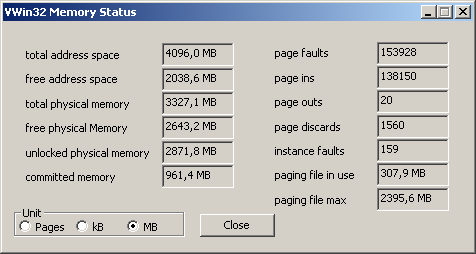
Yes, we miss Rudy! I have set [vcache]MaxFileCache=393216 for many years. My MS system inforformation doesn't work with more than 2GB RAM. I have to reduce phys memory (MaxPhysPage) accordingly. At my request Rudy said "Windows ME MSINFO32 definitely has a problem, probably an incorrect signed math bug.....You can also substitute the MSINFO32.EXE from Windows 98SE which works correctly" and I can use VWin32. Running Firefox 48.0.2:

-
Yes, Tahoma is my default font, too. MS Sans Serif for Firefox menus is a bad choice. That's why I changed it many years ago. That's probably also the reason that "missing last character" in search bar never occurred here. SeaMonkey 2.40 also crashes immediately here without "hardware acceleration". I had massive JS problems with some versions of KM76 last year around April/ May/ June. It had crashed on almost all sites, so I was forced to turn it off for these versions, too. Although the problems were maybe often caused by myself, caused by testing and fiddling. These were always flawed, buggy profiles. Deleting the profile or prefs.js mostly solved the problem. The profile should be fresh and not mixed with other versions. It hasn't occurred since October at least.
-
Geforce 6/7 and 8 AGP/PCI-E Driver Edition for Win98/ME by Zak!
schwups replied to ZakMcKracken84's topic in Windows 9x/ME
ZakMcKracken84: NV82.69 MDGX: http://www.mdgx.com/files/NV8269.EXE http://www.mdgx.com/files/NV8269.ZIP -
A YT user (and MSFN forum reader) uploaded some movies about KernelEX/98SE/ME. (https://www.youtube.com/channel/UCB52pssqm8lsRvQQMAFs6Dw/featured) Unfortunately, I don't understand the language - it's probably spanish. I'm surprised, the user seem to be able to run NewMoon 27. https://www.youtube.com/watch?v=O4o15zPq6RI. In a XPSP3 dll package he/she has ATL.dll (then probably ATL Module for Windows XP Unicode) and msdmo.dll (DMO Runtime DirectShow). I always use atl.dll of IE6SP1 (Ansi) in my system folder. Some time ago I had tested the ATL unicode, but I got annoying messages about the wrong version. I tried it again and set it to XPSP2 now. The messages are gone. She/he changed the msvcrt.dll. Fiddling with different msvcrt 6.1.8637.0/6.1.9848.0/7.0.9981.0 files has brought nothing here so far. This user could also be able to run Firefox 36 - 41.
-
- I compared layers DirectX mode with layers OpenGL mode on Firefox 45. OpenGL: user_pref("layers.acceleration.force-enabled", true); user_pref("layers.offmainthreadcomposition.enabled", "true"); user_pref("layers.prefer-d3d9", false); user_pref("layers.prefer-opengl", true); I can't see anything to choose OpenGL, nothing speaks for it. There are some more ui glitches. D3D9 is the better choice. - Icons on this board - FontAwesome: The settings browser.display.use_document_fonts;1 and gfx.downloadable_fonts.enabled;false in combination with entries (example) in prefs.js user_pref("font.name-list.sans-serif.x-unicode", "Arial, Symbola, FontAwesome, Segoe UI Emoji, OpenSansEmoji, Microsoft Sans Serif"); user_pref("font.name-list.sans-serif.x-western", "Arial, Symbola, FontAwesome, Segoe UI Emoji, OpenSansEmoji, Microsoft Sans Serif"); user_pref("font.name-list.serif.x-unicode", "Tahoma, Symbola, FontAwesome, Segoe UI Emoji, OpenSansEmoji, Arial"); user_pref("font.name-list.serif.x-western", "Tahoma, Symbola, FontAwesome, Segoe UI Emoji, OpenSansEmoji, Arial"); are worth a try here. I can even see the "search magnifier" and the "Rate stars". Font Awesome must be installed. Please check. - RT's builds FF 45 - crash due to exception in XUL.dll: I tested older versions and just now it also happened on 45.9.17. But I'm still waiting on it on 45.9.9.
-
I use Google search very rarely. I've just tried Google and have set Cookies to keep. Yes, I always have to accept the agreement, too. But it works on XP. So it is a bug on ME/KernelEx. Are you running FF45.9.31 (RT) or 45.9? Sometimes RT's FF crashed due to an exception in Xul.dll. (FIREFOX caused an exception 406d1388H in module XUL.DLL at 0177:027c56da)
-
Tjukok also reported this bug: msfn.org/board/topic/181424-firefox-24-for-me-and-98/page/12/#elControls_1192061
-
Thanks for the confirmation. I haven't proved with "KernelEx'd Windows 2000" Dll's and I don't run a VM. But it's good to know if "KernelEx'd Windows 2000" Dll's work, too. The question about "possible issue with Virtual Machines" hasn't yet been answered.
-
You must rename it to core.ini and it replaces the older one. "Core.20i" will be inoperable. Latest KernelEx could or will not work properly with a older Core.ini. You can rename your old Core.ini or make a renamed copy of the whole KernelEx folder to be able to restore the system quickly.
-
VLC 3.0.12 crashes on start, because of "InitializeConditionVariable". And I didn't find useful stubs for the Condition Variables, so I deactivatet InitializeConditionVariable in the Kexstubs.ini .
-
Backporting newer browsers to Win9X with KernelEx
schwups replied to roytam1's topic in Windows 9x Member Projects
I didn't test that with KernelEx update 16. 16 was the first Kex version, that had allowed FF24+ to run. The profile will created very faulty. There are significant improvements since update 18. Don't use an old profile of an older version like PaleMoon 3, 9 or 11. You can rename it for this purpose. The profile should be fresh. Version 25.4.1 could be a bit tricky to run, so test with 25.3.2 first. -
What is CBAKK.INI? Update Kext to 823 (Kstub823.dll) for FF42+
-
Don't install any strange files! Yes! From Topic KernelEx 4.5 Core Updates (4.5.2016.17) links on my post May 16, 2020 https://msfn.org/board/topic/181424-firefox-24-for-me-and-98/page/6/#elControls_1181947 - mouse-right-click not working ???? see, if it goes away after update - new tabs don't work properly read first post - Issues on ME/98SE => set "browser.newtabpage.enabled" to false - no javascript enable/disable checkbox under "Tools->Options" in Firefox later versions don't have this button anymore. Install an extension like QuickJava or disable it in about:config or prefs.js - Back-button next to URL bar does work only sometimes. ????? see, if it goes away after update
-
Hallo diamant, try to update KernelEX to 24. I don't recommend to use update 16 and definitely not 17. The profile can be buggy! You don't need Kstub for Firefox 31. See first post. You can download the improved versions in the my first post. The url bar will work (search.json is set to read only).
-
Backporting newer browsers to Win9X with KernelEx
schwups replied to roytam1's topic in Windows 9x Member Projects
tyukok, which PaleMoon Goanna versions are you referring to? I can't run any PM Goanna version on ME so far! I can run PM 25 - 25.4.1. It is a Gecko 24 engine. And I have no particular JS problems with these versions. -
Backporting newer browsers to Win9X with KernelEx
schwups replied to roytam1's topic in Windows 9x Member Projects
No, the setting prevents runtime errors when adding bookmarks or changing toolbar settings. JS freezing problems on many machines are still unsolved here. But I cannot reproduce the problem on any of my machines. Yes, sometimes it can be that the browser freezes on a website, but then usually also on XP. Recently I suspected it might have to do with certain firewalls. I'm running Fritz!DSL Protect (Router Fritz!Box). -
Now all images + some smilies have vanished (without JS)
schwups replied to siria's topic in Site & Forum Issues
Yes have vanished! At least required FF44 or KM76.3.1-Goanna-20201121. -
Did you try other user agents?
-
New MSFN site appears broken on Win 9x
schwups replied to Wunderbar98's topic in Site & Forum Issues
You said, "And personally can only test old Firefox-forks, era FF3.5+24, not Opera, not Chrome etc." era FF 3.5 + 24 => Then you have KernelEx installed.?? I can download my 7z file (screenshots) e.g. with Opera 11.64 or PaleMoon 3.6.32 or FF3.6.28. And what about the browser era FF24? Blank Page: Opera 10.63 > css problem, KM1.5.4 TLS1.2, Retrozilla TLS1.2 -
New MSFN site appears broken on Win 9x
schwups replied to Wunderbar98's topic in Site & Forum Issues
Here are some screenshots of KM76.3.1, FF35.0.1 (think there is no difference to 31.8esr) and KM74Goanna (Skin dbTango). The editor works with JS enabled from FF44 onwards. -
New MSFN site appears broken on Win 9x
schwups replied to Wunderbar98's topic in Site & Forum Issues
FF31 and 35 (KernelEx24) - JS enabled: - MSFN looks pretty good - no DARKGRAY background, by and large, objects are where they should be, (js) partially not working now - Functionless, long and narrow editor field - big grey like buttons I have installed Awesomefont 4.7 (https://github.com/FortAwesome/Font-Awesome) for the icons. -
New MSFN site appears broken on Win 9x
schwups replied to Wunderbar98's topic in Site & Forum Issues
I'm on Opera 12 to test. I've JS disabled to get an editor field. There is no control panel and even no possibility to add an attachment. It's the same on K-Meleon74 Goanna with the help of KernelEx. I have to run at least FF31esr. I just see the three dots with the edit control/button and it even works. And via edit I have the possibility to add an attachment. I changed the browser and now I'm on Retrozilla. I also have to disable JS. There is no control panel, but I have a Browse... button to add an attachment. My conclusion JS disabled is more of a makeshift. "Sign out" isn't possible on RZ. -
Thanks for the explanation. I just meant here that Kexstubs (stubs or Kstub823) isn't in the "contents" lines of your test Core.ini, so FF 24 and higher will not run.