




Everything posted by gamehead200
-
IF EVERYONE LIVED LIKE YOU, WE WOULD NEED 6.6 PLANETS.
-
Confirmed my my TI-89 and TI-83+ calculators. There are no solutions for that equation. However: d/dS(s^6+2S^5+S^4+8S^3+4S^2+15S+1562) = 6S^5+10S^4+4S^3+24S^2+8S+15 6S^5+10S^4+4S^3+24S^2+8S+15 = 0 S = -2.18274 Don't know if that will help...
-
Ha, someone else I know that reads Lifehacker. Yeah, I looked at that, and doesn't solve my problem...
-
Although this is a Mac problem, hopefully someone can figure out how to solve it, since it does involve Windows... My problem is the following: I have an iBook G4 that I use at school to access my files, Internet, etc. Up to now, everything has been fine until my school decided to put Websense on the school's wireless Internet. Now, I have spoken with the network administrators in order to grant me unfiltered access to the Internet for school-related and personal purposes and they decided that it would be alright. Since the beginning of the year, I have been connecting and authenticating to my school's wireless network by using the 802.1X WEP security option in the Airport menu on my Mac and it has worked fine. I was able to access my files and access the Internet without a problem. The admins gave me unfiltered access to the Internet today, HOWEVER, it does not work. Why? Well, after spending about an hour with one of the admins, we came to a conclusion that my laptop was not being authenticated properly in the Active Directory. The Websense control panel would detect my Internet usage as someone elses or simply by an IP address, not by my own username, which is what it was supposed to do. Therefore, because the admins set Websense to unfilter everything for my username, but because my laptop is not authenticating properly, my question is this: How do I properly authenticate through the wireless network? I know this is mostly a Windows forum, but there must be a few Mac guys (or girls) surfing around here... I'm desperate to get this working. Just so you know, I am able to add my laptop to the domain, login with my username, and authenticate properly when I am WIRED to the network. Thanks in advance.
-
It's fake.
-
Linux can run on a toaster and still work fine. That was a joke.... But seriously, I've got two linux boxes at home, both running Debian; one is a 300MHz P2 and the other is a 500MHz AMD-K6. Both have around 128MB to 192MB of RAM and work great... No overclocking needed!
-
w00t w00t!!! HAPPY BIRTHDAY, BIG BUDDY, ADMIN PAL!!
-
You can run the TweakUI powertoy from Microsoft (free download) to try and fix this problem.
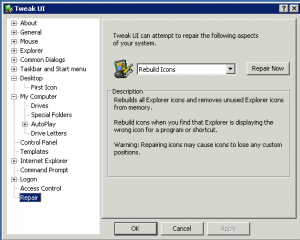
-
Yes, as long as you use the correct hostnames/IP addresses to connect to VPNs... Like rendrag said, it might not be so reliable. That setup is quite a pain, though.
-
I remember the thread you started a while back because of this. Glad you're getting better!
-
Does it only happen to MSFN.org?
-
He keeps switching the domain back and forth... Why? I have no idea...
-
[ Thread cleaned. ] I don't want to have to close this topic. Lamer/Tim0043 will be dealt with accordingly.
-
[ Closed. ]
-
Hey guys, I was just looking at one of the new Mac ads and found it pretty hilarious: http://movies.apple.com/movies/us/apple/ge...lts_480x376.mov What do you guys think?
-
Why doesn't anyone read the rules? [ Closed. ]
-
I've used HijackThis, Ad-Aware, Spybot, Ewido, and a few process scanners and that's all I've needed up to now.
-
Like I said, goes to the internet, can access the router firmware, but the computers on the network cannot ping the laptop, and the laptop cannot ping any other computer on the network. Also, when I go to change the computer name, the workgroup box is gray. I have also tried running a winsock fix, installed the latest drivers for both network cards, all settings at default. You didn't answer my question. Can the OTHER computers ping or access each other, excluding the laptop?
-
Doing this cannot be done in real time with PHP using my guide. You would have to have the user submit a form with the font they want to view in order to do it in PHP. That site is using Javascript in order to do what you want.
-
Can you access other computers from one of the other computers on the network?
-
Is it actually that good?
-
http://www.msfn.org/board/index.php?showtopic=79740 [ Closed. ]
-
[ Closed. ]
-
Bookmarked for later use! This can DEFINITELY come in handy!
-
Success!!!!!!!! Here are my exact steps! 1. Created a partition on each drive and set the type as Linux Raid Autodetect (FD). 2. Ran the following on each partition to clear the superblock in the MD: mdadm --zero-superblock /dev/hdb1 3. Created the array: mdadm --create --verbose /dev/md0 --level=linear --raid-devices=3 /dev/hdb1 /dev/hdc1 /dev/hdd1 4. Gave it a filesystem: mke2fs -j /dev/md0 5. Added the following line in /etc/fstab: /dev/md0 /files ext3 rw,user 0 0 6. Copied the RAID configuration to the mdadm.conf file: mdadm --detail --scan >> /etc/mdadm.conf 7. Mounted everything: mount -a 8. Rebooted, and everything still shows up in /files!! Filesystem 1K-blocks Used Available Use% Mounted on /dev/hda1 9487640 406704 8598988 5% / tmpfs 59640 0 59640 0% /dev/shm /dev/md0 44332080 32828 42047276 1% /files Thanks to TAiN for doing some 1337 Googling!
