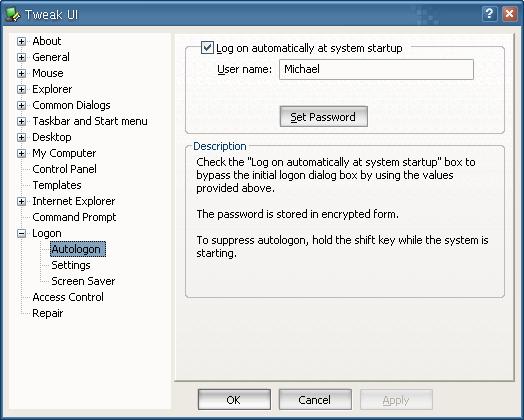
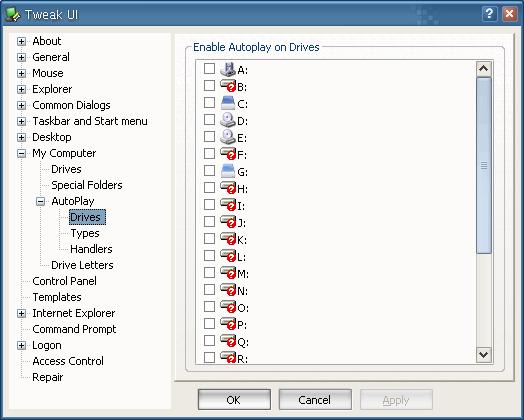
Everything posted by gamehead200
-
This is as good as a guide that you're going to get for now: http://nliteos.com/guide/index.html
-
[ Closed. ] There's already a topic for this. http://www.msfn.org/board/index.php?showtopic=25957
-
1. By using a 3rd-party tool such as Partition Magic (however, it might break the OS [not quite sure]). 2. 8MB isn't really a lot. Why would you even bother?
-
What exactly do you need in Pro that you don't have in Home? Comparison seen here: http://www.microsoft.com/windowsxp/home/ho.../choosing2.mspx The only legal way to do it would be to either buy a Windows XP Pro Upgrade or the full version of XP Pro.
-
Software for Starving Students http://softwarefor.org/ For Windows, it includes 7-Zip, Ant Renamer, Audacity, Blender, BZFlag, Celestia, ClamWin, DeepBurner Free, Dia, Enigma, Eraser, Exact Audio Copy, FileZilla, Firefox, Freeciv, Gaim, GIMPShop, GLtron, GNU Chess, Icebreaker, Inkscape, Juice Receiver, KeePass, MozBackup, NVU, OpenOffice.org, Paint.NET, PDFCreator, Portable Apps, POV-Ray, PuTTY, SolarWolf, Spybot S&D, Stellarium, SuperTux, The GIMP Toolkit, Thunderbird, Tortoise SVN, Tux Paint, Tux Racer, Tux Typing 2, VLC, WinDirStat, Wink, winLAME, WinSCP, XAMPP, and µTorrent.
-
Heard of MythTV? http://www.mythtv.org/
-
For Gmail: http://mail.google.com/support/bin/answer.py?answer=13273 http://mail.google.com/support/bin/answer.py?answer=12103
-
Have you tried recreating your account? Have you tried playing around with Tweak UI at all?
-
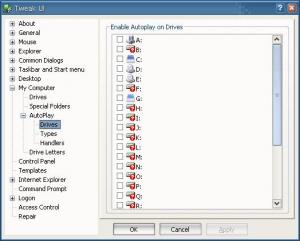
Has anyone ever heard of Tweak UI? Edit: Yes, it was mentioned... But this screen shot explains a lot more than just mentioning it...
-
Correct. The discussion of NTSwitch or anything else that changes the operating system's identifier is not allowed on MSFN. [ Topic closed. ]
-
Acer's recovery disc probably only has a disk image of your hard drive. In this case, you cannot use this disc with nLite.
-
[ Moved. ]
-
Again... Please read the rules! http://www.msfn.org/board/index.php?showtopic=79740 Do not join this board if you are not going to contribute! Second and final warning!
-
Please read the rules. http://www.msfn.org/board/index.php?showtopic=79740 [ Closed. ]
-
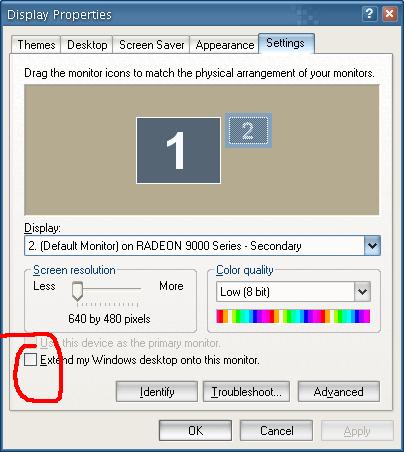
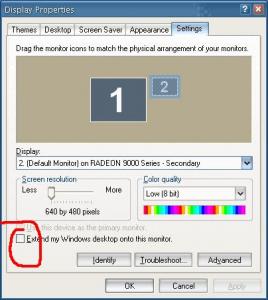
Have you tried unchecking this button?
-
It's possible that the CD keys on the cases only work for an OEM version of XP Home, kind of like a Dell copy. (Are they Dells?) May I remind you that this is BORDERLINE illegal as you have downloaded something that you do not own. If you contact the manufacturer(s) of the computers, I'm pretty sure they might end up sending you a replacement OEM copy.
-
That works well, as long as you're the only user of that system, and that you're not afraid of people just walking by and have fun with your PC while it's already loggged in Oh, I forgot to mention... It locks itself after a minute! And I'm usually present during that one minute, so no one can touch it.
-
This is as best as Babel Fish can translate it: gelloy, in the future, please write your posts in English and place them in the correct forum. [ Moved. ]
-
Well, someone has to be logged in at home while you're at school trying to connect to it. Nobody logged in? No VPN. That's a VERY significant problem by me. I just went away for a couple weeks, and I wanted access. Not only did I want to be forced to be loggged in on every PC before leaving, but things like having to reboot (or power bump or anything) would leave you with no way to reconnect. All VPNs should be services and do routing IMO. I do think this would affect most people a lot. Or you can do what I do: - Setup your computer to auto-boot every morning at 7AM. - Set it up to auto logon once it has finished booting. - Run Hamachi at startup. Bam! No problems connecting, restarting, and reconnecting! prx984, no need to get mad. crahak said he didn't want a flame war. He's not starting one. He's only listing the downsides of using Hamachi and suggesting others that computerMan might be interested in taking a look at. If it doesn't fit his needs, he'll go on to the next one.
-
That's what I thought, but wasn't certain enough to say for sure. As long as the HD is detected and the bootloader works I guess... (I hardly use linux at all, no use for it really) But with one drive, why not just keep the 300w until it dies (then buy a newer one). It's not like it can't really handle a single drive (and the old socket 7 system surely doesn't use much power). A 250w PSU would already be overkill (just look at Zxian's specs and power usage on a newer system) Edit: Looks like Zxian was faster than me on that one... @ LLXX, you were absolutely right about Linux not having to use the BIOS. After connecting the new drive, my BIOS detected it, but couldn't determine the size. I went into the BIOS setup and chose to disable it from checking the Primary Slave disk, booted into Linux, and it detected it without a problem! Filesystem Size Used Avail Use% Mounted on /dev/hda1 9.1G 5.9G 2.8G 69% / tmpfs 122M 0 122M 0% /dev/shm /dev/hdb1 230G 33M 218G 1% /files @ crahak, I bought this PSU for $30 a while back when I first got the system. I'm sure it will last for a little longer. Thanks for all of your help, guys!
-
I got the BIOS ID off of the computer, but haven't been able to come up with any useful information as to what maximum capacity my "server's" BIOS supports. If it doesn't support drives larger than 137GB, I always have that PCI IDE card that I just installed in it that should work. Here is the string: 08/21/1999-VP4-686A-2A5LHM49C-00
-
crahak, you are absolutely right. The only reason I have these hard drives working is because I wanted to put them to use. They were just sitting on my desk collecting dust. I had an extra computer lying around, so I figured, what the heck! Pop Linux on there and RAID them together. However, I haven't really had the chance to check if my BIOS would support disks larger than 137GB, so that will have to be done in the next while. I might just pick up one or two of these tomorrow since they're on sale: http://www.futureshop.ca/marketing/sale_th...=&langid=EN
-
Now comes the question... Can it handle another two drives?
-
Oh, and the PSU is a High Power one (HPC-300-101): http://www.highpowersupply.com/product-ps-hpc300101.htm
-
I am! Debian's telling me the processor's an AMD-K6 3D processor, but when I boot up, it clearly says AMD K6-2. It runs at 550MHz and it's equipped with 256MB of SDRAM!