-
You can always rename the administrator account. You do so under the unattended section of nlite... And if you do that, you will get a $OEM$ due to the net command being run in t12.
-
What did you do to create that?
-
Even after the fixes, the cmd still wont run, i may just scrap it all and start from scratch.
-
Holy hell, I didnt even see those. I now understand that the white space was causing the issue. Thanks for the help, i will test it in the morning. Thanks again.
-
Thanks, i dont know why i had it set up that way. I only had a setup from 2 years ago left on a CD, tried to copy some of the stuff over. Guess it didnt work. Thanks! Did what you said, and then i rechecked everything. Still no go. All the files end up on the HDD, but the cmd just isnt running. I have to be missing somthing else. Here are more of the settings" cmdlines.txt: [COMMANDS] "Install.cmd" I have my Install.cmd in the $OEM$ with the cmdlines.txt, im just out of idea on why it wont run.
-
Thanks, i dont know why i had it set up that way. I only had a setup from 2 years ago left on a CD, tried to copy some of the stuff over. Guess it didnt work. Thanks!
-
Recopy the files, or let nlite do the copying. Its mssing a file somewhere most likely.
-
Due to hard drive failure, i lost my unattended settings. Since then i have started the process but for the life of me i cant get guirunonce to work. Ill attach my winnt.sif, my folder layout and so on. Winnt.sif: ;SetupMgrTag [Data] AutoPartition=0 MsDosInitiated="0" UnattendedInstall="Yes" [Unattended] UnattendMode=FullUnattended OemSkipEula=Yes OemPreinstall=Yes FileSystem=* TargetPath=\WINDOWS UnattendSwitch="yes" WaitForReboot="No" DriverSigningPolicy=Ignore [GuiUnattended] AdminPassword="LOL WUT" EncryptedAdminPassword=NO AutoLogon=Yes AutoLogonCount=9999999 OEMSkipRegional=1 TimeZone=35 OemSkipWelcome=1 [UserData] ProductKey=LOL WUT KEY GOES HERE FullName="HO HO HO" OrgName="" ComputerName=Panda [GuiRunOnce] Command0="%systemdrive%\windows\system32\Install.cmd" [Identification] JoinWorkgroup=WORKGROUP [Networking] InstallDefaultComponents=Yes My install.cmd is in "\$OEM$\$$\System32". when i double click the file, everything goes great. It just wont run the file on its own at first login. Install.cmd: cmdow @ /HID @echo off SET KEY=HKLM\SOFTWARE\Microsoft\Windows\CurrentVersion\RunOnceEx REG ADD %KEY% /V TITLE /D "Installing Applications" /f REG ADD %KEY%\002 /VE /D "Steam" /f REG ADD %KEY%\002 /V 1 /D "%systemdrive%\install\Applications\steam.msi /qn" /f REG ADD %KEY%\002 /VE /D "Additions to Sendto" /f REG ADD %KEY%\002 /V 1 /D "%systemdrive%\install\Applications\ftp sendto.cmd" /f REG ADD %KEY%\099 /VE /D "Cleaning Up and Rebooting" /f REG ADD %KEY%\099 /V 1 /D "%systemdrive%\install\cleanup.cmd" /f EXIT The install files are located in $OEM$\$1\Install. I am out of ideas. Any ideas?
-
Tried the new switches, had the same issues. Looks like im going to have to try it from [Guirunonce]
-
ill try that, i was using steam.msi /quiet /norestart.
-
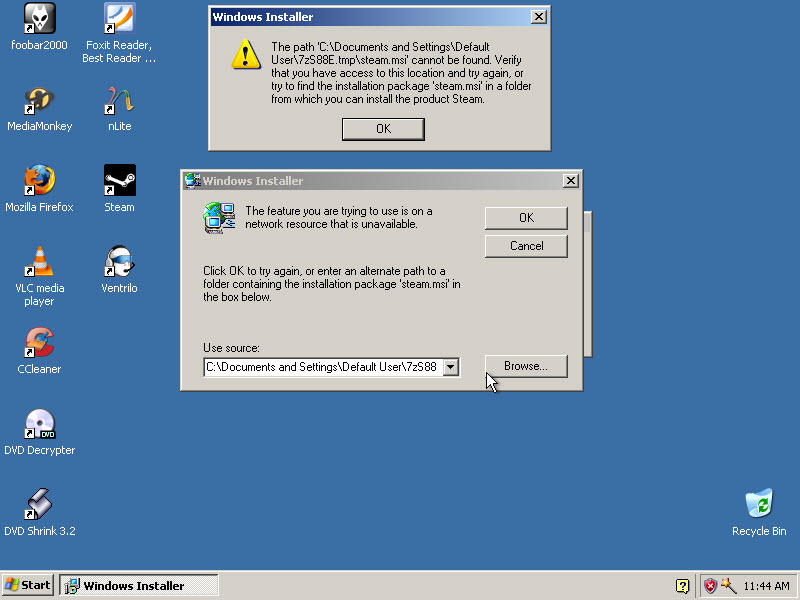
Hello, i made a silent install for steam that installs from SVCPACK. However upon trying to open the file i'm getting a missing DLL error. When the system restarts i'm getting the error that's shown below (see pic). It seems its looking for the temp install files in a user account that isnt around anymore. Would me installing it from GUIrunonce solve this? So its installed at first logon from the correct user account? Below is the error.
-
It's an Installshield with msi. Run the setup, goto Temp folder and copy the .msi file from there. Swihches are known. I cant seem to get the msi out. I extract the .exe even and see no .msi. Nothing in temp aswell
-
Hello, im looking for the silent switch for ventrilo-3.0.1-Windows-i386.exe. Ive searched and searched and just cant find it. Thanks
-
I don't have a MSDN account with subscription, how would i order a new DVD?
-
Im running on x86 atm so i cant slipstream the service pack (i have vista x64 ultimate). Does Microsoft offer pre-slipstreamed isos for download? I doubt it ;/