Leaderboard




Popular Content
Showing content with the highest reputation on 01/16/2026 in Posts
-
The same exact v23 *offline* installer when ran in Win10 *ALLOWS* for an OFFLINE installation. In XP, the *Offline installation* checkbox is disabled so you are forced to use the offline installer as a "stub" that downloads v22! XP: 10:2 points
-
Panda Dome's support has to be also made aware that while they advertise Windows XP SP3 x86 support, some features of the application (e.g. activation, sign-in to a Panda account) on that OS require ProxHTTPSProxy (or equivalent), which is NOT part of a standard installation of that OS; perhaps they need to "relax" some of the cipher suites needed to establish those secure connections, when XP SP3 is being detected as the host OS; but given their response record so far , I'm not betting any money in them addressing the mentioned issue(s) ...2 points
-
that had to be said. And yes, you were absolutely right. At least, Adlice's support has replied quite quickly. In contrast to that I haven't heard from Panda's support for weeks. Seems to be non-existent.2 points
-
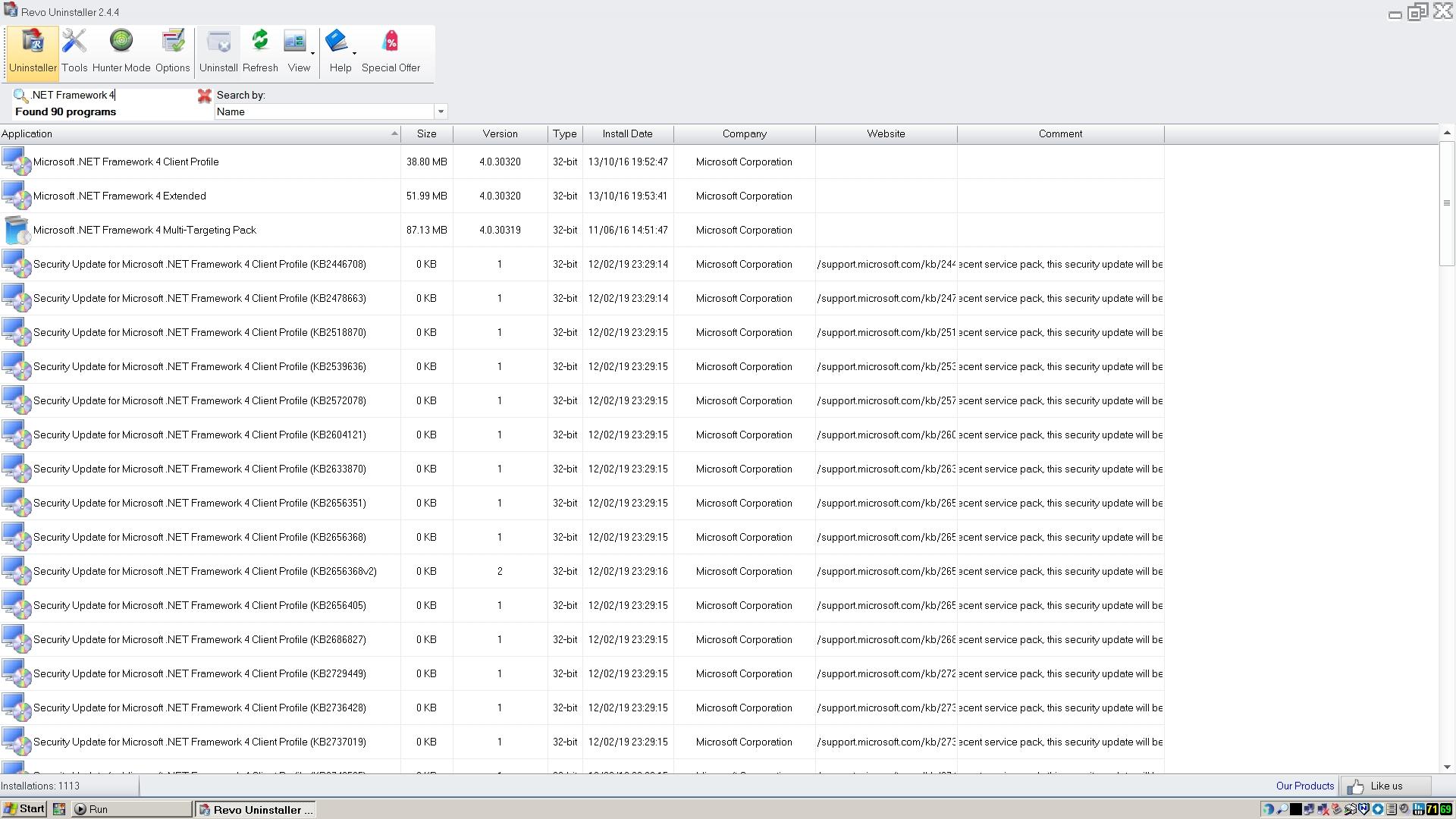
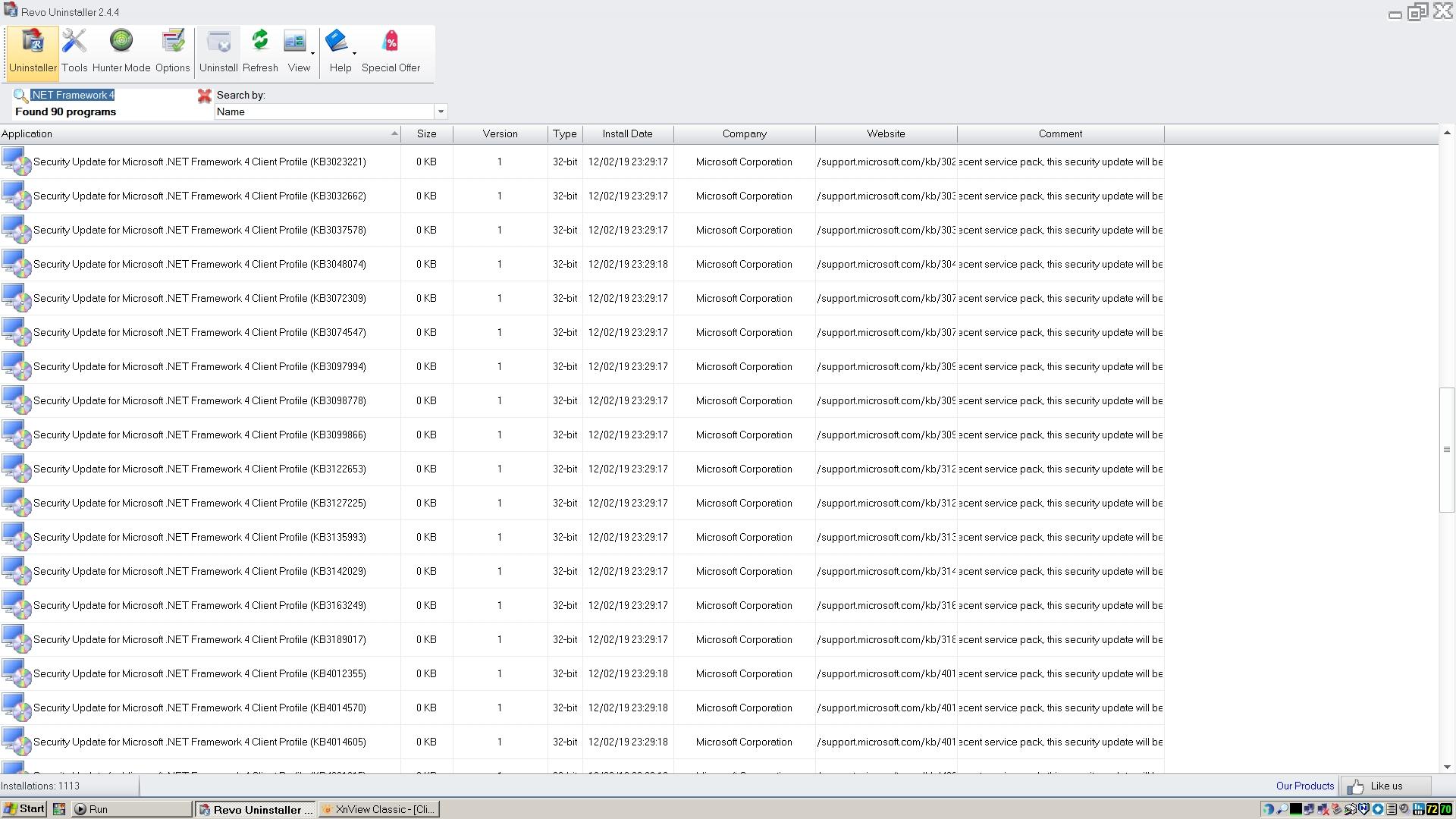
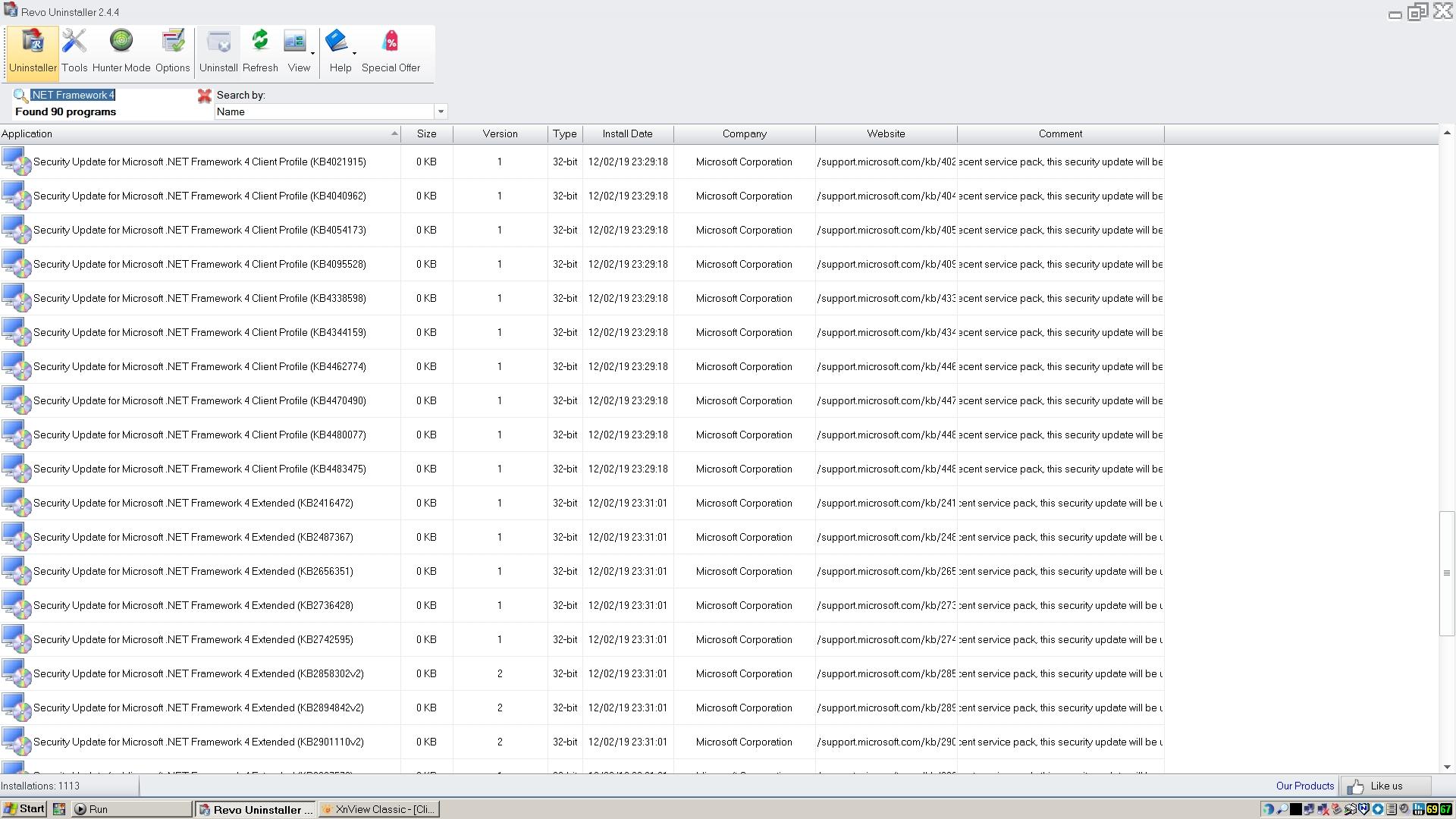
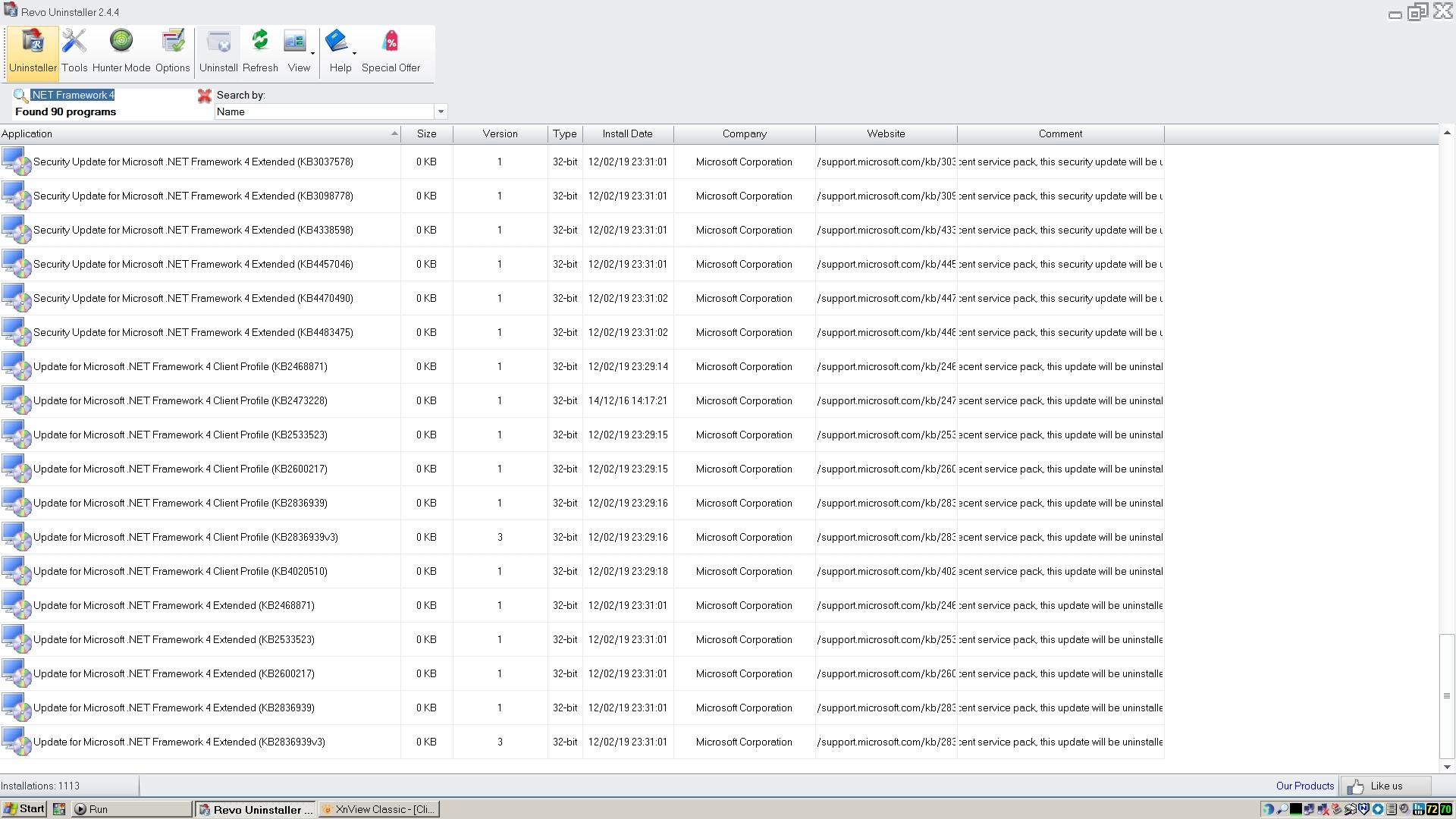
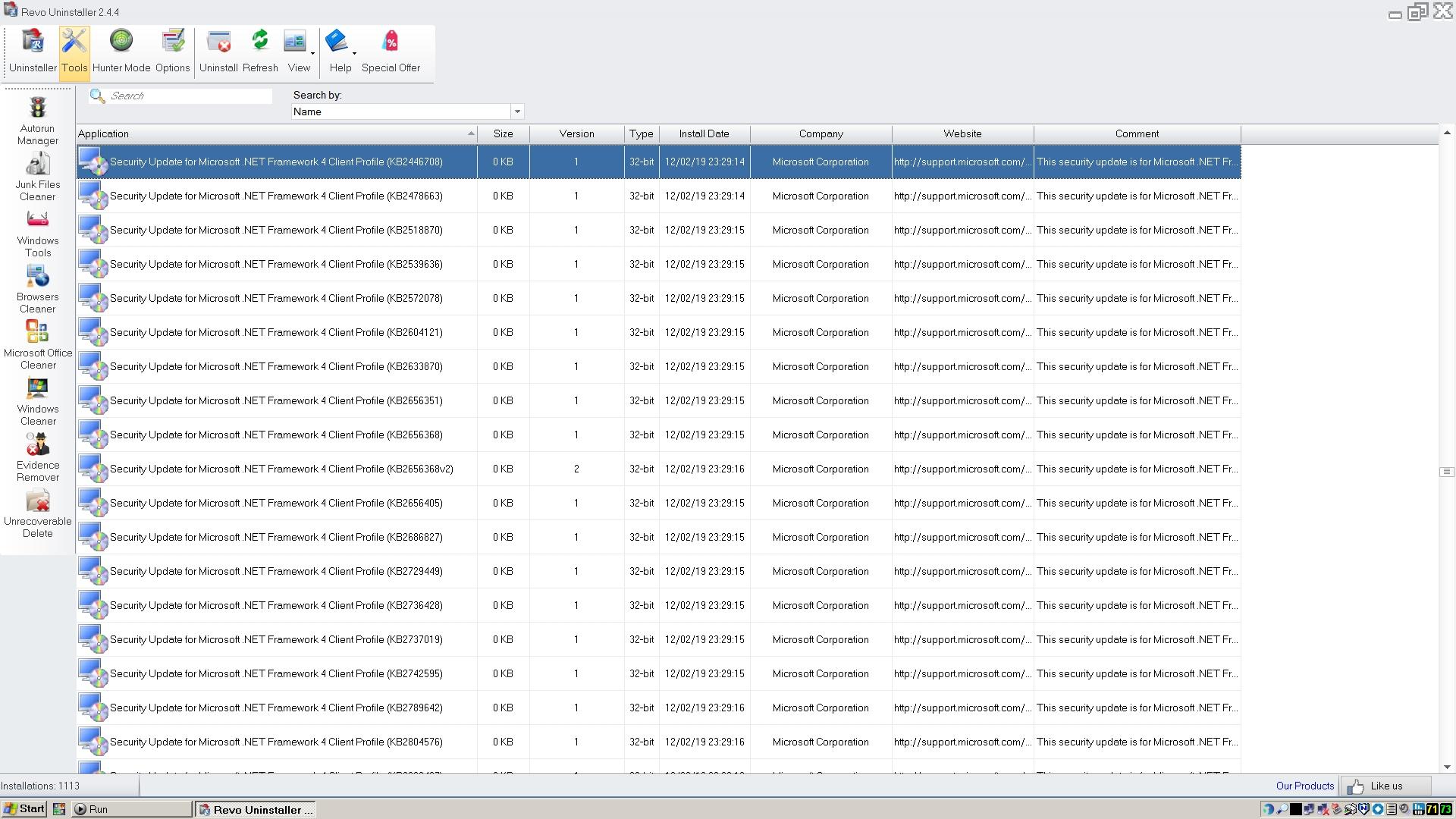
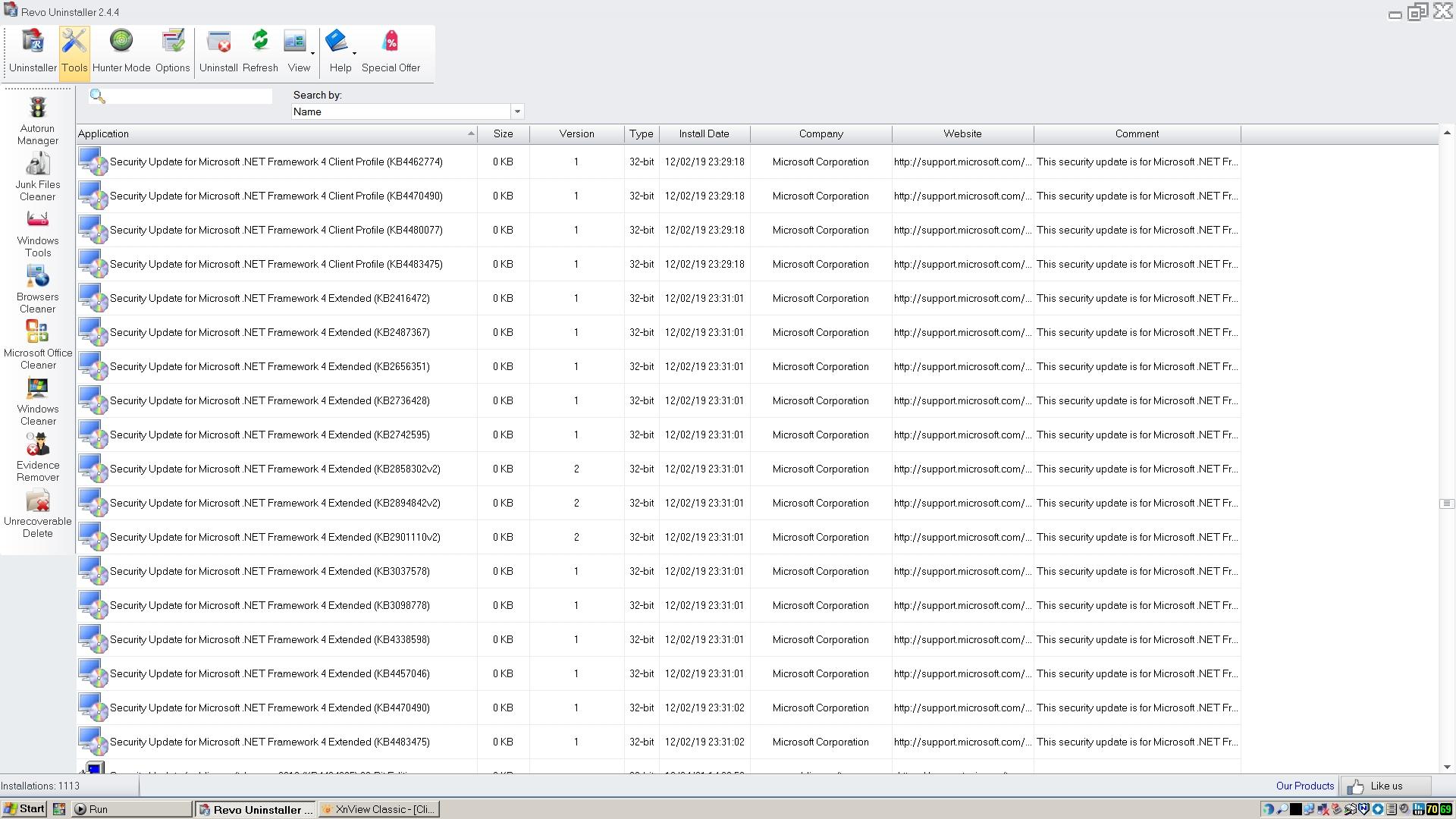
@Dave-H Have you installed Revo Uninstaller (Pro) on your Winows XP partition? If so, can you post screenshots of all Microsoft .NET Framework 4.0 updates for comparison taken from Revo Uninstaller? Inside its settings, you can enable to show all system updates. To list all updates, you can enter in the search form the string ".NET Framework 4" I have already repaired my Microsoft .NET Framework 4.0 installation and installed some old updates (before POSReady) which, strangely enough, have somehow disappeared. Here are mine:2 points
-
In my main article about Panda Dome, I posted download links to get the most recent installer. Even a link to a legacy installer.2 points
-
I just don't understand how can you not see the difference . And yes , I've made everything like you said. Still 3.0.0 and above stick with Win10 buttons and older versions have Vista style buttons . Yes , they became somewhat better after the patch , but not to the point of representing the previous glory. So I agree with the previous poster , VLC devs made something ugly to the buttons. The shot was taken on Vista x64.2 points
-
2 points
-
New build of Serpent/UXP for XP! Test binary: Win32 https://o.rthost.win/basilisk/basilisk52-g4.8.win32-git-20260117-3219d2d-uxp-aace8fa8c0-xpmod.7z Win64 https://o.rthost.win/basilisk/basilisk52-g4.8.win64-git-20260117-3219d2d-uxp-aace8fa8c0-xpmod.7z source code that is comparable to my current working tree is available here: https://github.com/roytam1/UXP/commits/custom IA32 Win32 https://o.rthost.win/basilisk/basilisk52-g4.8.win32-git-20260117-3219d2d-uxp-aace8fa8c0-xpmod-ia32.7z source code that is comparable to my current working tree is available here: https://github.com/roytam1/UXP/commits/ia32 NM28XP build: Win32 https://o.rthost.win/palemoon/palemoon-28.10.7a1.win32-git-20260117-d849524bd-uxp-aace8fa8c0-xpmod.7z Win32 IA32 https://o.rthost.win/palemoon/palemoon-28.10.7a1.win32-git-20260117-d849524bd-uxp-aace8fa8c0-xpmod-ia32.7z Win32 SSE https://o.rthost.win/palemoon/palemoon-28.10.7a1.win32-git-20260117-d849524bd-uxp-aace8fa8c0-xpmod-sse.7z Win64 https://o.rthost.win/palemoon/palemoon-28.10.7a1.win64-git-20260117-d849524bd-uxp-aace8fa8c0-xpmod.7z Win7+ x64 AVX2 https://o.rthost.win/palemoon/palemoon-28.10.7a1.win64-git-20260117-d849524bd-uxp-aace8fa8c0-w7plus-avx2.7z Official UXP changes picked since my last build: - Issue #1636 - Part 1 - Decouple Gio from GConf and always build it with GTK (fc78eec911) - Issue #1636 - Part 2 - Disable Gconf by default (990f256885) - Issue #1636 - Part 3 - Remove Gconf (b04e3d93c9) - Issue #2895 - Part 1: Replace XorShift128+ with Xoroshiro128++ (d4341ea07a) - Issue #2895 - Part 1b: Update license block. (d23afa84e5) - Issue #2895 - Part 2: Remove incorrect debug asserts. (5a0f190104) - Issue #2895 - Part 3: Add manual test. (75ec48bc41) - Issue #2889 - Part 0: Relocate Mozilla-specific files from Expat source. (b81b97ee47) - Issue #2889 - Part 1: Prepare Mozilla's changes and extensions for Expat 2.6.4. (9567601675) - Issue #2889 - Part 2: Import Expat 2.6.4 source. (9ade98b4fc) - Issue #2889 - Part 3: Apply Mozilla's patches to Expat 2.6.4. (0b9e221b14) - Issue #2889 - Part 4: Fix build and runtime issues. (a2f8e66162) - Issue #2889 - Follow-up: Avoid conflicts with system version of libexpat (e0f8acddc7) - Issue #2889 - Follow-up: void methods shouldn't return a value. (8956c61187) - Issue #2889 - Part 5: Rewrite patches for Expat 2.7.3. (a730f838c8) - Issue #2889 - Part 6: Import Expat 2.7.3 source. (d2acec73f7) - Issue #2889 - Part 7: Apply patches to Expat 2.7.3. (ca2ef5184a) - Issue #2889 - Follow-up: Allow generate_hash_secret_salt to be used. (acefed74fe) - Issue #2889 - Follow-up: Adjust Expat 2.7.3 local patches for removal of 3rd patch. (034eeaff97) - Issue #2889 - Follow-up: Remove fix for BZ 569229. (493169e227) - Issue #2895 - Follow-up: Fix JIT code generator for 32-bit targets. (d6e9c4d85b) - [gfx] Be more explicit when converting to cairo formats. (f6d18c7d78) - [gfx] Use better types for cairo image surface manipulations. (6ca8cf782b) - [DOM] Check worker script size (d8f7202951) - [Auth] Only set GSS_C_DELEG_FLAG flag when we confirm server supports delegation. (5321363a1b) - [NSS] Update NSS (464b24c608) - [XPCOM] Add hashkey helper classes for future use. (7b9eda3f69) - [gfx] Add some additional sanity checks to cairo surface creation. (3aff60e443) No official Pale-Moon changes picked since my last build. No official Basilisk changes picked since my last build. My changes picked since my last build: - application: remove gio from MOZ_EXTENSIONS_DEFAULT (69c17afbe0) - htmlparser: break when infinite loop happens (8201dadf41) Update Notice: - You may delete file named icudt*.dat and icu63.dll inside program folder when updating from old releases. * Notice: From now on, UXP rev will point to `custom` branch of my UXP repo instead of MCP UXP repo, while "official UXP changes" shows only `tracking` branch changes.1 point
-
Here -> https://web.archive.org/web/*/www.microsoft.com/windows/downloads/bin/* But you will probably have to try the files and try from snapshots of different dates because it usually happens that not all files are archived well...1 point
-
Technically, THEY ALREADY HAVE. "We" are only able to get it installed by using programs that are not part of XP, how many of even us MSFN Geeks truly consider that route to be "supporting" XP? And the "exception error" that I was getting in LTSB 2016 indicates to me that they don't support "Win10", but rather only "new Win10".1 point
-
Yes. Not in LTSB 2016, but yes in 24H2. In 2016, it "installed" but attempts to open the GUI resulted in an "exception error". At what version of 10 did the "exception error" get fixed is unknown. I've already deleted the VM clones. I could reclone/reinstall if screencaps are required. Basically, I know enough at this point that my "real hardware" XP will *not* be getting Panda Dome (it may not get ANY antivirus, to be perfectly honest, it's just for out in the garage).1 point
-
Glad to see that you had the same end result as me, with the file from Softpedia. I was going to try again with it myself, but I won't bother now as I know now that I will just end up with the same version 22! Although I didn't try installing without an internet connection, I too had noticed that despite the size of the 'offline' installer, it still actually downloaded the installation files, presumably the 22.03.05 ones! I suppose the next thing to try is using that 'offline' installer file on a Windows 10 installation, to see if it does the same thing. I'm speculating that maybe version 23 does not actually support Windows XP, so if the installer detects XP it installs version 22 instead. Just a thought.1 point
-
Well I've just updated my Panda Dome to the supposedly latest version, and it seems to be working fine, with no detrimental effects on system startup or anything else so far, which is good. Fingers crossed! I was a bit surprised to find that it's version 22.03.5 though, I thought there was a version 23? I tried with the supposedly latest offline installer, and that gave version 22. I then uninstalled that and tried with the public online installer from Panda's website, and that gave version 22 as well. Is there actually a version 23, and if so, where? It all installed fine, and works fine, the only strange thing was that it wouldn't log in to my Panda account. I immediately thought about HTTPSProxy, so I set Panda Dome up with the proxy address and port, and it came good. Not unexpected of course, but the strange thing is that the first version I had installed, version 21, did not need me to do this, it logged in fine immediately with the default settings. I can't explain that, but it's working anyway.1 point
-
I'd be more inclined towards "betting any money" that if we keep pinging "support" that the end result will end up being the REMOVAL of said advertised XP support.1 point
-
I don't remember doing any reinstallations or system repairs at that time. Anyway, here's the output from Revo Uninstaller using the search term you recommended. I hope that gives you what you need. Strange that as well as the updates apparently all having been installed on the same date, they all appear to be 0KB in size!
 1 point
 -
@Dave-H Thanks for your screenshots! They are much better. But to get all entries in terms of Microsoft .NET Framework 4.0, you have to enter the string ".NET Framework 4" into the search form since there are entries for the main installers, security updates and normal updates. With my search string ".NET Framework 4", you get all of them. Additionally, the number of all entries found will be shown (very important for quick comparison). And using small icons reduces the height of the lines which means less pages. All can be done even in the free version. If doing a repair or reinstallation, the current date and time will be assigned to all processed entries.1 point
-
Fair enough, as long as the conversation is kept directly relevant to the use of Panda Dome on XP, or indeed any other AV program. Sorry, I have now realised that the details of the .NET 4 updates on Revo Uninstaller are not with the actual installation records, as they are called 'Security Update for....' so appear in a different place in the list! Here they all are, enjoy! The last two images have duplicated entries. Why they all seem to have the same installation date i'm not sure, I don't remember doing an OS reinstallation in February 2019!
1 point
-
Here is a short report on the Panda Dome version 20.02.01 currently installed on my computer. This version runs very well under Windows XP without any performance problems. This Panda Dome version also does not significantly delay Windows startup. It only takes approx. 2 min. This is a good value for my old box. However, I have not yet been able to solve one problem. The application background remains green. No images can be loaded. Although it's not important, I don't understand why this is the case. Here is a screenshot of this issue and one taken from the settings where the image can be selected: This issue has been the case in all versions of Panda Dome (18.07.04, 20.02.01, 21.01.00, 22.00.00, 22.02.01 and 22.03.05) installed on my Windows XP partition with all POSReady updates. This issue doesn't exist on my Windows XP partition without POSReady updates.1 point
-
I have already provided a solution to activate Panda Dome under Windows XP. Read this post: and this one:1 point
-
Probably not the first to post about Supermium but it's great. Tried K-Meleon but it didn't work right for many websites. Tried MyPal but never could get it to run. Always blew up on start with the message MyPal has caused an error in kernel32.dll......MyPal will now close. Still have and was using Firefox 45.9 and it did pretty well with the exception that on some websites, such as this one, clicking on a button wouldn't work and many websites I had to make a security exception for Firefox to load the page. But Supermium is letting me go anywhere I usually go with no problems. Everything is displayed correctly and every button works. I'm very impressed and hope the developers (I know its a modified version of Chromium) keep it up to date for any future changes to the way browsers work. My system is an HP Pavilion Media Center with dual-core Pentium D processors running XP Pro SP3 on the one drive and XP Pro Media Center Edition on the other. Very handy to have parallel installations. Anyway hats off to those who work on Supermium. Great job!1 point
-
Vlag (Flag of Holland)1 point
-
Slug1 point
-
Slow1 point
-
By the way , I had the same flat buttons with Win 7 with everythin after 3.0.0 , it's just I do not use WIn 7 on a regular basis , just for testing once in blue moon , so can't make a pic. , sorry. It did have an aero frame though , but everything else was Win10 flat and ugly. Buttons , volume control , etc.1 point
-
I've never had this issue with any of Vista builds (SP or not). And I'm kinda Vista veteran. My first Vista RTM PC had 4GB of RAM , bought in 2007 , reinstalled many times without any issues too . Also, had RTM installed on Haswell back in 2013 with 16GB of RAM , and yes , it was x64. Logon happened from to time , even though I had defender removed since 2007 or so . Later I began to notice slower extraction of huge files with WinRar , when I replaced my mobo in 2010 , but i think it was chipset bound . I still have that mobo with Intel Q45 chipset and the extraction process is like 1.5 times slower , even when SP2 installed. I think it's a weird combination of the mobo's chipset and 2TB/3TB/4TB Seagate HDDs , because I never noticed such problem with other HDD manufacturers. I agree about the VRAM problem , it persists in RTM , that was the reason I moved to SP1 on my gaming PC , in 2009-2010 (approx.). Though , I still think RTM is better in many aspects. P.S. Would be interested in getting back to RTM too.1 point