Leaderboard




Popular Content
Showing content with the highest reputation on 10/24/2024 in all areas
-
@Sampei.Nihira suggested changing the cipher suites into something other than the standard ones. It isn't what anyone who wants to just blend in with the crowd wants to do. I use Cent browser, and it has a fingerprint of the standard Chrome.3 points
-
Ok. I was able to improve a bit my custom button for calling up the "Manage Cookies and Site Data" window. Both, the about:preferences#privacy and three seconds later the desired dialogue are now loaded in the same chrome window which avoids an additional loading of a tab. Nevertheless, I hope that there is a better solution yet.3 points
-
Xper, thank you for taking the time, it's not always with us, it's on and off. As of lately, it again went to normal with the last wave of spammers, I'm not joking. Or maybe it has something to do with links adding issues people reported earlier. Or PMs. https://msfn.org/board/topic/185994-cant-edit-my-first-post-in-thread-error-when-posting-links/ https://msfn.org/board/topic/186314-issues-with-the-board-personal-messages/ P.S. Probably the title needs to also include the inability to post cmd. exe (without the space), as I discovered recently.3 points
-
Long pause before the posting is done came back.3 points
-
No assumptions at all, it's what you wrote yourself, read above, all in capslock. Two or three daily poor spammers seem excessive to you, come on, really?3 points
-
I don't think so, what if I wanted to write I'm against using cracks, or tell it may even be unsafe? What then? What you suggest is called censorship, and I don't live in a place without the free speech rights.3 points
-
Dear Xper. I need to report a serious issue that can't be made publicly without violating the rules. Is there a way to establish a hot line for this one-time reporting? Again, I would never bother if it wasn't that serious. Thanks for understanding.2 points
-
I have zero problems with reporting bots, just like @Tripredacus once told me to do. It doesn't bother me at all, in a huge contrast to you. I even find them a bit funny, sometimes. The ones that were selling ego-boosting potions, for example.2 points
-
No, this wouldn't be different on any SAB version. This is not an error popup either.1 point
-
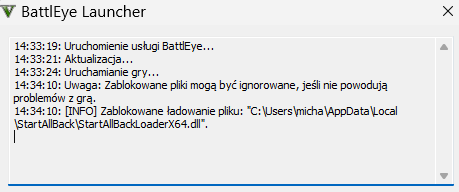
I did contact BE. But I don't believe it's an even minor level problem as it does not disrupt anything. Close BE window and that is it.1 point
-
... Possibly slightly off-topic here, but I, too, was using above userscript (in Violentmonkey, in Serpent 52) ; it used to work on both the (bloated) desktop YT GUI and the mobile YT GUI, too (via that Fx WE) ; well, the userscript can be now considered "a thing of the past", as a result of the ruthless war Google unleashed against YT-specific scripts/extensions/downloader apps, etc. A month or so ago Google changed radically the way their fragmented streams (MPEG-DASH) are being delivered to "web" clients (browsers); each fragment is now "POST-requested" instead of "GET-requested" and, additionally, each fragment URI is now being "protected" by a PO (point-of-origin) token, unique to the browser YT session; that change alone BROKE practically all downloader usercripts for browsers (e.g. Youtube Links) and SYTARB suffered the same blow, in that adaptive age-gated streams were impossible now to "unblock"; to add insult to injury, Google have also removed the most popular "progressive download" format 22 (premuxed, standalone MP4 container with h264@720p25+aac@128k), so the userscript could, at best, unblock just the lowly format 18 (progressive, h264@360p25) ... However, it appears that even that is now out of reach, because the "age-verified-YT-account-proxy", the back-bone of the userscript (and of a specialised yt-dlp plugin) has been taken DOWN ca. 2wks ago (supposedly the hosting agreement expired ); you can read more at the userscript's GitHub issue tracker ; with Google even patching the only known "hack" (tv_embedded client) to bypass age-gated videos, it's now IMPOSSIBLE to view/download age-restricted YT videos without an age-verified YT account... I have never had a Google account myself and I'm not inclined on creating one now just for the sake of watching those age-gated clips (which, due to "political correctness", have grown exponentially in their numbers; yet another Google ploy to grab your personal details, if you ask me); in my country (EU member), the last time I checked, Google wanted to send them a digital scan of your "proper" ID card so that they could "age-verify" your YT account ... The web, just like the real world, has turned into a really "bad place" - I'm despaired/depressed by both, TBH ...1 point
-
StartAllBack 3.8.121 point
-
@feodor2 Calling up chrome://browser/content/preferences/siteDataSettings.xul directly does not show the most recent cookie database. When calling up the about:preferences page beforehand, the most recent cookie database is shown, and the XUL file call works again correctly. Do you know how to do in JavaScript the same what calling up the about:preferences page does in terms of the cookies? I need the part of the code that is executed by the call to the about:preferences page regarding cookies before I call up the chrome://browser/content/preferences/siteDataSettings.xul file. As I mentioned, I am in the process of creating a Cookie Button which opens the dialogue "Manage Cookies and Site Data". My current version automatically opens the about:preferences#privacy page and three seconds later the wanted dialogue in an own chrome window. This indeed works properly but actually I would like to avoid opening an about:preferences#privacy tab by doing the necessary commands internally via JavaScript. I already tried a lot but without any success. So, any ideas?1 point
-
Ok. I understand that very well. Completing the new version is a much higher priority. But one thing is clear. A bug is a bug. Or call it an issue, an unwanted behaviour or whatever. Regardless of whether you don't consider it important or don't want to fix it. Calling the cookie GUI via its XUL file directly is faulty. I have investigated and documented it in detail. The script is the same, it is heavy obfuscated and refuses to work too if to block the connection to its site, very suspicious so not suitable. No need to block its connection. The script is simply great. Sometimes, one has to trust. Without trust you can't do anything when using software, scripts and similar made by others. Would be great to have document.loadOverlay() back in Mypal 68.1 point
-
@feodor2 The non-standard JavaScript function document.loadOverlay() is deprecated since Gecko 60 (Firefox 60). Did you completely remove it in Mypal 68? Some of my (important) scripts call up this function which leads to the error message "TypeError: document.loadOverlay is not a function" in the Browser Console. If it has been removed, can it be re-implemented? I ask this as in more recent Firefox versions, these problematic scripts seem to be working again which means the document.loadOverlay() method is there again and works.1 point
-
Hope you can fix this bug. If it was fixed, my self-created custom button would work as I planned without any special workaround to be implemented. I use the VORAPIS V3 script version. Works great here in Mypal 68.1 point
-
@feodor2 Thanks for the links! The history feature of GitHub is great. Thanks to @UCyborg's hint to use this time machine, I started downloading repositories from the Firefox 68 era. With the linked version of xiaxiaofloods's userChromeJS, you can indeed install bootstrapped, legacy extensions in Mypal 68, but unfortunately, none of xiaxiaofloods's extensions I've tested from the linked repository do actually work.1 point
-
Surely this is unsolvable? GTA Online works fine but this popping up can be annoying.
 1 point
 -
@feodor2 I noticed this issue when creating a custom button for calling up the cookie manager. For reproducing this issue, call up chrome://browser/content/preferences/siteDataSettings.xul, delete a site cookie of your choice, close it, open the site whose cookie you deleted and call up chrome://browser/content/preferences/siteDataSettings.xul again. You will then notice its cookie is not listed although it is there. And when now restarting the browser, the call up of this internal chrome site leads to an empty, broken and non-functional interface. Here is a screenshot of this issue including the TypeError message Uncaught TypeError: this._getQuotaUsagePromise is null SiteDataManager.jsm:255:5 getSites resource:///modules/SiteDataManager.jsm:255 init chrome://browser/content/preferences/siteDataSettings.js:127 onload chrome://browser/content/preferences/siteDataSettings.xul:1 in the Browser Console: Only by calling up the about:preferences page will it work again. BTW, when doing so in an UXP browser as, for example, New Moon 28 or Serpent 52 by calling up chrome://browser/content/preferences/cookies.xul, there is no such problem.1 point
-
@feodor2 When calling up the internal site chrome://browser/content/preferences/siteDataSettings.xul in Mypal 68.14.4b directly, the list of all cookies is not up to date in most cases. Only when you call up the about:preferences page beforehand, you get a current list of all cookies. Actually that can't be the intention. Right? So, is this a bug or really by design? When calling up the internal site chrome://browser/content/preferences/siteDataSettings.xul directly after browser restart, it is empty, broken and non-functional.1 point
-
I have spent the last few days testing Mypal 68.14.4b with heavy and resource-hungry websites and have come to the conclusion that old, heavily modified profiles with many extensions, userscripts and CSS stylesheets installed do not work well with sites such as eBay, Amazon or Discord. With a new, fresh profile, in which only the most necessary settings are made, these sites run much better.1 point
-
I can't confirm your statement. VORAPIS V3 works perfectly on my very old Windows XP computer. I simply installed it without any special settings. Very, very fast and responsive frontend, resource-friendly and fully functional video playback. Have a look at here: https://msfn.org/board/topic/183657-mypal-68-in-windows-xp-custom-buttons-and-extensions/?do=findComment&comment=12730341 point
-
I downgraded the browser to 116 from 119 Chrome, MSFN now works very good!1 point
-
I think it makes no sense to test ordinary and simple words. Those that have problems are usually tech. terms.1 point
-
1 point
-
AdapterTroubleshooter.exe1 point
-
And which exactly (hence one word postings).1 point
-
It's simply not funny and very spammy. People are trying out to find out why those technical terms like cmd .exe are blocked, please don't interfere.1 point
-
1 point
-
1 point
-
1 point