Dave-H
Content Type
Profiles
Forums
Events
Everything posted by Dave-H
-
Tried pointing to the folder, and I get "The wizard could not find a better match for your hardware than the software you currently have installed". There seems to be no option to override that. I'll try again with the new INF file.
-
@Damnation @George King I'm afraid both those driver packages just produce "The specified location does not contain information about your hardware". I am assuming that it's the "Standard Dual Channel PCI IDE Controller" that I should be trying to update? I'm beginning to wonder now! Its ID is PCI\VEN_8086&DEV_0F21.
-
Thanks again all! Just a quick update, I now have the ACPI system working! As suggested all that was needed was the substitution of the acpi.sys file with one of the updated ones. I should have had more faith! Fortunately of all the different versions of acpi.sys on offer in the Patch Integrator the default one did work. So, I have a lot of functionality back now, but the problem at the moment is that the AHCI system has stopped working again. After updating the ACPI system, it started blue screening with the "inaccessible boot drive" error again. If I returned the BIOS to compatible mode, it then didn't load, hanging permanently on the XP splash screen. I've now removed the ACHI driver and have it booting again in compatible mode, but it's crawlingly slow of course. I will need to see if I now need a different AHCI driver now ACPI is working. I'm away again overnight tonight, so I will pick this up again tomorrow. Cheers Dave.
-
I'm only seeing it because my ACPI system isn't working at the moment of course. It must be extremely rare to see it on any system nowadays, I last remember having its equivalent on Windows 95, and I'd never ever seen the XP version before until now!
-
OK @RainyShadowand @Mr.Scienceman2000 I'll give it a try! There seem to be a huge number of alternative acpi.sys files around, any recommendations on the one most likely to work? BTW, I bet not many of you have seen this for a very long time, if ever!

-
I had already looked at that, but once again it's all about creating an ISO to do a new installation, which isn't what I want. I found some other sources too, which seemed to be just alternative acpi.sys files. Surely it can't be fixed by just changing one file?! 🤔
-
Phew, now fixed! Back to being a "Standard PC". So, any suggestions as to an ACPI driver which might work here?
-
OK, rather ill-advisedly, I thought I would try restoring the ACPI to as it was originally, just to see if now I've got the AHCI working it might now work. Of course it didn't! I restored the registry from a backup I made just before I changed things, but it still blue screens, even in Safe Mode. I'm obviously going to have to restore the necessary files as well (easy to do in Windows 10 of course). Now I've just got to remember which ones they are, and which versions I need! IIRC it's ntoskrnl.exe, ntkrnlpa.exe, and hal.dll. Is that right?
-
I finally tried this AHCI driver, and it works! Thank you so much! Now time to move on to find an ACPI driver! I won't make another thread for that as thankfully this thread didn't last too long, as i thought it might, but I will amend the title.
-
Thanks, I found that and downloaded it and the batch script now works to completion. Unfortunately again it seems to be all about building an ISO to do a new installation of Windows XP, which is not what I really need. I ideally need drivers which I can just install into my existing installation.
-
Although it's a 64 bit machine, my operating systems are 32 bit. I'll carry this on later today, thanks everyone for all the suggestions!
-
Thanks, but isn't that only for 64 bit? 🤔 I'm actually away overnight tonight, so I'll pick this up again tomorrow. Thanks all! 👍
-
I've been trying with the "WinXP-IE Optional Patch Integrator". I've downloaded it fine, and it appears to contain loads of drivers, but when I run the batch file it eventually fails on "extracting "WinXP-IE "x(Vanilla).iso" file". It then fails on "Cannot find archive". What is that and where can I get it? I've drawn a blank everywhere so far.
-
Thank you both so much! I will investigate those possibilities and report back. I should add that I am very anxious to be able to do this without reinstalling the operating system from scratch! Cheers, Dave.
-
I would agree that it needs a new thread.
-
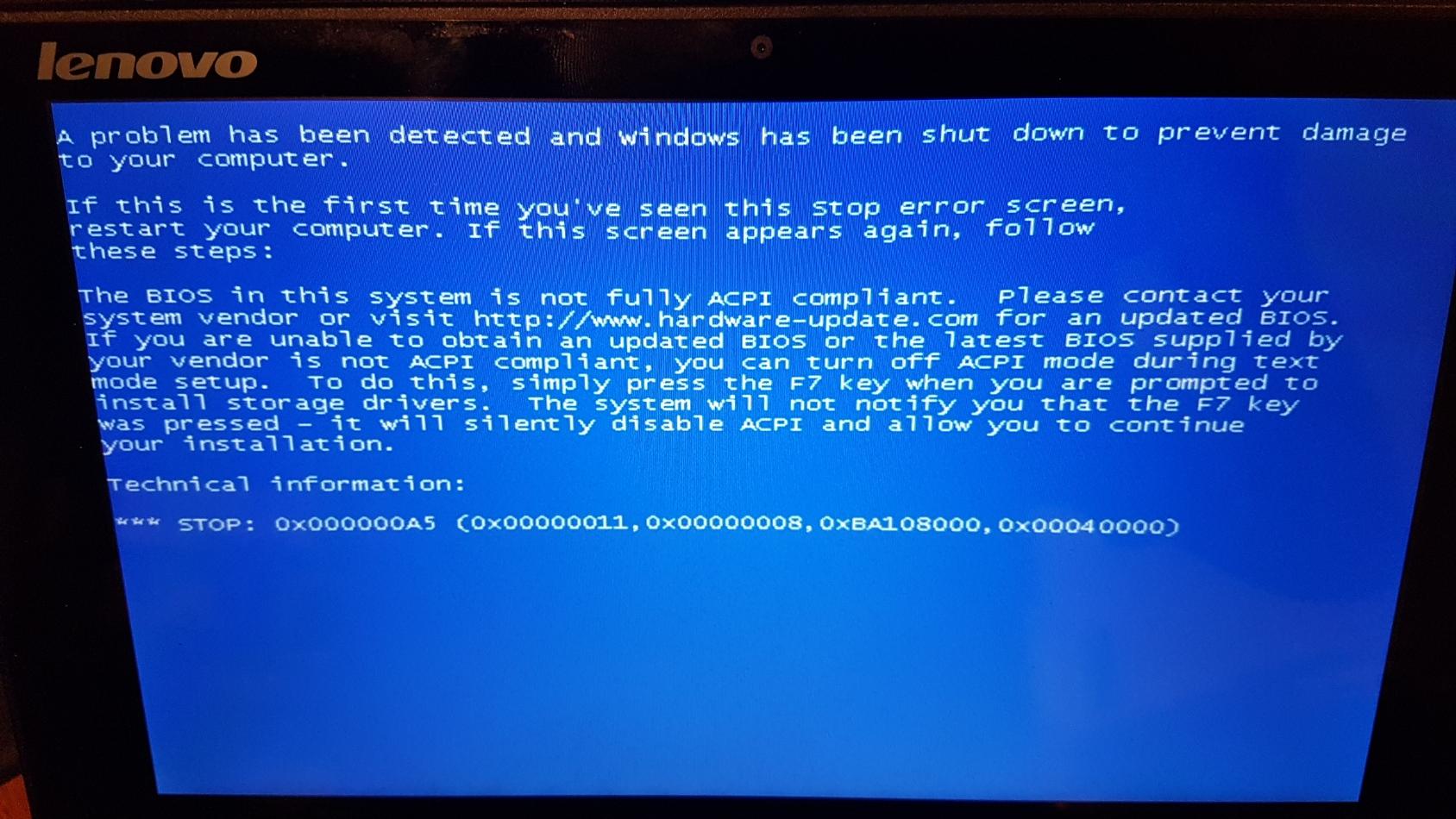
Hi all! This is really a sort of continuation of this thread, but as this is yet another machine, I thought a new thread would be appropriate. I got very tired with my previous Asus X102BA netbook being so slow and unresponsive, and I stupidly managed to crack its screen! I therefore started looking around for a better same-sized replacement. I have ended up with a Lenovo Ideapad Flex 10, which although it's missing a few hardware facilities like an Ethernet port and a card reader, is generally a much better machine. I did what I did the first two times when I updated my netbook, I just swapped the drive across from the previous machine. It is dual boot Windows 10 32 bit and Windows XP 32 bit, although like it's Asus predecessor it's a 64 bit machine. It was originally designed for Windows 8/8.1 64 bit, but when I got it, it had been updated to Windows 10 64 bit. My 32 bit Windows 10 is fine of course, after a bit of tinkering and reconfiguration. I had to disable UFEI of course, which threw me for a short while. I didn't actually realise that it fundamentally only works with 64 bit operating systems! After that Windows 10 seemed fine, but trying to boot into Windows XP produced a rather unexpected BSOD which I'd never seen before saying that the BIOS wasn't ACPI compatible. To cut a long and at the moment irrelevant story short (there will be another thread about this in due course!) I managed to get Windows XP configured as a "standard PC" to work around that problem, but the next BSOD was the dreaded "Inaccessible Boot Device". So I'm now back with the good old issue of how to get it to boot XP in AHCI mode. Where I am now is this. With the BIOS set to AHCI, Windows 10 boots fine, but XP just blue screens. If I set the BIOS to compatible mode, Windows 10 blue screens, but after failing a couple of times and going into the repair routine, I am offered the choice of booting into another OS, and if I select XP it then boots OK. Hardly a permanent option of course! The previous second Asus machine was AMD based, and we found a fix for that by installing an AMD driver. The current machine is Intel based, as the first machine was, and on that machine I simply installed the Intel Application Accelerator and that fixed the boot problem, and I thought that would work on this machine too. Unfortunately not of course! When I try to install it I just get a message that the hardware isn't compatible. I also have an Intel Rapid Storage AHCI driver which also won't install on this machine. There are people who say they have produced universal AHCI drivers for XP, but I've had no luck with any of them either, if I force install them XP won't boot in AHCI or compatible mode, and the only way back in is to use Windows 10 to restore the registry! The machine uses the Bay Trail chipset, with a Celeron N2840 CPU. Anyone any ideas? Thanks, Dave.
-
My goodness, I thought I was probably the only one left with Norton Utilities 2002 still installed! I've got it installed on Windows 98 and Windows XP, and the Norton System Doctor has never given any problems for me on either system. I haven't got it set to run when Windows starts though.
-
Presumably you've tried disabling all the startup programs using msconfig? That's what I've always done to eliminate programs causing a problem on startup. Once you've identified which program it is, then the fun starts!
-
That isn't an option I'm afraid, the computers are just too different. I'm not really that worried about this, although it's been very interesting to find out why it's probably happening. I noticed it years ago, but just assumed that was the way it was by design for some reason. I still can't think of a reason for it, other than an obscure bug in XP which was probably never ever identified, letalone fixed.
-
Something else I've now noticed while playing. The "More Advanced Options" options' settings don't seem to be saved either for me. They revert on restart to everything checked except "Search tape backup". Are they saved for others? If they are, presumably it's another symptom of the same problem as with the columns.
-
Well that's even stranger, as effectively I am logged on as "THE Administrator", and my settings aren't being saved! Perhaps it just doesn't like the fact that I've renamed the built-in Administrator account. I'm not going to worry too much about it, but it is puzzling.
-
Well I haven't actually "fixed" it, just confirmed why it's happening (I think!) Disabling automatic logon makes no difference, so I can only now assume it's happening because I'm logging on with the built-in Administrator account, albeit renamed, and not a normal user account. Why this should be I have no idea. Does saving the columns work for you if you log in using the Administrator account? Sounds like a bug to me, I can't think of any logical reason why it would have been designed that way.
-
I've now finally looked at my other XP installation on another machine, where I am just a normal user with administer rights, and the default Administrator user is still intact, and the Search columns' settings are being saved on that machine. So it's definitely a by product of the way I have the first machine configured.
-
Strangely Malwarebytes didn't flag it when the file was first installed. The warning only came up when MB did its weekly scan. I've added the file to the "allowed" list now.
-
Yes, that's exactly what I did. Why it doesn't save my Search results columns' settings in that configuration is a mystery. Surely it can't be the fact that I have auto logon enabled? It's still using the password, it's just doing it automatically.