Everything posted by Wesmosis
-
ok one more question, does xpize take some of system resources? in other words when I UA install xpize, is there something running in the background? coz I'm so so picky about system performance
-
thanx xpero for the great work, I'm in love with Xpize but I rather stuck to 32 size icon, so I want to get the smallest xpize size the lite is 6 mega (128x128 icon size support) I'm kinda picky and need only the 32x32 to reduce the size of the exe as much as possible my uA XPSP2 CD is so **** full of appz and every single byte is a tragedy for me I know it's kinda strange request but..........you know!
-
@Panda you talking to me?
-
yeah Dale, I hope the final release will be soon
-
you talking to me?
-
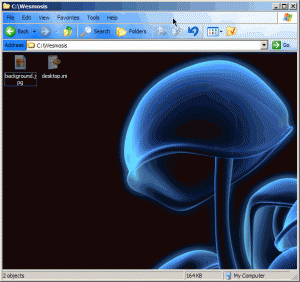
I mean think about the size If I use K-lite Mega codec (24 Mbs) from the start, it maybe better than using 3 softwares (ffdshow 3.7 Mbs + Real alt 6.25 MBs + QT alt 10 MBs = Total 21 MBs! so it doesn't make sense for extra 3 MBs in Mega Codec you get: BSplayer vobsub many other stuff which I can't remember1- Microsoft Office 2003 SP2 2- Nero 6.6.0.16 3- K-lite Mega Codec v1.38 4- ACDsee PowerPack 7.0 5- Adobe Reader v7.0.5 6- AVG Antivirus v7.0.323 Free 7- CCleaner v1.24 8- Flash v8 And Shockwave v10.1 9- FlashGet v1.7 10- Maxthon v1.3.3 11- MSN Messenger v7.5.244 12- Sun Java RE v5.0.4 13- Taskswitch Pro v2.0.7 14- TweakUI Powertoy & Calculator Powertoy 15- Winamp 5 Pro v5.1 16- Windows Media Player v10.0.3923 (Slipstreamed) 17- WinRAR v3.5 Corp 18- Yahoo! Messenger v7.0.426 19- .NET Framework 1.1 SP1 20- Win32pad 1.5.9.1 21- Google Talk 22- Zuma Deluxe (lol) 23- Xpize 4 Final 24- PhotoFiltre v6.1.5 duh!Nice after and before photoscan I integrate this version by nlite into my XPSP2 to save this 9 MBs? I mean there is no need for the uAE version?I think I'll shift to ffdshow! but what about QT & Real supportI'v bin a loyal fan of K-lite Mega Codec. recent versions are so goodI think this the best and safest solution: I enter this topic HOTFIXES: Win2000 SP4 – WinXP SP1 – WinXP SP2 http://www.msfn.org/board/index.php?showtopic=31886 then check every HF removed, then I delete it from my HFs folder, of course after downloading every updated HF for instnace So I delete KB873333 and KB893086, and DL KB896688, KB899589, KB900725, KB901017, KB902400, KB904706, KB905414 and KB905749 ****after deleting every (REMOVED HF), then I can slipstreamed the rest with my eyes closed what do you think guyz?Suuuuuuuuuuure :)man! My above giude woked also with the burned CD! I just was blind to see it, I think to see the background in the CD you have to enable the Autoplay option for the CD, thanx guyz, have fun with changing your folders backgroundthanx muiz for he flash msi waiting for both Flash & Shockwave players in one msiDaemon is Demon!this is after 24 hours, any ideas or suggestions?you **** right Andromeda! but man I can feel you suffering to convince the average-joe customers that Norton + McAfee + PC Cillin are just Empty Barrels making big bubbles and noises :)thanx Gouki, I'll slipstream every single HFs I have all in my XPSP2 CDthanx man, but I faced some problems with the latest RyanVMi which there is a known Delay issue, I downloaded only the critical HFs in the sticky post here in msfn.org and yeah about replacing the newer ones with the old ones,needs a microsofot.com visit! which I hate most and have no time anyway, what about Start >Run >Winver is the build number can help?man! I got a folder full of hotfixes since the release of SP2 so I got confused about which of which I slipstreamed into my Nlited UAXPSP2 CD, I'm refering to the ISO CD, I know there is a proggy called WinUpdatesList by Nirsoft.com, but this is ONLY for the manually integrated HFs in already installed windows, even it doesn't show the SLIPSTREAMED ones I need my ISO is up-to-date with hotfixes so 2 Qs here: 1- How can I know till when my CD is updated with Hotfixes? in order to slipstream only the newer HFs 2- if the above Q is impossible to answer, is it safe to Sliptreame ALL the hotfixes from the first one to the last one in without any complications? although the CD is slipstreamed with a bunch of HFs (not clean SP2)thanx yo, you da manthanx for the infohey guyz how are ya ll? I managed to change the (white) backgound in any XP folders, by making an desktop.ini file and put the following informations: [{BE098140-A513-11D0-A3A4-00C04FD706EC}] Attributes=1 IconArea_Image=.\background.jpg <------------------you photo name in the same folder IconArea_Text=0x00FFFFFF <--------------- to make the font white then make this folder in a system attribute simply by (for instance the folder name is Wesmosis Run> CMD> c:\attrib Wesmosis +s Bingo! now you folder will look aewsome by its new background now my qustion is how can I permanently change the background of the root of burned CD, I tried to put the desktop.ini & background.jpg on the Root of the CD, and burned it, did't work..any idea?