Leaderboard




Popular Content
Showing content with the highest reputation on 09/19/2024 in all areas
-
CPU-Z 2.11 works again in Windows XP.2 points
-
8.4 does indeed have the ugly UI I was talking about. It had been introduced somewhere in 2012. I never tried anything higher than 6.x, not sure about the UI in the others.2 points
-
Again, thank you very much, honestly, I don't know which is the better version, ideas? I don't mind testing 5.5 or any other, but not with the modernised UI.2 points
-
It's an undisclosed, "ancient" version (like @Multibooter puts it) version of Comodo Firewall 6.3.297838. @Saxon, 5.5 looks different, it has no aero.2 points
-
Update notification! Malware Hunter has been again updated on 08.07.2024 and is now available in version 1.186.0.808. It is still listed to be compatible with Windows XP. Accordingly, I will update my article as soon as I can confirm its XP-compatibility. Cheers, AstroSkipper2 points
-
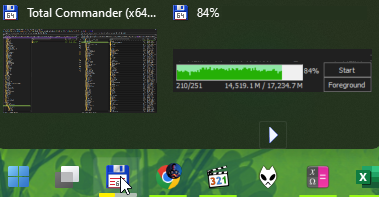
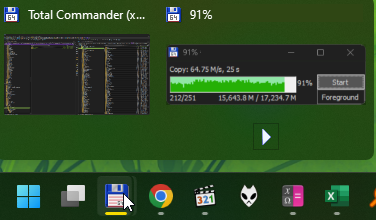
With SAB 3.8.8 installed, I found when copy/move files using "Total Command", and as the operation defaults to "background copy/move", another window is spawned showing operation progress, the progress on the taskbar is halved in this case (as there're 2 windows SAB takes into account while there's only one). The stock taskbar doesn't have this problem.
 1 point
 -
I've never used the installer, so I haven't even checked to see if it works.1 point
-
Thanks for reporting! Have you already checked it?1 point
-
@AstroSkipper, you may want to check this one out: https://www.portablefreeware.com/forums/viewtopic.php?p=1075941 point
-
In the case of Mypal 68, however, the effect of rebasing its DLL files is only sustainable in multiprocess mode as the main problem with most browsers is, among other things, the release of memory when tabs are closed. The browser is not inherently prepared to release the amount of memory that a tab requires to load when this tab is closed again. In the course of a browser session, more and more RAM is therefore used that is not actually required but is no longer available to the system and can usually only be released if the browser is closed or restarted by the user. Unfortunately, the effect of rebasing fizzles out very quickly in single-process mode. And even in multiprocess mode, it is necessary to do more than just change the base address of its DLL files to fully enjoy the effect of rebasing in the entire browser session. Especially on systems equipped with a small amount of RAM where every single megabyte counts. In any case, I have managed to configure my installation of Mypal 68 so that the memory occupied by tabs is almost completely released when they are closed again. Of course, without restarting the browser and being a tab hoarder.1 point
-
Start Mypal 68, open Process Hacker, right-click on the mypal.exe file and left-click on its Properties! Select then the Memory tab and check the base address range from 0x60000000 to 0x6f000000! If, for example, no other DLL file has the base address 0x60000000 and behind it is enough free address space for the DLL files to be rebased, then of course you can also start with the base address 0x60000000 for rebasing the DLL file series. For testing purpose only, I have rebased the DLL file series to the base address 0x60000000. As I already assumed, it works in the same way as with the other addresses. Here is a screenshot: I should still mention that I checked the base address range before rebasing. The range from 0x60000000 to 0x66700000 was not occupied by any other DLL file.1 point
-
Excellent choice! I'm thinking to try this approach, I'll observe the whole situation a bit longer, then install this new one, many thanks for it!1 point
-
So, have you found anything yet? I'm pretty sure that the original installer was stored somewhere on the Windows system partition. When the uninstaller is called to change features, you can check which files are accessed. I assume it'll be a MSI installer.1 point
-
AstroSkipper, man-miracle! I'll test these and report back, may thanks for these rarest installers!1 point
-
I don't have the installer anymore, sorry. I'll search the old HDDs with backups. I found these installers: Comodo Firewall 6.3.39949.2976: https://web.archive.org/web/20140202172445/http://downloads.comodo.com/cis/download/installs/2000/standalone/cfw_installer.exe Comodo Firewall 6.3.39542.2974: https://download.comodo.com/cis/download/installs/2000/xml_binaries/cis/cis_setup_x86.msi or https://download.comodo.com/cis/download/installs/2000/xml_binaries/cis/cis_setup_x64.msi Here is the command to only install the firewall from the MSI file: msiexec /I cis_setup_x86.msi INSTALLANTIVIRUS=0 INSTALLFIREWALL=1 FWFEATURES=1 THREATCASTFEATURE=2 SETOURDNSSERVER=0 CIS_LANGUAGE_ID=1033 Comodo Firewall 6.3.39106.2972: https://web.archive.org/web/20131116044454/http://downloads.comodo.com/cis/download/installs/2000/standalone/cispremium_installer.exe Comodo Firewall 6.2.23257.2860: https://web.archive.org/web/20130826060441/http://downloads.comodo.com/cis/download/installs/2000/standalone/cfw_installer.exe1 point
-
Thank you! Brilliant advice! I don't have the installer anymore, sorry. I'll search the old HDDs with backups.1 point
-
As you may have seen in the Thorium thread regarding my issue with sudden crashes, finding the cause of an issue can lead to an odyssey. But maybe, you try a clean unistall and then a reinstall of the Comodo Firewall. In some cases, it really helps. And don't forget to backup your firewall settings first!1 point
-
Where were you when a member wasted 16 or so last pages by not calling his version.1 point
-
It worked for 15 years without a problem. All started to glitch out with Thorium. But I have no documented evidence of that. Just a big, fat, huge coincidence, for now. The notebook is barely used, still has the original OS. No PoS, no updates. Toshiba Satellite with a Celeron at 1.5Ghz. What year? 2003 or so.1 point
-
Never used this version. So, I can't say anything about it. Seriously? Personally, I can't see any privacy concerns in providing the version of a defective programme. When reporting an issue, the name and the affected version is a matter of course, so to speak.1 point
-
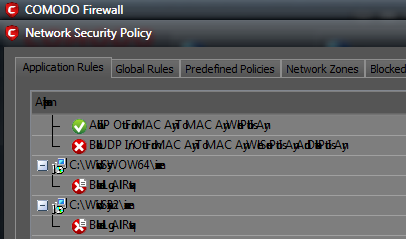
Which Comodo Firewall version does your snapshot refer to?1 point
-
Comodo glitched the hell out on my laptop.
1 point
-
Yes, I will keep on using Malwarebytes 3.5.1 until I think that the definitions it's using are too out of date to be effective protection. I'm open to suggestions for alternatives, I don't even mind paid options as long as the subscription is not too expensive. I would like to protect the XP installations on my main desktop and on my netbook. The one security program I never had any luck with in the past was Avast/AVG which I just could not get to work on my desktop (the main service refused to start, and the cause was never identified). I could try it again, and I do have an account with Avast (I use it on my smartphone). I don't know how usable it is on XP now though.1 point
-
I totally agree. I assume you will still stay for a while with Malwarebytes Premium 3.5.1. Do you already have any preferences for what kind of antimalware programme you want to use under Windows XP afterwards?1 point
-
1.0.39678 is indeed the last pattern version I have. I too was very annoyed at the lack of notice of this. I always knew pattern update support would be ended at some point, of course, but always assumed we'd get at least a few weeks notice when it was about to happen. Just suddenly pulling the plug like that is very unprofessional in my opinion, especially for those like me who are still paying a subscription for the service!1 point
-
And one thing should be made clear. The way Malwarebytes treats customers of older versions is beyond good and evil. To stop updating virus definitions without prior notice and simply present customers with a fait accompli, as seems to be the norm with this company, is a no-go. And being customer of Malwarebytes also means you have to pull any information out of these guys' noses every time such things happen. That's not how you win customers , that's how you lose them .1 point
-
Comodo Firewall Pro 2.4.18.184 Comodo Firewall Pro has an easy to use and intuitive GUI which is suitable for both advanced and novice users. The selection of wizards make sure novice users will face no difficulties in managing vital security configurations. Advanced users and experts can fine tune Comodo Firewall Pro using its extensive configuration options. Comodo Firewall Pro is now freeware (it comes with lifetime free license on installation itself) and, of course, fully compatible with Windows XP. Features (listed in the manual): Network Protection: Comodo Firewall Pro, although designed for personal use, includes an industrial strength stateful inspection firewall, acting at OSI Layers 2, 3 and 4 to filter incoming and outgoing network traffic. Such an advanced filter keeps track of each and every packet sent/received and performs intelligent analysis on critical protocols such as TCP, UDP, FTP etc. Comodo Firewall Pro also detects and prevents DOS/DDOS attacks including: • SYN/UDP/ICMP Floods, • TCP/UDP Port Scans, Upon facing such an intrusive attack, it switches to an emergency mode by creating some automatic rules and updating its internal states according to the attack behavior, to secure the host against it until the attack ceases. Users will not notice such a change in terms of functionality but will remain protected. Quick Features: • Advanced TCP/UDP/ICMP and IP protocol filtering • IP fragmentation handling • DOS/DDOS resistance and handling • Stateful TCP/UDP Protocol Inspection Application Protection: Although the network protection is adequate to defeat the most of the network based attacks, today’s threats require highly sophisticated application based access filtering mechanisms to enforce true host based security policies. Comodo Firewall Pro provides a powerful application firewall which is one of the best application filters available in the market. Restricting network traffic according to the application which generates it, requires filtering at OSI Layers 3, 4, 5, 6 and 7. Application Filtering: Comodo Firewall Pro provides full control on applications’ networking behaviors. Application firewall can: • Limit applications network access characteristics such as port, protocol and host. • Give users the ability to control number of connections per minute an application can create. Leak Resistance: Unfortunately, malware programs are evolving rapidly. Many of such programs employ very advanced techniques to conceal their malicious activities so that they easily bypass the standard protection mechanism provided by the most personal firewalls. These techniques are commonly known as “leak” techniques. Comodo Firewall Pro passed ALL LEAK TESTS with an outstanding success rate not seen in any other firewalls available. Although passing the known leak tests are often enough to provide you a robust protection, Trojans do not have to limit themselves to these known techniques and they always try to find new ones to cheat the protection mechanism you have. Due to this fact, Comodo developers constantly research to improve our firewall to keep you protected at all times against emerging and unknown threats. Benefits quoted from the homepage: Constantly monitors and defends your PC from internet attacks Free maintenance upgrades Gain complete control over which programs are allowed internet access Stay protected against new threats via automatic online updates Real time traffic monitoring enables you to react instantly to threats and identify bandwidth bottlenecks. Easy to use interface and quick setup No license fee - complete protection at no cost for networks and home users Version history/Release notes: Homepage: https://web.archive.org/web/20070215084752/http://www.personalfirewall.comodo.com/ Version number: 2.4.18.184 Date of release: 14.02.2007 System requirements: Windows 2000, Windows XP Reviews and tests: https://web.archive.org/web/20070301011725/http://www.pcmag.com/article2/0%2C1895%2C1969515%2C00.asp https://web.archive.org/web/20070228161335/http://www.matousec.com/projects/windows-personal-firewall-analysis/leak-tests-results.php https://www.comodo.com/news/press_releases/31-05-07/ Download links: https://web.archive.org/web/20070806133356/http://us2.download.comodo.com/cpf/download/setups/release/CFP_Setup_English_2.4.18.184.exe https://www.filesoul.com/software/Comodo-Internet-Security/Comodo-Firewall-2-4-18-184/ Manual: https://personalfirewall.comodo.com/Comodo_Firewall_Pro_2.4_User_Guide.pdf Screenshots: Comodo Firewall Pro 2.4.18.184 is a very old firewall from 2007. It surely was a good firewall at that time. And maybe, it is even today. A very positive point is that this version is totally unbloated, though. The installer size (English version) is only round about 5 MB. This Comodo Firewall version was very often recommended by users, but it unfortunately lacks modern features as, for example, IP6 support. This feature was only introduced starting with the version Comodo Firewall 5.3.174622.1216 from 2011. That means Comodo Firewall Pro 2.4.18.184 is only an option for those users whose internet provider does not offer or does not use the Internet Protocol Version 6 (IPv6). Due to its age, the potential users should carefully test this version in their Windows XP system whether it is still properly working even in these days as no one here reported any detailed test results or current experiences in using it. And as already explained in previous posts, I couldn't test this version, and I won't do it either. Personally, I think this firewall could still be an option in these days, but exclusively for the users of the Internet Protocol Version 4 (IPv4). If anyone needs the German version of Comodo Firewall Pro 2.4.18.184, please post the request here in the thread! Cheers, AstroSkipper1 point
-
For users of the Internet Protocol Version 6 (IPv6), it would definitely be a loss as the Comodo Firewall 2.4 wouldn't work. In such a case, it would simply become useless and would no longer be an option.1 point
-
Any further posts in this conversation and this thread will be locked.1 point
-
Kaspersky was developed in Russia/USSR, it can't be "ancient" by the very definition. It's not Rome. Will you finally tell us the version? It looks really impolite. Edit. We aren't going to hack into your notebook. I promise you.1 point