The search index is currently processing. Activity stream results may not be complete.
All Activity
- Today
-
For some reason StartAllBack fails to hook the system context menu in Explorer and also the UWP apps system context menu completely stopped working due to UAC being enabled...

-
 we talk a little away from each others, the "fix it" part was for notheretoplaygames not for K4sum1 and we have like 100 % the same meaning: "2) We-the-consumer can just slip back to a previous version - IT AIN'T GONNA HURT YOU ONE D@MN BIT TO USE A PREVIOUS VERSION." i totally agree on that one, but what notheretoplaygames also says is that he has to much of upgrades he says always something like "that upgrades go a little to fast" but here is where i tryed to point out you can fix this version trick - i dont have to repeat what i wrote about that, its a version trick in short again also you only missing the part with version 8 - thats the last one from the "common trick list" - there are certainly more - but having these would be ok for now and it does indeed work against that "fast upgrade problem" the other part regarding the user agent - if r3dfox has a problem with the new versions - yes the user agent is a solution that work against that - it might not fix it totally - but it would be a step into the right direction that same thing also goes for supermium - what is even the problem to searching for the value that is being added to not_a_brand with "version 8" ? thats the only thing you missing, its only 1 thing
 -
 Bottetoundra719 changed their profile photo
 -

My Browser Builds (Part 5)
AstroSkipper replied to roytam1's topic in Browsers working on Older NT-Family OSes
Thanks for your reply and hints, @jumper! Yesteday, I checked all prefs related to memory management and performance. And there are a lot. After investigating them, I adjusted my settings, and now New Moon 28 behaves better than before. When starting the browser under same condition as before, the palemoon.exe process decreases its RAM usage from 184 MB to 139 MB. And after surfing some sites and closing their tabs, my automatic memory minimization in the background is now able to release more memory than before. But of course, that doesn’t solve the fundamental problem with browsers that run in single-process mode. But it’s a significant improvement nonetheless. My user.js is now totally optimised for my old P4 processor. Regarding your suggestion, I don't think setting browser.cache.memory to false is a good idea. My IDE hard disk is too slow for that. Although my RAM is SD-RAM, it is much faster. -
 Well, two things here. 1) There really is zero reason for r3d to fix what HE DID NOT BREAK. 2) We-the-consumer can just slip back to a previous version - IT AIN'T GONNA HURT YOU ONE D@MN BIT TO USE A PREVIOUS VERSION. This is where the Browser Universe is just a bunch of whining babies, it really is the biggest STUPIDITY on the planet that browsers are updated so d@mn fast and no matter how fast it is, there are always folks that want it FASTER. FASTER is WHY we have issues like this. Because the ecosystem is all about pushing updates out fast, fast, fast. INSTEAD OF TRULY TESTING THOSE UPDATES BEFORE SENDING THEM OUT INTO THE UNIVERSE. And we end up with an ecosystem that is "happy" because they get FAST updates instead of GOOD updates. Send out VULNERABILITIES all day long, nobody really cares, "because they fix them fast". No, what we have is that they CREATED those vulnerabilities and sent them out to a population DEMANDING faster update cycles. PUBLIC GOT WHAT THEY WANTED.
 -
fact is some of them are doing this, and they will do this in the future why you just cant fix it ? what stands against that ? you leave up an option you certainly can fix - so to say i also understand it its a one time fix, its not like you have to bring out 150 versions of it ancient or not they are doing this but that i already said and the other thing both firefox and chrome have these - why we can not compare them in that matter ? what they are trying is a version check - while they offer zero new functionality a solution for this idiocy is to fix exactly that - a changeable version then they no longer can point out that bullXrap instead they have to rely on a new functionality - what they often dont do its like with a d3d9 vs d3d10 question - there is barly any improvment either video or 3dmodels and what they would do they would make a check for d3d10.2 and say - ha see now this dont work anymore for what purpose ?
-
Bottetoundra719 joined the community
-

My Browser Builds (Part 5)
jumper replied to roytam1's topic in Browsers working on Older NT-Family OSes
I would try lowering the browser.cache.memory settings or disabling it altogether. Extensions CacheToggle and CacheSwitch can flush the memory cache out to disk. - Yesterday
-
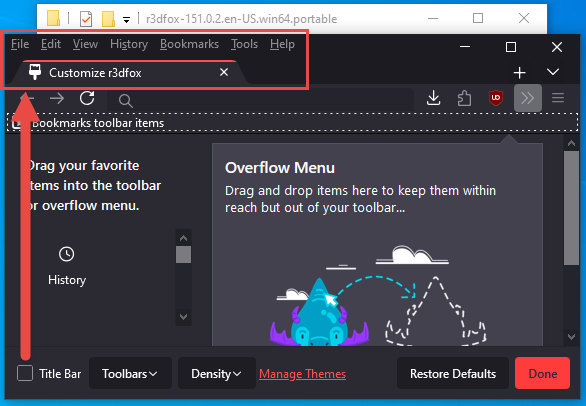
 If it makes any difference, the "missing-titlebar-bug", https://github.com/Eclipse-Community/r3dfox/issues/177 https://github.com/e3kskoy7wqk/Firefox-for-windows-7/issues/147 , is caused by a change between v151.0a1-v4 (last GOOD build of the 151 branch) and v151.0.2 (first BAD build of the 151 branch); so, not that big of a "regression window" to dissect ...
 -
I disagree. For one, the user agent is ANCIENT TECHNOLOGY that is DYING, DYING, DYING. And for two, we should never lump Firefox forks (r3dfox, this thread) and Chromium forks (Supermium) into that sort of direct comparison. No offense, but web sites that still do use the ANCIENT TECHNOLOGY of the DYING user agent isn't exactly (pro and con) up to par with the latest "googleims" and therefore stuck with Site A relying on a faked OLD user agent, Site B relying on a faked RECENT user agent, Site C relying on something totally in the middle, and therefore those OLD SCHOOL web sites can never use a ONE-FOR-ALL user agent, you will always have to rely on the "user agent override" settings in about:config.
-
I'm seriously wondering what the significance is, ie, the "viral" aspect is, of that number THREE. e3k-blah... r3dfox... probably just overthinking it, but that 3 just feels like some "viral meme" that I'm just not "hip enough" to know.
-
hmm when you either stuck, dont want to make more of releases, coming to an end, versions dont go high quickly then it might be time for the same thing as in the supermium then it would be time for a user agent changer, build in
-
.thumb.jpg.b251015fc522288a9691c6db583793fd.jpg) So I just shouldn't work on r3dfox is what you're saying? I like adhd hop between projects and r3dfox is taking a backseat currently, I don't even know if I want to release a v152 yet. I don't feel like diagnosing this when I didn't touch the code myself, I would have to trace and debug and it's a lot of work and effort for something I myself don't use. I do wish the feature worked, but I just don't feel like diving into it. This also does not affect ESR 140.
So I just shouldn't work on r3dfox is what you're saying? I like adhd hop between projects and r3dfox is taking a backseat currently, I don't even know if I want to release a v152 yet. I don't feel like diagnosing this when I didn't touch the code myself, I would have to trace and debug and it's a lot of work and effort for something I myself don't use. I do wish the feature worked, but I just don't feel like diving into it. This also does not affect ESR 140. -
 I know these forks are free, and it's their time, but if you're going to commit, then commit. Don't deliver because, "I don't feel like it". The browser artist known as e3k-blah (I friggin love that), is not going to further compile any ESR 140x builds. I appreciate these builds, but either deliver consistently, or don't.
 -
 AaronS joined the community
 -
 Yes, when I check what and how, I will add the eMMC driver to my guide on MDL
 -
 The new version is very difficult to use. It wastes space, adds unnecessary features, and doesn't allow you to turn them off. old version new version
-
Yeah, I kind of assumed upstream as "e3k-blah" is also affected.
-
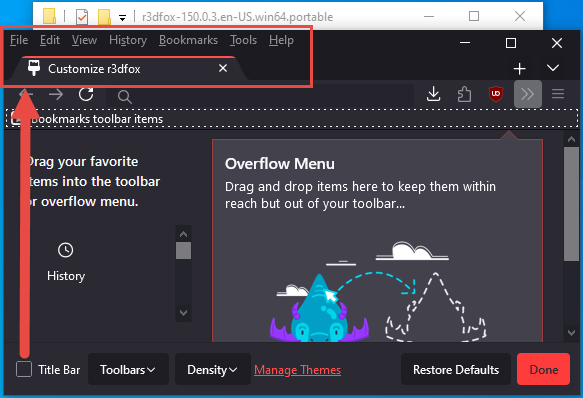
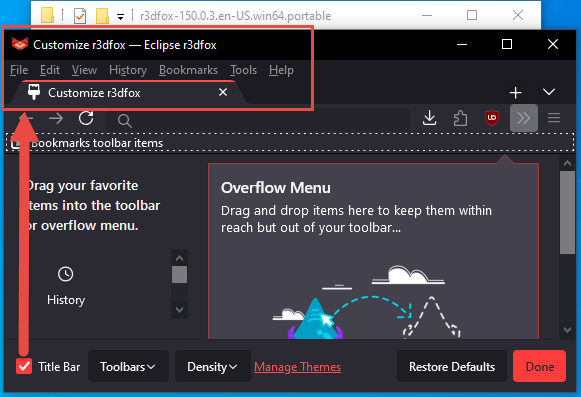
ty notheretoplaygames (picture 1) in the first 2 pictures i can see 2 different things at the first upper picture the "file edit view history bookmarks tools help" looks like a menu having that at the spot of the "window title" (picture 2) then "file edit view history bookmarks tools help" has gone downwards its no longer at the part of the "window title" instead at the window title now it has "Customize r3dfox -- eclipse r3dfox" and below it shows "file edit view history bookmarks tools help" it very much look to a menu (picture 3) in your second post you are showing v151 where the windows title is not showing "Customize r3dfox -- eclipse r3dfox" instead it shows what it shows in (picture 1) the menu "file edit view history bookmarks tools help" is at the window title in the second post (picture 4) does not show a differens so we can discard this one that also refers to a common problem devlopers often have (also supermium) often something is coming in like "this dont work - then like nothing else - no pictures - not where it happens - not how it happens - not even what the problem is - and often the most important: how it is to reconstruct to happening" - but rather you need to reconstruct the error - so you can see what the problem is
-
 zip joined the community
 -
Oh it's that problem. I didn't understand the wording. It's an upstream issue for all Windows versions and I don't feel like diagnosing it.
-
 Clover on legacy through CSMWrap (on UEFI Class 3, ASUS x509FA). I will try this when I have time.
 -
Q.E.D. However, whether this is an rd3fox issue or an upstream issue is "not my problem", no clue if it upstream, no clue if it only r3dfox, don't care, neither is my default browser. edit: those are in Win10. so if this isn't doing this in Win7 or Vista, I cite again as "not my problem", but then we are faced with NO LONGER calling this "Vista+" but saying "don't use on 10 [or 11?]".
-
v151 not working like it has always worked in the past:
-
My Browser Builds (Part 5)
AstroSkipper replied to roytam1's topic in Browsers working on Older NT-Family OSes
Yesterday, I uploaded files to MediaFire, and the used RAM increased to over 600 MB. After closing the tab, only a very, very small amount of used RAM was freed up. @roytam1, any chance to natively improve that behaviour in New Moon 28? -
v150 working like it has always worked in the past:
-
the title bar is there with correct names and reacting correct ? dont sound to bad for me it somewhat looks like the window title bar - i dont know if NotHereToPlayGames means that if it is that problem there are solutions that draw a "tab like title bar" - sumatra pdf use one for example, if that is the problem it certainly is solveable maybe someone put up the right pictures - like version before - like chrome 151 normal on win10 (representing a visable working picture, so everybody know what is meant), how it looks on redfox (might already be posted), a normwise representation what is suppose to be or how it suppose to look like
-
 @reboot12 Are you going to be putting everything you've worked on into a WIM image for easy UEFI 64bit installation? You could probably use something like Universal NT Installer to apply the image, but getting the UEFI boot part working might need some additional script of some sort.
 -
You're not looking at it correctly. I will post PICTURES to demonstrate. Will be back . . .