All Activity
- Past hour
-

My Browser Builds (Part 5)
Egorkaru replied to roytam1's topic in Browsers working on Older NT-Family OSes
@roytam1, please remove Cloudflare from website https://o.rthost.win. Cloudflare is blocked in Russia by Roskomnadzor. Because of this, opening website https://o.rthost.win on my SkyNet ISP in Saint Petersburg, Russia (https://skynet.ru) has been interrupted within the first 16 KB since December 2025. All free VPNs has been blocked by SkyNet ISP, and my mom won't give me money for paid VPNs. -

Firefox 52 no longer working on XP
Dave-H replied to Dave-H's topic in Browsers working on Older NT-Family OSes
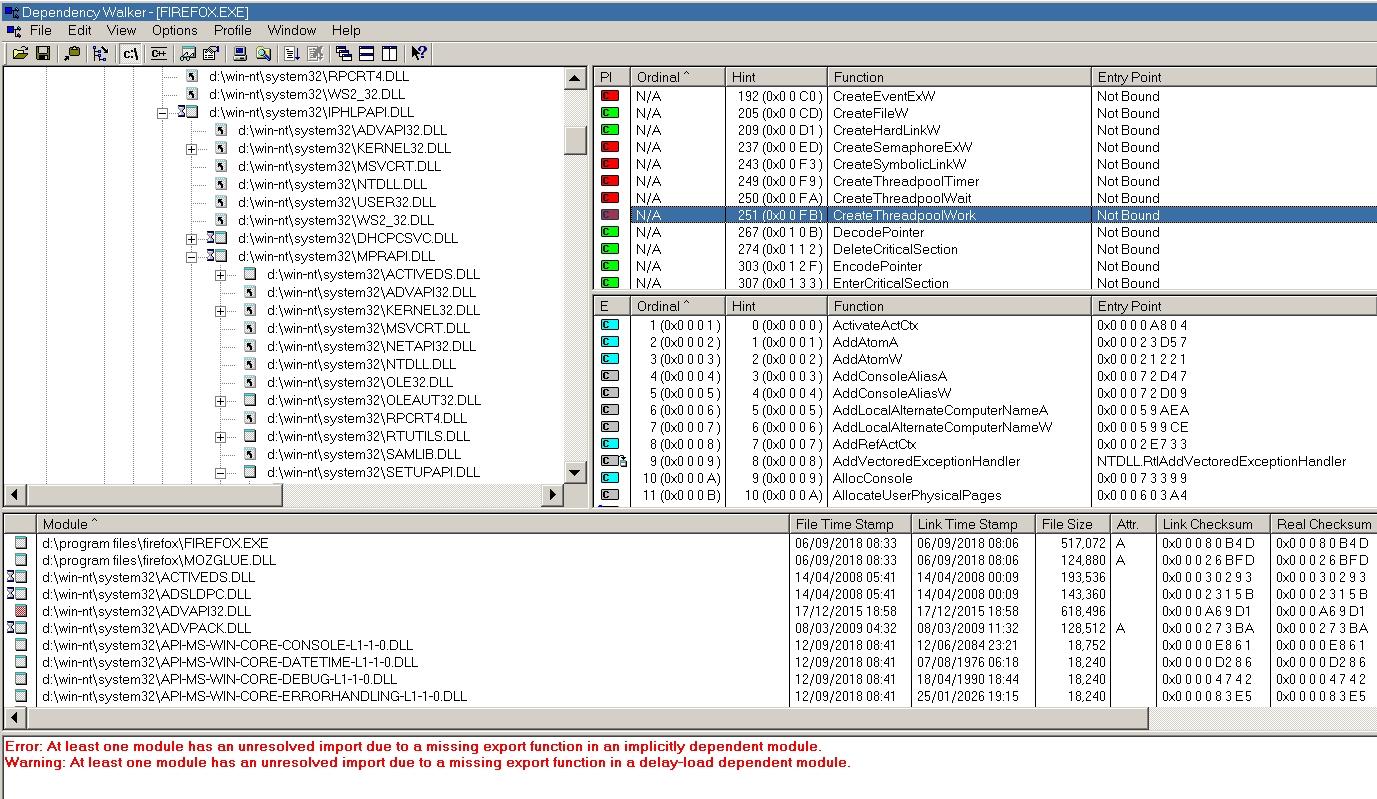
Here's what Dependency Walker says. CreateThreadpoolWork is indeed showing an error, but so are several other functions, and they're not stopping it from running! Incidentally, why does it say 'Not Bound'? Should that actually be 'Not Found' or is that terminology correct? Sorry, I'm no expert on this sort of thing!
- Today
-
Blackwingcat Please update some files using ESU KB's windows2000-kb2508429-x86-custom-plk_949c1405efd680cf901db2748dbbec1de297dcfd.exe srv.sys 5.0.2195.7441 windows2000-kb2676562-x86-custom-plk_dcab96b4e7275a50644ce047299fcefc74e98c79.exe ntkrnlmp.exe, ntkrnlpa.exe, ntkrpamp.exe, ntoskrnl.exe v7473 windows2000-kb2758857-x86-custom-plk_f5cfc4c05068b39fdf86d6e2b021b87a8f8c6f2f.exe kernel32.dll v7505 windows2000-kb2876217-x86-custom-plk_e1e4f63016a50df3e2f8fd195a78134ba16ce082.exe ole32.dll v7551 windows2000-kb2992611-x86-custom-plk_e18cbdacd7826ac86fc9b25ba1eb877f332b5946.exe schannel.dll v7593 windows2000-kb3039066-x86-custom-plk_ce91eb9d39184f03580a4e3fbc372db93d473ffd.exe shell32.dll v7604
-
Firefox 52 no longer working on XP
Dave-H replied to Dave-H's topic in Browsers working on Older NT-Family OSes
Thanks everyone, and sorry for the delay in replying. I was having terrible problems accessing the site yesterday, which i hope is now fixed. @NotHereToPlayGames I ended up uninstalling Malwarebytes in Safe Mode because when I tried in normal mode, when I said yes to 'do you want to uninstall' the machine immediately rebooted! Rather than try again and probably have the same thing happen, I then tried in Safe Mode, and it immediately uninstalled, very quickly indeed. Why the machine rebooted, I have no idea. I doubt this has anything to do with Firefox now failing to run, but you never know! @schwups @NotHereToPlayGames I'm not running any form of extended kernel. @ED_Sln Firefox.exe looks to be OK. Very strange. Just to add that Firefox won't run in its own 'safe mode' either.
-
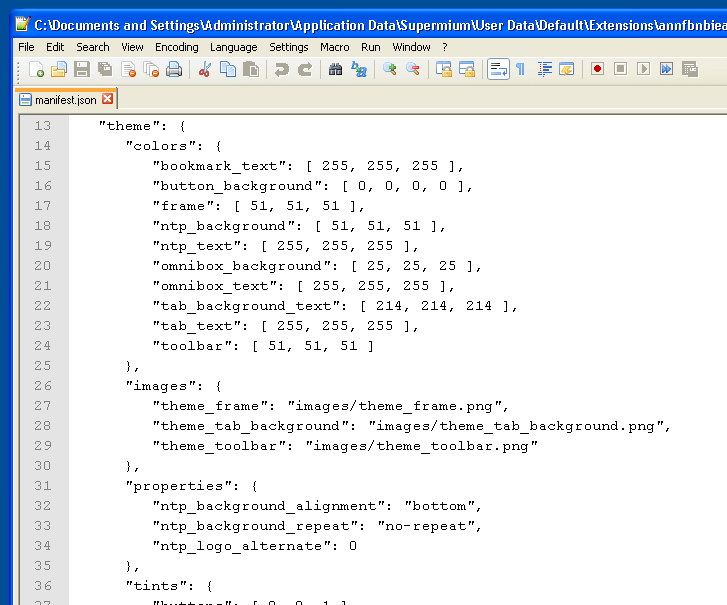
ps - If you download the .crx, all you have to do is modify the manifest.json *before* installing into Supermium and you can make the colors ANYTHING YOU WANT THEM TO BE. You don't have to "find" a theme that you like, you control your own destiny and CREATE the theme using the downloaded .crx as a "template". It can be easier if you find a "close enough" theme to what you WANT and then just modify to get it to EXACTLY what you want. That's what I've been doing ever since migrating from XP+360Chrome (where I embedded my own skin/theme) to 10+Chrome. For me, I really "hate" for Chrome to not LOOK LIKE everything else in XP. And that extends to 10 where "active" and "inactive" Chrome windows don't by default LOOK LIKE everything else in 10. This is a good source for all of the available "notations" that can be used - https://github.com/mike-u/EditChromeThemes
-

Firefox 52 no longer working on XP
ED_Sln replied to Dave-H's topic in Browsers working on Older NT-Family OSes
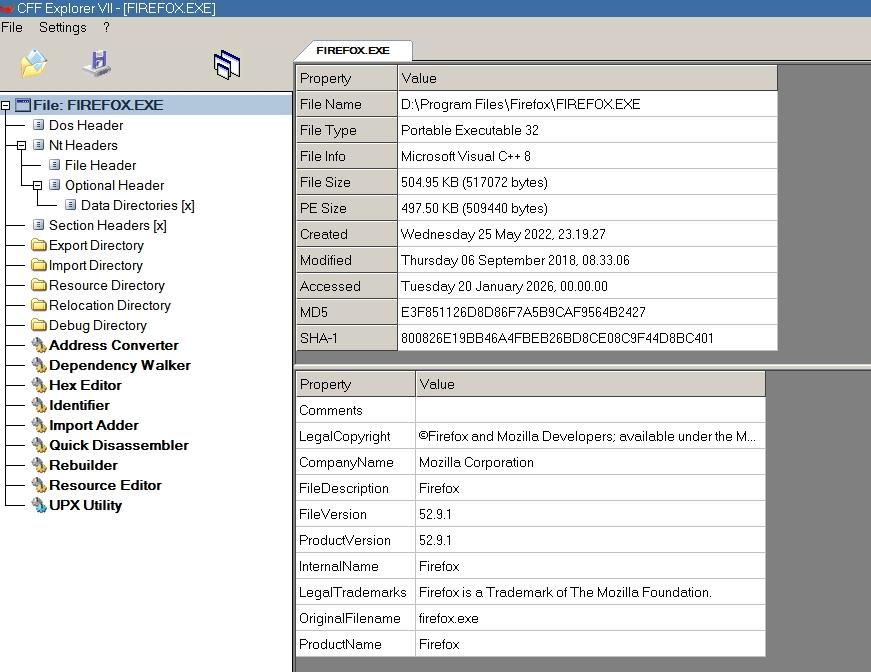
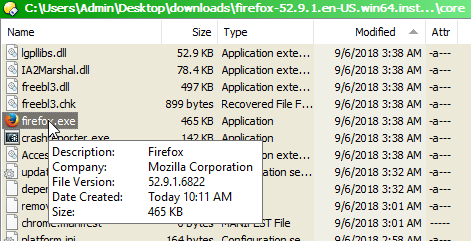
@Dave-H Check that the firefox.exe file has not been modified, it must have a valid digital signature and this SHA-1 hash: 800826E19BB46A4FBEB26BD8CE08C9F44D8BC401 -

Native (WDM) HD Audio driver for Windows 98se/Me
Deron416 replied to Drew Hoffman's topic in Windows 9x/ME
After some tests in WindowsMe, I found that if I launch ScanDisk and start scanning my hard drive while playing an MP3 file in WindowsMediaPlayer, the sound of the MP3 file being played becomes clear for a while. -

My Browser Builds (Part 5)
roytam1 replied to roytam1's topic in Browsers working on Older NT-Family OSes
upstream made their new release today, and 32bit build may have same issue I got in my last build. still need some more time on testing their builds. EDIT: issues we got happens in upstream as well. EDIT2: it seems that there is another individual is testing our cases and reporting them to upstream. - Yesterday
-
Nearly all of the bad-eyesight folks that I know all "swear by" anything-and-everything "dark mode". Why not try a "dark theme"? ie, something like this works in Supermium in XP+POS x86 -- https://chromewebstore.google.com/detail/dark-theme-for-google-chr/annfbnbieaamhaimclajlajpijgkdblo Normal Supermium: Supermium + above-link'd Dark Theme:
-
I can vouch for this!
-
So, Hello after a while, and I need help. I have the DESKTOP and the LAPTOP. a year ago or so I fought hard to enable shared folder on LAPTOP to be seen from DESKTOP. I did all the registry tweaks described here: https://www.wintips.org/fix-windows-11-24h2-cannot-access-network-shares-0x80070035/ , checked all the necessary services are running, set network as trusted on both computers, enabled connection without password, turned on network discovery. Well, it worked. Then I left it off for a few month and, after a windows update and changing home router, blam, I cannot access shared folder on LAPTOP anymore. Windows cannot access LAPTOP. error 0x80070035, The network path was not found. After a few hours of trying to set it up again, I gave up. And id the opposite, namely created shared folder on DESKTOP and accessed it from LAPTOP. well, it worked. Which is a workaround, and "maybe" proofs that new router is not an issue, as devices are shown in network panel on both machines. But the whole situation makes me crazy, and I'd love my machines to work as previously. Do you have any slightest hints what might have just happened? and how to fix it? needless to say top google search is about an issue nearly 1:1 as mine, and with no answer :/ https://www.elevenforum.com/t/cannot-access-shared-folder-via-network.37320/
-

Firefox 52 no longer working on XP
NotHereToPlayGames replied to Dave-H's topic in Browsers working on Older NT-Family OSes
This is confusingly "not normal". I've never needed to use SAFE MODE to perform a NORMAL uninstall. I myself have never used Malwarebytes, so no clue what it/they consider to be "normal". I tend to think of things this way, "Can My Parents Do It?" ie, Malwarebytes would be STUPID to think somebody like my PARENTS would know how to get into SAFE MODE in order to perform an UNINSTALL. -
Firefox 52 no longer working on XP
NotHereToPlayGames replied to Dave-H's topic in Browsers working on Older NT-Family OSes
So @Dave-H, are you running an "extended kernel" ??? -

Firefox 52 no longer working on XP
schwups replied to Dave-H's topic in Browsers working on Older NT-Family OSes
CreateThreadpoolWork isn't supported by XP. It came with Vista. Programs like DependencyWalker should reveal the module (probably Vista+) you are looking for by profiling. DW also shows all module versions. -
Firefox 52 no longer working on XP
Dave-H replied to Dave-H's topic in Browsers working on Older NT-Family OSes
I do have Revo installer, if you remember I used it to give AstroSkipper a list of .NET updates in another thread. I don't think I've ever actually used it to uninstall anything though! If I did, it would have been a very long time ago, so not related to this issue I'm sure. I have recently uninstalled Malwarebytes 3.5.1 though, using the normal uninstallation routine in Safe Mode. I wonder if there's any connection there? -
PortableRegistrator 1.5 certainly works with XP, I don't know about any later versions. I can upload it for you if you can't get a version which works. FWIW I use the Classic Blue theme, which always looks very pleasing to me, but it may not help with your issue of course.
-
#2 is done. By setting new tab pages to Luxxle this largely covers for the fact that SM allows default search engines only if chosen from a small list. #3 remains frustrating: I cannot be the only one using SM with less than perfect vision and as far as I can tell all themes and color scheme customizations give fine gray lines and white icons on a very light background. There may be worse scemes for visibility but it's hard to think what they'd be. However I expect that as SM becomes more popular this will get fixed. Windows and virtually all of the popular Win brwosers over the years had this right: SM (or Chromium's?) new bad idea won't go without an option indefinitely. Unless, of course, I'm still missing something obvious. That could happen. #1 The software you suggest is Win 7 and later I believe. My 'modern' machine (this one) is XP. I can probably do the edits by hand but I'll wait until I'm sure everything is stable. Though come to think of it most other browsers are capable of setting themselves as the default so switching away from SM should be easy if ever needed. Supermium is tops. Thanks for the help! Back to working on Win 98 on a Dell 4600.
-
Hie @raddy, thank you for the heads up. I'll fixed it.
-
Firefox 52 no longer working on XP
NotHereToPlayGames replied to Dave-H's topic in Browsers working on Older NT-Family OSes
If I had to fathom a guess, you have used Revo to uninstall a program or two. I used to "swear by" Revo. Until using it to uninstall AVG/Avast (don't remember which, to be honest) forced a reformat/reinstall to get XP running properly again. Granted, that was DECADES ago, but the bitter and sour taste is still present. Technically, it was THAT experience that pushed me into VMs for "testing". -
Firefox 52 no longer working on XP
NotHereToPlayGames replied to Dave-H's topic in Browsers working on Older NT-Family OSes
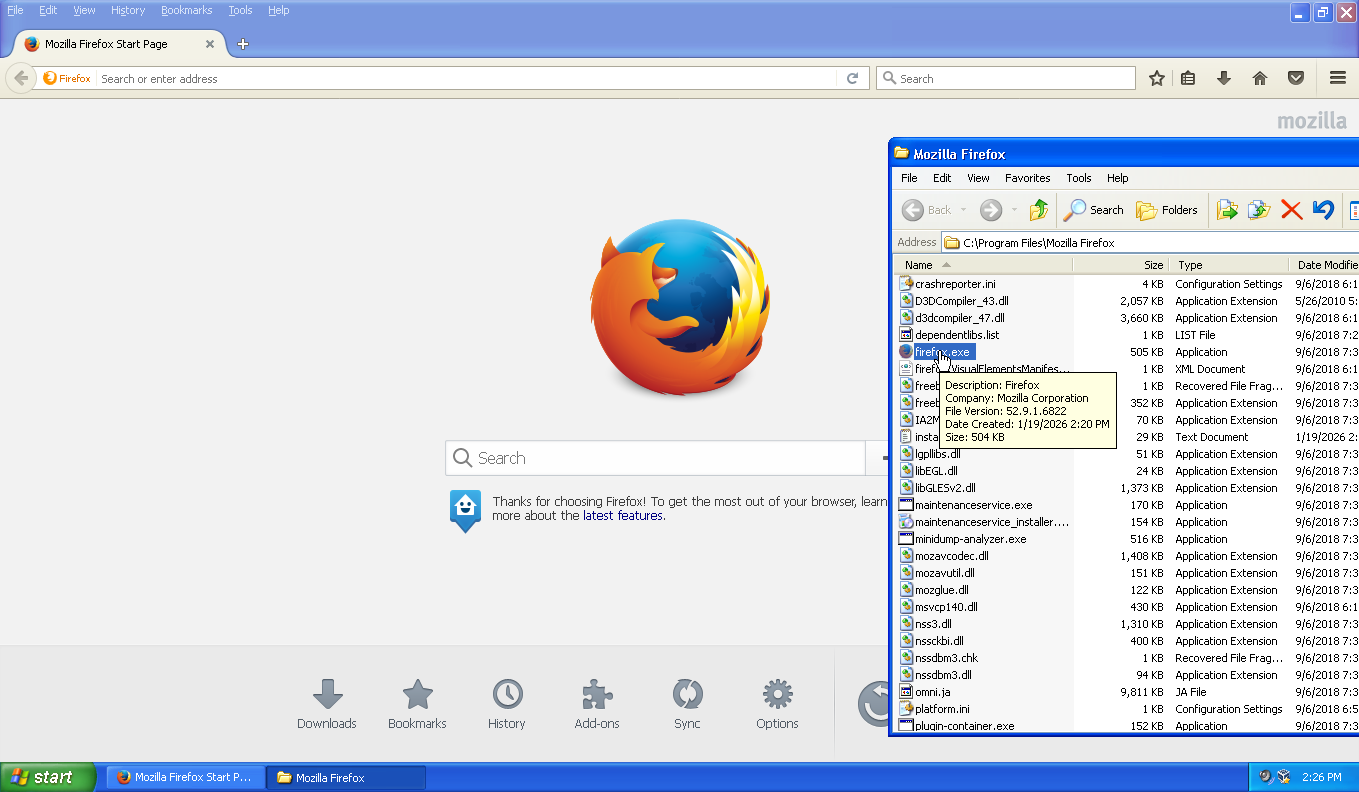
Cannot replicate. Firefox 52.9.1.6822 is working for me in XP+POS (32-bit) with *NO* extended kernel (not a fan of them, technically not a fan of POSReady but been using it experimentally). This is from inside a VM. My era-correct real-hardware for an XP+POS deployment is still undergoing experimentation.
-
Firefox 52 no longer working on XP
NotHereToPlayGames replied to Dave-H's topic in Browsers working on Older NT-Family OSes
Available here - https://archive.org/download/firefox52.9.1esr (x86 and x64, I only screencap'd x64 below)
-
Firefox 52 no longer working on XP
Dave-H posted a topic in Browsers working on Older NT-Family OSes
I've had Firefox 52.9.1.6822 installed on the XP side of my machine for many years, as the last Firefox version which will run on XP. I don't use it often now as I use a much more up-to-date version of Supermium. However, I tried to run it today, and it won't run any more. I just get a popup saying - "The procedure entry point CreateThreadpoolWork could not be located in the dynamic link library KERNEL32.dll." Anyone any idea why it would have stopped working? I've not knowingly changed anything relevant since I last used it. The Firefox files seem to be as they have always been, and no system files have been knowingly changed either. -
And that (D3D9!) was all it took to return my water sewer bill to an infinite unsolveable Cloudflare captcha loop! Even as high as Chrome v144. D3D9 flag is working in Chrome v143. No video stutters in v143 *when using* D3D9. What a d@mn F'in Nightmare all of this Cloudflare sh#t is evolving into !!!
-
Solved. v141 updated a flag "behind my back" that was set in v140. Returning the #use-angle to D3D9 setting which was set in v140 but v141 updated to "D3D11 WARP" solved the video stuttering.
-
So I've now had TWO consecutive "forced updates" that both did the same exact thing on my end. That result being that Cloudflare captchas would loop endlessly and never be able to be "solved". The "are you human" checkbox would show a checkmark after solving the puzzle (only for a split second), but it would only take you to another puzzle. Endlessly. The first time was last November. The solution was a "forced update" from running Chrome v136 and manually updating to Chrome v140 (v138 technically solved, but v140 solved a different issue). The same exact thing happened yesterday. Cloudflare captchas would appear to solve but all they would do is take you to another puzzle. Manually updating from v140 to v141 solved the endless captcha loops (but presented video stutter issues that v140 did not have!). In both cases, the first sign of something happening was that Google Search would present Cloudflare captchas EACH AND EVERY TIME you visited Google Search. They would "solve" but you were presented with it EACH AND EVERY TIME you visited Google Search! In both cases, my water sewage bill would present the unsolveable endless loop! This happened EXACTLY in this manner in November. And again yesterday. Simply can not be a "coincidence". The Cloudflare captcha server-side algorithms being updated to use new coding is behind this. They (the algorithms) are getting smarter and smarter at detecting "old browsers".