




-
If you do, please update. Hooboy, have I got an update for you! I stuck a PATA drive from a working win98 machine on that port on this machine -- looked good, I could see the files there (Windows ...). The port was stolen from the CD drive I've used to install Win98 -- worked at normal speed for that. I did drag and drop for my 150 MByte file from the usual PNY thumb drive to the added drive. It did copy -- in about 20 minutes. It looked like the copy went fast in very short bursts every few minutes. During the copy the mouse/cursor worked okay but when I tried to open process explorer that took several minutes and it gave no ongoing data -- the numbers were frozen until the copy finished. The copy seemed okay -- I could open the files on the target volume and the folder deleted normally. Is that the 'real' SATA driver for Win 98? That's a logical next step. And if someone wants to explain why USB 2 flash drive to disk copy time goes up more than 20-fold when using a real PATA drive, I'm all ears. I have a feeling I'm doing something wrong but can't think what it is ... most errors in plugging drives, etc. just lead to 'don't work.'
-
The thing I hate about taking more data is that often sometimes it proves I've been out in left field. Copying that 150MB file under Win98 from USB to the HDD takes ~45 seconds. Doing the exact same using XP is 6-8 seconds. But when I copy the same file under Win 98 from disk to another folder on the same HDD it takes 40 seconds. Copying it to another HDD on the same machine (source disk on port 0, target port 1), 70 seconds. It seems that what I thought was slow USB 2 is partly or mostly a slow HDD. All of the disks involved are SATA and --- since Win 98 doesn't do SATA -- I've been using the BIOS SATA emulation which is known to be slower than the real thing. The 4700 has a PATA port or two. Probably what I'll do next is try the copies to a PATA HDD.
-
I've now tried turning off USB booting. In the A10 version of the BIOS that I installed a week or so back (but not in the A06 that came on the machine) there are three options for the USB Controller: 'ON,' 'OFF,' and (new) 'No Boot.' In 'No Boot' mode the OS can see USB devices but the BIOS ignores them for boot purposes. This is a bit confusing because you can also turn off booting from USB in the boot sequence menu. But evidently even if they are off there, they're visible to the BIOS during boot. Anyway if you select 'No Boot' for the USB Controller the machine boots up and shuts down just fine with a USB device plugged in. Everything else is the same -- still does I/O too slowly -- but eliminating the excessive punishment for an unneeded device being present is good. Thanks!
-
There is -- 'Boot from USB' (or some such wording) is an option. It's currently ON (default, I think) and I've meant to flip it off and see what happens but have not done so. I'll check it tomorrow -- I mean, later today. . A test I don't think I've mentioned: I set up to do a USB to disk copy under DOS -- no Windows. This was by booting from a USB stick -- apparently the only way to get USB under DOS. Used XCOPY rather than COPY because the DOS COPY doesn't deal with sub directories. This was 2-3 times faster than using Windows. Since the comparison isn't exact one can't draw a firm conclusion but the result is consistent with 'Windows 98 is the problem.' Though I suppose the real meaning is that the USB code in the BIOS is faster than that in Windows ... not really surprising. Of course all AI is a 'scrape of a vast database' coupled to a language generator. The most accurate results occur when the database covers the entire universe -- there are no possibilities 'elsewhere.' This is the case for playing chess and finding coding errors, both of which AI does superbly. On problems involving human intent, open end design matters (did Intel want fast USB 2 on machines running Win 98?) results are going to be messier and the paid-for-it answer that amounts to some manufacturers chose 'No USB 2 speed' as the lesser evil when running under Win 98 is plausible as a scrape of history although halucination cannot be ruled out. I used Win 95 and 98 when they came out; I had one extended encounter with Microsoft support and was astonished to discover that their level two people knew less about the area (don't remember the details) than I did.
-
First I want to apologize. When I said: "Unless we can interest some driver writer out there it may not have a solution within Win 98" I had come to the belief that there is no simple answer to Win 98 taking 5-10 times as long for a USB 2 copy to disk as XP. That fixing this would require at least days, maybe weeks of work by someone who knows how -- not what most people would call a worthwhile project. 'Interest' is one thing, 'major project' is quite another. Again, sorry. Since then -- aside from 'life' which makes non-negotiable demands from time to time -- I've pretty well finished up the Win 98 on a Dell 4700 project. USB 2 (and 1 of course) work fine, at ~1.1 speed and with the restriction that you cannot shutdown or start up with a drive inserted. I've replaced the ATI Rage 128 (PCI) video card with a Radeon X300 (PCi-e) card, thus freeing that PCI slot. I installed a Belkin 802.11g WiFi card which worked fine except about once a day it would hang with "has encountered a problem and needs to close" -- except everything was hung but the power button meaning waiting for a SCANDISK on restart. Replacing that card with a noname (Ralink 2561 chip) fixed that problem. The Retrozilla 2.3 browser will actually connect and display some websites -- Breitbart and The Gateway Pundit are examples. And I installed the Riptide game card in the remaining PCI slot -- joystick, audio, and a dial up port on one card with one driver package. All of it seems to work fine. Then yesterday I pesuaded my wife to ask her paid-for AI about USB 2 under Win 98 SE and yes AWK, "if a you spends some money ( on the better ones )" ... In two pages I got a complete and seemingly authoritative discussion of the whole issue. According to Wife's AI slow speed is built in to USB 2 under Win 98. Win 98SE had (brand new) USB 2 support and it didn't work at all well. In fact the problems were so bad -- including data corruption, even loss of the whole drive -- that some companies gave up. Quoting: "Motherobard makers got a lot of support calls. "The Practical Workaround Vendors Used "Many chipset vendors (notably Intel and VIA) implemented drivers that did one of the following: "1. Run EHCI in conservative compatibility mode "2. Disable EHCI entirely "3 Leave devices attached to the USB 1 companion controller [instead of handling them to the EHCI after enumeration]" Fascinating stuff. Basically the claim is that some (many? most?) drivers for machines with USB 2 hardware looked at the OS and if it was Win 98 they said "Nope -- we promised you USB 2 but what you get is USB 1.1." It's certainly possible because when I plug in an HDD with XP my 150 megabyte copy takes around 6 seconds while using the drive holding Win 98 the same copy takes 45 seconds. The only difference seems to be the OS. Maybe the BIOS really is raising a middle finger to my USB 2 drive just because it hangs around in a Win 98SE neighborhood. Furthermore it doesn't seem to be just poor coding: I've tried packages that replaced most modules beginning 'USB' with later ones and differences were slight. Of the three 'workarounds' (above) only #1 seems possible because if I disable EHCI in Device Manager USB 2 gets even slower, indicating that EHCI was in use. Beyond that I don't know ...
-
A useful result yesterday: Just for kicks I disabled EHCI. Speed for my 150 Mbyte test file went from 40-50 seconds to 3 minutes 5 seconds -- almost a 4:1 slowdown. Conclusion: The problem is not USB 2 under Win 98, it is all USB. That suggests a different focus. It's not a negotiation failure or fallback, it's not EHCI, it's USB itself. AI is attempting to help me understand that but it is slow going: You're on your own to recognize blind alleys before spending too much time on them. Often it'll propose a test but when handed results, get the conclusion wrong. Or explain how to change something (in the Registry for example) which turns out not to exist. A problem in the use of AI in legal work has been its tendency to make up false citations -- cases claimed to be precedental that simply don't exist. That's got to be in the training materials -- maybe a student paper with fabricated cites? It's harder to see how it happens in material researched to help with my USB speed question. But I've had a lot of it in this quest. No 'common sense,' no 'checking your work' -- how would it even do that? Look in the Windows Registry to see if the value it wants to change is actually there? Or is read by anyone else? This tool is not ready to take over middle management or any but the most grunt-level programming tasks Awk, I'm sorry but I don't do Linux. This is a life-decision and I won't defend it. I'm glad Linux exists but I won't go there again. Also I only do new speed tests for special cases (like 'EHCI disabled') that may shed new light on what's wrong. A ratio of over 5:1 in speeds on the same physical machine with the same USB drives changing only the HDD from Win 98 to XP is the only blanket speed data I need. This represents the kinds of thing I do and is clearly unsatisfactory: No other measurement is going to change that. The speed with the VIA card was in the same ballpark but I don't recall the exact number. Since I haven't a slot for it long-term I didn't want to spend much effort in that direction, for example by buying an NEC card. I don't recall a BIOS setting for USB keyboard/mouse but I'll look and if there is one, I'll see what happens when I disable it. I never use USB k/m on these old systems because I spend too much time with things messed up and USB HID = no HID. There isn't a legacy USB setting on the 4700s as I seem to recall on the 4600s. Lone C. said: " Work and real life have a way of always preventing me from spending time on any of my computer related projects these days." And when you retire, 'life' expands to take up the slack. Fixing things that were someone else's problem in working days, health and physical limitations ... I wouldn't go back, but the rules in old age are just as strictly enforced as those of a career. I'm just real glad to see some familar names here. I'm feeling more optimistic about figuring this out. Unless we can interest some driver writer out there it may not have a solution within Win 98 but we should be able to find the cause.
-
I've mainly tested using two drives, both FAT32 and both formatted using the Win 98 machine. One was a 16Gb USB 2 PNY formatted 64k blocks using a Win98 tool that allowed selectiing allocation unit numbers, the other (a new 32Gb USB 3 drive) was tested once 'as from the factory' and once after formatting using default DOS.numbers. (8k I think, though I will not swear to that) All of these are/were in the same ballpark -- 4 Mbyte/sec -- though the USB 3 drive was 10-20% faster than the other. All 'hard' formats -- no 'quick.' I've tried a couple of other USB 2 drives at various times with no significant difference. I guess it is possible that the two different software systems (Win 98 and XP) could differe in their ability to handle some oddball or inappropriate geometry. I wish there were tools to log USB device recognition and mounting because obviously the software knows what's wrong.
-
This isn't a misunderstanding: I simply don't see the benefit. Benchmarks are valuable for comparisons across different platforms and situations, particularly when small differences may be important -- is this an improved model, or not? My situation is a (roughly) 6x difference in performance between two operating systems on the exact same hardware (I just plug one sysres volume or the other) and copying the same data from the same device. It is true that a benchmark might tell me the truth is one system is only 4.9x faster (or 6.9, or 7.2 or ...) but how would that matter? As far as I can tell, it wouldn't matter at all. To the extent that I have a real issue at all (rather than just a 'ship in a bottle' exercise) being able to copy a 150 meg file is the bottom line. What would be useful now is a tool that fingers some specific part of the process and thus tells us which module and function aren't going right. I haven't found anything that'll do that, though AI told me that it was ebedded in Win 98 and gave specific directions for turning it on. (Which did not work ... And when I specifically questioned that, it couldn't find anything.) If I'm wrong about all this -- just misunderstanding something -- please enlighten.
-
Impressive stats, SweetLow. I'll run the same if I get USB 2 going at correct speed on the Win 98 system. After another afternoon of being led around by AI without measureable progress, I have ... no measureable progress. It would be nice to have a way to log USB actifities starting with negotiation to at least narrow the territory in which the problem lies but after assuring me that such a tool exists (and how to start it) AI later told me there is no such thing. If it does exist someone here probably knows ... ??? Other than that I've swapped USBEHCI.SYS from a current WinXP SP3 system -- it perhaps improved speed slightly but not close to USB 2. In order to do much else I'd have to start over without NUSB3.6 since that mods some modules. This is a difficult problem because of the number of different chipsets, the varying goals (is it working USB 2 if it only goes at 1.1 speed?), and the lack of specific instructions for most packages. I'm not sure whether trying to get help from AI gave any net benefit. The only appealing thing about it is it always gives an answer, but most of them are either wrong or useless. I don't think anyone has gotten USB 2 to go full speed on an ICH 6 machine under Win 98 without using an add-in card. Since I can unplug the Win 98 HDD and plug in the one with XP and get about a 6x speed boost it has to be possible but either it hasn't been done or the result is very well hidden. Same argument applies to format/geometry questions: It's the same drive on XP at 20+ Mb/s as under Win98 at 3-4 Mb/s. I'd be happy to be told I'm wrong.
-
I have installed Win 98 on my 4700 with ACPI on and the exact same NUSB3.6 and other .inf/.sys tweaks as formerly. Makes NO DIFFERENCE in speed. Copy of a 150 Mb file from my various thumb drives to disk takes the same amount of time ACPI ON as ACPI OFF. The only difference noted is that with ACPI ON you can bring up or shut down the system without an hour or more delay (effectively a hang) if there's a thumb drive inserted. Win XP times average around 7 seconds = 20 or so Mb/s -- low end of USB 2 but definitely not USB 1.1. And that's really too short a test for precision. This is good news: It means that Win XP still knows a USB trick that I haven't yet taught Win 98. So the problem can be solved -- it is not buried in the bowels of the BIOS. The post-NUSB3.6 files I'm using are Win 2000. I can check the other packages I've found and see if anything later will work. Probably this will turn out to be like many other problems in my life -- User Error.
-
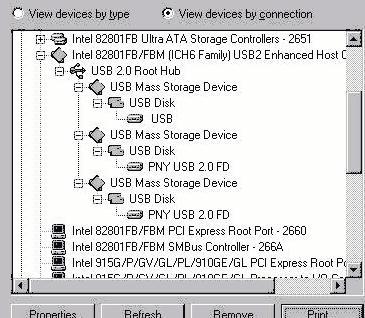
The ideas help. Let's try again, pasting a .jpg of my 'devices by connection': That looks better. The trick I was missing was .jpg instead of .bmp: Thanks, folks. I don't see anything wrong with it I have Everest (early version of AIDA64) on the machine: There's a ton of information there but nothing that leaps out as a problem. As I understand things, USB 1.1 is typically 1-10 Mb/s, USB 2 20-30. With the PNY drives I move 150M in just about 40 seconds, = 3.8 Mb/S while using a SanDisk USB 3.2 drive (shows as 'USB' in the picture since '98 has no awareness of USB 3) the time is 32 seconds or 4.7Mb/S. I am having another discussion with AI as to whether anyone has ever gotten USB 2 speeds on Win 98 on a 4700. So far he's repeated the claim for success on a 4600 -- irrelevant since a different chipset -- and some armwaving about the need for NUSB 3.6 or maybe one of the later packages containing .sys files from XP. All of which is already done -- in order to get to the picture above. My wife uses a paid AI chatbot: It sounds like it's better than the Luxxle free chat I'm using. In other news I got a Belkin 802.11g card working in this machine without trouble and Retrozilla 2.3 loads at least some modern sites adequately. And I have an ATI x300 PCI-e card on order so that'll free a PCI slot for a game card. (4700 has 2 PCI, 1 PCI-e x16, 1 PCI x1.) I can't recall the details of my attempt to patch SATA; I probably got something wrong there. I'll try again. And once I've got the PCI-e video card for this machine I'll put the PCI one back in the 4600 and check out it's USB speed. That's a much easier machine for running Win 98. I've got PowerQuest Second Chance on this machine so I can try things and roll them back just as with XP's System Restore. Added advantage: PQSC lets you build a boot disk so you can do a restore even if the machine won't boot.
-
Thanks for clarifying all that, Lone. As I say, I'm no expert. One observation: Operating systems and drivers for complete computers sold to a mass market are mainly paid for out of hardware sales. The incentives are to make current sales successful but mostly not to support activities (such as continuing to use obsolte items) that would compte with future hardware sales. The maker of a motherboard sold to an end user has different incentives because his customers are nearly all people like us and supporting non-current systems may be a competitive advantage. Which means an aftermarket board with a certain chipset is likely to have better support for earlier systems. =================== I will try to attach the file showing the 'devices by connection' on the 98SE 4700. Any thoughts appreciated ... Okay, so I have no idea how to add a picture to this post. I attached it but that meant you'd have to download it to see ... not something anyone wants. ???
-
I checked the same USB 2 PNY drive in all eight ports. While there was some variation -- say +/- 15% -- it was random. Several trials in the same port varied just as much. Average is around 40 seconds to copy 150 Mb. The brand new 32Gb SanDisk USB 3.2 is definitely faster -- about 32 seconds for 150 Mb. It's enough faster that the COPY informational block with the progress bar sometimes doesn't show up until the last second or so. You click COPY and nothing happens. Until all of a sudden, there's your file. I tested it both 'as stolen borrowed from my wife' and after formatting via DOS prompt: No difference. The 'Devices by Connection' picture is good: Everything that ought to be aware of USB 2, IS. And all the USB 2 / USB 3 devices show up as being connected to the EHCI controller. The USB 3 drive just says 'USB' but it's in there with the USB 2 ones and getting as good handling as they are. If I can scrape up another HDD I'll probably see about installing Win 98 with ACPI ON -- that is, without the '/p i' switch. Even if it's not a practical setup (because of conflicts or ???) I might be able to get USB going and test speed. EDIT: Also I'll probably fire up a Win 98 4600 and/or 3000 and see about USB 2 speeds there -- those ICH5 systems take less fiddling to run Win 98. I've asked AI for an example of someone running Win 98 on a 4700 with full-speed USB 2. No joy there yet. Anyone here have that experience?
-
[Dell] " may be the issue, in and of itself!" I run a speed test with a USB 2 thumb drive on one Dell 4700 with Win XP -- the OS that was shipped on these machines -- and get 15 Mb/s. I take the same thumb drive to another Dell 4700 with Win SE with an Intel chipset driver for that machine, NUSB 3.6 plus several .USB .SYS files (from early XP I think) and some tweaks to a USB INF and get smooth function but only 3 Mb/s. If I do the same test -- same drive, same machine -- but with nothing beyond NUSB 3.6 I get something around 0.1 Mb/s. It's hard to blame those differences on Dell. Dell never shipped the 4700 with Win 98 in any flavor. Other makers offer many bits and pieces, particularly Intel for their chipset (used in other machines and by other makers for products that did support '98) but Dell made no claim to support it. It's enough that they provided compatibility modes that let some earlier software (including '98) run at a less-than-modern-system level of performance and without a specific claim. As to 'random crashes,' I've had none of that and I wonder if your '98 on a 4700 experiments included chasing down and installing the proper ICH6 chipset driver? For the next previous generation -- ICH5 and machines like the 4600, 3000, and 2400 that never shipped with Win 98 you can get the chipset driver from Dell because they made other machines with that chipset that did ship with Win 98. But for ICH6 and after you have to look elsewhere. And if you don't install a proper chipset driver you will get crashes. I'm not sure what you mean by 'prefab'; I'm not sure there's any recent manufacturer that builds a whole computer in-house. We all have our preferences of course; mine's Dell because they still make available all the drivers for these vintage machines and because the machines are easy to work on with most of the equivalent parts being interchangeable. My wife and I thank Dell for supporting their old machines by buying her occasional new computers directly from Dell. I think in fact that's the only new household equipment we've bought in the last 25 years. I tried the RLoew SATA patch, got a couple of BSODs and put it aside for later. I'll try it again if it appears that SATA emulation of PATA in the BIOS could be an issue. Today's tasks include another speed test with Everest (aka Aida64) and a look at 'devices by connection' on the '98 machine to be sure I'm testing on a proper USB2 port -- there may be some variability as to just which of those six rear ports are what speed. The manual says all six are USB 2 but now and then XP lectures me "This device can perform faster ..." so it thinks I've got a 2 drive in a 1 connector. There's still a bunch to understand: The VIA card with the manufacturer's driver (from the CD that came in the same box) also seemed to go at 1.1 speed -- maybe the PCI bus is throttled to that speed if ACPI is disabled? ????
-
"I do not mean to suggest these basic tests, as an insult to your ability ..." <--------- NOT an issue. The answer -- if it's eventually found -- will turn out to be BASIC. Eliminating those basics that we can, one by one, is the only possible way to do it. I've talked my wife out of a new SanDisk USB 3.2 drive ... I didn't ask if it came from Temu. Regardless, this will be another tweak of the variables. I got the real HDD version going today -- Win 98, ICH23456, NUSB3.6, plus five .SYS and a USB2.INF from a later package (early Win XP file versions I think) and add some strings and short UHIC and EHIC sections to that INF. At the NUSB3.6 point (where ICH5 machines would be happy campers) USB is molassas in the freezer slow ... it works, but only at a fraction of a Mb/sec. Mounts are practical only by booting to DOS prompt, insert, and then EXIT. I've made one attempt to take M-D's NUSB3.6 apart and integrate the changes that make USB work tolerably but self-extracting exe files are another thing I've never done before so no joy yet. As on the SSD version the additional changes make USB behave absolutely correctly (mounts a drive in seconds, for example) as long as you don't boot or shut down with a drive installed and as long as you're okay with USB 1-range copy speeds -- 150 Mb in about 50 seconds. (Instead of about 5x that fast for same drive, exact same hardware under Win XP.) I've got a 4600 and a 3000 running Win98; I don't think I've ever checked the USB speeds. Of course I don't know if those machines were supposed to have USB 2. I tried Process Explorer on the HDD version: It behaved very little better. In 50 seconds of copying it might show you numbers three times? My impression (on very little data) is that the CPU's not smashed: USB just seizes the machine and does it's own thing at its own speed. The CPU spikes when Process Explorer gets a chance which is pretty rare. Another interesting result: The copy time is hardly any different between SSD and HDD. I will try benchmarking with Everest. With the aid of AI I've found some books that may help undestand some of this stuff. Thanks for the help!