Search the Community
Showing results for tags 'NVidia'.
Found 12 results
-
Hello What are the last versions of CUDA and NVidia driver that still work with Windows 7? I mean the versions that do not officially support it but still work if you install them manually. (Sorry if this has already been asked but I cant find this information anywhere.) Right now I am using CUDA 11.7, and the 473.62 driver because it's the last one being signed and I never managed to have a non-signed driver work. My problem is that these versions are becoming too prehistoric, the recent versions of Forge Neo (Stable Diffusion) don't work with CUDA 11.7 anymore. Can't more recent versions of CUDA and driver be installed manually? I remember reading somewhere that CUDA 12 actually works, and even CUDA 13 may partially work. Thanks.
-
The last Windows 9x official NVidia Video Driver Version 81.98 and the unofficial Version 82.69 both hang during Shutdown when used with 6xxx or 7xxx Video Cards. I have analyzed the problem and it appears that one of a couple of System Broadcast Message Call never returns. I have developed a Patch to bypass these Messages. This Patch is for Windows 98SE and Windows ME. It has not been tested with Windows 98FE or Windows 95. Since this Patch only affects Shutdown Functions, it should not have any affect on normal operations. Boot to DOS seemed unaffected on the one machine I tested. I have not tested Suspend or Hibernate as my test machine didn't support it before. I have not tested 82.16 or 82.69, but other people have. The Patch is applied to the WINDOWS\SYSTEM\NVCORE.VXD File as follows: Version 81.98: (Revised 07/29) 144: 24 -> 3B 31F35E: 9E 55 E5 FF -> C2 05 00 00 31F924: 00 00 00 00 00 00 00 00 00 00 00 00 00 00 00 00 00 00 00 00 00 00 00 -> 3C 04 74 08 3C 25 74 04 3C 32 75 02 B0 52 89 44 24 04 E9 C5 4F E5 FF Version 82.16: (Revised 07/29) 144: AC -> C3 31F6E6: E6 54 E5 FF -> C2 05 00 00 31FCAC: 00 00 00 00 00 00 00 00 00 00 00 00 00 00 00 00 00 00 00 00 00 00 00 -> 3C 04 74 08 3C 25 74 04 3C 32 75 02 B0 52 89 44 24 04 E9 0D 4F E5 FF Version 82.69: (Revised 07/29) 144: C8 -> DF 329802: DA A7 E4 FF -> C2 05 00 00 329DC8: 00 00 00 00 00 00 00 00 00 00 00 00 00 00 00 00 00 00 00 00 00 00 00 -> 3C 04 74 08 3C 25 74 04 3C 32 75 02 B0 52 89 44 24 04 E9 01 A2 E4 FF Revised 07/29/15 to include third System Message for Windows ME
-
Hello members, I lost my driver installation CD for the 10 y.o. notebook, and online drivers are now gone, does someone have them archived? Gigabyte Aorus X7 Pro-SYNC NVIDIA Graphics Driver 9.18.13.4810 for Windows 8 64-bit https://drivers.softpedia.com/get/GRAPHICS-BOARD/NVIDIA/Gigabyte-Aorus-X7-Pro-SYNC-NVIDIA-Graphics-Driver-918134810-for-Windows-81-64-bit.shtml Original manufacturer link (ERR_EMPTY_RESPONSE) 348.10 Geforce http://download.aorus.com/DownloadFile/nb-driver-x5-x7v3g-win8.1-64bit-vga-nv-9.18.13.4810.zip Thanks.
-
 This is a continuation of my previous nVidia tutorial, but this time I decided to do it for folks with the extended kernel by @win32! As we know, the last officially supported driver was from the early May of 2016. This one is from 2017 ! Some may say it's a miracle , you betcha ! This driver was tested and confirmed fully working on 600, 700, 900 and 1000 series. Except the cheapest GT1030. You need the ex-kernel installed, I tested on a clean Vista with the updates up to 03.2019.+ the kernel. It's not allowed to share modded copyright protected material here, hence the new topic with the precise instructions follows. Tools you need :Driver Signature Enforcement Override, Universal Extractor and any HEX editor you like. Go and grab here: https://www.softpedia.com/get/Compression-tools/Universal-Extractor-Bioruebe.shtml Download here, here it is. NVIDIA - Display - 23-Feb-2017 12-00-00 AM - 21.21.13.7878 https://catalog.s.download.windowsupdate.com/d/msdownload/update/driver/drvs/2017/03/93376a87-7e31-472c-9236-b5f013236705_d5f668ad398d7409e8a2efa8c6d107ef7fbba1fe.cab and extract with Universal Extractor to an empty folder : In the nv_dispiwu.inf replace NTamd64.6.1 with NTamd64.6.0 and [NVIDIA_Devices.NTamd64.6.1] with [NVIDIA_Devices.NTamd64.6.0] Having difficulties to do so ? Then read how to Modify NVIDIA Driver .INF Files https://null-src.com/posts/nvidia-notebook-driver-inf-mod/post.php PATCHING : Extract nvlddmkm.sy_ file and patch the nvlddmkm.sys . 1 - search for and REPLACE 0000080000AAD5 with 00000800004B72 2 - search for and replace 84C0740AB8BB0000C0 with 84C0EB0AB8BB0000C0 and save. RENAME the patched file back to nvlddmkm.sy_ and place into the installer folder. Run CMD as ADMIN bcdedit.exe /set loadoptions DDISABLE_INTEGRITY_CHECKS bcdedit.exe /set TESTSIGNING ON bcdedit /set nointegritychecks on Reboot . Run SETUP.exe and install the driver. Do NOT restart . Run Driver Signature Enforcement Overrider and choose "sign a system driver" Sign this file ! C:\Windows\System32\Drivers\nvlddmkm.sys Reboot , go and play. DISCLAIMER Some might not like the use of additional software that may or may not be flagged by their KGB/FSB "antivirus". Per various sources inluding me , permanent disabling of drivers signature enforcement is just not possible since Vista , so you'd have to use Driver Signature Enforcement Overrider 1.3b and I'm not resposible in any way ! Optional : Run RemoveWatermarkX64 to remove the "test mode" watermark .REBOOT. If you share this topic , don't forget to tag me. @D.Draker Final thoughts : Vista lives. Supported Devices: NVIDIA_DEV.06C0 = "NVIDIA GeForce GTX 480" NVIDIA_DEV.06C4 = "NVIDIA GeForce GTX 465" NVIDIA_DEV.06CD = "NVIDIA GeForce GTX 470" NVIDIA_DEV.06D1 = "NVIDIA Tesla C2050 / C2070" NVIDIA_DEV.06D2 = "NVIDIA Tesla M2070" NVIDIA_DEV.06D8 = "NVIDIA Quadro 6000" NVIDIA_DEV.06D9 = "NVIDIA Quadro 5000" NVIDIA_DEV.06DD = "NVIDIA Quadro 4000" NVIDIA_DEV.06DE = "NVIDIA Tesla T20 Processor" NVIDIA_DEV.06DF = "NVIDIA Tesla M2070-Q" NVIDIA_DEV.0DC0 = "NVIDIA GeForce GT 440" NVIDIA_DEV.0DC4 = "NVIDIA GeForce GTS 450" NVIDIA_DEV.0DC5 = "NVIDIA GeForce GTS 450" NVIDIA_DEV.0DC6 = "NVIDIA GeForce GTS 450" NVIDIA_DEV.0DD8 = "NVIDIA Quadro 2000" NVIDIA_DEV.0DE0 = "NVIDIA GeForce GT 440" NVIDIA_DEV.0DE1 = "NVIDIA GeForce GT 430" NVIDIA_DEV.0DE2 = "NVIDIA GeForce GT 420" NVIDIA_DEV.0DE4 = "NVIDIA GeForce GT 520" NVIDIA_DEV.0DE5 = "NVIDIA GeForce GT 530" NVIDIA_DEV.0DE7 = "NVIDIA GeForce GT 610" NVIDIA_DEV.0DF8 = "NVIDIA Quadro 600" NVIDIA_DEV.0E22 = "NVIDIA GeForce GTX 460" NVIDIA_DEV.0E23 = "NVIDIA GeForce GTX 460 SE" NVIDIA_DEV.0E24 = "NVIDIA GeForce GTX 460" NVIDIA_DEV.0F00 = "NVIDIA GeForce GT 630" NVIDIA_DEV.0F01 = "NVIDIA GeForce GT 620" NVIDIA_DEV.0F02 = "NVIDIA GeForce GT 730" NVIDIA_DEV.0F03 = "NVIDIA GeForce GT 610" NVIDIA_DEV.0FC0 = "NVIDIA GeForce GT 640" NVIDIA_DEV.0FC1 = "NVIDIA GeForce GT 640" NVIDIA_DEV.0FC2 = "NVIDIA GeForce GT 630" NVIDIA_DEV.0FC6 = "NVIDIA GeForce GTX 650" NVIDIA_DEV.0FC8 = "NVIDIA GeForce GT 740" NVIDIA_DEV.0FC9 = "NVIDIA GeForce GT 730" NVIDIA_DEV.0FF3 = "NVIDIA Quadro K420" NVIDIA_DEV.0FF9 = "NVIDIA Quadro K2000D" NVIDIA_DEV.0FFA = "NVIDIA Quadro K600" NVIDIA_DEV.0FFD = "NVIDIA NVS 510" NVIDIA_DEV.0FFE = "NVIDIA Quadro K2000" NVIDIA_DEV.0FFF = "NVIDIA Quadro 410" NVIDIA_DEV.1001 = "NVIDIA GeForce GTX TITAN Z" NVIDIA_DEV.1004 = "NVIDIA GeForce GTX 780" NVIDIA_DEV.1005 = "NVIDIA GeForce GTX TITAN" NVIDIA_DEV.1007 = "NVIDIA GeForce GTX 780" NVIDIA_DEV.1008 = "NVIDIA GeForce GTX 780 Ti" NVIDIA_DEV.100A = "NVIDIA GeForce GTX 780 Ti" NVIDIA_DEV.100C = "NVIDIA GeForce GTX TITAN Black" NVIDIA_DEV.1021 = "NVIDIA Tesla K20Xm" NVIDIA_DEV.1022 = "NVIDIA Tesla K20c" NVIDIA_DEV.1023 = "NVIDIA Tesla K40m" NVIDIA_DEV.1024 = "NVIDIA Tesla K40c" NVIDIA_DEV.1026 = "NVIDIA Tesla K20s" NVIDIA_DEV.1027 = "NVIDIA Tesla K40st" NVIDIA_DEV.1028 = "NVIDIA Tesla K20m" NVIDIA_DEV.1029 = "NVIDIA Tesla K40s" NVIDIA_DEV.102A = "NVIDIA Tesla K40t" NVIDIA_DEV.102D = "NVIDIA Tesla K80" NVIDIA_DEV.103A = "NVIDIA Quadro K6000" NVIDIA_DEV.103C = "NVIDIA Quadro K5200" NVIDIA_DEV.1040 = "NVIDIA GeForce GT 520" NVIDIA_DEV.1042 = "NVIDIA GeForce 510" NVIDIA_DEV.1048 = "NVIDIA GeForce 605" NVIDIA_DEV.1049 = "NVIDIA GeForce GT 620" NVIDIA_DEV.104A = "NVIDIA GeForce GT 610" NVIDIA_DEV.104B = "NVIDIA GeForce GT 625 (OEM)" NVIDIA_DEV.104C = "NVIDIA GeForce GT 705" NVIDIA_DEV.107C = "NVIDIA NVS 315" NVIDIA_DEV.107D = "NVIDIA NVS 310" NVIDIA_DEV.1080 = "NVIDIA GeForce GTX 580" NVIDIA_DEV.1081 = "NVIDIA GeForce GTX 570" NVIDIA_DEV.1082 = "NVIDIA GeForce GTX 560 Ti" NVIDIA_DEV.1084 = "NVIDIA GeForce GTX 560" NVIDIA_DEV.1086 = "NVIDIA GeForce GTX 570" NVIDIA_DEV.1087 = "NVIDIA GeForce GTX 560 Ti" NVIDIA_DEV.1088 = "NVIDIA GeForce GTX 590" NVIDIA_DEV.1089 = "NVIDIA GeForce GTX 580" NVIDIA_DEV.108B = "NVIDIA GeForce GTX 580" NVIDIA_DEV.1091 = "NVIDIA Tesla M2090" NVIDIA_DEV.1094 = "NVIDIA Tesla M2075" NVIDIA_DEV.1096 = "NVIDIA Tesla C2075" NVIDIA_DEV.109B = "NVIDIA Quadro 7000" NVIDIA_DEV.1180 = "NVIDIA GeForce GTX 680" NVIDIA_DEV.1183 = "NVIDIA GeForce GTX 660 Ti" NVIDIA_DEV.1184 = "NVIDIA GeForce GTX 770" NVIDIA_DEV.1185 = "NVIDIA GeForce GTX 660" NVIDIA_DEV.1187 = "NVIDIA GeForce GTX 760" NVIDIA_DEV.1188 = "NVIDIA GeForce GTX 690" NVIDIA_DEV.1189 = "NVIDIA GeForce GTX 670" NVIDIA_DEV.118E = "NVIDIA GeForce GTX 760 (192-bit)" NVIDIA_DEV.118F = "NVIDIA Tesla K10" NVIDIA_DEV.1193 = "NVIDIA GeForce GTX 760 Ti OEM" NVIDIA_DEV.1194 = "NVIDIA Tesla K8" NVIDIA_DEV.1195 = "NVIDIA GeForce GTX 660" NVIDIA_DEV.11B4 = "NVIDIA Quadro K4200" NVIDIA_DEV.11BA = "NVIDIA Quadro K5000" NVIDIA_DEV.11C0 = "NVIDIA GeForce GTX 660" NVIDIA_DEV.11C2 = "NVIDIA GeForce GTX 650 Ti BOOST" NVIDIA_DEV.11C3 = "NVIDIA GeForce GTX 650 Ti" NVIDIA_DEV.11C4 = "NVIDIA GeForce GTX 645" NVIDIA_DEV.11C5 = "NVIDIA GeForce GT 740" NVIDIA_DEV.11C6 = "NVIDIA GeForce GTX 650 Ti" NVIDIA_DEV.11C8 = "NVIDIA GeForce GTX 650" NVIDIA_DEV.11CB = "NVIDIA GeForce GT 740" NVIDIA_DEV.11FA = "NVIDIA Quadro K4000" NVIDIA_DEV.1200 = "NVIDIA GeForce GTX 560 Ti" NVIDIA_DEV.1201 = "NVIDIA GeForce GTX 560" NVIDIA_DEV.1205 = "NVIDIA GeForce GTX 460 v2" NVIDIA_DEV.1206 = "NVIDIA GeForce GTX 555" NVIDIA_DEV.1207 = "NVIDIA GeForce GT 645" NVIDIA_DEV.1208 = "NVIDIA GeForce GTX 560 SE" NVIDIA_DEV.1241 = "NVIDIA GeForce GT 545" NVIDIA_DEV.1243 = "NVIDIA GeForce GT 545" NVIDIA_DEV.1244 = "NVIDIA GeForce GTX 550 Ti" NVIDIA_DEV.1245 = "NVIDIA GeForce GTS 450" NVIDIA_DEV.1249 = "NVIDIA GeForce GTS 450" NVIDIA_DEV.124B = "NVIDIA GeForce GT 640" NVIDIA_DEV.1280 = "NVIDIA GeForce GT 635" NVIDIA_DEV.1281 = "NVIDIA GeForce GT 710" NVIDIA_DEV.1282 = "NVIDIA GeForce GT 640" NVIDIA_DEV.1284 = "NVIDIA GeForce GT 630" NVIDIA_DEV.1286 = "NVIDIA GeForce GT 720" NVIDIA_DEV.1287 = "NVIDIA GeForce GT 730" NVIDIA_DEV.1288 = "NVIDIA GeForce GT 720" NVIDIA_DEV.1289 = "NVIDIA GeForce GT 710" NVIDIA_DEV.128B = "NVIDIA GeForce GT 710" NVIDIA_DEV.1380 = "NVIDIA GeForce GTX 750 Ti" NVIDIA_DEV.1381 = "NVIDIA GeForce GTX 750" NVIDIA_DEV.1382 = "NVIDIA GeForce GTX 745" NVIDIA_DEV.139D = "NVIDIA GeForce GTX 750 Ti" NVIDIA_DEV.13B9 = "NVIDIA NVS 810" NVIDIA_DEV.13BA = "NVIDIA Quadro K2200" NVIDIA_DEV.13BB = "NVIDIA Quadro K620" NVIDIA_DEV.13BC = "NVIDIA Quadro K1200" NVIDIA_DEV.13C0 = "NVIDIA GeForce GTX 980" NVIDIA_DEV.13C2 = "NVIDIA GeForce GTX 970" NVIDIA_DEV.13F0 = "NVIDIA Quadro M5000" NVIDIA_DEV.13F1 = "NVIDIA Quadro M4000" NVIDIA_DEV.1401 = "NVIDIA GeForce GTX 960" NVIDIA_DEV.1402 = "NVIDIA GeForce GTX 950" NVIDIA_DEV.1406 = "NVIDIA GeForce GTX 960" NVIDIA_DEV.1407 = "NVIDIA GeForce GTX 750" NVIDIA_DEV.1430 = "NVIDIA Quadro M2000" NVIDIA_DEV.17C2 = "NVIDIA GeForce GTX TITAN X" NVIDIA_DEV.17C8 = "NVIDIA GeForce GTX 980 Ti" NVIDIA_DEV.17F0 = "NVIDIA Quadro M6000" NVIDIA_DEV.17F1 = "NVIDIA Quadro M6000 24GB" NVIDIA_DEV.1B00 = "NVIDIA TITAN X (Pascal)" NVIDIA_DEV.1B06 = "NVIDIA GeForce GTX 1080 Ti" NVIDIA_DEV.1B30 = "NVIDIA Quadro P6000" NVIDIA_DEV.1B80 = "NVIDIA GeForce GTX 1080" NVIDIA_DEV.1B81 = "NVIDIA GeForce GTX 1070" NVIDIA_DEV.1B84 = "NVIDIA GeForce GTX 1060 3GB" NVIDIA_DEV.1BB0 = "NVIDIA Quadro P5000" NVIDIA_DEV.1BB1 = "NVIDIA Quadro P4000" NVIDIA_DEV.1C02 = "NVIDIA GeForce GTX 1060 3GB" NVIDIA_DEV.1C03 = "NVIDIA GeForce GTX 1060 6GB" NVIDIA_DEV.1C30 = "NVIDIA Quadro P2000" NVIDIA_DEV.1C81 = "NVIDIA GeForce GTX 1050" NVIDIA_DEV.1C82 = "NVIDIA GeForce GTX 1050 Ti"
 -
 Someone gave me a present (old 2013 stock, but totally new sealed in box) Zotac GTX780ti. But display colour quality has decreased when I switched to it. I tried a lot of all the latest Vista drivers from all over the web, but no luck, the colour quality went down a lot, is there any way I can improve the colours again? It looks like it went from 8 to just 6bit colours. The card performs very good, much better than the old Maxwell generation I had before.
 -
 I got past the installation using an old PS/2 keyboard, but that keyboard doesn't exactly work the best. Also, I don't have a PS/2 mouse. I tried installing the official Intel ethernet drivers, but it just said there was no network card. The NVIDIA drivers for my GPU (which officially support Windows 7) get past the "Extracting files" part, and then it does nothing. Drivers to install: USB Drivers NVIDIA GPU drivers Ethernet drivers Hardware: Intel H510 chipset Intel I219-V network adapter NVIDIA Geforce GTX 1050 Ti GPU Intel Core i3-10100f CPU MSI H510M-A PRO
 -
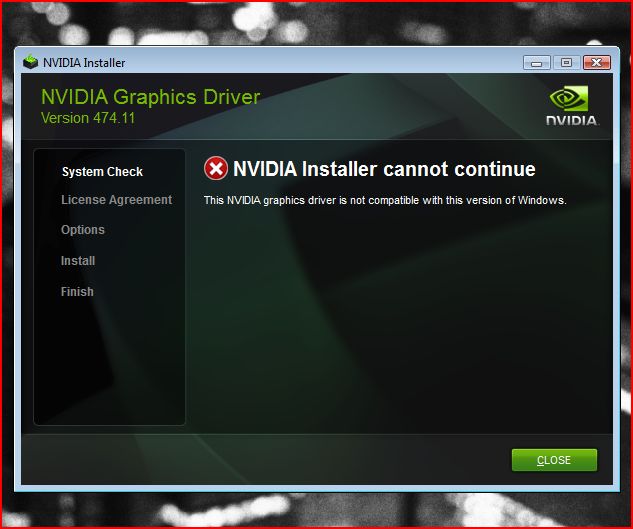
I am trying to make an RTX 2060 driver that works with Windows Vista, I have modified a bunch of files, I tried so many fixes and patches but so far no luck, I don't know if the architecture even works with Vista. Point is no matter how much I modify the installer it always gives me the "nvidia driver is not compatible with this version of windows" error. HOW DO I BYPASS THE ERROR?

-
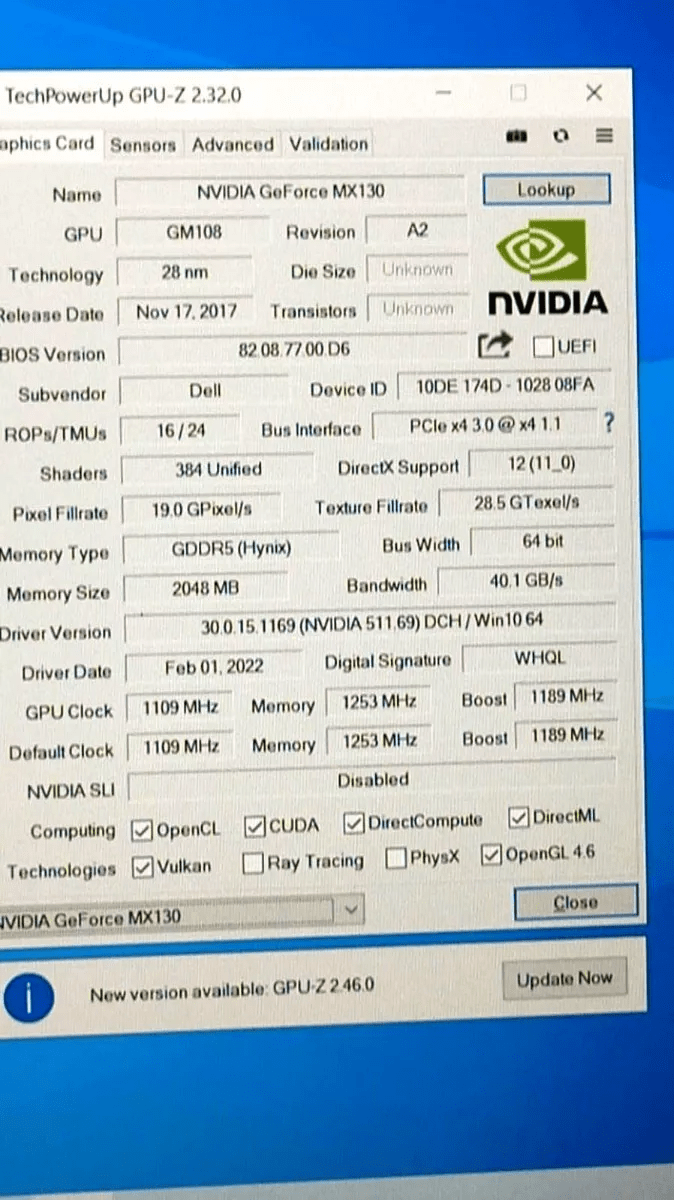
 Hi everyone! I need help with .inf modding. I'm planning to purchase a DELL Inspiron 15 5584 (which has a MX130) for college use and some light gaming here and there. And yesterday I found out that MX130 is a Maxwell-based GPU, whose architecture was the last one supporting Windows XP. After some research, I did find out that MX130's chip is the same as Geforce 940MX (N16S-GTR-S-A2), which DELL added support up to 368.81 driver. So I downloaded 368.81-desktop-winxp-32bit-international and extracted its files using 7-Zip and opened nvdmi.inf (which has DELL's OEM hardware IDs). In there, 940MX has 6 variants using the same SectionID, 019. So, my question is: Can I get it working under Windows XP using "Section019" as SectionID for MX130? I'm attaching a GPU-Z print (that the seller sent to me) containing all specs, including Device ID and such. Please, I need help! PS. If image quality is too low (due to its compression), here's a link to original image: https://imgur.com/UWIBD7E
-
[done! be my guest!] Hi, it's time to post my resume on my research on AMD-chipsets and boards. This will be a long post, split up in some mails, for the purpose of clarity and transparency. All of this is not "matter-of-fact", but my very personal opinion and experience, so: YMMV ------------------ In a nutshell: After all the years, with the appearance of the 870A chipset, AMD-boards, with the modern socket AM3+ appear on the screen for W98SE-User with a Bang! And we didn't see that coming... Depending on board and chipset, they have some drawbacks and advantages, but something can be said right now: There has never been better compatibility. Some work just right out of the box, and with a minimum of AddIn-cards, you get gaming-enabled boards. You can now go to the shop, and, by careful selection, buy a brand-new board, a brand-new CPU, install, and have fun! (and perhaps a NIC, if you are lazy, and definitely a used sound-card, as the necessary exception from the rule). This is WAY better than P35/P45 or similar Intel-Chipsets, and as a bonus on top, provides excellent Dual-Boot capability with Windows 10 (and XP, of course, but that goes without saying). All of this would not have been possible without the help and programming skills of RLoew, one way or the other, so Kudos to him!!! ------------------ I added some further mails: - one for each chipset tested (AMD 970, 990*, 870A, 890, 880G*, 770) (*not done yet, but will follow later) - one for miscallaenous hardware that was tested (to make this happen), and - one for the "Dual-GPU-stunt", which is of interest for people who want to Dual-boot with i.e. XP and W10, and want to put in some extra effort to have such a modern machine ready for some serious gaming, while they are at it. ------------------- What to think about, before trying this yourself: The socket AM3+ provides space for the modern FX- and Opteron-CPUs, capable, and cheap (and for legacy, use your old Phenom II or Athlon II, that would otherwise gather dust in the corner). Unfortunately, they have some drawbacks: Their single-thread performance cannot touch those of modern Intel CPUs, and to add insult to pain, they can only deliver their subpar speed with an enormous usage of power. Even though their idle-power usage is actually not really bad (and, if done right, still better that i.e. Intel Wolfdale or Yorkfield CPUs, like the latest Core 2 Duo or Core 2 Quad, and maybe even on par with the first generation of i3/i5/i7), these are not really machines for your everyday use, especially with the dual-GPU-stunt. Still, a machine with a good AMD 970 board, and some ATI x800 or NVidia GF 7600 GT, can still provide a good gaming experience on W98SE (and perhaps even XP), and provide an ok machine for browsing and such activities on W10 64bit. Believe me, it is still a much more performant combination than any Legacy-build. And regarding legacy hardware now slowly becoming expensive on ebay, and ageing, this may even be the cheapest solution, if you don't have the right - and *intact* - hardware lying around. And as a (perhaps secondary) machine built for gaming only, you can, via the dual-GPU-stunt, enjoy Full-HD-gaming in XP and W10, and, with some restrictions, on W98SE as well (kind of... more in the "normal" HD range...) IMHO: At the moment, these provide the best build for W98SE on "modern" PCs. Maybe this will change again some time later, when RLoews research on modern Intel-chipsets succeeds. But until then... ;-) -------------------- Restrictions, and problems (of which most can be circumvented by choosing the right hardware): On many boards, you will have difficult times - at least during installation, and definitely with KVM-switches - if they don't have two separate PS/2-ports. PCI-PS/2-port cards (of which i only know of one model) don't work at all on the boards tested by me. For W9*5* users, this means, either to have two PS/2-ports, or end of the show (for experience with W95 on such chipsets, better ask RLoew, as i don't use it, and equally I'm not using WME...). If you want sound, you need a compatible Soundcard, and a free and well-positioned PCI slot on that board. I always recommend Soundblaster Audigy 1 or 2 PCI. For LAN, boards with the RTL 8111E are common, and if you know how to, you can use them with the NDIS2-driver (aka DOS-driver). I always have problems with that, so, as there are always ample of free PCIe 1x slots on those boards, for my convenience, i install an RTL 8111B Gigabit NIC, which can be bought in shops, and has drivers for W9x. For NVidia-cards on 890 and AMD 9xxx chipsets, to avoid stuttering because of an incompatibility of the NVidia-Driver with those chipsets, you need a commercial patch by RLoew. It also includes the NVidia-Ram-Size Fix, so this gives you further options. You don't need this on 870A chipsets (and probably not on 880G chipsets). You don't need this patch for ATI-cards, like the x800, so, yes, AMD/ATI-fanboys can rejoyce... :-) Because USB2 on W98SE will only work (on AMD 9xx and 890 chipsets, and not hang your board on 870A) when you fiddle with the USB2-legacy-settings, you will have trouble with booting from USB-devices, which very often need legacy-compatibility. If you do that (as i.e. you don't want to work with DVD-drives), you will have to find an individual way around this. It always woked out for me in the end, but was tedious. -------------------- All of this may work with AM2, AM2+ or AM3 boards, if you have one of those lying around, provided they have the same chipsets. But don't bet on that, and, moreover, better don't spend money or much time on those - this has been tried, with unconvincing results. And, until further notice: The AMD 770/710 chipset, today also sold as "AMD 980", or "760G", is NOT fit for W98SE (even though they are tempting, because of their onboard-equipment looking like feature-heaven for W9x-users). You have been warned. -------------------- Why i did all this: 1. for the same reason old man (with too much time and money... kind of...) lay under old (nice) cars on their weekends 2. since the ASRock Dual Series, i had some Phenom II lying around, and i asked myself: Why the f*** can't i run an AMD CPU with W98SE AND W10 on the same machine? I can do this with Intel... heck... now... let's do this... -------------------- I hope all of this is useful for you - it was nice for me, but pretty expensive. Does anyone need an AMD 770 board right now? ... Cheers, Ragnar G.D.
-
512MB Graphics Cards have proven to be problematical when used with Windows 9x. I ran some tests with a nVidia 7200GS and a nVidia 7950GT on various Motherboards to determine why. Apparently nVidia decided to change their design approach after releasing some 512MB Cards. Previously they provided access to the entire Video RAM through the Memory Mapped I/O Space. This approach unfortunately limits the amount of System RAM that can be used by 32-Bit OSes. With the later 512MB Cards they decided to Bank Memory access through a smaller MMIO Space, typically 256MB. Starting with the 8xxx series they also implemented a Memory Page Mapper similar to the MMU in the CPU. The 7200GS is an example of the earlier design. The 7950GT is an example of the later one. The 82.69 nVidia Driver does not recognize the difference between the reported amount of Video RAM and the size of the MMIO Space allocated to the Card. The Driver overwrites the MMIO Space above the Video Card's allocation. Depending upon what is in the next 256MB of MMIO Space, your Computer can crash or other Devices, such as USB, can malfunction. A few people have been lucky enough not to have anything important in this space so they have been able to use a 7950GT although they only get 256MB. Others have not been so lucky. I have developed two solutions for this problem. 1. A Patch to the 82.69 Driver to make it recognize the smaller MMIO Space. 2. A BIOS Patcher for the nVidia BIOS ROM to increase the amount of MMIO Space it claims. The first is more universal but limits the Video RAM typically to 256MB. The second provides the full 512MB Video RAM of the Card. I am preparing a Package to put on my Website.
-
Hey guys! I've been working on a retro rig recently. Specs are: 1.8 GHz Pentium IV 512MB of RAM 40GB HDD nVidia GeForce 6200 256MB PCI The problem lies in the last of the specs I've listed. In Windows ME (yeah, hate all you want, but as far as I'm concerned ME>98) my dual monitors work perfectly. Each is represented as it's own separate monitor and I'm able to run programs with that in mind. The problem I run into is with Windows 2000. In 2k, which I'm typing this from, I've tried 3 different nVidia drivers for my card and I've found no solution. I'm either left with an option for a mirrored display or a stretched between two monitors, instead of both being separate. I run Windows ME for my old games (Twisted Metal 1 and 2 PC FTW) but, at this rate, it's basically worthless for web browsing. That's something I rely on Windows 2000 for, and for other nostalgia related stuff. I'd love to be able to fix this issue with Win 2k, and if anyone has any insight it'd be greatly appreaciated. I've tried three versions of the nVidia drivers for 2k. 81.98 (the same version ME uses) 93.71 94.24 none work. Also, bonus questions! 1. What's the best browser for Windows ME (KernelEX included)? 2. What's the best anti-virus for Windows 2000? (Avast doesn't seem to want to update anymore, sadly)
-
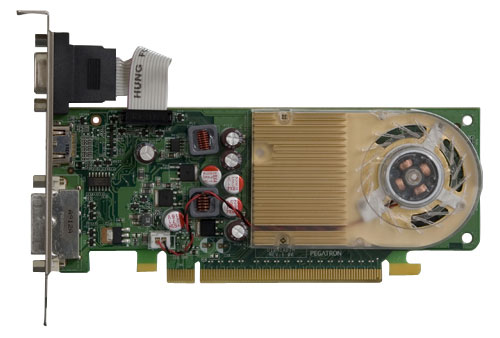
Hi there: Really long time no come back to MSFN... The new forum really run slow on my old Win9x machine, heh~ BTW, I am looking for the BIOS of the HP G210 display card BIOS, the exact outlook is as below pic: http://partsurfer.hp.com/ShowPhoto.aspx?partnumber=586382-001 I pretty sure my card's BIOS is corrupt, since I tried to flash other brand (MSI/PNY) G210 BIOS to this card, and it becomre alive again, but the side effect is that the fan becore so NOISEY, its why I look for the original BIOS for the card. This card is in lots of HP/Compaq desktop computer, if some MSFNers see this post, pls help me to backup the BIOS by GPU-Z or nvflash, thanks a lots! NOTE: the slimline series also got this card, but in low profile, the upper VGA head is disabled by BIOS (Coz I got this BIOS and tried) Best Regards, Ken Yaksa