TranceEnergy
Content Type
Profiles
Forums
Events
Everything posted by TranceEnergy
-
Installing XP on FAT32 partition -> missing NTLDR
TranceEnergy replied to 98 Guy's topic in Windows XP
i havent used fat x filesystems for years on end, but i do remember one thing, that you need to have the first fat partition quite small, max 2-8gb, something like that, and then extended partition for the rest. Alas simply take a look here: http://www.allensmith.net/Storage/HDDlimit/FAT32.htm -
How to remove registry keys
TranceEnergy replied to TranceEnergy's topic in Windows XP 64 Bit Edition
Yes it makes sense when you say it like that, but it is not what i read MS describes it as. Alas MS fails to describe it properly but you do not. Thanks once again, also for making this observation. -
Well there are 2 versions of that file. And they both carry the same file name. However, if you right click on it and see its properties you can see that one of them will have the internal name of ntompkrnl.exe or something. Anyway, 1 version for single core system and 1 for multi core/processor system. That might be what has happened that this file has gotten overwritten with the wrong version somehow. Or you have used a tool to create custom boot screen and it didnt do it properly. I've also seen xp install these files on a totally different partition then systemroot, because somehow in the installation process windows decided that was the primary active boot partition or what not. Makes no sense to me either. IN ANY CASE, i'd just get hold of a boot cd and copy files to proper location, and if all else fails, i'd boot with a windows cd and do the recovery thing. If you have many OS like me, you should get a decent boot manager program, also it is best to install oldest OS first, then newer and newest last.
-
How to remove registry keys
TranceEnergy replied to TranceEnergy's topic in Windows XP 64 Bit Edition
Ok now im confused, because that works. According to what i read at http://support.microsoft.com/kb/310516 "How to add, modify, or delete registry subkeys and values by using a registration entries (.reg) file" That would just erase the content of the registry keys, not the keys themselves. Thank you so much =) -
HOWTO create a fully up to date XP x64 DVD (EoL Feb 2016)
TranceEnergy replied to Kurt_Aust's topic in nLite
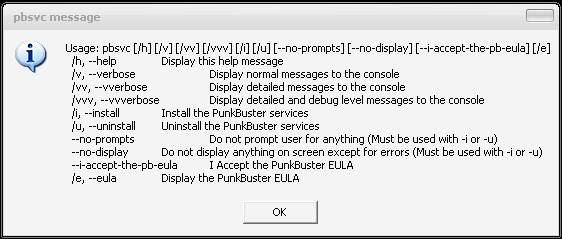
Punkbuster silent install. PB is a service that installs itself into the os, providing anti-cheating service for online games. pbsvc.exe /i --no-prompts --i-accept-the-pb-eula Direct download link here Punkbuster website (FAQ with link) here Tested and works. However, if you have removed windows firewall with nlite, you will get an error saying couldnt get currentprofile. Dont know how to bypass that one, except keeping firewall. sigh..
-
I have the following in a .reg file, and when importing it, nothing happens. Keys doesnt get removed. Which is what i want to do. Windows Registry Editor Version 5.00 [-HKEY_LOCAL_MACHINE\SOFTWARE\Microsoft\Windows\CurrentVersion\Run\RTHDCPL] [-HKEY_LOCAL_MACHINE\SOFTWARE\Microsoft\Windows\CurrentVersion\Run\SkyTel] [-HKEY_LOCAL_MACHINE\SOFTWARE\Microsoft\Windows\CurrentVersion\Run\SoundMan] [-HKEY_LOCAL_MACHINE\SOFTWARE\Microsoft\Windows\CurrentVersion\Run\AlcWzrd] [-HKEY_LOCAL_MACHINE\SOFTWARE\Microsoft\Windows\CurrentVersion\Run\Alcmtr] thats the contents. Now if i just: [-HKEY_LOCAL_MACHINE\SOFTWARE\Microsoft\Windows\CurrentVersion\Run] Whole Run folder is removed, but it doesnt work to remove the individual keys therein. I've tried some combinations, but geesh.. Help?
-
How do I get rid of the seurity warning when I run a .exe ?
TranceEnergy replied to BlueScreenJunky's topic in nLite
Thank you so much for asking this question BlueScreenJunky and GrofLuigi for simple solution. One of the many things i keep forgetting to my-to-do-list of tweaks to have in nlite xp cd. But better to set it for DefaultUser so it's for everyone on system?, i plan to silent import the registry tweak before 1st login. -
You can't have both browsers in system simultaneously without doing some editing of where the files go. Having said that i havent tried IE8, nor do i plan to, but it's a fair assumption in scenario of integrating it, that it could overwrite ie7. Thus no profit and you fail at life. If you need ie8 for webdesign purposes, i would recommend to go with a portable version if such exists. More offtopic, Accu browser is also great browser, and supports windows updates as well. I love it.
-
HOWTO create a fully up to date XP x64 DVD (EoL Feb 2016)
TranceEnergy replied to Kurt_Aust's topic in nLite
Open Al. Sound dll files needed for some games to run properly. Might refuse to start if this is not installed. Direct download link here OpenAL Webpage here Tested with "%Source%Myprograms\oalinst.exe /F /NU /S", dont need uninstaller imho. /F or /f or -F or -f Bypasses any verification and version checking and forces the installer to install both the OpenAL32.dll and wrap_oal.dll components. /NU or /nu or -NU or -nu Prevents an uninstaller from being installed. /R or /r or -R or -r Use error codes to report OpenAL installation issues -- 0 for no issues (default), 1 for "reboot required", and 2 for "write access denied". /S or /s or -S or -s The installation runs in silent mode. Nothing will be displayed. -
Hello! Just installed the latest version of directx, it doesnt work. Ran thru diagnosis program and it freezes at drawing the bouncing white box in fullscreen. Might be some driver settings/conflict or what not, but thought i'd mention it anyway. Geforce 8600 GTS 512. Driver 175.16 x64 WHQL. update: I did a clean reinstall, and went directly to update to june version from fresh xp source. Now all directx tests work. Weird. But i'm happy =)
-
Please Two small helps (loade a personal desktop bmp and change string
TranceEnergy replied to helen_baby40's topic in nLite
I thought u WANTED to have YOUR THEME customized as you like it and ready from first boot. If however, only thing you want to change is default wallpaper there are other solutions. I am sorry, but it is not always easy to understand across languages =) Hope u can forgive me. I would like to suggest you perhaps simply tweak: HKEY_USERS\.DEFAULT\Control Panel\Desktop\ and key there called : Wallpaper ( C:\U\0\Local Settings\Application Data\Microsoft\Wallpaper1.bmp ) and ConvertedWallpaper ( C:\X\Resources\Themes\IllumeCG\BlueXP.jpg ) Please understand windows converts jpg format wallpaper to bmp. So i *think* you only need to change ConvertedWallpaper registry key. Then export registry key to a .reg file and import it with regedit /s parameter at Guirunonce in nlite. I could be wrong, but something like this would work. Also understand if you use defaultuser, it will be that wallpaper for all users. Same as if you apply any gui tweaks those will apply to all users. -
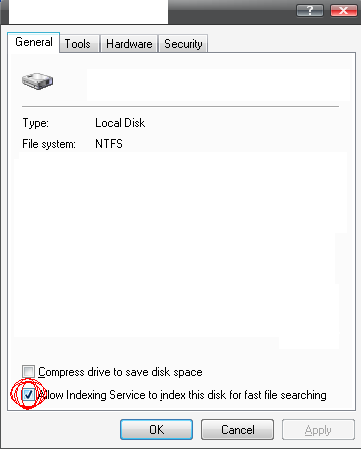
Remove "Allow Indexing Service to index this disk for fast file s
TranceEnergy replied to TranceEnergy's topic in nLite
Thank you for pointing that out. However, i am using 64bit windows, and would preferrably like another solution not involving resource editing files. Not that i am against it, heck im all for it, but as a general rule of thumb i like to find solutions that works in general/for everybody. Im probably going to try and find a registry key for it in any of the reg hives, and cross fingers. -
As in topic, is there any way to prevent this from being the default?
-
Just use portable wlm, known only as WLM afaik. Much better in every way. Havent had problems with any corrupt chars. Have removed OE and works great.Also removed all languages except english (built in) of course. Works perfect.
-
Please Two small helps (loade a personal desktop bmp and change string
TranceEnergy replied to helen_baby40's topic in nLite
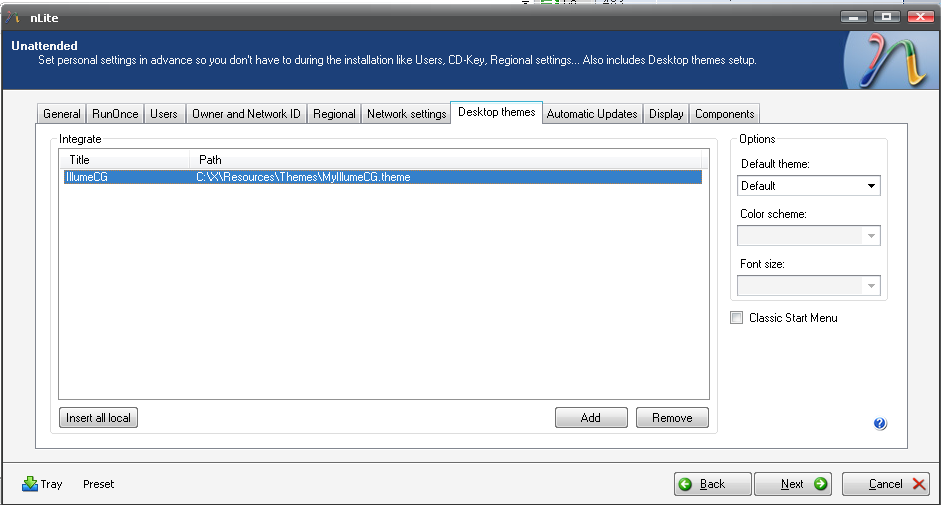
I just tested this on a real install, it works. Just put all files inside %systemroot%\yourWindowsfolder\Resources\Themes\YourTheme\whereuwant I forgot to copy mouse cursors, but no biggie. In Nlite program, on unattended page, select your theme to integrate, doesnt matter where it is, but you should have all files preferrably inside %systemroot%\yourWindowsfolder\Resources\Themes\YourTheme\whereuwant to be sure to have paths for cursors,wallpaper and sounds , correct. I dont think nlite rewrites the paths in .theme file, but then i havent really bothered to check if it does. -excerpt from myilumecg.theme file- : [Control Panel\Desktop] Wallpaper=%WinDir%Resources\Themes\IllumeCG\BlueXP.jpg TileWallpaper=0 WallpaperStyle=2 Pattern= Attachment show where to integrate theme in nlite, and how this looks here on 1st boot, to show it works. Hope this explains things a bit better.
-
Program : Windows Search File : WindowsSearch-KB940157-Srv2K3_XP-x64-enu.exe Install will not start if Terminal services is removed with nlite (v1.4.5.5) apparently. Program asks for something like "Please make sure Terminal services is started before installation". Tested on real install, not vmware. update: i did a reinstall same settings, but this time around kept Terminal Services. Installation went flawless, so that confirms it imho.
-
I'm curious if the /integrate parameter of MSI installer 4.5 is for integrating with windows source or something else? Can't find any documentation on it.
-
Please Two small helps (loade a personal desktop bmp and change string
TranceEnergy replied to helen_baby40's topic in nLite
I dont understand your first question what you are trying to say. as for question #2. Simply find your favourite wallpaper, configure desktop appearence as you want, and save themefile into c:\windowsfolder\resources\themes\yourtheme.theme F.ex i use IlumeCG theme, with my own wallpaper etc. So just copy any wallpaper i like into that theme's folder (point is not to have it on another drive, must be systemroot so theme is sure to find it upon first boot). You can also edit the themes file with Notepad if you wish. Inside the .theme file it says for example: [Control Panel\Desktop] Wallpaper=%WinDir%Web\Wallpaper\V_LA5.jpg So that's the default wallpaper for that theme. -
Yes, we know =)
-
If you know how to reverse all removals by heart, i'd like to see a list of that =) As long as you have the original registry tweak setting or such, there's nothing stopping you from "reversing" any such tweaks.
-
Here's to 10 years running without. Using Firefox or any browser with scripts disabled and similar, only allowing site's i trust, using the web is perfectly wo problems. Imho its better to configure your adsl modem/router and use some time on that so it suits your needs. Check what ports you have opened and see how many you can close, things you dont need everyday.
-
Im pretty sure the answear is yes . Tho as to why you would want to do that, i dont know. There is little memory savings if thats what you think of. XFCE uses very little memory imho, and there's still many ways to save resources when using any gui. I'd look up a gentoo forum and ask there. I remember seeing some screenies where there was only like IRC program opened and a bash/shell/cli if u will.
-
Still would not be legal i'm afraid.
-
There are no tweaks which cannot be reversed from nlite. Patched files can also be reversed by simply overwriting with a file with an updated win source. How to reverse removals is another thing tho, and that might be what you want a list of? A good idea per se, but instead of just asking someone to do it for you, you might start searching this forum and dig up what you can find.
-
A much, much faster and EASIER way is to simply install (or use portable version wtf) X-Setup and activate recording mode. Then do all tweaks you like, and when done, simply stop recording mode and export it to a .registry file ready for silent install as previous post #2 mentions. It doesnt have all tweaks, and you should check if some tweaks are really for your installed OS, but its a real timesaver. Well worth the effort!