Dave-H
Content Type
Profiles
Forums
Events
Everything posted by Dave-H
-
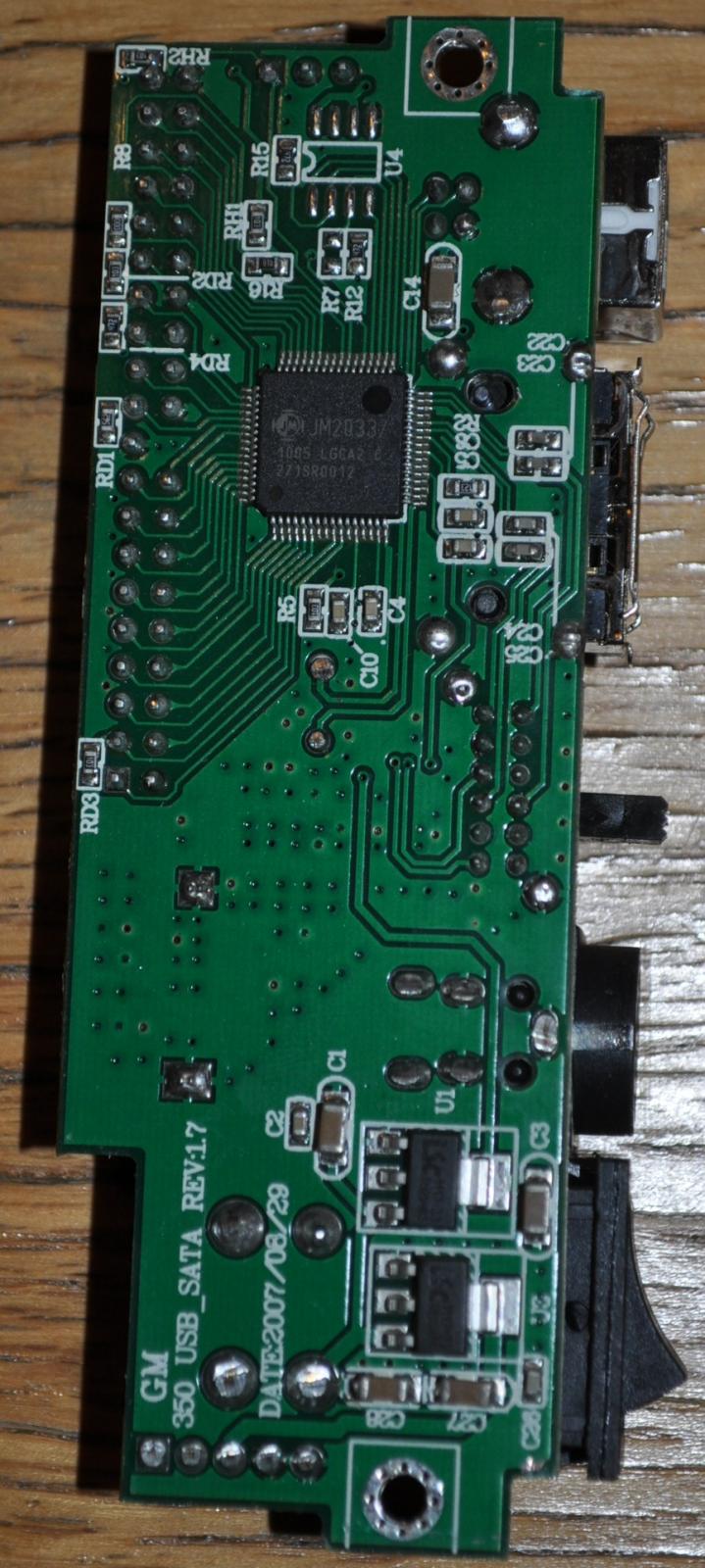
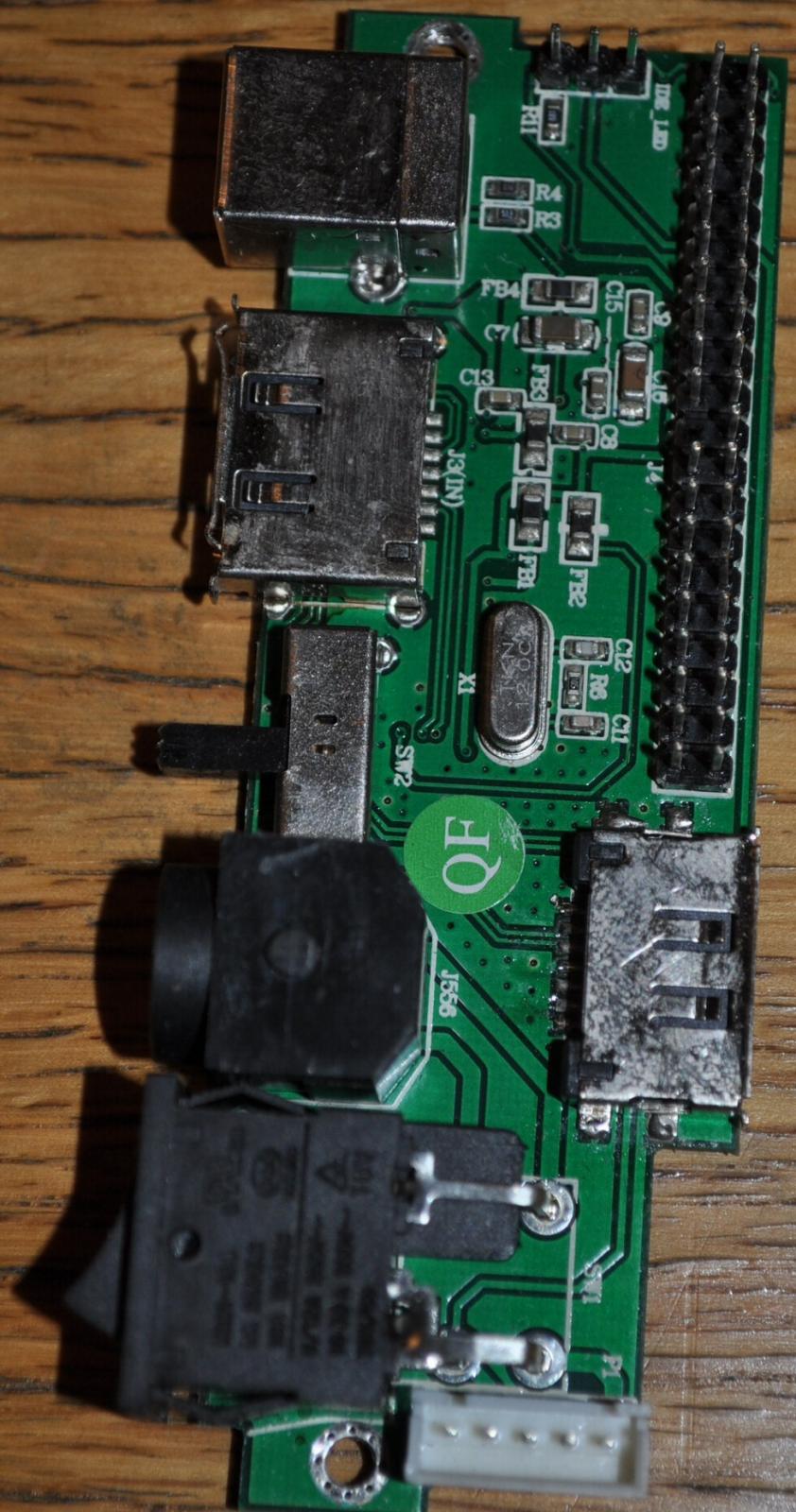
A firmware update may help.No firmware update at distributor: http://www.newlinkproducts.co.uk/prodinfo.asp?catID=6&prodID=294 Which chipset is used internally? Can you make some pictures? Well here's a couple of pictures of the interface, for what it's worth. I'm not quite sure how you would update the firmware even if it were possible, would you do it via the USB connector, or from the connected drive perhaps?

-
Well my new drive arrived, and I put it in, and was presented with exactly the same problem! I won't bore you all with the details of the subsequent few hours I spent trying to find what was wrong, as when I finally checked the obvious I found that I'd actually been sent a different drive from the one I ordered. I ordered a WD1002FAEX, which was clearly specified on all the order documentation, but what they'd actually sent was a WD1003FZEX. The latter is, of course, an Advanced Format drive! I will ring them tomorrow, but I'm fully expecting them to say that they haven't actually got any WD1002FAEX drives, and simply sent the WD1003FZEX as a substitute. Of course 99 times out of 100 it would have been a perfectly acceptable substitute, but not this time!
-
I should be getting my new drive tomorrow!
-
The BIOS sees the hard drive connected to the eSATA port OK on boot, it gives a readout of the device parameters. I'm sure it would do the same with a drive connected to the internal SATA port. I'm getting a new 1TB drive tomorrow, so I might try formatting it temporarily as FAT32 and see if DOS and fdisk can see it.
-
Getting back on topic, I forgot to ask about something else. One good thing about having a SATA card which works in Windows 98 is the fact that I thought that potentially I could use a SATA SSD to replace my old SCSI system drive. I already have a couple of NTFS SSDs in the system, used for Windows 8.1. They are connected to the SATA connectors on the motherboard, which Windows 98 can't see as there are no AHCI drivers for Windows 98. There is an internal SATA connection on the new PCI card though, which Windows 98 should be able to see. Unfortunately, when I got the card and read the documentation, above the Windows 98 install instructions it says - "SATA drives attached to the SATA/eSATA PCI Host Controller can not be used as boot drives for Windows 98/98SE/ME." Why would this be, is it because Windows 98 won't be able to see the drive until Windows has already started? I did try booting into DOS while a NTFS drive was connected to the eSATA connector, and was surprised to find that fdisk appeared to see it, because it queried that it was an NTFS drive. I couldn't get it to display any partition information at all, because as soon as I tried to select a drive the program hung. The drive certainly appears in the BIOS, so is there any fundamental reason why DOS (and therefore Windows 98) shouldn't be able to see it on startup and boot from it?
-
The old drive was a Hitachi HDS721010KLA330, which was originally in my Sky+ satellite PVR. The enclosure I'm using is a NL-HD29 made by Newlink.
-
I suspect that if I did tell the manufacturers of my enclosure about this problem they wouldn't be particularly interested. It would only apply to enclosures with dual interfaces anyway, and the vast majority I've seen are USB only. Hopefully newer enclosures will take this potential problem into account, especially now that Advanced Format is becoming standard, but I suspect the makers tend to assume that you will be only using one connection option anyway, not both, so it's not an issue.
-
LOL, I can't wait to see the Norton Operating System!
-
Yes, I thought that probably wouldn't be a viable way of working! The chances of finding another enclosure with both eSATA and USB that would actually work with these Advanced Format drives are not good I would have thought. There are plenty around with just USB interfaces of course, but the one I've got was the only one I could find at the time with eSATA as well, and I wanted that to get the extra transfer speed on my main machine, as I will be using the drive for video editing sometimes. With the netbook USB is fine as it will only be used for system backups. There may be other enclosures available now, but I decided to just buy a WD1002FAEX drive while I still could. I got one in the UK for a reasonable price, although they are getting scarce, most places were out of stock. As this isn't an Advanced Format drive I'm hoping that it will just work, as my previous drive did. Fingers crossed, I'll let you know! Thanks for all the help as always, I never anticipated that this would be a problem, especially an unresolvable one. Something else to be aware of in the future, as I guess it won't be long before all available drives are Advanced Format. I'm assuming that all SSDs already are, so I guess that wouldn't have been an option (assuming you can now get 1TB ones anyway of course). Cheers, Dave.
-
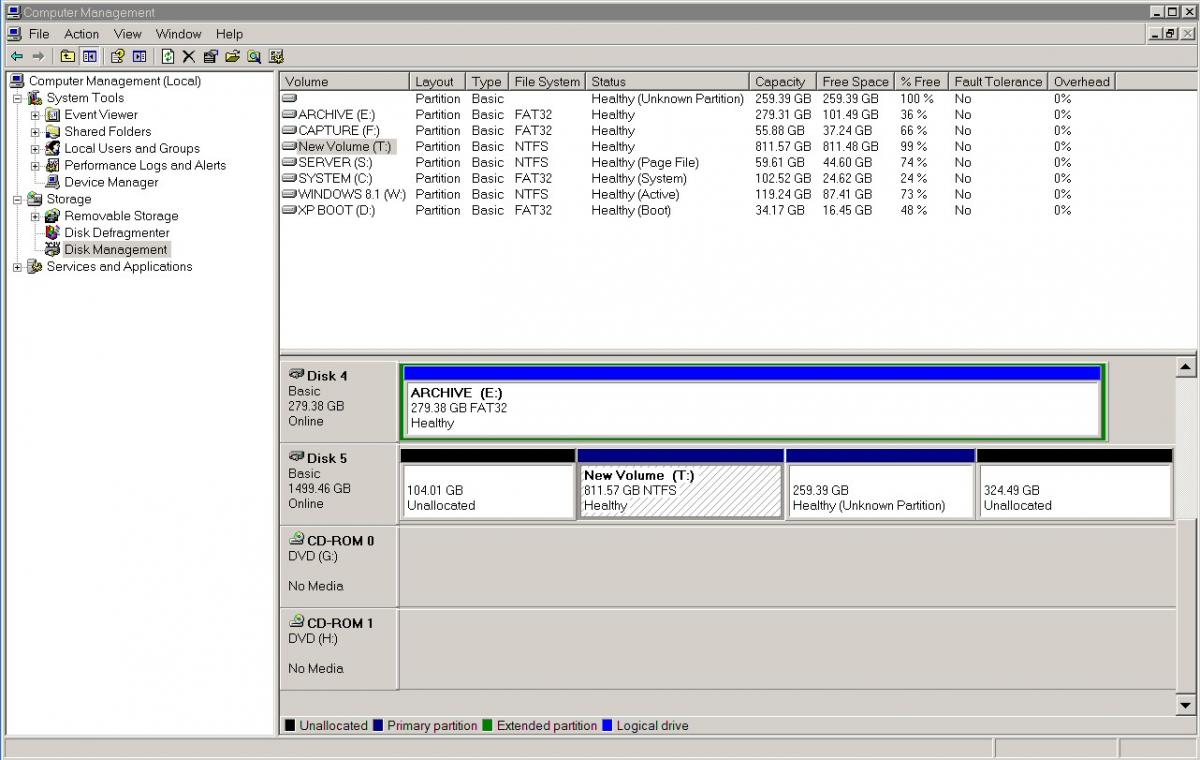
Thanks guys! I tried fitting the jumper, and it didn't help matters, in fact it seemed to make the drive more difficult to see via the USB interface, with a lot of power cycling before it was finally recognised. I did wonder whether to leave it there if it would improve Windows XP compatibility, but I've taken it off for now. I've tried playing around in Windows XP (off-topic for this forum, sorry) and I've now ended up with a full capacity primary partition on the drive when viewed through the USB interface. However, when viewed (again in XP) through the eSATA interface, I have this reported by the Disk Manager. It is of course total nonsense as the total size of the partitions reported is way above the actual capacity of the drive! I formatted the reported 811.57 partition, and now have a drive of that size that I can access on eSATA. I can still access the full drive via USB. So, is this a viable configuration, or am I going to come to grief as soon as I start actually writing data to these drives?
-
So, is there anything that can be done about this? Is it worth trying the jumper, or is that "clutching at straws"? Will trying to set the drive up using XP be any better? I have tried that already of course, with pretty much the same result.
-
Thanks shae, I'll try that jumper if all else fails! I've run fsutil on both systems, and the results are attached. As expected, they are very different! eSATA fsutil output.txt USB fsutil output.txt
-
Thanks jaclaz. It's a Western Digital WDC WD10EZEX-00BN5A0 drive. That all looks very complicated, but might indeed be the explanation as to why it's a problem now that it wasn't before, as my previous drive was a few years old and therefore almost certainly wouldn't have been "advanced format". Do you think I should try doing the format with a different allocation unit size. I had been using the default, which appears to be 4096.
-
Thanks as always jaclaz! I downloaded and used Dimio's HDHacker. (Incidentally I've been using his DTaskManager for years now on XP, it's great!) I hope it got the data you need, which is attached. Both sets of data seemed to be a lot smaller on the eSATA formatted drive than on the USB formatted drive, which seemed odd. The drive is drive 1 on the netbook (USB), and drive 5 on the main machine (eSATA). All done in Windows 8.1 pro with a full capacity primary partition created. Cheers, Dave. DriveData.zip
-
Happy New Year everybody! Just reporting back in to say that my eSATA PCI card arrived a bit earlier than I expected, and I've now removed the plug-in Ethernet card and replaced it with the new card. Amazingly, it actually has Windows 98 drivers! http://www.msfn.org/board/topic/173268-esata-card-drivers-for-windows-98/ I also re-enabled the second on-board Ethernet controller. No real problems, the readout on the startup of Windows 98 looks exactly the same as before, which confirms that the Windows 98 system was seeing the second on-board card even while it was supposedly disabled using a hardware jumper. I don't actually need the second on-board card working in Windows 98 so I haven't looked into trying to get it working alongside the first one. I'm just grateful that we got the first one working!
-
I have an external 1TB SATA drive in an enclosure, which has two connection interfaces, eSATA and USB. I am trying to get it working as a backup drive for my two Windows 8.1 Pro computers. Only one computer has an eSATA interface, which works fine and can see the drive no problem. The other computer, a netbook, can only connect to the drive via USB, which also works fine. The problem is that I can create a full sized primary partition on the drive which can be seen by both machines using the different interfaces, but when I NTFS format the partition on one machine, the other machine doesn't see it as formatted. If I then format it again on the second machine, the first machine no longer sees it as formatted! Anyone any idea why this should be, surely the type of interface shouldn't make any difference to the way the drive itself is seen? I've also tried using Windows XP (which is also on both machines) to create a logical drive within an extended partition instead of a primary partition (Windows 8.1 doesn't seem to offer this option) but with the same result. The annoying thing is that I'm sure I did have this working with a previous 1TB drive in the same enclosure, which I had to replace as it went faulty. Now try as I might I can't get it to work. Any suggestions gratefully received.
-
I'm used to information on websites being wrong, especially on auction sites, but having the wrong information actually printed on the product box, and on the documentation inside, as it is on the ST400 I bought, is right out of order! Anyway, I'm pleased to report that the 1.3.67 driver seems to work perfectly on the ST300, so assuming that is the last Windows 98 compatible driver, that's the one to add to the collection!
-
Thanks guys, sorry I've been otherwise engaged this evening, but I will try the 1.3.67.0 driver tomorrow and report back.
-
That is actually a later driver for Windows 98 than the one I've got on disk, good find! The one I've got is 1.3.61.0, that one is 1.3.65.2. I can't try it with the ST300 at the moment, but I bet it will work!
-
Unfortunately the drivers on Vantec's website for the ST300 are the same, no Windows 98 driver included, despite what the page says! The only Windows 98 driver seems to be the one on the installation CD that came with my ST300 card. I guess that might well work with the ST400 as well.
-
Thanks Drugwash. The Vantec UGT-ST300 eSATA card I just installed is the PCI version of the previous one I had, a Vantec UGT-ST400, which appears to be the PCI Express version of the same card. I never got the ST400 to work, as the motherboard refused to recognise it in a PCI Express slot, which is why I fell back on the PCI version. Both versions claim to have drivers for Windows 98, the ST400 ones being a bit later (from 2007 instead of 2005). Now I've looked into the driver situation more closely, it appears that the ST300 is the only card that actually has Windows 98 drivers. Despite the fact that the ST400 box and installation booklet clearly state that it supports Windows 98, there are no Windows 98 drivers on the disk in the box! Also the latest ST400 driver available from Vantec's website is the same as that on the ST400 disk, so no Windows 98 there either even though the page says that the card supports it! Anyway, I've got one that works, although had the ST400 worked with the motherboard I would have been highly miffed to find that there weren't actually any Windows 98 drivers for it despite what the documentation says! I'm sure I can get the necessary files off the installation disk if you think they would be worth having. I'm still getting odd niggles with Windows 98, sometimes it tries to load on the splash screen, and then the system just spontaneously re-boots, or occasionally the system just freezes. Usually telling it to load normally again then works. I'm also getting BSODs when inserting CDs into the CD drive, which is annoying. If I then reboot with the disk already in the drive it seems to be fine. I guess these sorts of things are par for the course when you're using Windows 98 on a system that fundamentally wasn't designed for it, and I think I've actually been very lucky to have got it working so well at all! The main niggle still outstanding is the graphics driver crashing sometimes, but that's definitely for another thread! Cheers, Dave.
-
Happy New Year everybody! Just wanted to report that I've just fitted a Vantec UGT-ST300 eSATA PCI card to my system, which I had been very pleased to find actually has Windows 98 drivers. It works perfectly, so would be a solution to add SATA/eSATA to an older motherboard with Windows 98. It has one eSATA port and one internal SATA port. It's obviously not a current card, but there did seem to be several sources of it on eBay.
-

Day-to-day running Win 9x/ME with more than 1 GiB RAM
Dave-H replied to dencorso's topic in Pinned Topics regarding 9x/ME
I'd be very surprised if you couldn't find some 1GB sticks of the right type on eBay. There are many recycling firms that sell such bits of old hardware, I've had several old pieces of kit from them for my system. -
Day-to-day running Win 9x/ME with more than 1 GiB RAM
Dave-H replied to dencorso's topic in Pinned Topics regarding 9x/ME
Hear hear! I've never regretted buying the RAM Limitation Patch. It not only allowed Windows 98 to cope with huge amounts of memory, but made it an enormous amount more stable too. I can almost count the number of BSODs I've had since installing it on the fingers of one hand, far better than it ever was before. -
I'd already tried that as a test a while ago when I was still trying to get the DOS driver working. I pulled out the plugin Ethernet card, and it still saw two adapters!