Dave-H
Content Type
Profiles
Forums
Events
Everything posted by Dave-H
-
Tried again in XP. Same result - Microsoft Windows XP [Version 5.1.2600](C) Copyright 1985-2001 Microsoft Corp.C:\XP User Files\Dave>i:I:\>switcher"DUAL" disk found as \\.\PHYSICALDRIVE5OK, NTFS volume is mounted to drive J:and it uses a 512 bytes/sector interfaceCurrent NTFS bootsector is NOT the 512 bytes/sector one.Do you want to switch to the 512 bootsector? [Y/N]yIf you are on Vista or later you may need to authorize the copy (UAC prompt).OK, written 4096 bytes at offset 0Press any key to continue . . .I:\>Drive J: still reporting unformatted, and the same layout in Disk Management.
-
Ah, I thought it would be more complicated than just running mountvol without any switches! Did it and got this - Microsoft Windows [Version 6.3.9600](c) 2013 Microsoft Corporation. All rights reserved.C:\WINDOWS\system32>mountvol J:\ /DC:\WINDOWS\system32>i:I:\>dsfi \\.\Volume{bc47db8c-a4c7-11e4-bf69-00304879f908}\ 0 4096 as512NTFS.bss\\.\Volume{bc47db8c-a4c7-11e4-bf69-00304879f908}\ - The volume does not containa recognised file system.Please make sure that all required file system drivers are loaded and that the volume is not corrupted.I:\>mountvol J:\ \\?\Volume{bc47db8c-a4c7-11e4-bf69-00304879f908}\I:\>Drive J: is now back in Explorer as it was before, apparently unformatted. Should I have deleted the incorrect partitions in Disk Management first before I tried this?
-
Ah, yes of course it would have helped if dsfo.exe had actually been in the folder I was trying to run it from! Tried again and got - I:\>dsfo \\.\J: 0 4096 mycurrent.bssOK, 4096 bytes, 0.000s, MD5 = e60735c779a4b11d0b454ba626c6a42bI:\>Not sure about finding that ID for drive J:\. Is that in the registry? There don't seem to be any relevant entries if I search for J: in the registry.
-
OK, this is what I got - I:\>fc /b as4kbNTFS.bss as512NTFS.bssComparing files as4kbNTFS.bss and AS512NTFS.BSS0000000C: 10 020000000D: 01 080000001D: 20 000000001E: 00 0100000028: FF F800000029: EA 570000002A: 8D 6F0000002B: 0E 74I:\>dsfo \\.\J: 0 4096 mycurrent.bss'dsfo' is not recognized as an internal or external command,operable program or batch file.I:\>Running the switcher again on the eSATA connected drive produces the same output as before with the same result in Drive Management. Going back to the USB connected machine, everything is still fine, the drives are correct in Explorer and Disk Management, so it looks as if nothing has actually been changed by running the switcher on the eSATA connected machine.
-
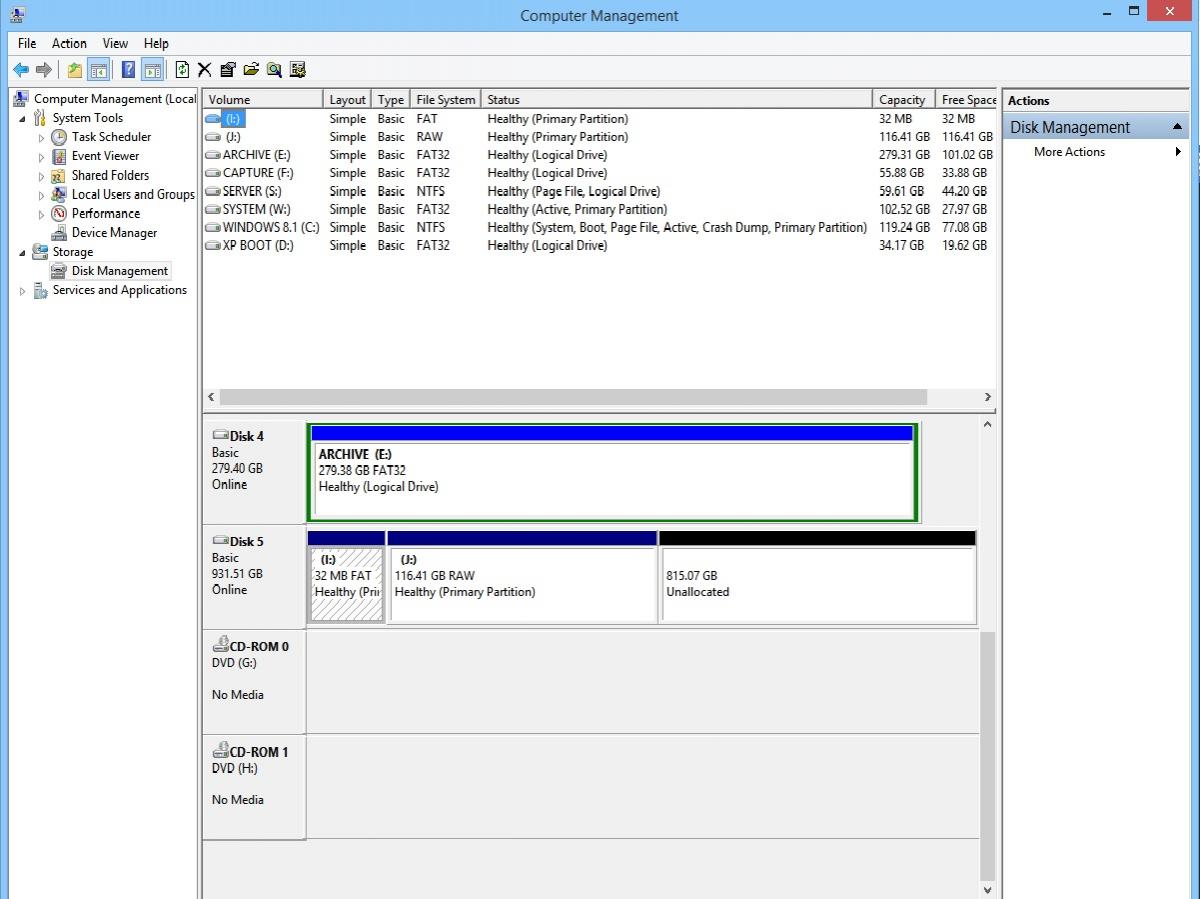
OK, running switcher from an elevated prompt on the eSATA machine I'm now getting - Microsoft Windows [Version 6.3.9600](c) 2013 Microsoft Corporation. All rights reserved.C:\WINDOWS\system32>i:I:\>switcher"DUAL" disk found as \\.\PHYSICALDRIVE5OK, NTFS volume is mounted to drive J:and it uses a 512 bytes/sector interfaceCurrent NTFS bootsector is NOT the 512 bytes/sector one.Do you want to switch to the 512 bootsector? [Y/N]yIf you are on Vista or later you may need to authorize the copy (UAC prompt).OK, written 4096 bytes at offset 0Press any key to continue . . .I:\>It's still not actually mounting the other drive though. I'm seeing this in Disk Management, which doesn't look too good. Drive J: appears as an unformatted drive in Explorer.

-
Sorry to report that the switching function isn't working. I went over to the eSATA connected machine, ran the switcher from the files in the 31.6 MB drive, which appeared OK, and just got - "Attempting to mount the the NTFS volume to drive J:", followed by "The parameter is incorrect". This was just repeated over and over again until I shut down the command prompt. I then went back to the USB connected machine, and ran the switcher again, with the same result (although it said drive H: instead of drive J:, as expected), so I've now lost access to the big partition completely! Disk Management on the eSATA machine is showing it as unallocated, on the USB machine it's showing as a primary partition with no drive letter assigned. If I try and look at its properties I get an error message about the Disk Management console view not being up to date, which doesn't go away if I refresh or restart it.
-
OK, after the modification everything seemed to go through OK. No UAC prompts (USB connected Windows 8.1)! Microsoft Windows [Version 6.3.9600](c) 2013 Microsoft Corporation. All rights reserved.C:\windows\system32>cd\mkprilogC:\MkPriLog>mkdualdisk"DUAL" disk found as \\.\PHYSICALDRIVE1Creating a temporary copy of the MBROK, 4096 bytes, 4.813s, MD5 = dde5a655ffb6537e52cf7d354f811bdfNow the extent of the FAT12 partition is 8128We need to multiply this value by 8, once increased by 64, and then subtract 64Offset 474=0xC0,0xFF,0x00,0x00Now the extent of the FAT12 partition is 65472000001B8h: 44 55 41 4C DUAL000001BEh: 00 00 00 00 0F 00 00 00 3F 00 00 00 01 00 00 00000001CEh: 00 00 00 00 01 00 00 00 40 00 00 00 C0 FF 00 00000001DEh: 00 82 03 00 07 FE FF FF 00 20 00 00 00 EB 8D 0E000001EEh: 00 00 00 00 00 00 00 00 00 00 00 00 00 00 00 00Condition #1, PriLog=1Condition #1, PriLog=2Condition #1, PriLog=3Condition #1, PriLog=3Condition #1, PriLog=4Condition #1, PriLog=5Entry446=000000000F0000003F00000001000000Entry446_Length=1Entry446_LengthHex=00000001Entry446_Start=63Entry446_StartHex=0000003FEntry446_Type=0FEntry462=000000000100000040000000C0FF0000Entry462_Length=65472Entry462_LengthHex=0000FFC0Entry462_Start=64Entry462_StartHex=00000040Entry462_Type=01Entry478=0082030007FEFFFF0020000000EB8D0EEntry478_Length=244181760Entry478_LengthHex=0E8DEB00Entry478_Start=8192Entry478_StartHex=00002000Entry478_Type=07Entry494=00000000000000000000000000000000Entry494_Length=0Entry494_LengthHex=00000000Entry494_Start=0Entry494_StartHex=00000000Entry494_Type=00sum462=65536by8=65536by8XP=65032The disk was recognized as created with the Prilog schemeCreating a temporary copy of the NTFS partition bootsectorOK, 4096 bytes, 0.016s, MD5 = 449a1256e3e767410c50d27131c80921Press any key to continue . . .Creating a copy of the 4kb bytes/sector NTFS bootsectorAnd modifying it to become the 512 bytes/sector NTFS bootsectorOffset 11=0x00,0x02,0x08Offset 28=0x00,0x00,0x01,0x00Offset 40=0xF8,0x57,0x6F,0x74OK, 4096 bytes, 0.000s, MD5 = e60735c779a4b11d0b454ba626c6a42bPress any key to continue . . .Creating a copy of the 4kb bytes/sector EPBRand writing to it the values for the NTFS volumeOK, 4096 bytes, 0.000s, MD5 = fc86b746e3b8c6f0108aaf1a1ac6271aOffset 450=0x07Offset 454=0xC1,0x1F,0x00,0x00Offset 458=0x00,0xEB,0x8D,0x0ECreating a copy of the 512 bytes/sector EPBRand writing to it the values for the NTFS volumeOK, 4096 bytes, 0.016s, MD5 = 620f0b67a91f7f74151bc5be745b7110Offset 4034=0x07Offset 4038=0xC1,0xFF,0x00,0x00Offset 4042=0x00,0x58,0x6F,0x74Press any key to continue . . .If you are on Vista or later you may need to authorize three timesthe writes to disk (UAC prompt)Press any key to continue . . .OK, written 4096 bytes at offset 0OK, written 4096 bytes at offset 29672OK, written 4096 bytes at offset 258048C:\MkPriLog>Will try the actual switching process later on and report back on that.
-
OK, now getting this - Microsoft Windows [Version 6.3.9600](c) 2013 Microsoft Corporation. All rights reserved.C:\windows\system32>cd\mkprilogC:\MkPriLog>mkprilogplease input an approximated size in Megabytes for the FAT12 partition, minimum1, maximum 32...The image will be created in the same folder as this batchand will be named PriLog.img32Writing MBR at offset 0 ...... done.... done.Writing the 512 bytes/sector bootsector BPB at offset 32768 ...BS512_Res=456BS512_SBef=64BS512_Sectors=65472BS512_SpF=32... done.... done.Writing the 4096 bytes/sector bootsector BPB at offset 262144...... done.Writing FAT tables incipit ...... done.Base address of EPBR 512 is 4190208Base address of EPBR 4Kb is 33521664Press any key to continue . . ..The image should have been created as PriLog.img, now you need tomanually dd it to the destination disk, a suitable command would be:dsfi.exe \\.\PhysicalDrive[n] 0 0 PriLog.imgMake sure that you use the RIGHT Disk Number [n], do check in Disk Manager.The disk can be mounted indifferently through the 4kb or the 512bytes/sector interface to deploy the image.Once the image has been deployed you may need to disconnect and reconnect thedisk to have the FAT12 volume be recognized and mounted.Then you can go to Disk Manager and create a Primary partition, NTFS formattedextending on all the available space on disk (or on just a portion of it).It is "better" to use a Vista (or later) OS to create the NTFS partitionThe partition would be better if Megabyte aligned.(or do it manually or use a suitable third-party tool) as the XP will align iton head/cylinder boundaries, whilst a MB-aligned partition will be faster onslow buses such as USB 2.0The partition and the NTFS filesystem MUST be created when the disk is connected asa 4kb sectored device, this is NOT negotiable.Once the second partition has been created, and I repeat, this MUST be donewith the device connected as 4kb sectored, you can run the mkdualdisk.cmdWhich will modify the disk and create the needed EPBR's.C:\MkPriLog>dsfi \\.\PhysicalDrive1 0 0 PriLog.imgOK, written 33554432 bytes at offset 0C:\MkPriLog>mkdualdisk"DUAL" disk found as \\.\PHYSICALDRIVE1Creating a temporary copy of the MBROK, 4096 bytes, 0.032s, MD5 = dde5a655ffb6537e52cf7d354f811bdfNow the extent of the FAT12 partition is 8128We need to multiply this value by 8Offset 474=0x00,0xFE,0x00,0x00Now the extent of the FAT12 partition is 65024000001B8h: 44 55 41 4C DUAL000001BEh: 00 00 00 00 0F 00 00 00 3F 00 00 00 01 00 00 00000001CEh: 00 00 00 00 01 00 00 00 40 00 00 00 00 FE 00 00000001DEh: 00 82 03 00 07 FE FF FF 00 20 00 00 00 EB 8D 0E000001EEh: 00 00 00 00 00 00 00 00 00 00 00 00 00 00 00 00Condition #1, PriLog=1Condition #1, PriLog=2Condition #1, PriLog=2Condition #1, PriLog=2Condition #1, PriLog=3Condition #1, PriLog=4Entry446=000000000F0000003F00000001000000Entry446_Length=1Entry446_LengthHex=00000001Entry446_Start=63Entry446_StartHex=0000003FEntry446_Type=0FEntry462=00000000010000004000000000FE0000Entry462_Length=65024Entry462_LengthHex=0000FE00Entry462_Start=64Entry462_StartHex=00000040Entry462_Type=01Entry478=0082030007FEFFFF0020000000EB8D0EEntry478_Length=244181760Entry478_LengthHex=0E8DEB00Entry478_Start=8192Entry478_StartHex=00002000Entry478_Type=07Entry494=00000000000000000000000000000000Entry494_Length=0Entry494_LengthHex=00000000Entry494_Start=0Entry494_StartHex=00000000Entry494_Type=00sum462=65088by8=65536by8XP=65032The disk was NOT recognized as being created with the known schemesPress any key to continue . . .C:\MkPriLog>
-
OK, done that. This is what I'm now getting - Microsoft Windows [Version 6.3.9600](c) 2013 Microsoft Corporation. All rights reserved.C:\windows\system32>cd\C:\>cd MkPriLogC:\MkPriLog>mkdualdisk"DUAL" disk found as \\.\PHYSICALDRIVE1Creating a temporary copy of the MBROK, 4096 bytes, 4.828s, MD5 = c5e2a6e6a72dd713bde01cef7939e4dd000001B8h: 44 55 41 4C DUAL000001BEh: 00 00 00 00 0F 00 00 00 3F 00 00 00 01 00 00 00000001CEh: 00 00 00 00 01 00 00 00 40 00 00 00 C0 FF 00 00000001DEh: 00 14 11 04 07 FE FF FF 00 00 01 00 00 0B 8D 0E000001EEh: 00 00 00 00 00 00 00 00 00 00 00 00 00 00 00 00Condition #1, PriLog=1Condition #1, PriLog=2Condition #1, PriLog=2Condition #1, PriLog=2Condition #1, PriLog=3Condition #1, PriLog=4Entry446=000000000F0000003F00000001000000Entry446_Length=1Entry446_LengthHex=00000001Entry446_Start=63Entry446_StartHex=0000003FEntry446_Type=0FEntry462=000000000100000040000000C0FF0000Entry462_Length=65472Entry462_LengthHex=0000FFC0Entry462_Start=64Entry462_StartHex=00000040Entry462_Type=01Entry478=0014110407FEFFFF00000100000B8D0EEntry478_Length=244124416Entry478_LengthHex=0E8D0B00Entry478_Start=65536Entry478_StartHex=00010000Entry478_Type=07Entry494=00000000000000000000000000000000Entry494_Length=0Entry494_LengthHex=00000000Entry494_Start=0Entry494_StartHex=00000000Entry494_Type=00sum462=65536by8=524288by8XP=523784The disk was NOT recognized as being created with the known schemesPress any key to continue . . .C:\MkPriLog>Hope that helps!
-
OK, I've tried again stating for scratch using elevated prompts, which may or may not be necessary. Everything went fine until i ran mkdualdisk, at which point I got - Microsoft Windows [Version 6.3.9600](c) 2013 Microsoft Corporation. All rights reserved.C:\windows\system32>cd\C:\>cd mkprilogC:\MkPriLog>mkprilogplease input an approximated size in Megabytes for the FAT12 partition, minimum1, maximum 32...The image will be created in the same folder as this batchand will be named PriLog.img32Writing MBR at offset 0 ...... done.... done.Writing the 512 bytes/sector bootsector BPB at offset 32768 ...BS512_Res=456BS512_SBef=64BS512_Sectors=65472BS512_SpF=32... done.... done.Writing the 4096 bytes/sector bootsector BPB at offset 262144...... done.Writing FAT tables incipit ...... done.Base address of EPBR 512 is 4190208Base address of EPBR 4Kb is 33521664Press any key to continue . . ..The image should have been created as PriLog.img, now you need tomanually dd it to the destination disk, a suitable command would be:dsfi.exe \\.\PhysicalDrive[n] 0 0 PriLog.imgMake sure that you use the RIGHT Disk Number [n], do check in Disk Manager.The disk can be mounted indifferently through the 4kb or the 512bytes/sector interface to deploy the image.Once the image has been deployed you may need to disconnect and reconnect thedisk to have the FAT12 volume be recognized and mounted.Then you can go to Disk Manager and create a Primary partition, NTFS formattedextending on all the available space on disk (or on just a portion of it).It is "better" to use a Vista (or later) OS to create the NTFS partitionThe partition would be better if Megabyte aligned.(or do it manually or use a suitable third-party tool) as the XP will align iton head/cylinder boundaries, whilst a MB-aligned partition will be faster onslow buses such as USB 2.0The partition and the NTFS filesystem MUST be created when the disk is connected asa 4kb sectored device, this is NOT negotiable.Once the second partition has been created, and I repeat, this MUST be donewith the device connected as 4kb sectored, you can run the mkdualdisk.cmdWhich will modify the disk and create the needed EPBR's.C:\MkPriLog>dsfi \\.\PhysicalDrive1 0 0 PriLog.imgOK, written 33554432 bytes at offset 0C:\MkPriLog>mkdualdisk"DUAL" disk found as \\.\PHYSICALDRIVE1Creating a temporary copy of the MBROK, 4096 bytes, 0.031s, MD5 = c5e2a6e6a72dd713bde01cef7939e4dd000001B8h: 44 55 41 4C DUAL000001BEh: 00 00 00 00 0F 00 00 00 3F 00 00 00 01 00 00 00000001CEh: 00 00 00 00 01 00 00 00 40 00 00 00 C0 FF 00 00000001DEh: 00 14 11 04 07 FE FF FF 00 00 01 00 00 0B 8D 0E000001EEh: 00 00 00 00 00 00 00 00 00 00 00 00 00 00 00 00The disk was NOT recognized as being created with the known schemesPress any key to continue . . .Pressing a key just goes back to the command prompt. I had formatted a primary partition on the drive as per the instructions.
-
Ah, right! I have to say that I do think that most people will expect to be able to run the cmd files by double clicking on them, at least in the final version. Should I be using elevated command prompts or normal ones for this BTW? My command prompt shortcuts run elevated prompts by default.
-
@dencorso You'll love this! What I got back was - "it was my grandsons (sic) hard drive the turnip obviously forgot to delete it, appologies (sic)"! Well at least the seller knew where the drive had came from, which is more than most eBay sellers know I'm sure, selling on stuff supplied by third parties. @jaclaz I've deleted the partitions and tried again. The problem is that when you run mkPriLog.cmd, you get this - please input an approximated size in Megabytes for the FAT12 partition, minimum1, maximum 32...The image will be created in the same folder as this batchand will be named PriLog.img32Writing MBR at offset 0 ...... done.... done.Writing the 512 bytes/sector bootsector BPB at offset 32768 ...BS512_Res=456BS512_SBef=64BS512_Sectors=65472BS512_SpF=32... done.... done.Writing the 4096 bytes/sector bootsector BPB at offset 262144...... done.Writing FAT tables incipit ...... done.Base address of EPBR 512 is 4190208Base address of EPBR 4Kb is 33521664Press any key to continue . . .On pressing another key, now I know they're there I can see the rest of the instructions come up, but then the command prompt window immediately closes, giving you no time to read them!
-
Hi again jaclaz! Been trying this out using Windows 8.1 and the USB interface, which is the correct one for 4k sectors I hope. You say in the readme "To run the mkdualmode.cmd, you need to have already deployed the prilog.cmd image to the target disk". I assume that "mkdualmode.cmd" is the same file as "mkdualdisk.cmd" which is what you've actually called it. The other thing is that I think you need to tell people how to actually do that. I ran the command "C:\MkPriLog\dsfi \\.\ Physicaldrive1 0 0 PriLog.img", which seemed to work, but I had to look back in this thread to remind me how to do it! I now have my drive reported in Disk Management as two partitions, a 256 MB FAT one, and a 931.26 GB one which I've formatted as a primary partition. There are also two drives in "My Computer", a 31.6 MB one, and a 931 GB one. I'm now a bit stuck, as the readme says to now copy dsfi.exe, as4kbNTFS.bss, as512NTFS.bss, elevate.exe, and Switcher.cmd, presumably to the 31.6 MB drive. Where exactly are the two *.bss files? Should they have be included from the start or should they have been generated, and if so where? Cheers, Dave.
-
Thanks jaclaz. I've collected all the necessary files into a folder and I'll be experimenting with this tomorrow! The contents of your spreadsheet mean absolutely nothing to me I'm afraid, way over my head! I'll let you know how it goes.
-
I always use a local account, and I've never had any problem downloading free apps from the store. Occasionally in the past (I can't remember the exact circumstances, but it was while I was still configuring the system) I've been told that I can't go any further without signing into my Microsoft account, which I have then done, but I always revert to a local account afterwards. I don't use SkyDrive, which would be only enabled with a Microsoft account, and I won't use the Skype app either for the same reason, as that not only won't let you access it without a Microsoft account, but switches the desktop version permanently to your Microsoft account as well, and as far as I can see that is not reversible, and you lose your original Skype account completely.
-
I've checked and the drives are appearing on both machines as "local disks", although when they first appear on both machines the pop-up appears in the top right hand corner for both of them saying "click or tap to select what happens with removable drives", if that means anything! The Windows 8.1 "boot" folder on both machines is 17.8 MB in size.
-
I do have a Microsoft account, but I don't use it in Windows 8.1 unless I absolutely have to, and then only temporarily. Downloading and installing apps from the store seems to work without that, but this may only apply to free apps, which is all I've ever tried.
-
OK, I decided I was probably getting into a bit of a mess here, so I went right back to the start, deleted all the partitions and started again! The prompt is not now coming up on XP at all, only on 8.1 when connected via the eSATA interface. I'm wondering if this might be because the USB connected computer treats the drive as a removable one which doesn't have such high security requirements? One thing I have noticed is that if I try now to edit switcher.cmd with my normal Notepad substitute, NoteTab, it tells me it may be a binary file and converts some characters to apostrophes. This has only recently started happening, and might have caused some corruption. I'm now making sure that I only edit it with the old Windows Notepad! All seems good now!
-
Don't worry @bphlpt I'm sure @jaclaz will publish all the information once we've finished experimenting! @jaclaz, everything seems to be generally working fine, but observations below. I'm getting the UAC prompt on the eSATA connected machine, but not on the USB connected machine. I'm still getting the prompt on XP on both machines. Thanks for that, I'm sure people would have been caught out by it!
-
Does that only apply if Windows Update is completely disabled? I have it set to notify me of updates but not to download or install them, and I have installed free apps from the Windows Store and it's worked fine.
-
Hi again jaclaz. I've checked out my "new" WD1002FAEX drive, and all seems well with it. I've used it to back up both my Windows 8.1 systems and I've now put it to one side and re-connected the Advanced Format drive. Firstly I must apologise yet again for being really stupid! The reason why the drive wasn't being converted using your command line on the USB interface was simply because although I changed the drive letters to be correct for the USB connected machine, I forgot that I also needed to change as512.bss to as4kb.bss on the command line! It does now work using the appropriate commands on both machines. It is still only putting up the UAC prompt on the eSATA connected machine though, not the USB connected machine. The other strange difference is that the conversion and detection by Explorer of the new drive is immediate on the USB machine, whereas on the eSATA machine nothing seems to happen once the UAC prompt is dismissed until I actually open Explorer At that point, but not before, the new drive appears.
-
I don't think that the person I bought the drive from on eBay is the person who it originally belonged to. How the drive got into the seller's hands I have no idea, but there seems to be no connection.
-
Just to update, I received my "new" WD1002FAEX drive today, and I've put it in the enclosure to test it. I was quite taken aback to find that it still contained the entire contents of someone else's computer, including all their pictures, videos, and music files! I actually think that's right out or order, selling on a hard drive with someone else's data still on it without re-formatting it, or at least deleting the partitions. I will be contacting the person i bought it from to tell them this. There was nothing sinister on it I'm glad to say, but even so I think this it's wrong on principle! The drive seems to work fine, and as expected/hoped, it works as a normal drive identically using both interfaces with both computers. I'm quite happy to carry on doing the testing with the Advanced Format drive, so do feel free to carry on with this jaclaz!
-
I installed them all today on two completely different machines, both 32 bit with IE8, and no problems so far (touch wood!) Why would you think that this month's updates would be any more problematic than any previous ones using the hack?
-
Hi bphlpt. Both interfaces are physically connected at the same time, but there is a switch on the enclosure to select one or the other, and I've been assuming (perhaps wrongly!) that when one is selected the other is isolated. I've not seen any behaviour so far to contradict that.