superleiw
Content Type
Profiles
Forums
Events
Everything posted by superleiw
-
Indeed, people will always find ways to backport all kind of things ! Here someone backported Java 21 to run on Vista and even XP https://github.com/Win-DVD/openjdk-jdk21u-vista I haven't tested it myself but perhaps it can also be used on Windows 7.
-
I think people might be interested, it just seems that noone has ever backported it. Or the code is too complicated to adapt it to anything before Windows 10.
-
What did you upgrade from and how much free space do you have left on your drive? If you are using an SSD or NVMe drive, try manually trimming it. A good start would also be to disable the Search Indexer service and the Sysmain service and see if that already helps.
-
Gah, I can't believe this thread has become a reality I hope Steam and the various launchers remain compatible with Windows 10 for as long as possible. I really don't want to be forced to use Windows 11 to play (older) games.
-
Could the Next Firefox ESR Version Be Supported on Windows 7/8x ?
superleiw replied to Jody Thornton's topic in Windows 8
That's why I don't think Mozilla will extend again. A lot of websites now only accept Firefox version 128 or higher. Sometimes faking the User Agent still works but it's not always an optimal solution either if the website relies on newer API. In any case, Firefox 115 will be 3 years old in July, in browser age that's a very long time ! I personally follow a 2-year rule where I force myself to update my browser(s) after 2 years because usually too many problems start appearing if I don't. -
I think for Vista it made sense because userbase was simply too low. But Windows 10 userbase is still close to 30% of Global Marketshare atm.
-
I think they should extend support beyond 2026 for GRD drivers. We are only 5 months away from the deadline now. Windows 10 is still supported through ESU and then there are also LTSC 2019/2021 editions. If their Windows 10 userbase remains large., hopefully they'll review their decision...
-
Microsoft removed outdated Windows 10 cumulative updates from MUC
superleiw replied to halohalo's topic in Windows 10
Could be related to older, soon incompatible, Secure Boot Certificates in those updates. Microsoft recommends May 2025 LCU at minimum to manually update the Secure Boot Certificates : https://support.microsoft.com/en-us/topic/frequently-asked-questions-about-the-secure-boot-update-process-b34bf675-b03a-4d34-b689-98ec117c7818 Q8: When where the updated 2023 Secure Boot Certificates shipped? The certificates were included in the May 13, 2025, cumulative updates (LCU) and later. However, they are not applied automatically additional steps are required. For deployment guidance, see https://aka.ms/getsecureboot -
Microsoft removed outdated Windows 10 cumulative updates from MUC
superleiw replied to halohalo's topic in Windows 10
That's intriguing ! I also opened a thread in the Win11 section about Intel removing all older drivers for Intel Arc and for 7-10th Gen it's even all except the very last ! Looks like Microsoft and Intel are doing some massive "spring cleaning" session or something... -
Important Notice Regarding Driver Availability (Reviewed: 04/13/2026) Intel is committed to providing customers with the highest quality graphics drivers that deliver optimal performance, functionality, and security. As of April 2026, Intel removed select graphics drivers from the Download Center for Historical Intel® Arc™ Graphics drivers (versions older than 32.0.101.6987) and Intel® 7th-10th Gen Processor Graphics drivers (versions older than 31.0.101.2141). This decision was implemented to ensure customers receive optimal support and efficiently manage Intel's driver portfolio. We encourage all users to utilize the most current driver versions, which incorporate the latest performance enhancements, feature updates, and security improvements. You may find the latest validated driver versions for your graphics products in the Download Center: Intel® Arc™ Graphics - Windows Intel® 7th-10th Gen Processor Graphics - Windows Source : https://www.intel.com/content/www/us/en/support/articles/000102734/graphics.html
-
I have looked further into this and from my understanding : Starting with Windows 8, the generic FireWire 400 drivers were removed (1394a) Starting with Windows 10 1909, the generic FireWire 800 drivers were also removed (1394b) However, in both cases it may still be possible to manually install custom drivers to use FireWire 400/800 devices.
-
Seems Aerosteen also asked this question on another forum and got his answer https://www.tenforums.com/drivers-hardware/218667-last-version-windows-10-firewire.html But it should still work on 1903+ if you install drivers manually such as the one that I linked in my earlier post.
-
Did W10 ever truly support Firewire ? I think they already partially removed it in Windows 8 Microsoft did however provide additional generic drivers and people have reported that these may also work in W10 https://support.microsoft.com/en-us/topic/firewire-port-based-device-does-not-work-correctly-in-windows-8-1-or-windows-8-2242eed9-e8e2-00eb-c854-9335ea06c5fe
-
Could the Next Firefox ESR Version Be Supported on Windows 7/8x ?
superleiw replied to Jody Thornton's topic in Windows 8
Mozilla being a bit indecisive lately after making a major decision of ending support for ESR 115. And now out of the blue, it's back in support until August 2026 with the possiblity of even further extensions... Did they get an enormous amount of backlash from Windows 7,8,8.1 users or what happened ? In any case, I'm not complaining but the 115 engine is starting to show its age ! ESR 153 is already on the horizon... -
After Premium Assurance ended for NT 6.1 , it doesn't surprise me that Mozilla would do the same with ESR 115. They had already extended support 3 times !! Originally it was supposed to end in September 2024 so THANK YOU MOZILLA !!
-
Looks like Visual C++ 2015-2022 (14.44.35211.0) is the version to keep for Win7 installs then It can still be downloaded from here : https://www.techpowerup.com/download/visual-c-redistributable-runtime-package-all-in-one/ -> Below the "Download" button, there is "Show older versions" -> Download Visual C++ Redistributable Runtimes All-in-One Jul 2025
-
Normally Readyboot should help with slightly faster boot times and faster recovery from hibernation by pre-fetching files. But ironically it can cause the exact opposite if too much logging is happening, so in your case you are not losing anything. This feature might have been useful to some extent when HDDs where the norm, but with SSDs or even NVMe it shouldn't make much of a difference.
-
I've been using the Registry Tweak posted by GrofLuigi to completely disable it since the Windows 7 era and didn't have any problems with that feature after that. From when I last tested, it still works up to Windows 11. To configure manually : Go to the Control Panel ->Administrative Tools ->Computer Management ->In the left panel, open Performance Monitor -> open the "Data Collection Sets" and click on "Startup Event Trace Sessions" -> In the right panel, double-click on "Readyboot" -> In the "Trace Session" tab, you can now uncheck the "Enabled" checkbox As an alternative, you can also set the Maximum Filesize of the Log File to 0 in these setttings (in the "Stop Condition" tab) if you dont want to completely disable the ReadyBoot Service itself.
-
Intel 8th-9th Gen processors will reach ESU on June 30, 2025
superleiw replied to halohalo's topic in Windows 11
Only Desktop processors have reached ESU. For now the drivers continue to get updated as some Intel 8th Gen Mobile processors are still supported until September 2026. But in the end ironically all 7th-10th processors still benefit from these drivers... so good thing -
On later versions of W10 the function "GetSystemCpuSetInformation" might have been moved to "api-ms-win-core-processthreads-l1-1-4.dll" The Microsoft API website seems to not have been updated in a while , I have found an alternative website here : https://apisets.info/apisetschemas/ For anyone interested, I also came across these interesting links for the "GetSystemCpuSetInformation" function https://learn.microsoft.com/en-us/windows/win32/api/winnt/ns-winnt-system_cpu_set_information https://stackoverflow.com/questions/75755496/meaning-of-schedulingclass-in-system-cpu-set-information
-
I tested the latest 146.0a1 Nightly and FF itself does launch using the modifications posted by mjd79 on the previous page but it is unable to load any website. Maybe some problem with the patched GetProcessAffinityMask function. The latest ESR 140.5.0 still works however (although not surprising since ESR 140.0 was working)
-
Intel 8th-9th Gen processors will reach ESU on June 30, 2025
superleiw replied to halohalo's topic in Windows 11
Intel finally released an official W11 24H2 / 25H2 compatible graphics drivers for 7th-10th Gen processors https://www.intel.com/content/www/us/en/download/776137/intel-7th-10th-gen-processor-graphics-windows.html?wapkw=driver -
DirectX Addendum for Windows Server 2012 and 2012 R2
superleiw replied to superleiw's topic in Windows Server
Technical Details : In case you are wondering, using regsvr32 on these dll files is not necessary ! You will get an error message if you manually try to do it. -
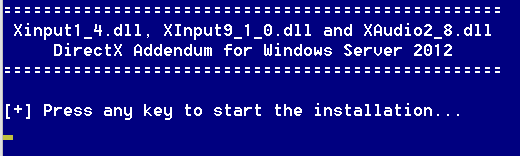
DirectX Addendum for Windows Server 2012 and 2012 R2 Microsoft only included partial DirectX functionality in Windows Server 2012 and 2012 R2 This Addendum will restore full functionality by installing Xinput1_4.dll, XInput9_1_0.dll and XAudio2_8.dll respectively from Windows 8.0 and 8.1 Also make sure to install the DirectX June 2010 Redist https://www.microsoft.com/en-us/download/details.aspx?id=8109 The Addendum can be installed before or after the DirectX June 2010 Redist. The files from the Addendum can also be manually copied to an offline image ! How-to : - Extract folder "Server 2012" or "Server 2012 R2" depending on your OS - Right-click on Install.cmd and select "Run as administrator" - Follow the on-screen instructions ! - Done ! Credits Allukend from the now defunct http://www.win2012workstation.com/ website for the original script Alternative MediaFire Download Link : https://www.mediafire.com/file/7tdsy5v2u1gqkw2/DX_ADDENDUM.rar/file MSFN Download Link : DX_ADDENDUM.rar

-
I had come across another issue related to Dual Monitors / DWM Lag on W7 : https://www.sevenforums.com/general-discussion/414954-dwm-exe-aero-desktop-composition-lag-has-anyone-figured-out.html Maybe this can help with your problem as well : Windows Registry Editor Version 5.00 [HKEY_LOCAL_MACHINE\SOFTWARE\Microsoft\Windows\DWM\Schedule] "FrameRateMin"=dword:00000078 [HKEY_CURRENT_USER\Software\Microsoft\Avalon.Graphics] "Force10Level9"=dword:00000001 For FrameRateMin... 0000003c = 60, if you run your monitors at 60hz. 00000078 = 120, if you run at 120hz. 00000090 = 144, if you run at 144hz.