
mjd79
Content Type
Profiles
Forums
Events
Everything posted by mjd79
-
 A lot of misconceptions have arisen, and there are many voices of discontent. First, as ED_Sln mentioned, version 91, which e3k released, is just a preliminary milestone. Second, even though the Chromium for Windows 7 rework was designed from the start to support XP and Vista, it’s much better than the previous version. I think the same will be true for Firefox for Windows 7 Rework.
 -
Of course. My suggestion was completely automatic, because I don't use Supermium and wanted to test this tool the easy way. I'm busy porting Chromium for Windows 7 to Windows 2000 SP4 without KernelEx
-
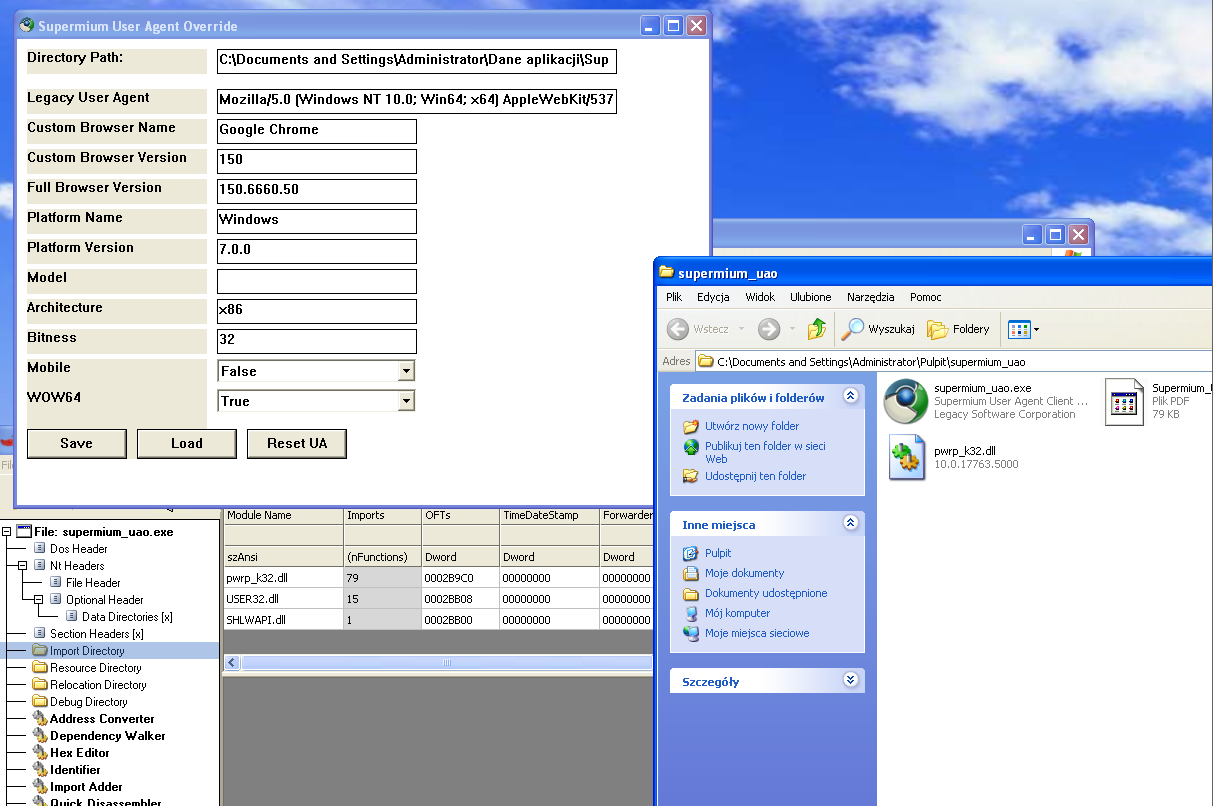
In CFF Explorer, replace the kernel32.dll import with pwrp_k32.dll and copy this file from your Supermium installation. The screenshot was taken on XP RTM

-
Advertisements are getting heavy-handed: unfreezehuge
mjd79 replied to j7n's topic in Websites and Boards
I ask everyone to read the release notes carefully. I only help solve certain problems, and I created wrappers for DWrite to get it working on XP. All this hard work is thanks to e3k. Personally, I think his browser is better than Supermium in every way. Especially after restoring WebGL acceleration support for D3D9 on XP and porting DWriteCore from the Win Apps SDK for XP (though users have reported that the browser doesn't work with it under certain conditions - I need to look into that). I also think it’s simply much faster - both on relatively good hardware and on low-end hardware, and it works with processors that only support SSE2. https://github.com/e3kskoy7wqk/Chromium-for-windows-7-REWORK/issues/65#issuecomment-4357771559 I won't repeat myself, because e3k's post on this issue covers everything there is to know about the differences between Supermium and Chromium for Windows 7. The x64 version still has a problem with excessive virtual memory usage on XP x64, but fixing it would be pointless, it would take weeks or months of work to restore the behavior of the disabled GigaCage to the code, which was removed between versions 91 and 92, and in the meantime, Chromium has undergone two major changes to its memory allocator. Supermium, on the other hand, is clearly very low on the author’s list of priorities, after all, he also develops an extended kernel available behind a paywall, so it’s clear which option is more profitable. -
It looks like we've managed to identify the cause of the virtual memory leak on XP x64. It turns out to be GigaCage, which has been enabled by default since version 92.0.4486.0.
-
https://github.com/e3kskoy7wqk/Chromium-for-windows-7-REWORK/issues/37#issuecomment-4237808546 https://github.com/e3kskoy7wqk/Chromium-for-windows-7-REWORK/releases/tag/149.0.7793.0 New version has been released, with removed dependencies on dxgi in libGLESv2. Simply install VC 2015–2019, or if you don’t want to install it, just copy the relevant files. DWrite is also included.
-
It all depends on the motherboard and the USB 3.0 controller in the chipset. If you have a specific hardware in mind, please provide the model number of the device if it is a laptop/OEM PC, or the model number of the motherboard. Then I'll try to find something.
-
Chromium 146.0.7679.0 still have MV2 support --enable-features=AllowLegacyMV2Extensions --disable-features=ExtensionManifestV2DeprecationWarning,ExtensionManifestV2Disabled,ExtensionManifestV2Unsupported in shortcut.
-
WidevineCDM on Windows 7, 8.0 and 8.1 in 2026 and later.
mjd79 replied to mjd79's topic in Web Browsers
I added links to download the latest versions of WidevineCDM and added a guide for Windows 7 in the first post. -
The more I visit the browser section of this forum, the more I wonder if everyone is okay. Some people seem to have a persecution complex, in the form of a panic-stricken fear of surveillance. I recommend going outside and touching the grass. All threads in browsers section are full of off-topic posts related to this. I'm writing about this because it irritates me terribly. It's becoming increasingly difficult to find anything actually related to browsers in these threads.
-
I have updated my old guide about compiling Chromium. Now it only applies to compiling clear Chromium. A new one will be created for building with e3kskoy7wqk patches.
-
https://github.com/e3kskoy7wqk/Chromium-for-windows-7-REWORK/issues/7
-
On XP only GDI rendering is working. I will try to use DirectWrite. 139 on vanilla Vista SP2 works, but if you run without existing profile, it has some function missing in shell32.dll. Edit: DirectWrite from Supermium working! I can't get working hardware acceleration, even with disabled blacklist and D3D9... All api-ms-win-crt, p_advp32.dll, pwp_shd.dll, p_ole.dll, pwrp_k32.dll, ucrtbase.dll - that's the files needed for working dwrite.dll from Supermium.
-
https://github.com/e3kskoy7wqk/Chromium-for-windows-7-REWORK He made few reworked versions. It also can support XP and Vista without extended kernels
-
I'll check it out (for free ) That's me too. I can send you a modified version of 140 ESR or the latest one.
-
Yes, also on 8.0
-
I see that there is a need for a more detailed explanation. You need: Vista SP2 x64 (you may need to upgrade it to 2017 EOL) kernel33.dll from Vista extended kernel v2023-03-09. p_advp32, p_ole, pwp_shl, p_user from Supermium 132 R4. (for convenience you can name them advapi33, ole33, shell33, user33 etc) In the chrome.exe file, change kernel32.dll to kernel33.dll in the import table using CFF Explorer In the chrome.dll file, change the same import. Then open this file in HxD and search for advapi32, ole32, shell32, user32 - they may be in several places, change the ones that are full import table looking like below: In the chrome_elf.dll file, as you rightly pointed out, change NtOpenKeyEx to the NtOpenKey version.
-
I used kernel33 from extended kernel and advapi32, ole32, shell32, user32 wrappers from Supermium 132. As you can see, for example, ublock works. I didn't need a platform upgrade or an extended kernel installation for this
-
The first builds of Chromium 140 are available. As expected, flags have been removed and the policies entry in the registry no longer works. But after adding --enable-features=AllowLegacyMV2Extensions --disable-features=ExtensionManifestV2DeprecationWarning,ExtensionManifestV2Disabled,ExtensionManifestV2Unsupported to the MV2 shortcut it still works. We will see for how long, as these are very early compilations. That is Chromium for Windows 7 by e3kskoy7wqk*
-
Many people use a different system than they have in their profile, or have several computers with different systems.... So reboot12 was right to ask the question.
-
I described a few posts above what to do. In addition to changing the minimum version in the PE header of firefox.exe, you should swap a few imports in xul.dll and mozglue.dll, and you will be able to run the latest version.
-
Wrapper of bcryptprimitives (e.g., p_cryptp from Supermium) and kernel32 (e.g., pwrp_k32 also from Supermium). And you can mod this yourself.
-
https://github.com/ToprakBZK/Modern-Chrome-134-For-Windows-7-and-8.1/releases Be warned, should anyone come across it, it's Blaukovitch's crack LOL My goal for more than a year was to become independent of his solutions when creating my own mods, but unlike that kid, I succeeded....
-
Sandbox working
-
I already know what is messing up Chromium 127+ It is the kernel32.dll and kernelbase.dll version checking. I rewrote it to return a false value for them indicating Win 10, and here is the result: The latest versions also use IsWindowArranged from user32, which is absent in 8.1 - possible to be replaced by, for example, IsWindowVisible. Now it remains for me to write my own version of UpdateProcThreadAttribute.