Ben Markson
Content Type
Profiles
Forums
Events
Everything posted by Ben Markson
-
Okay, my solution is a bit weird. Its not working was down to my User Agent setting. By default I override my XP UA to Windows 10 running the latest Firefox – this keeps sites from telling me how 'out of date' everything is. When things don't work out on a particular site I try setting the UA to simply: Mozilla/5.0 Windows – because the UA doesn't match anything the site's code recognises this sometimes seems to have the effect of bypassing all of the UA tomfoolery. For Virus Total I'd already done that for the Original FF52 but was still running as Windows 10 under Serpent. Changing the Serpent UA to: Mozilla/5.0 Windows, fixed the problem – that is in addition to using palefill-1.17.xpi. So, mystery solved. Sorry for the misleading report. Ben.
-
FWIW... palefill-1.17.xpi fixes original FF52 but it doesn't fix Serpent v52.9.0 (2022-07-15) (32-bit) From Serpent: 11:46:10.968 window.controllers is deprecated. Do not use it for UA detection. gui 11:46:11.696 Shell timeout main.b3a5f442b60154dd25de.js:15:534011 11:46:12.531 WARNING: Unhandled promise rejection. Reason: TypeError: o.setQuery is not a function unhandledrejection { target: Window ? gui, isTrusted: false, srcElement: Window ? gui, currentTarget: Window ? gui, eventPhase: 2, bubbles: false, cancelable: true, defaultPrevented: false, composed: false, timeStamp: 2898, cancelBubble: false } gui:35:156 11:46:12.537 WARNING: Unhandled promise rejection. Reason: TypeError: o.setQuery is not a function unhandledrejection { target: Window ? gui, isTrusted: false, srcElement: Window ? gui, currentTarget: Window ? gui, eventPhase: 2, bubbles: false, cancelable: true, defaultPrevented: false, composed: false, timeStamp: 2898, cancelBubble: false } gui:35:230 11:46:12.541 TypeError: [Unknown global error]: "o.setQuery is not a function" main.b3a5f442b60154dd25de.js:15:534011 Stack trace: value/<@https://www.virustotal.com/gui/main.b3a5f442b60154dd25de.js:15:584232 callReaction@https://www.virustotal.com/gui/polyfills/core-js.743054a088626b13bb851b7d26724fb5.js:9:13867 notify/<@https://www.virustotal.com/gui/polyfills/core-js.743054a088626b13bb851b7d26724fb5.js:9:14103 11:46:12.988 App did not load (Unsupported app) gui:35:169 11:46:12.989 Error: Unsupported app main.b3a5f442b60154dd25de.js:15:534011 Stack trace: r</r.exports/b<@https://www.virustotal.com/gui/polyfills/core-js.743054a088626b13bb851b7d26724fb5.js:7:25457 Error@https://www.virustotal.com/gui/polyfills/core-js.743054a088626b13bb851b7d26724fb5.js:7:24006 supportedAppTimeout<@https://www.virustotal.com/gui/:35:293 11:46:12.999 Error: core-js.743054a088626b13bb851b7d26724fb5.js:7:25457 Ben.
-
TLS 1.1 & 1.2 for OE 6 (XP), Key ´POSReady´ not to set to ´1´
Ben Markson replied to visionhelp's topic in Windows XP
It is possible to install the POSReady patches without using the registry hack - I have never applied the registry change and have installed all of the POSReady KBs. It's worth mentioning that you can extract an XP kb file using its /x switch ... kb4019276.exe /x:"c:\kb4019276". To apply the patch you can simply execute update.exe in the update folder. It is that update.exe that you need to replace and the update_SP3QFE.inf that needs changing. I have a version of a modified update.exe but I don't think it is allowed to post hacked Microsoft files. There is a how to mod your own starting here (I never did this, I downloaded my version many years ago): https://msfn.org/board/topic/171814-posready-2009-updates-ported-to-windows-xp-sp3-enu/page/4/#comment-1078363 I have always done it this way (starting from before the registry hack was known). Ben. -
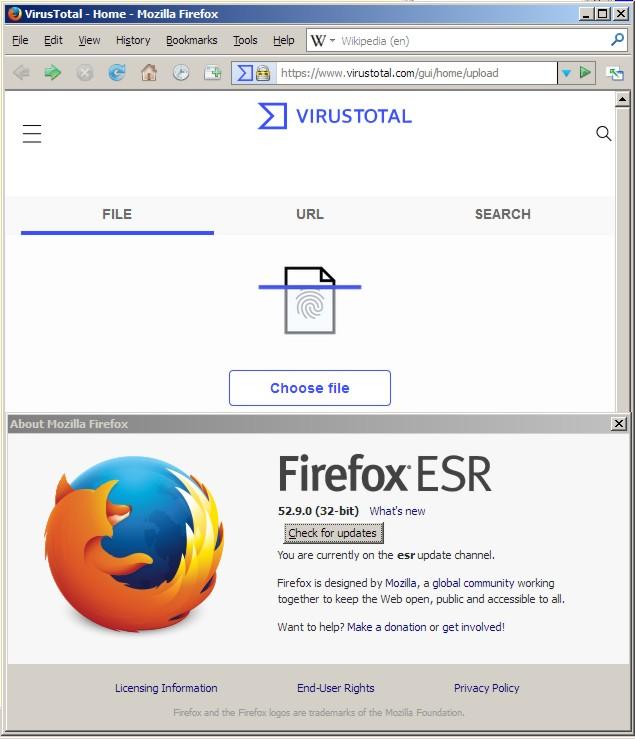
Maybe I'm not understanding something but I don't have any problems using the VirusTotal website... https://www.virustotal.com takes me to https://www.virustotal.com/gui/home/upload Ben.

-
My Browser Builds (Part 3)
Ben Markson replied to roytam1's topic in Browsers working on Older NT-Family OSes
And another add-on that allows you to edit mozlz4 files (like search.json.mozlz4) is this one... https://addons.mozilla.org/en-GB/firefox/addon/mozlz4-edit/versions/ I have... https://addons.mozilla.org/firefox/downloads/file/3304367/mozlz4_edit-4.1.2-an+fx.xpi ,,,installed under ff52.9 Ben. -
Is it a permissions thing? There's a nice guide here: http://johnsonyip.com/how-to-unlock-windows-registry-permissions-tuturials.htm Ben.
-
I'm not sure that you are right. The thing about the app password is that it does not give full control over your account (that is only possible using the 2FA login which is separate) and you do not need to activate the less secure sign-in thing for it to work. But, yes, as usual with Google's self-serving choreographed approach it's less than clear what works - I'm not even convinced that Google know how their stuff works. This covers it pretty well: https://old.reddit.com/r/GMail/comments/t6hhfj/you_may_lose_access_to_some_of_your_thirdparty/ Ben.
-
This is the solution: https://devanswers.co/create-application-specific-password-gmail but... for this to work you need to first switch on 2FA: https://devanswers.co/enable-2-step-verification-google-account/ ...which is a pain. Ben.
-
So, to preserve CloudFlare's security model I have to compromise my security. Gee thanks. Perhaps Proxomitron could eventually broadcast either a generic fingerprint, or a randomly changing fingerprint. I don't like cookie solutions. I routinely remove all cookies and always remove them on browser exit. Still, the cookie thing is interesting. Proxomitron can spoof cookies on the fly. What does one of these hCaptcha accessibility cookies look like? A Proxomitron cookie need never expire. Ben.
-
Could anyone confirm that going to https://support.cloudflare.com triggers Cloudflare's "We are checking your browser..." protection? For me this happens if I have Proxomitron set to intercept SSL traffic whereas if I have it disabled then there is no challenge and I arrive on the support page. Toggling off the various filters makes no difference. This is the Proxomitron log: +++GET 129+++ CONNECT / HTTP/1.1 User-Agent: Null Proxy-Connection: keep-alive Connection: keep-alive Host: support.cloudflare.com:443 Accept-encoding: gzip, deflate +++SSL:GET 129+++ SSL cipher TLSv1.2 AES128-SHA (128 bits) GET / HTTP/1.1 Host: support.cloudflare.com User-Agent: Mozilla/5.0 (Windows NT 10.0; Win32; x86; rv:95.0) Gecko/20100101 Firefox/95.0 Accept: text/html,application/xhtml+xml,application/xml;q=0.9,*/*;q=0.8 Accept-Language: en-GB,en;q=0.5 Accept-Encoding: gzip, deflate DNT: 1 Upgrade-Insecure-Requests: 1 Connection: keep-alive +++SSL:RESP 129+++ SSL cipher TLSv1.2 ECDHE-ECDSA-AES128-GCM-SHA256 (128 bits) HTTP/1.1 403 Forbidden <<<<<<<<<<<<<<<<<<<<<<<<<<<<<<<<<<<<<<<<<<<<<<<<<<<<<<<<<<<< This? Date: Fri, 04 Feb 2022 08:45:53 GMT Content-Type: text/html; charset=UTF-8 Transfer-Encoding: chunked Connection: close CF-Chl-Bypass: 1 Permissions-Policy: accelerometer=(),autoplay=(),camera=(),clipboard-read=(),clipboard-write=(),fullscreen=(),geolocation=(),gyroscope=(),hid=(),interest-cohort=(),magnetometer=(),microphone=(),payment=(),publickey-credentials-get=(),screen-wake-lock=(),serial=(),sync-xhr=(),usb=() X-Frame-Options: SAMEORIGIN Expect-CT: max-age=604800, report-uri="https://report-uri.cloudflare.com/cdn-cgi/beacon/expect-ct" Set-Cookie: __cf_bm=7Wd9iXmUM6O9FLtNg1102WA2zB_B6bMvEKvSqdvTC8w-1643964353-0-Ac/NnwpZFJXCz6eB88NDbRLuIl2IIQCQKxI+ph9PnbjYui80g3jMHOUFU2tElecV2MNwfnG7lGjD1sbZOxgE8oVsYrJjQCps+vOAdmgk10n2; path=/; domain=.support.cloudflare.com; HttpOnly; Secure; SameSite=None Report-To: {"endpoints":[{"url":"https:\/\/a.nel.cloudflare.com\/report\/v3?s=Vkv8KqrFthnDwqvoKTvFsQ5L12aV%2BYmKmwtzWGUJhn1Wju5AFDR%2B3XlN%2FEvxKIjxVQshPKxr1u71LDmD5vfuEa2ycPb5UxZYNzHZ4KxC7CV5Jmu2qwjgPvJgtOM4ZZ31O%2B4oZctk3FY%3D"}],"group":"cf-nel","max_age":604800} NEL: {"success_fraction":0,"report_to":"cf-nel","max_age":604800} Vary: Accept-Encoding Server: cloudflare CF-RAY: 6d82a01bcccd3613-MAN Content-Encoding: gzip alt-svc: h3=":443"; ma=86400, h3-29=":443"; ma=86400 +++CLOSE 129+++ Obviously I can't produce the same log without Proxomitron intercepting SSL traffic but I'm pretty sure it's that HTTP/1.1 403 Forbidden that's the problem. But why does it occur? It appears that the way Proxomitron connects to a web site is different to the way the browser connects and Cloudflare is seeing the difference as some kind of attack. Ben.
-
Okay, I think I'm there. This post confirms what you have already said and it has a pretty comprehensive explanation of what happens. https://prxbx.com/forums/showthread.php?tid=2331&pid=19523#pid19523 This is also interesting: https://prxbx.com/forums/showthread.php?tid=2331&pid=19530#pid19530 I think this adds a layer of security when it comes to Proxomitron allowing sites using 'bad' certificates by first checking a list of trusted certificate authorities. I've done that without getting any errors. Ben.
-
The devil sure is in the detail. I've used Proxomitron for many years, albeit not with a huge degree of sophistication. For example, in the early days it was one of the few ways to block ads (I'm proud to have been blocking doubleclick for way more than a decade). Anyway, the issue I've had for a long time is that the filters don't get applied over a secure connection. I was still using Naoko 4.5 (2003-6-1) which I think is the final version produced by the late Scott R. Lemmon. Using your instructions I thought I'd give the whole SSL thing another go. This is using FF52. The creation of proxcert.pem and proxcert_certonly.pem is confusing. When I click the Certificate Generation and Installation button it creates both files (overwriting proxcert.pem previously created by proxcert-MakeCert.bat) so I'm wondering if the proxcert-MakeCert.bat step is redundant? I can get the Use SSLeay/OpenSSL option to work so Proxomitron applies filters on HTTPS pages. I did have to delete certs.pem from the ProxN45j install otherwise Proxomitron throws a challenge for each HTTPS site visited. The HTTPS tab is a bit of a mystery to me and I wish I could find some documentation on this new tab. I can't get the whole 8443 thing to work. I'm not even sure what it is trying to achieve. I can get Proxomitron to listen on 8080 and 8443 but if I tell FF to use 8443 as its SSL Proxy I get Secure Connection Failed messages. Using just 8080 for both the HTTP Proxy and SSL Proxy seems to work okay, so again I'm not sure what I'm trying to achieve. Is the 8443 thing supposed to replace the Use SSLeay/OpenSSL option? __________________________________________________________ I do have a concern about the way Proxomitron establishes a secure connection between itself and a web site while at the same time using a different secure connection using its own certificate with the browser. With Use SSLeay/OPenSSL, if you interrogate the Web Site Identity it will indicate that it is Verified by Proxomitron. View Certificate shows the Proxomitron certificate. Are there any dangers in this? For example, might Proxomitron facilitate a bad web site that the the browser would otherwise block? I did some tests here: https://badssl.com/ and it suggest that it might. I've seen these roll-your-own certificate solutions before and I've seen reports that as a side effect they can compromise security. I seem to remember some antivirus software that hijacked the SSL certificate so that it could virus check the secure traffic only to introduce its own vulnerability. I think they are fine when used in conjunction with, for example, an old email client because you presumably trust your email provider but in this scenario you're trusting the whole of the internet. Oh, and I also have a request. Is it possible that yourself or someone else could publish your zip files some place more easily accessible than Google's Dropbox? This is all interesting stuff, Ben.
-
: [HKEY_LOCAL_MACHINE\SOFTWARE\Microsoft\Microsoft Antimalware\Signature Updates] "FallbackOrder"="FileShares" "DefinitionUpdateFileSharesSources"="C:\\MSE" ...redirects MSE to check for updates locally. Ben.
-
Browsers working on Older NT-Family OSes
Ben Markson replied to Ben Markson's topic in Site & Forum Issues
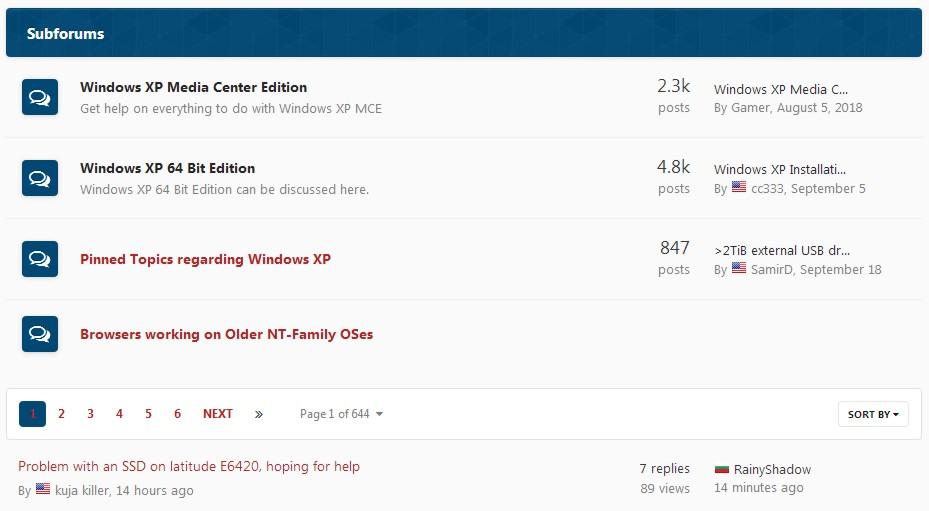
Here you go: ...but I'd believe the code over a screenshot. This is the 'active' content': a.href = "https://msfn.org/board/forum/201-browsers-working-on-older-nt-family-oses/"; a.textContent = "Browsers working on Older NT-Family OSes"; Ben,
-
My Browser Builds (Part 3)
Ben Markson replied to roytam1's topic in Browsers working on Older NT-Family OSes
This is my solution: https://msfn.org/board/topic/183118-browsers-working-on-older-nt-family-oses/?tab=comments#comment-1207753 Ben. -
Browsers working on Older NT-Family OSes
Ben Markson replied to Ben Markson's topic in Site & Forum Issues
It helps me to have a direct link so this is my solution. It adds a Subforums link to the Windows XP page that points to the Browsers working on Older NT-Family OSes page. // ==UserScript== // @name addBrowserLink // @namespace BenMarkason // @author Ben Markson // @description Add Browser Link. // @include https://msfn.org/board/forum/34-windows-xp/ // @grant none // @version 1.0 // @run-at document-end // ==/UserScript== (function() { eli = document.getElementsByClassName("ipsDataList_zebra"); if (eli[0]) { li = document.createElement("li"); li.className = "cForumRow ipsDataItem ipsDataItem_responsivePhoto ipsClearfix"; eli[0].appendChild(li); div = document.createElement("div"); div.className = "ipsDataItem_icon ipsDataItem_category"; li.appendChild(div); span = document.createElement("span"); span.className = "ipsItemStatus ipsItemStatus_large cForumIcon_normal ipsItemStatus_read"; div.appendChild(span); i = document.createElement("i"); i.className = "fa fa-comments"; span.appendChild(i); div = document.createElement("div"); div.className = "ipsDataItem_main"; li.appendChild(div); h4 = document.createElement("h4"); h4.className = "ipsDataItem_title ipsType_break"; div.appendChild(h4); a = document.createElement("a"); a.href = "https://msfn.org/board/forum/201-browsers-working-on-older-nt-family-oses/"; a.textContent = "Browsers working on Older NT-Family OSes"; a.className = "ipsDataItem_title ipsType_break"; h4.appendChild(a); } })(); Ben. -
My Browser Builds (Part 3)
Ben Markson replied to roytam1's topic in Browsers working on Older NT-Family OSes
@Eclectic 1) You don't say what browser you're using or what error you get to it's not really possible to tell. 2) It seems that palemoon.org is doing a User Agent check. The links start out as: http://palemoon.org/ but if you spoof to (for example): Mozilla/5.0 (Windows NT 10.0; Win64; x64; rv:93.0) Gecko/20100101 PaleMoon/29.4.1 ...the links will change to (for example): https://addons.palemoon.org/?component=download&id=neomelodica@vannilla.org&version=2.3 ...from there you can Save Link As to grab neomelodica-2.3.xpi In the install.rdf it has entries for both: <em:id>{8de7fcbb-c55c-4fbe-bfc5-fc555c87dbc4}</em:id> which is Palemoon <em:id>{ec8030f7-c20a-464f-9b0e-13a3a9e97384}</em:id> which is regulaer Mozilla Firefox 3) I tend to rely on Help... About or (probably better) Troubleshooting Information. Ben. -
The new home for all the browser threads. https://msfn.org/board/forum/201-browsers-working-on-older-nt-family-oses/ Can this link be pinned in this forum? Ben.
-
Root Certificates and Revoked Certificates for Windows XP
Ben Markson replied to heinoganda's topic in Windows XP
I didn't check the links but assuming you got the one to work for the Revoked Certificate Update: · http://www.microsoft.com/download/details.aspx?id=41542 ...it returns rvkroots_3f2ce4676450c06f109b5b4e68bec252873ccc21.exe Everything is the same for the Root Certificate Update except for the .inf, file, this is it: [Version] Signature = "$Chicago$" Provider = %Msft% AdvancedINF = 2.0,%AdvPack% [DefaultInstall] RequiredEngine = setupapi.dll,%SetupAPI% CheckAdminRights = 1 AddReg=AppCompatSetup.reg RunPostSetupCommands = RunPostSetupCmds [RunPostSetupCmds] updroots.exe authroots.sst updroots.exe updroots.sst updroots.exe -l roots.sst updroots.exe -d delroots.sst [AppCompatSetup.reg] HKLM,"Software\Microsoft\Active Setup\Installed Components\%GUID%",,,"%COMPName%" HKLM,"Software\Microsoft\Active Setup\Installed Components\%GUID%","IsInstalled",0x10001,01,00,00,00 HKLM,"Software\Microsoft\Active Setup\Installed Components\%GUID%","Version",,"%VERSION%" HKLM,"Software\Microsoft\Active Setup\Installed Components\%GUID%","Locale",,"%LANG%" HKLM,"Software\Microsoft\Active Setup\Installed Components\%GUID%","ComponentID",,"%COMPID%" [Strings] ; !!!!!!!WARNING!!!!!!!! ; !!!!!!!WARNING!!!!!!!! ; !!!!!!!WARNING!!!!!!!! ; !!!!!!!WARNING!!!!!!!! ; >>>>> VERSION must be updated for each update roots package <<<<< ; HKEY_LOCAL_MACHINE\SOFTWARE\Microsoft\Active Setup\Installed Components\{EF289A85-8E57-408d-BE47-73B55609861A} = 40,0,2195,0 ; "Ver" must also match the first field of VERSION. VERSION="40,0,2195,0" Ver="040" ; Don't change this -- this is our unique GUID GUID={EF289A85-8E57-408d-BE47-73B55609861A} ; Don't change these either COMPID=Windows Roots Update COMPName=RootsUpdate ; Same set of roots for all locales LANG=* ;---------------------- ; localizeable Strings ;---------------------- Msft = "Microsoft" AdvPack = "The correct version of Advpack.dll was not found, update halted." SetupAPI = "Required file: SetupAPI.dll, is missing from your system." I do have a copy of rootsupd.exe from 5th June 2020 but I'm not sure I'm supposed to post such things. Ben. -
Root Certificates and Revoked Certificates for Windows XP
Ben Markson replied to heinoganda's topic in Windows XP
I have never used the tool, instead I have always used the manual process outlined on page #1 of this thread: Download and extract the two updroots.exe packages (they are the same except for the inf files): · updroots.exe [5.2.3790.4456] · ADVPACK.DLL [7.0.5489.0] · rvkroots.inf and rootsupd.inf Tweak both rvkroots.inf and rootsupd.inf with: · VERSION="5,0,2195,0" · Ver="005" and Ver="040" Download the latest .sst files (from http://www.download.windowsupdate.com/msdownload/update/v3/static/trustedr/en/): · disallowedcert.sst · authroots.sst · delroots.sst · roots.sst · updroots.sst Use Rundll32.exe to apply the files: · Rundll32.exe advpack.dll,LaunchINFSection rvkroots.inf,DefaultInstall · Rundll32.exe advpack.dll,LaunchINFSection rootsupd.inf,DefaultInstall This has always worked for me. Ben. -
My Browser Builds (Part 3)
Ben Markson replied to roytam1's topic in Browsers working on Older NT-Family OSes
Hi, With basilisk52-g4.8.win32-git-20210925-f94c0da-uxp-9ab5fe727-xpmod.7z any add-on I try and install is throwing this kind of error: 1632563439888 addons.weblistener WARN Exception showing install confirmation dialog: TypeError: Ci.nsISecurityUITelemetry is undefined (resource://gre/components/amWebInstallListener.js:184:1) JS Stack trace: checkAllDownloaded@amWebInstallListener.js:184:1 < Installer@amWebInstallListener.js:81:3 < onWebInstallRequested@amWebInstallListener.js:335:5 < installAddonsFromWebpage@AddonManager.jsm:2206:16 < installAddonsFromWebpage@AddonManager.jsm:3509:5 < buildNextInstall@addonManager.js:107:9 < installAddonsFromWebpage/buildNextInstall/<@addonManager.js:149:9 < safeCall@AddonManager.jsm:186:5 < getInstallForURL_safeCall@AddonManager.jsm:1920:11 < getInstallForURL/<@XPIProvider.jsm:3936:7 < createDownloadInstall/<@XPIProvider.jsm:6628:33 < process@Promise-backend.js:931:23 < walkerLoop@Promise-backend.js:812:7 < scheduleWalkerLoop/<@Promise-backend.js:746:11 ...this is by dragging and dropping the xpi into the browser window. Ben. -
You can also have a service run in its own svchost.exe which makes its behaviour a lot easier to observe: sc config <service> type= own And to revert to the 'normal' shared behaviour: sc config <sevice> type= share For example, if you wanted the Automatuc Updates service to have its own svhost.exe: sc config wuauserv type= own Ben.
-
Adobe Flash, Shockwave, and Oracle Java on XP (Part 2)
Ben Markson replied to Dave-H's topic in Windows XP
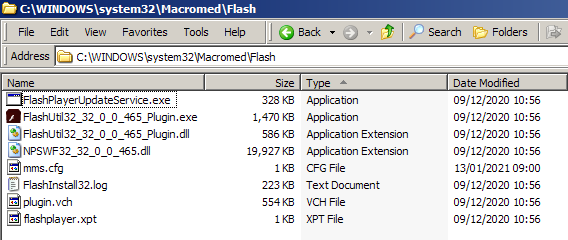
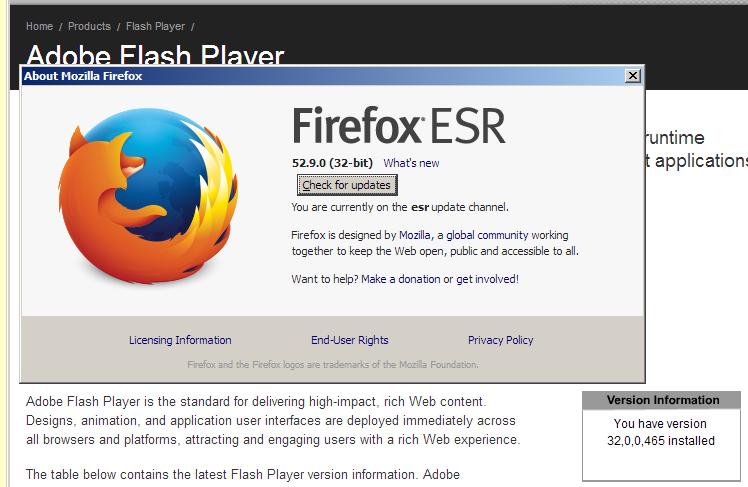
@VistaLover My Macromed/Flash folder contents look slightly different to yours: ...you have an extra exe, and an extra folder. For the Adobe thing I need this: AllowListUrlPattern=https://wwwimages.adobe.com/ ,,,direct link: https://wwwimages.adobe.com/www.adobe.com/swf/software/flash/about/flashAbout_info_small.swf @RainyShadow is spot on, http://chat.kongregate.com/gamez/0009/4075/live/myth_rider_cs3.swf is a better link than going anywhere near Kongregate's site proper. That one still works for me using: AllowListUrlPattern=https://chat.kongregate.com/ I'm really not doing anything clever! This is my mms.cfg: SilentAutoUpdateEnable=0 AutoUpdateDisable=1 DisableAnalytics=1 EOLUninstallDisable=1 EnableAllowList=0 AllowListUrlPattern=file:* AllowListUrlPattern=https://wwwimages.adobe.com/ AllowListUrlPattern=https://chat.kongregate.com/ The file:* thing is to allow local .swf files to run. Since yesterday EnableAllowList=0 is depreciated and now defaults to '1'. Ben.
-
Adobe Flash, Shockwave, and Oracle Java on XP (Part 2)
Ben Markson replied to Dave-H's topic in Windows XP
I think the problem may be that Kongregate is particularly squirrelly. swf_location = "https://chat.kongregate.com/flash/GameShell_4ef1b0e3533afbd9c353a999a01b4ee6.swf" So, how about... AllowListUrlPattern=https://chat.kongregate.com/ Worked for me Ben. -
Adobe Flash, Shockwave, and Oracle Java on XP (Part 2)
Ben Markson replied to Dave-H's topic in Windows XP
I can confirm that the mms.cfg workaround is working for me in both the original FF52.9 and Serpent v52.9.0 (2021-01-08) (32-bit) https://msfn.org/board/topic/174085-newest-adobe-flash-and-shockwave-and-java-too/page/38/?tab=comments#comment-1187691 https://msfn.org/board/topic/180462-my-browser-builds-part-2/page/161/?tab=comments#comment-1193119 Ben.