Everything posted by dmiranda
-
I saw that too. It goes away lonesy, though
-
-
Thank you very much for your careful reading, @basilisk-dev. Much appreciated.
-
Well, after testing a while, as a boolean it works fading the title within the fixed with tab, as modified by the style code you provided. With browser.tabs.fadeLabels set to true, the label doesn't cover the close or mute button. Freak occurrence, once or twice Without the forced user.css, though, label size, in my set up, continues to determine tab with, though. Cheers!
-
It does the trick, although it leaves the close tab and mute tab thinguies out. But now I can browse. Let's hope this is solved soon.
-
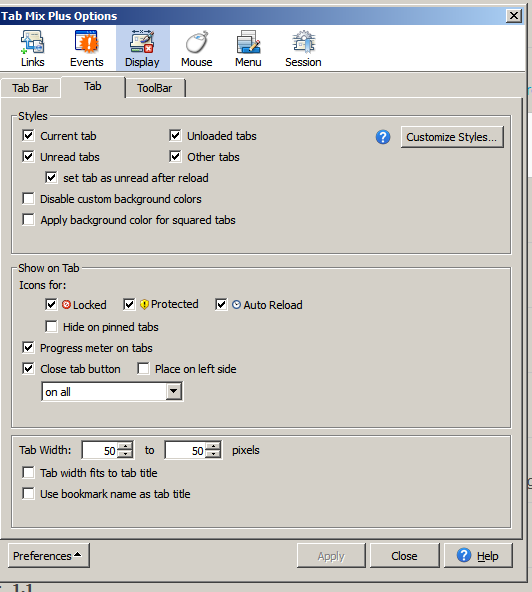
Hi Ben. I was using TMP 0.5.8.1 until this build, no problem, but with this latest build not even 0.5.8.4 makes the trick, as you pointed out. I intuit that the issue is that this latest build doesn't respect fixed size tabs, as it extends its width to cover the page title, when it loads, overlapping with left and right tabs till resulting in the crazy pic I posted. Open 20 pages and you can't know what is what, anymore. As in the attached pic, TMP has a setting in its display section, tab's tab, next to last item: tab width fits to tab title. I have always have it un-tick, But the last build disregards this setting, I reckon, and forces full title width tabs, on top of other 50 width tabs. A fresh vanilla profile does not suffer this problem: tabs' width are fixed, irrespective of page title. Now, in the meanwhile (forgive my ignorance): where should I enter the code you suggested? Thanks!
-
There is definitively something worng with the way tabs in this building behave, in interaction with other other tab-affecting addons. In a fresh profile, all seems fine. In my case, though, it seems to conflict with some of the extensions I use (I guess it is tabmix plus), which results in an extra large foreground tab, overlapping with other inactive tabs.

-
laf
-
oopsie. https://github.com/JustOff/cookies-exterminator
-
Yeah. this one here [follow the link].
-
Well, extensions of that sort would prevent that s*** from happening to you, and some others will allow you to select which cookies to keep and which ones to delete, both in chrome and firefox browsers.
-
It seems them cookies have you surrounded. Show your teeth and make a last stand, me fwiend.
-
Hey, I do ask for their opinion, when we watch! I'm all good, then.
-
OMG! Tell us there is a cure, please.
-
I looked at it wrongly, obviously .
-
Youtube plays a trick or two a month, unfortunately, which shows up in many ways. For example, your last yt-dlp build seems to require, to work well in converting to mp3 (in my usual home set up), the last built of the ffmpegs I generally use (at https://rwijnsma.home.xs4all.nl/files/ffmpeg/?C=M&O=D)
-
At least one is marked as so in RT's repo, and recently updated, by the look of it. I haven't used a 3.x since forever. https://rtfreesoft.blogspot.com/2023/01/greenpad-for-nt-3x-build-20230108.html Wrong observation.
-
I like the sound better in youtube, so I use the 360chrome variety to let them watch me watch them videos. They learn with me and then go after you and get you!
-
Attention starvation aint' gotta be easy, init? Get well all. This is a thread about the mod of a soon to be outdated mod of a (continental) chinese (some claim proof of russian hybridization, but I don't dare comment on such things) hack of sorts to an outdated chromium second cousin, twice removed. Meaning: hello! Let them watch your fb and yt life! PS: I know all about it coz I trained that spy monkey that is keeping you awake at night, me gewd fella.
-
Somewhat related to @ntfoxy's systrayutil at https://msfn.org/board/topic/183027-my-xp-programs/?do=findComment&comment=1205826 So far, the only way to prevent the systray from showing all icons is to right click start menu --> properties and go program by program... until the next system or shell crash forces you to redo the damn thing over again. Happens to me once or twice a month. The settings for hide/show icons are (sort of) saved in the traynotify key in the registry (https://www.techsupportforum.com/threads/registry-settings-for-systray-icons.492771/), but that is just a container, the settings are somewhere else (who knows where). It really p***es me off. Surfing around I remembered an old W98 16bit app that can be found in the systraymngr link. Being 16bit, it won't install in a hardened setup. But you can install it on a virtual machine (or build it, if you know how to) and copy the files NTStart.exe, trayman.exe, tmhook.dll, tmhook.dll, trayman somewhere, and run a reg file with the text at the end of this message. For one or two reboots, it works fine in xp-pro. Soon enough, though, it begins to fail, slowing the loading of core services, and firing up trayman.exe too late to get the selected apps' icons into the tray folder. This is unfortunate, because it really works, while it does. Any clue on what may be wrong (besides being 16bit, using XP, etc)? Thanks! REGEDIT4 [HKEY_LOCAL_MACHINE\SOFTWARE\2000 Ziff Davis Media, Inc.] [HKEY_LOCAL_MACHINE\SOFTWARE\2000 Ziff Davis Media, Inc.\TrayManager] [HKEY_LOCAL_MACHINE\SOFTWARE\2000 Ziff Davis Media, Inc.\TrayManager\2.0] [HKEY_LOCAL_MACHINE\SOFTWARE\PC Magazine] [HKEY_LOCAL_MACHINE\SOFTWARE\PC Magazine\TrayManager] "Installed"="TRUE" [HKEY_LOCAL_MACHINE\SOFTWARE\PC Magazine\TrayManager\Users] [HKEY_LOCAL_MACHINE\SOFTWARE\PC Magazine\TrayManager\Users\YOURUSER(list of apps generated when placing them into the folder within the tray)] "App5"="unlockerassistant.exe 1" "App12"="processlasso.exe 37655" "App13"="firemin.exe 1" "App14"="sideslide.exe 999" "Restore"=dword:00000001 "App18"="findandrunrobot.exe 18134080" "App19"="setpoint.exe 0" [HKEY_LOCAL_MACHINE\SYSTEM\ControlSet001\Services\TrayMan] "Type"=dword:00000110 "Start"=dword:00000002 "ErrorControl"=dword:00000001 "ImagePath"=your path to ntstart.exe in hex "DisplayName"="TrayMan" "ObjectName"="LocalSystem" [HKEY_LOCAL_MACHINE\SYSTEM\ControlSet001\Services\TrayMan\Security] "Security"=hex:01,00,14,80,90,00,00,00,9c,00,00,00,14,00,00,00,30,00,00,00,02,\ 00,1c,00,01,00,00,00,02,80,14,00,ff,01,0f,00,01,01,00,00,00,00,00,01,00,00,\ 00,00,02,00,60,00,04,00,00,00,00,00,14,00,fd,01,02,00,01,01,00,00,00,00,00,\ 05,12,00,00,00,00,00,18,00,ff,01,0f,00,01,02,00,00,00,00,00,05,20,00,00,00,\ 20,02,00,00,00,00,14,00,8d,01,02,00,01,01,00,00,00,00,00,05,0b,00,00,00,00,\ 00,18,00,fd,01,02,00,01,02,00,00,00,00,00,05,20,00,00,00,23,02,00,00,01,01,\ 00,00,00,00,00,05,12,00,00,00,01,01,00,00,00,00,00,05,12,00,00,00 [HKEY_LOCAL_MACHINE\SYSTEM\CurrentControlSet\Services\TrayMan] "Type"=dword:00000110 "Start"=dword:00000002 "ErrorControl"=dword:00000001 "ImagePath"=hex(2):43,3a,5c,44,65,73,6b,74,6f,70,5c,54,6f,6f,6c,62,61,72,73,5c,\ 6e,74,73,74,61,72,74,2e,65,78,65,00 "DisplayName"="TrayMan" "ObjectName"="LocalSystem" [HKEY_LOCAL_MACHINE\SYSTEM\CurrentControlSet\Services\TrayMan\Security] "Security"=hex:01,00,14,80,90,00,00,00,9c,00,00,00,14,00,00,00,30,00,00,00,02,\dd 00,1c,00,01,00,00,00,02,80,14,00,ff,01,0f,00,01,01,00,00,00,00,00,01,00,00,\ 00,00,02,00,60,00,04,00,00,00,00,00,14,00,fd,01,02,00,01,01,00,00,00,00,00,\ 05,12,00,00,00,00,00,18,00,ff,01,0f,00,01,02,00,00,00,00,00,05,20,00,00,00,\ 20,02,00,00,00,00,14,00,8d,01,02,00,01,01,00,00,00,00,00,05,0b,00,00,00,00,\ 00,18,00,fd,01,02,00,01,02,00,00,00,00,00,05,20,00,00,00,23,02,00,00,01,01,\ 00,00,00,00,00,05,12,00,00,00,01,01,00,00,00,00,00,05,12,00,00,00
-
With all due respect, tt is interesting that you, a person that has zero use for this browser, would dare comment on some of the most helpful persons in this thread, presuming they do it to gain... what? I agree with a previous fellw here in that most of comments in the last three pages could go somewhere else, yours in particular.
-
For the examples you provided no problem. The issue is with whatsapp only, then.
-
Well, I like my social media in dark mode, so it sounds good. I have seen you guys discuss using style sheets, but never tried it. Is there anywhere a short introduction to do it?
-
Yeah, tried all of them. Same same: phone can't read the qr. Which is required for whatsapp.
-
I must say, @NotHereToPlayGames, that this build is the best one yet. Very robust. I've been playing up to 4 youtube tabs, 1 youtbe plus facebook and linkedin and whatsapp, and hardly any crash. Cheers!