deomsh
Content Type
Profiles
Forums
Events
Everything posted by deomsh
-
Part II: Quasi-universal Windows 98se on Grub4Dos Memdrive with full Legacy USB 1.1 access The “Part I”-installation can be run from a Grub4Dos Memdrive and with full access to the USB-boot-partition and with changing UUID of the Memdrive (experimental). In my experience Windows will only boot from a Memdrive with HIMEMX.EXE and without HSFLOP.PDR (or disabling floppy-controller; also DRV*.vxd’s can give problems). Memdrive will be max 400-500MB, mainly depending on drivers and vcache. I used [vcache] MinFileCache=1024 and MaxFileCache=1024 during experimenting. GRUB.EXE (0.4.6.a) can be started from real MS-DOS with following MENU.LST: ------------------------------ MENU.LST ------------------------------ # comments always BEFORE a command title Boot IO.SYS chainloader (hd0)+1 rootnoverify (hd0) title Memdrive with Legacy USB 1.1 access # with, or without existing second disk errorcheck off map (hd1) (hd) # mapped USB-bootdrive becomes always second disk map (hd0) (hd1) # needed for possible use of floppy drive map (fd0) (fd1) map (fd1) (fd0) # USB boot-partition loaded in memory and mapped as first drive map --mem (hd0,0)+1 (hd0) map --hook map (fd1) (fd0) map (fd0) (fd1) map --rehook # UUID must be different from existing MS-DOS Volume Serial Number # 16 characters available (hex; 0 – not O) uuid --write (hd0,0) B00D-1D11 # vol --write not compatible with labels written by FORMAT or LABEL vol --write (hd0,0) U11MEMDRIVE chainloader (hd0)+1 rootnoverify (hd0) title Reboot IO.SYS on Memdrive chainloader (hd0)+1 rootnoverify (hd0) ------------------------------ More space is possible with Drivespace and/or a logical partition. A logical partition can get a fixed drive-letter with SUBST, but the drive-letter will shift if booting from the Memdrive. SUBST for different drive-letters can be automated with following batch-file, USB11.BAT: ---------------------------------------------------------------------- USB11.BAT ---------------------------------------------------------------------- REM if USBLOGICAL1 label of logical partition REM SMARTDRIVE not in AUTOEXEC.BAT DEL C:\VOLUME*.txt VOL C: > C:\VOLUMEC.txt VOL D: > C:\VOLUMED.txt VOL E: > C:\VOLUMEE.txt FIND "USBLOGICAL1" C:\VOLUMED.TXT if errorlevel 1 GOTO U11MEMDRIVE SMARTDRV /X C+ D+ /B:57344 SUBST X: D:\ GOTO END :U11MEMDRIVE FIND "B00D-1D11" C:\VOLUMEC.TXT if errorlevel 1 GOTO SMARTDRIVE REN C:\WINDOWS\SYSTEM\IOSUBSYS\HSFLOP.PDR HSFLOP.PD_ REN C:\WINDOWS\SYSTEM\IOSUBSYS\DRV*.VXD DRV*.VX_ FIND "USBLOGICAL1" C:\VOLUMEE.TXT if errorlevel 1 GOTO SMARTDRIVE SMARTDRV /X C+ D+ E+ /B:57344 SUBST X: E:\ GOTO END :SMARTDRIVE SMARTDRV /X C+ /B:57344 GOTO END :END ---------------------------------------------------------------------- In case of attached hard-drives, IO.SYS patched with PCHIO is very convenient for collecting drive-letters (part of MDCU, see: http://www.mdgx.com/web.htm ). BTW: BUFFERS shouldn't be set too low, or “Reboot to MS-DOS Mode” from a Memdrive may fail. Update januari 17, 2025: 1) mapping floppies is not needed if line 'map --floppies=2' is added instead to MENU.LST 2) instead of HIMEMX.EXE also XMGR.SYS seems to work on my system. HIMEM.SYS never 3) important to test memdrive with SCANDISKW in Windows, option 'Thorough'. If errors, use smaller USB flash-drive and check again
-
Part I: Quasi-universal Windows 98se on Legacy-USB 1.1 Installation of Windows 98se with "SETUP /P I;S=detectbus" (without quotation marks, a space between P and I) skips installation of the PCI-Bus and dependent PCI-devices. Although USB-drives have different speeds, Smartdrive speeds up ALL volumes running in MS-DOS Compatibility mode. I used SMARTDRV /X C+ /B:57344 for highest speed; max partition-size is 128GiB ( according to R. Loew). With my fastest USB-drive BOOTLOG.TXT gives 6 seconds boot-time! BTW: strictly spoken, "/P I" is not needed here, but used for Part III and further on.
-
Every part of this project is one out of (almost) nine ways to run Windows 98se from an USB-drive. Two parts are about the Windows 98 Second Edition installation using the legacy USB-connection. The other parts are dependent on Grub4Dos. Each part gives needed changes in respect to the one before. All installations are possible in directory C:\WINDOWS: no drive-letter assignment needed; Part 8½ B is an exception however. Needed for the first eight parts: · Legacy BIOS must be USB-HDD compatible. · 512MB RAM (reasonable minimum). · 500MB USB-drive (reasonable minimum). · Partitioned USB-drive (USB-HDD). I am not sure if anything I did is new, but you will let me know. In retrospective everything is easygoing, although later parts and project extensions are more complicated. Except Grub4dos, everything is experimental and (almost) undocumented. The results of the project are divided into following parts: Part I: Quasi-universal Windows 98se on Legacy-USB 1.1 Part II: Quasi-universal Windows 98se on Grub4Dos Memdrive with full Legacy USB 1.1 access Part III: Windows 98se with PCI-devices (except USB) on legacy USB 1.1 Part IV: Windows 98se on Grub4Dos Memdrive with full USB 2.0 access Part V: Windows 98se on USB 2.0 with Grub4Dos Memdrive as bootchain Part VI: Windows 98se from a logical partition on Grub4Dos Memdrive Part VII: Installation of Windows 98se on a logical partition with Grub4Dos Part VIII: Windows 98se on other USB 2.0 partition with Grub4Dos Memdrive as bootchain Part 8½ A: Full installation of Windows 98se on an empty Grub4Dos Memdrive without rebooting Part 8½ B: Full installation of Windows 98se on a Rloew non-XMS Ramdrive without rebooting Concluding remarks DISCLAIMER: THIS PROJECT IS POTENTIALLY ADDICTIVE, I DON’T PAY FOR REHAB!

-
This is my workaround, together with Total Commander for Android (free!). Using an USB-drive with normal and with micro-USB-connection. BTW: not all smartphones can mount an USB-drive!
-
Is duckduckgo not working in Dillo?
-
Please read this: https://msfn.org/board/topic/157173-kext-diy-kernelex-extensions/page/25/#comments MSVCR70.DLL or MSVCR71.DLL should be used instead of MSVCRT.DLL too. Rename/ copy when still in MS-DOS (real mode) or use KnownDLLs in Registry (reboot needed).
-
Already tried this fix? https://web.archive.org/web/20060314222520/https://www.tweaktown.com/guides/68/agp4x_via_chipsets_fix/index.html
-
Win9x vs GTX 1070 - VDD initialization crash, protection error
deomsh replied to MERCURY127's topic in Windows 9x/ME
Are you using Dblbuf.sys in win31? I once had to use it with a GF 650ti before I could enter protected mode. Try: 1) DEVICE=DBLBUFF.SYS /D (is equivalent to DEVICE=SMARTDRV.EXE /Double_Buffer (loads DBLBUFF.SYS too, '.EXE' is needed in Device-statements). 2) DEVICE=DBLBUFF.SYS /D+ (or: DEVICE=SMARTDRV.EXE /Double_Buffer+). 3) DEVICE=ANSI.SYS DEVICE=DBLBUFF.SYS /D (or /D+) DEVICE=ANSI.SYS (so ANSI.SYS loaded directly before AND after DBLBUFF.SYS) -
Win9x vs GTX 1070 - VDD initialization crash, protection error
deomsh replied to MERCURY127's topic in Windows 9x/ME
-
Win9x vs GTX 1070 - VDD initialization crash, protection error
deomsh replied to MERCURY127's topic in Windows 9x/ME
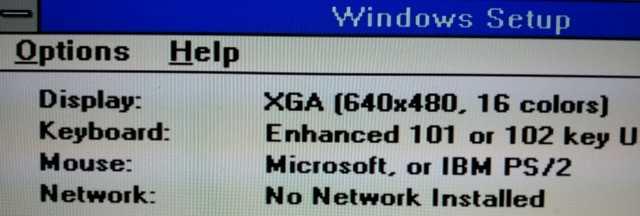
Is win31 Enhanced mode working with XGA (640x480 16 colors)? XGA uses the older 3.0 vga-driver. -
Win9x vs GTX 1070 - VDD initialization crash, protection error
deomsh replied to MERCURY127's topic in Windows 9x/ME
Did you try Tihiy's SVGA patch in safe mode? -
Did you try the 77.72 drivers? By the way, in my experience its better to reboot first after driver installation in safe mode and remove ALL Nvidia entries in MSconfig/ Startup.
-
The Sims 2 Under Windows 98. Freezes during startup
deomsh replied to egbertjan's topic in Windows 9x/ME
SESP2.03NL changes SYSTEM.INI (SPUPDATE.INF). MaxFileCache is set to 393216 (384MB). This can be a high setting with 512MB memory. Try lower values, like MaxFileCache=131072. Use MSConfig or (better) SysEdit. -
What do you mean with "Dos mode"?
-
No. About a year ago I tried emulator VDMSound (9x, alpha) playing Prince of Persia 1 in a DosBox inside Windows, with hda2.dll as wave-device. Sound worked, but the game crashed as soon Midi had to be played. I didn't find a solution yet to use DirectMusic (Hda2.dll is not a WDM-driver!).
-
Do you mean this little fellow? I never use it, but it´s there on my old Windows SE installation (with original KernelEx).
-
I have made some log-files you can use if you like. The Filemon-log lists the files opened by MOC.EXE, the Regmon-log lists the registry-keys and the Dependency Walker-log lists API's and all files with version numbers. Filemon FileFormatConverter SaveAs DOC.LOGRegmon FileFormatConverter SaveAs DOC.LOGDW MOC -f [Path]Test2.docx.dwi.dwi
-
I just tried myself. I have two versions of the 12.6500.5000 FileformatConverter.exe. The one with version nummer in properties won't install, only the MSI works. The other version, without details in properties, installs directly. Otherwise reinstall the MSI.
-
I asked just to be sure. Did you allready reinstalled the Compatibility Pack with "Windows 2000 SP4" mode set on Fileformatconverter?
-
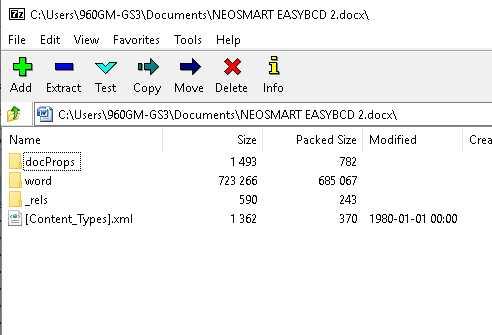
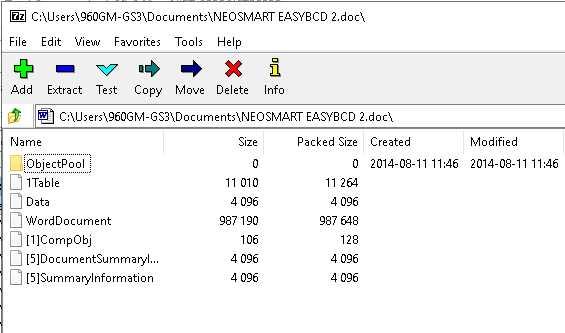
@Dave-H Are you sure you have a real DOCX-file? If you open the file with 7-zip you should see something like the first picture. This a DOC-file after converting to DOCX with FileFormatConverter (this time from my Windows 10 64-bit installation where I am using Office XP for now). All dates/ times of the files inside the folders are the same: 1980-01-01 00:00 Second picture is the original DOC-file.
-
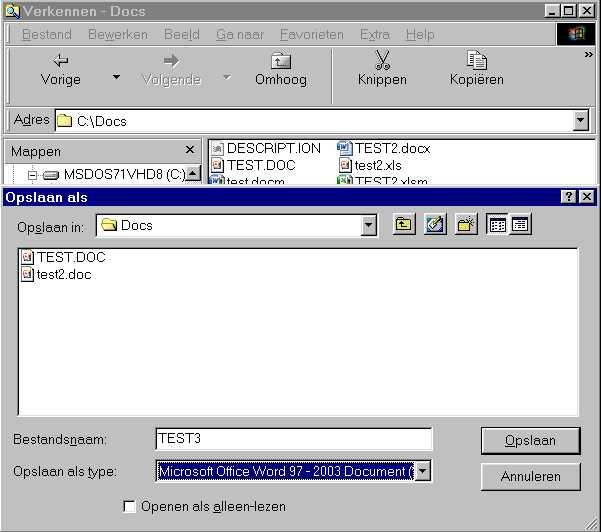
@Dave-H I am absolutely sure CTFMON.EXE is NOT installed with the Compatibility Pack. About Save As doc-file: it´s not clear to me what happening. On my system I see following dialog after clicking SaveAs... in the Context Menu of a docx-file: Please describe your problem a bit more in detail.
-
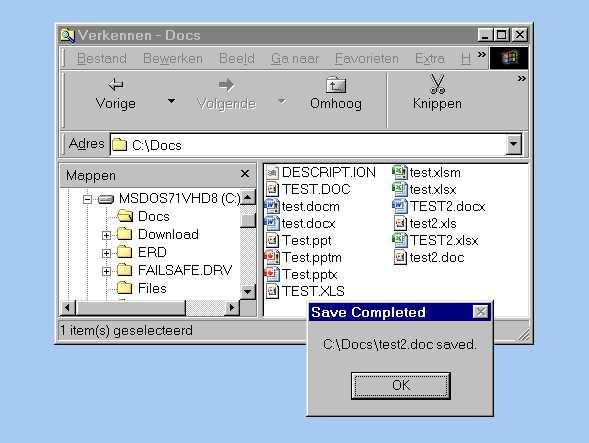
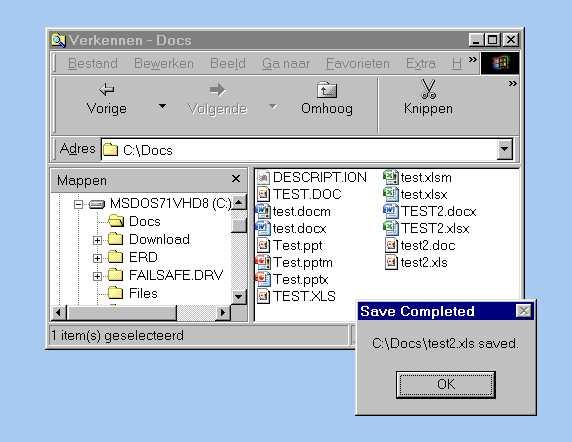
I am almost sure its possible With latest KernelEx version I had to set MOC.EXE in "Windows 95" compat mode. Without there wasn´t even a Save As Dialog box. With original Kernelex it worked out-of-the-box, only the NT4-trick I found out, was needed for conversion of Excel-files. BTW: better disable CTFMON.EXE if not needed, see: https://web.archive.org/web/20031001031315/http://support.microsoft.com/default.aspx?scid=kb;EN-US;q282599
-
@Dave-H KernelEx Compatibility mode "Windows NT 4.0 SP6" should be set for: EXCELCNV.EXE and can be helpfull with EXCELCNVPXY.DLL. KernelEx Compatibility mode "Windows 2000 SP4" should be set for: WORDCONV.EXE and MSO.DLL (both already set this way by Xeno86! MSO.DLL is in "C:\Program Files\Common Files\Microsoft Office\Office 12 "), and if needed for WORDCNVPXY.CNV and MSVCR80.DLL (MSVCR80.DLL is in "%Windir%\System") KernelEx Compatibility mode "Windows 95" can be tried for MOC.EXE (the "Save As..." Explorer dialogue). You can play a bit with some settings, but the settings for MSO.DLL and EXCELCNV.EXE are mandatory (as far as I tested).
-
@Dave-H: The Excel-conversion is sometimes sloppy. Set KernelEx Compatibility mode "Windows NT 4.0 SP6" for EXCELCNVPXY.DLL too, may be helpfull. About the SaveAs... in Explorer, it's not really needed unless you have to convert files without use of MSOffice. But I think setting KernelEx Compatibility mode "Windows 95" for MOC.EXE will help. Both files are normally in the folder "C:\Program Files\Microsoft Office\Office 12"
-
@Dave-H: Great job! Is the Excel-conversion working too with Office XP?