deomsh
Content Type
Profiles
Forums
Events
Everything posted by deomsh
-
@Dave-H: did you set VolumeWidget=$0C ? Further: please read my post of april, 2 (answer to UCyborg).
-
@Dave-H: my congratulations with your HDA sound, you deserve it. Regarding sound quality: did you try Mytimer=1 in HDACFG.INI, so without HDARUN?
-
@Dave-H: Please try again with new version Dave-H_Hdaicout.hda.200
-
@Dave-H: I am sorry to hear you don't possess such a card. Nevermind, was just an idea to test if your Sound Mapper is working. Same for the four files I ment. 98 SFC will test the three original one's too for integrity. Just to be certain your installation is valid, but it's up to you. I have a new HDAICOUT.HDA version to test. Please rename your first one to HDAICOUT.HDA.000 and rename te new one to HDAICOUT.HDA. Afterwards please attach HDAICIN.TXT and HDALOG.TXT again. This version is mainly to test if the Verb Interface is fully functional and if Play-related functions of your codec are set correctly.
-
@Dave-H: The files resides in WIN98_32.CAB and WIN98_43.CAB. If checking is a difficult, you can use System File Checker (Run -> SFC). Watch the settings. Best is: let SFC do a first run and choose everywhere "ignore". If you want to restore original files, let SFC make a backup.
-
@Dave-H: Thanks for the file information. I assume that "checked" means also the files are binary identical with the files from your WIN98se CD. I am searching for some spare time to work at step: Check if the CODEC is fully programmable according to the data sheet. I will have to write HDAICOUT.HDA adjusted for your chipset. I'd like to see to log-files that should reside in your WinDir: HDALOG.TXT and HDAICIN.TXT. If they exist, will you be so kind to attach them? BTW: about your Sound Mapper problems: do they disappear with a normal PCI sound card, while HDA2.DLL is disabled? Disable is very easy: with semicolon before the wave-entry in SYSTEM.INI [Drivers] ;;wavehda=HDA2.DLL.
-
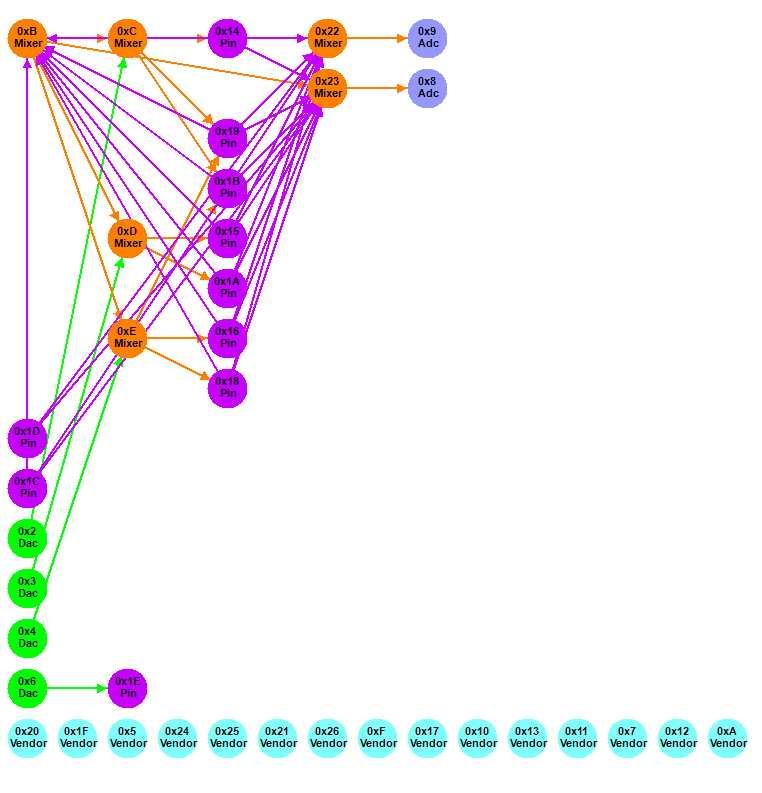
@UCyborg: I didn't ment to offend you. I am not an expert either, I only tried to say that using "facts" from experiences with other drivers like AC'97 doesn't say anything to me. You didn't answer my question if you could give the HDA controller an EXCLUSIVE IRQ. If that's possible on your system and you have still choppy audio, I would tend to agree that IRQ's are not a (possible) problem. Interesting that with Windows XP as a Guest in VirtualBox HD-audio is not possible, so your Windows 95 OSR2 with a Win3.x driver is already surpassing Windows XP! The (older) posts I red where from angry Win2k/XP users about not working HDA, in Windows 10 the problems where about choppy audio. Windows 7 was not mentioned, but I didn't do a full search yet (very time consuming). But I am becoming more interested in VirtualBox, if I have some spare time I will try an installation on my Windows 10 as a Host. But in the mean time I give Dave-H priority if you don't mind, it's his thread. It would of interest too try MS-DOS HDA players, like I suggested Dave-H, but with respect to choppy audio. About volume setting for your virtual STAC9921 codec: I have red somewhere that it's not fully implemented in VirtualBox. If you have some spare time I'd like to see the codec graph. My ALC662 looks like this one: You can produce this graph with a Microsoft tool: High Definition Audio Utility 3.3. It needs Windows 7 or higher. If I understood well, you are running Windows 7 as a guest too. https://en.freedownloadmanager.org/Windows-PC/Microsoft-High-Definition-Audio-Utility-FREE.html After installing the msi, go to File -> Local Machine Codecs and load DEV9221 or something like that.

-
@Dave-H: Thanks for testing, after the BIOS option I do not see means to do something with the HDA-controller. In the Intel High Definition Audio Specification I found that the HDA controller is opaque for responses from the CODEC. In my (maybe simplified) understanding that means that rewriting HDAICOUT will have no influence on the HDA-controller. IF the controller is the real problem. Regarding Sound Mapper, did you check following with your Win98se CD: MMSYSTEM.DLL, WINMM.DLL, MSACM.DLL, MSACM.DRV and MSACM32.DLL. Check your Registry for Wavemapper too. This is my (dutch) Sound Mapper Reg-entry in HKCU (same in HKU): [HKEY_CURRENT_USER\Software\Microsoft\Multimedia\Sound Mapper] "Playback"="HDA Sound " "Record"="" "PreferredOnly"=dword:00000001 "UserPlayback"="HDA Sound " "UserRecord"="Geen opnameapparaten"
-
@Dave-H: MPlayer will not work in a DOSBOX, because inside it cannot connect to the real hardware. To move on we have to solve a few problems. 1) Not hearing soft "plops" or "clicks" during boot. 2) Not having Slider movement while playing an audio-file. 3) Check if the CODEC is fully programmable according to the data sheet. 4) Write a CODEC-specific HDAICOUT.HDA and test it. Although I have a certain order in mind, I used bullets in my previous post, because I am still not fully sure that there is NO relation between the way a CODEC is programmed by HDAICOUT.HDA and sending some "device ready" message to the driver. My actual understanding is that they are independent and that such messages are sent/ received by the HDA controller in relation to both the CODEC and the driver. In that case concentrating on 3) and 4) will be a waste of time. In many CODECS all, or almost all, Widgets that connect to Jacks, are in the default state set as Input devices. Drivers from ALSA, FreeBSD or Kolibri are using Widget parsers, asking all information (including all connections) from an unknown CODEC with so called "GET VERBS". By sending "SET VERBS" CODECS can be programmed. You can even redirect analog inputs like MIC and CD to analog outputs and mix then with digital audio. HDA2.DLL doesn't have a real Widget Parser onboard, but is using the settings of HDAICOUT.HDA. By absence of this file, some settings are set to a default value (at least the last three lines of HDACFG.INI). All these "new" settings are reset to defaults by the BIOS during reboot. You don't have to worry about your triple-boot companions. I asked you earlier to test Jacks, just in case there is a problem with my version of HDAICOUT.HDA in relation to your specific CODEC. That will be the case if you're hearing soft "plops" or "clicks" during boot on other Jacks. So each jack has to be tested with one boot seqeunce. That's all, regarding first bullet. With PCI related BIOS settings I didn't ment Audio settings. According to the manual of X7DAL-E+ disabling audio is done by a jumper. But in your BIOS setup there is on page 4-9 ONE entrance that can be tested: Enable "Emulated IRQ Solutions", default is Disabled. This option is ment for legacy systems. My (bit loose) idea to try this is because audio problems sometimes can be "healed" by disabling MSI (according to some Linux forum post's). Its difficult to find more information about this BIOS option, but I think it's worth a try (although first backup all your configuration files to be for sure, and better reset first to default when booting in your other OS). In my opinion there is real progress if the Slider of an audio player is moving with this BIOS setting enabled. Maybe other members can give some input about this BIOS option. Before investing time in a CODEC-specific HDAICOUT.HDA I have to know if GET and SET verbs are fully functional, can be done with AHDA17O, or by another (less general) version of HDAICOUT.HDA.
-
@Dave-H: You're right, no difference. So there is no need trying "pcipatchB" settings in HDACFG.INI. At least it seems that these registers of your HDA-controller are not the problem. Summarizing you have following problems/ did following tests/ took following actions/ gained following results: Trying to install HDA2.DLL -> PASSED Try to hear "something" with the default settings: NOT PASSED Try to hear "something" with experimental general version of HDAICOUT.HDA: NOT PASSED Try to select "HDA Sound" as Preferred Playback device: NOT PASSED Try to hear "something" while using different Verb Interface: NOT PASSED Try resolving conflicts in System (conflicts between Motherboard resources System timer/ DMA controller): NOT PASSED Try to hear "something" with different "Mytimer setting" in combination with HDARUN: NOT PASSED Movement of the Slider of Sound recorder while playing a WAV-file: NOT PASSED Try to hear "something" without using HDATSR and setting [BUSMASTER] to memory addresses "out of the reach of Windows": NOT PASSED Try to hear "something" with different "wait" settings: NOT PASSED Compatibility of actual HDA PCI-Registers with settings of working HDA-player: PASSED If you like to move on, I see only the following possibilities where I can be of use: Try to hear "something" trying ALL audio jack's Change PCI settings of your Motherboard's BIOS Check communication with the CODEC with help of AHDA17O Write specific HDAICOUT.HDA for ALC883
-
@Dave-H Great, you deserved it. Nice picture, but I need another one. Please try this batch-file, assuming MPLAYER resides in C:\MPLAYER together with a WAV-file, not a short one, say 60-100 seconds. Rename it to YOUR.WAV, or edit the batch-file according to the name of your WAV-file. Make following batch-file and save it in C:\ as BUG2.BAT. ======================= BUG2.BAT ======================= cd MPLAYER MPLAYER YOUR.WAV C: cd \ WIN ======================= BTW: if needed earlier, edit the command-line. Afterwards the batch-file will boot DIRECTLY (no reboot) into Windows. If the player won't stop, try [ESC]. Once in Windows please do the same as you did earlier to deliver a picture with AHDA17O. Details are in my post of monday 10:01 pm.
-
I didn't either at first sight. Yes, same folder.
-
@Dave-H: Sorry, forgot they are not included, tonight I just checked the files, they where exactly the same as allready on my System (my smartphone is not compatible with Win9x). Good you are carefull, but it's safe. Read: https://en.m.wikipedia.org/wiki/CWSDPMI BTW: you used CWSDPMI.EXE with Judas 2.1c allready.
-
@Dave-H: Sorry for misunderstanding. I suggest: stay using HDATSR, HDAICOUT.HDA, HDACFG INI: Verbinterface=$1, Mytimer=0 and VolumeWidget=$0C as I suggested earlier. While experimenting stay with latest "best" configuration! For faster testing make shortcuts in your Startup folder to HDARUN.EXE and SNDREC32.EXE and place a long WAV-file in MyDocuments. I found two MS-DOS MPlayer versions during traffic, just tested with a WAV-file on my System. http://rayer.g6.cz/download/download.htm https://web.archive.org/web/20170501000000*/http://falcosoft.hu/mplayer_dos.zip You can download mplayer_dos.zip from the link september, 24th. So no direct linking (just in case Moderators think so and ZIP is included in the rules). Rayer's file is newest. If his version is not working with MPLAYER YOUR.WAV add to command-line: ao=wss:dev=-1:vol=21:latency=0.025 Other version should work with MPLAYER YOUR.WAV
-
@Dave-H: That erratic behaviour/ 'Device in use problem's' of the "HDA Sound"-option should be tackled somehow. Since I am not a programmer I cannot rewrite HDA2.DLL (source code is included in the Zip!). If I did understand your question well: you want a hint regarding "wait settings". Start with 120 (both) reboot, test, set to 140, etcetera. Go up to 200. If no changes try 80 and go down to 20. In the meantime I will try to re-read Intel's High Definition Audio Specification, although the part about the HDA Link is not my favorite. BTW: did you find a MS-DOS version of MPlayer?
-
@rloew: ALC885/ALC887 have no VolumeKnobWidget, as far I can see in the data sheet. The four DAC's connects to Mixers 0C/OD/OE/OF. If using HDAICOUT.HDA all PinWidgets should be connected to OC (I am not sure if SPDIF-OUT is acually functional, never tested it). ALC885 has more streams, with extra Mixer 26. HDA2.DLL has some stability issues: Sporadic 202 Error's at Startup or during operations involving bigger files. On my system extreme low Vcache settings gave more stability, MinFileCache=1024, MaxFileCache=1024, especially with other 16-bits drivers used). Also higher MinTimeSlice values May help. I have no video/ audio-problems. HDATSR's buffer can be forced being set to high by other program's (already with SMARTDRV 4096!). Alternative is shown in one of my Post's for Dave-H in this thread. Clipboard operations, depends somehow on the video card/ drivers too, didn't really test this, so maybe hypothetical. Issues with DosBoxes, absolutely video card/ driver related. Since I had to reverted back to my PCIe GF 6700XL I had less issues with the 7772 driver (IF all Nvidia's utilities had been disabled in MSCONFIG. BTW: according to the Readme EMM386 shouldn't be used (no testing possible on my System).
-
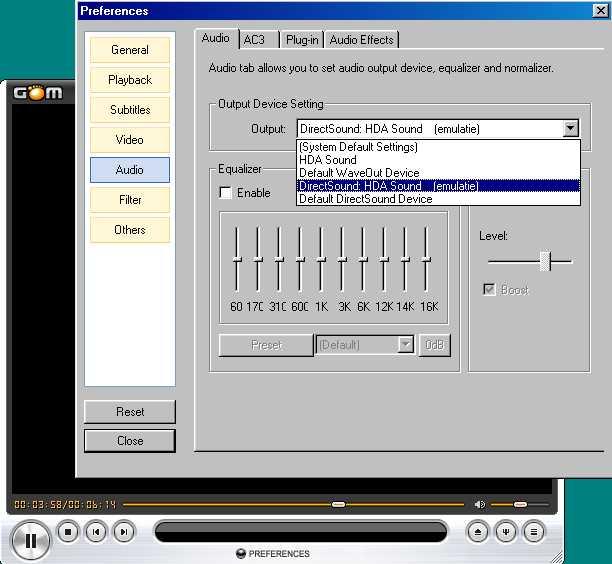
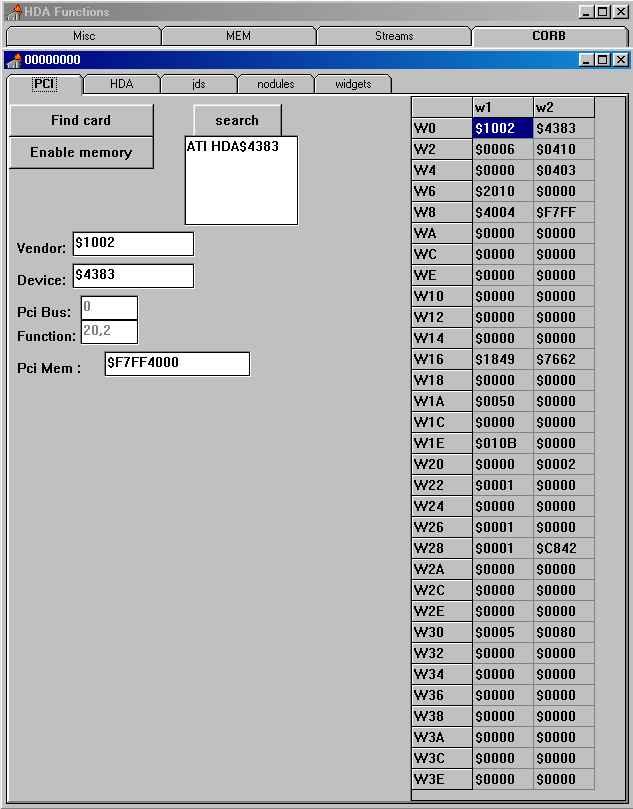
@rloew: Oops, I found that there are different species of M5A97, with different codec's. Please post content of HDACFG.INI. HDARUN is only needed with Mytimer=0, copied for testing purposes (but absolutely needed in Windows 3.x Standard mode). Maybe I should delete it in my INF-file in favour of WAVEOUT.EXE, and add some Volume Control Icon. There are some delays, on my system the Desktop is ready a few seconds later, opening a sound-file less than a second delay. Should be related to the timing settings in HDACFG.INI. They are related to sending/ receiving Verb's to the codec througt the Azalia controller. "Verbinterface=$1" is the CORB/RIRB-Interface (Default in version 9 of HDA2.DLL), "Verbinterface=$0" is the Immediate Command-Interface (only interface in earlier verisons of HDA2.DLL). The settings wait1=$100 and wait2=$100 can be changed, only a reboot is needed. I tested GOM Player, no problems. Best Audio renderer is Direct Sound, further setting the Wave Buffer in Multimedia Properties at 5 seconds. That sounds bad. Never heared of such "overheating", is damaging electronic circuits a possibility? There are various species of Z87. Your board seemes to have the same problem as Dave-H's. Most Linux-sources I have been reading mention in case of controller related HDA-problems setting/ disabling the NoSnoop bit, or setting MSI to a legacy mode. @Dave-H: In the mean time I compared the PCI-Registers of your picture with your HDA Controller's data sheet (page 495-507). Except one hardwired value, all values are the Defaults. So nothing special. Interesting test with Judas 2.1c. Maybe Judas is to old, but at least it's good to know that it doesn't work too. The operation of a MS-DOS HDA-player is of cause independent of HDA2.DLL, but I hoped to see a difference in your Controller's PCI-Registers afterwards. With a certain version of HDA2.DLL, Judas 2.1c changed one tiny bit on my SB600 system and I got sound in Windows. For a while I had to start Windows 3.1 with BUG.BAT, until Watler produced a new version of HDA2.DLL. Yesterday I tested MS-DOS version of MPlayer, plays WAV files and is much more recent. At the moment I have no time to seek for a link, but maybe you can find it. I'd like you to do the same test with a rewritten BUG.BAT, and posting a picture of AHDA17O -> PCI, IF you observe differences. I am hesitating a "bit" with theoretical possibilities, because of writing to PCI-registers on a system that is not mine. In HDACFG.INI one 8-bit Register can be changed with the setting "pcipatchB=$xxxx". About "HDA Sound", is the option stable with Mytimer=$1 too? If yes, return to this setting. Further it would be nice if you start experimenting with the "wait=" settings, I suggest higher settings first, with "20"-steps. Maybe you can observe a difference regarding the "your sound card may be in use" problem. Will cost you many reboot's, I don't feel responsible for the bearings of your Hard Disk. @UCyborg: Thanks for testing, does your IRQ-changing imply that the Controller had an exlusive IRQ? I am sorry but I can't understand your logic of facts related to a (even virtual) AC'97 controller. About your Choppy sound: maybe a silly question. Did you rule out Guest/Host problems? How's HDA-sound with W2K or XP? I saw some interesting HDA-correspondence on the VirtualBox-Forum about W2k/XP and even WIN10 as a Guest (mainly on older versions of VirtualBox). Your (Virtual) HDA Codec should be STAC9221. According to the data sheet: "VolumeKnob Node (NID = 0x16)". So try VolumeWidget=$16 if you like.
-
@Dave-H: Thanks a lot for the PCI-picture. I will compare it with your chipset's data sheet. Next (we are still in Step 3) I want you to run a small test: check with the batchfile if JUDAS 2.1c is delivering sound on your system in pure MS-DOS (after loading CONFIG.SYS/ AUTOEXEC.BAT). Both your chipset and your codec are listed inside the source code of JUDAS 2.1c. If there is some sound, enjoy Afterwards the batch-file will boot DIRECTLY (no reboot) into Windows. Once in Windows please do the same as you did earlier to deliver a picture with AHDA17O. Steps: 1) Get Judas 2.10c (ZIP-file) from https://web.archive.org/web/20121109163845/http://www.piotrkn22.republika.pl/judas/index.html 2) Make following directory in your root: JUDAS21C 3) Copy JP.EXE, JUDAS.CMD, ANAL.CFG, ANAL.EXE, CWSDPMI.EXE and TUNE1.XM to this directory. 4) Make following batch-file and save it in C:\ as BUG.BAT. ======================= BUG.BAT ======================= cd JUDAS21C JP.EXE TUNE1.XM -d C: cd \ WIN ======================= 5) Shutdown and Restart after a while (please!) 6) Boot into MS-DOS 7) Run BUG.BAT BTW: if CWSDPMI.EXE gives problems, try DOS4GW.EXE instead (never worked for me). It resides in the ZIP-file too.
-
@Dave-H Allright: Go to http://turkeys4me.byethost4.com/files and get AHDA17M (in fact it's version O) and unzip the AHDA17O-directory somewhere. Run INTELHDA.EXE, you will see two windows, both with tabs. Click ONLY Tab "PCI", resize the windows just like my picture below, and upload a picture. All W1/W2 values must be included. BTW: you can disable MaxPhysPage as long as you reenable HDATSR in AUTOEXEC.BAT. HDACFG.INI [Busmaster] values will be overwritten by the TSR after reboot.
-
@Dave-H: About the changing behaviour of the "HDA Sound"-option: is there any difference in behaviour after a cold boot (including power switch off for 120 seconds), a hard reset (Reset switch) and a soft reset (a reboot)? Regarding "SETUP /p i", I understand and respect your position, although unfavourable from a testing point of view. At the moment I am preparing the next step, so we (hopefully) get information about the actual values of the PCI-register of your Azalia controller.
-
@UCyborg: Thank you. I never used QEMU, but if you like to try.... More results are always of interest. Can you tell what version of VirtualBox you are using? I'd like to see your HDACFG.INI too. I always can take a look in the data sheets. Regarding IRQ's: maybe it was'nt clear what I ment. I am not a native speaker, sorry for my poor English. I did not ment an IRQ-conflict, but IRQ-sharing. Because of disturbances of the audio stream in Windows 3.1, I had to abandon my Legacy USB-mouse in favorite of PS/2. This could be IRQ-related. In Windows 98se IRQ-sharing is not bad, but in this respect I am not sure about Windows 95 osr2. If in VirtualBox exists a (virtual) BIOS, maybe there are options to change IRQ's.
-
@rloew: So a "successtory"? Good to hear that your RAM Limitation Patch is not conflicting, as I expected (if using HDATSR). Did you need HDAICOUT.HDA, or was the driver running out-of-the-box? Your motherboard has codec ALC887, according to the datasheet you will have to set VolumeWidget=$0C in HDACFG.INI. The Volume Control program has to be started manually, it's not included in my INF-file. Personally I do not use it, in Win9x I use the volume slider from the (multimedia) application. Regarding uninstall: HDA2.DLL can be disabled with a semicolon in SYSTEM.INI and manually deleted AFTER reboot. HDATSR can be removed from AUTOEXEC.BAT and deleted in %Windir%. My INF-file comes with an uninstall procedure ( Control Panel -> Software). After reboot the entrances in SYSTEM.INI and AUTOEXEC.BAT and all files directly related to HDA2.DLL should be removed (HDAICOUT.HDA has to be added if needed, so this file and the corresponding logfile HDAICIN.TXT will remain, but will do no harm). Only the entrance "High Definition Audio Controller" has to be deleted manually, but can be left too. I searched and experimented a lot, but I could not find a way to delete it by means of an entrance in an INF-file. I added the entrance in Device Manager -> System Devices only as information that the generic VEN/ DEV is accepted. The entrance is not needed since the driver is loaded by SYSTEM.INI (loading HDA2.DLL is not even logged by BOOTLOG.TXT).
-
@MrMateczko: For Ethernet there are many factory-made NDIS2-drivers. In case of HDA it would be nice if there exists a universal 16-bits driver, with non-ISA motherboards in case of Win3.x audio is much more difficult to get. Such an universal driver could be tried on Win9x too, without the "not really convenient" issues you described. Maybe take a look at the Linux ALSA project, how convenient programming their universal driver is. Watler adjusted his Win3.x driver for all chipsets/ motherboards he could obtain, but there was virtually no interest in his driver. The first version I tested (in Windows 3.1 on my motherboard) had no configuration options. When I asked him for help, I had to test more than twenty versions before I became sound. But he too made configuration options in HDACFG.INI and made startup codec-programming possible with HDAICOUT.HDA, both (almost) on a user level. I had the simple-minded idea to use this driver as 16-bits driver in Windows 98 SE about a year ago, and all in all it satisfies my needs. Still there are some stability and other issues, but I can live with them. "HDA Sound" should be usable with every program compatible with Wave Out or Direct Sound. In case of Direct Sound: with Software Emulation only. Hardware related Audio Accelaration is out of the question. As far I know in that case (minimal?) a WDM-driver is needed. I have used "HDA Sound", apart from System Sounds, with various Windows 3.1 VfW/ WAV/ Audio-CD/ MP3 and MIDI-to-wave players. In Windows 98se: Sound Recorder, various Microsoft Multimedia players, Foobar, WinAmp (16-bit output only, max 48khz; I assume two-channel - I am using headphones), MPC, MPC-HC, MPC-BE, KMplayer and POTplayer. BTW: did you read UCyborg's report about VirtualBox in this tread? As long no one is trying, there will be no new "success"-stories.
-
@Dave-H: That's the real spirit. I noticed your NDIS2-driver in your MEM output. Nice project too, I've did one for RTL8189. I am "confident" in so far, IF it's possible to get "HDA Sound" as stable Playback option it's worth to move on. In this respect you didn't answered my question yet if you tried in the past a Windows install with SETUP /p i Regarding the sound of silence it can be worth trying to plug-in your speakers (better use headphones!) one by one in all other available jacks, and listening during boot-time if you hear the slightest "plop" or "click".
-
@Dave-H: I am sorry to hear that your Sound System is not stable in combination with HDA2.DLL. This problem must be resolved first before we can move on. If you're afraid wasting your time, better go for another option. In the meantime I have found your motherboard manual; if I'm right you have two normal PCI-slots, so maybe there is a PCI-soundcard that suits your needs. I think I found the datasheet of your chipset too (needed for step Three) and I am reading it already. So plenty of time to waste If you'd like to continue, I'd suggest first retesting after commenting out following devices in your SYSTEM.INI: [386Enh] ;; device=convmem.vxd ;; device=c:\programf\afterdar\adw30.386 ;; device=dva.386 (unless you really need DVA.386 ??) [Drivers] ;; Adwrap=c:\programf\afterdar\adwrap.drv