


reboot12
Content Type
Profiles
Forums
Events
Posts posted by reboot12
-
-
OK, but now I test BIOS setting and Win7 with i219 works OK even if VT-d Enabled, PCIE Wake Enable.
BIOS settings do not affect the operation of the driver under Win7 and i219 always work OK.
My bios - https://www.upload.ee/files/19131682/A786BIOS.zip.html
P.S. Maybe it will be faster to make a ported driver from Win7 - the NDIS62 one?
0 -
Yes, my bios is AMI V5 - Core 5.0.1.3 0.45 x64, UEFI 2.7; PI 1.6
0 -
i219W17 - https://pastebin.com/pXUUsJf1
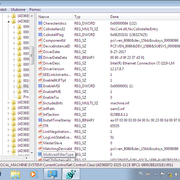
i219W18 - in registry advanced settings present but in Device Manager no Advanced tab - https://pastebin.com/NEMUKQ5b
i219W19 - no Advanced tab - https://pastebin.com/rtfV00TR
This is the W19 with corrected .inf file for the Advanced tab present but still not help: https://www.upload.ee/files/19131436/i219W19_Adv.zip.html

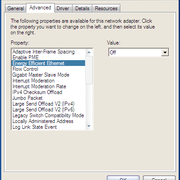
I tried change EEE, ULP, Speed & Duplex (half, full), checksum, Interrupt Moderation - nothing help :-(
I don't think any registry settings will help. You need fix your i219.sys driver to properly detect and set Link Speed because now is always 1.0 Gbps but my router is only Fast Ethernet (100)
0 -
I will check tommorow. Bad line endings in these commands, I guess?
0 -
i219W16 - hangs for 5 sec after install or Enable (while disabled) - https://pastebin.com/SPHUHPuE
0 -
I test i219 NDIS62 W7 x86 driver on my AIMB mobo and work OK
EEE and ULP is Enabled
https://www.upload.ee/files/19129751/NDIS62_W7x86_i219_OK.zip.html
0 -
-
i219W14 - hangs WinXP for about 15 seconds. Then cable unplugged, plugged, unplugged, plugged etc. in loop
0 -
-
-
-
16 hours ago, Dietmar said:
Make a test.Delete everything in registry
I removed most of the settings from the registry but the driver still works - after reboot.
7 hours ago, Dietmar said:I build for you a minimal driver package for WIN7
No, my driver (only .inf) is for WinXP, not Win7 - I made it based on the Win7 .inf driver. I use your i219.sys (renamed) file in this driver.
In LAN package from AIMB I have folders NDIS62, NDIS63, NDIS64, NDIS65 - I don't know if these of way work in Win7 - need test. In readme.txt is these info:
The driver package files in this folder can be used to install drivers for Intel(R) Ethernet Gigabit Adapters and Connections on the following Operating Systems:
  *  Microsoft* Windows* 7 (32-bit)
	NDIS 6.2 introduced new RSS data structures and interfaces. Because of this, you cannot enable RSS on teams that contain a mix of adapters that support NDIS 6.2 RSS and adapters that do not. The e1e6232 driver does not support NDIS 6.2 RSS. If you team one of these devices with a device supported by another driver, the operating system will warn you about the RSS incompatibility. This applies to the following devices:
  *  Intel(R) PRO/1000 EB and EB1 Network Connections
  *  Intel(R) PRO/1000 PF Network Connections and Adapters
  *  Intel(R) PRO/1000 PT Network Connections and Adapters
  *  Intel(R) Gigabit PT Quad Port Server ExpressModule
  *  Network Connections based on the Intel(R) 82566 Controller
  *  Intel(R) PRO/1000 PB Dual Port Server Connection
  *  Intel(R) PRO/1000 PB Server Connection
0 -
29 minutes ago, Dietmar said:
I see, that the *.inf from the win10 driver sets special values for EEE, ULP etc. in Registry via *.reg commands in this *.inf.
AIMB driver 23.2.0.1006 has EEE settings but I check settings in my Win10 (driver version 12.17.10.8 included in my Win10) and no any EEE settings but driver works OK:
0 -
7 minutes ago, Dietmar said:
Now I integrate them also in our i219.inf
I added all settings in .inf - https://msfn.org/board/topic/183464-compiling-acpi-v20-driver-for-windows-xp-sp3-and-windows-2003-sp2-x32x64/page/155/#findComment-1285425
7 minutes ago, Dietmar said:I am back here at about 19:00.
I'll be there tomorrow morning.
0 -
-
Now I install Win10 x86 Legacy MBR
0 -
44 minutes ago, Dietmar said:
Please tell me the full exact entry in Device Manager for your i219-LM with Dev_15BB.
PCI\VEN_8086&DEV_15BB&SUBSYS_00008086&REV_10\3&11583659&0&FE
i219W8 - https://pastebin.com/JxbLZwvK
0 -
-
-
-
-
-
i219spyWin10 - WinXP hangs for 1 second - https://pastebin.com/DhiA81pM
i219collsavewin10 - hangs 1 sec, no need more g for GO, WinXP boot to desktop - https://pastebin.com/EvMfM19H
i219W4 - hangs for 1 sec,no need more g, XP boot to desktop - https://pastebin.com/iQTy41Vf
After shutdown WinXP PC still run - black screen, CPU fan max speed
0 -
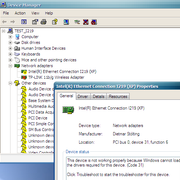
i219fixGiomaster & i219besttt drivers hangs the WinXP. After reboot (force) yellow exclamation mark and error Code 31 in Device Manager:
What's going on here, it's starting to really annoy me


I'm going to the garden to cut the branches of fruit trees (Obstbäume beschneiden)
 0
0


Updated drivers for Windows XP SP3 and Windows 2003 SP2 (x32/x64) for modern hardware
in Windows XP
Posted
@Dietmar
Please send me this driver - https://msfn.org/board/topic/183528-ndis6-support-for-xp/#findComment-1218032