jaclaz
Content Type
Profiles
Forums
Events
Everything posted by jaclaz
-
 No, not without altering the boot sequence. The proposed is a "side" boot (i.e. an alternative), set in such a way that it changes NOT anything in the MBR, the PBR or in the \boot\BCD store. If you want *something else* you need to give "full control" to the alternative, this implies altering the normal way of booting, i.e. "installing" something or editing the \boot\BCD. That is another thing. A "normal" Windows NT boot CD/DVD (an install disc but also many PE discs) includes in its booting sequence a file called BOOTFIX.BIN. It is a simple executable that checks whether on the machine there is a partitioned disk (I believe it also checks if there is an Active primary partition on it, but cannot swear about this). The idea is that if you boot to CD/DVD and the machine has an internal disk that needs to be partitioned (a new, "blank" disc) the CD/DVD will continue booting without asking you anything, but, once you have installed the OS (and forgot the install CD/DVD in the drive AND did not change booting sequence in BIOS) the CD/DVD asks for confirmation and if you don't press the key within the timeout it will attempt to boot the internal disk. jaclaz
 -
The "best" in the sense of "less intrusive" way would be to use grub4dos in a "non installed" setup. In a nutshell: Get a recent grub4dos from here: http://grub4dos.chenall.net/downloads/ You can get either latest of the 0.4.6a "branch": http://grub4dos.chenall.net/downloads/grub4dos-0.4.6a-2016-08-06/ http://dl.grub4dos.chenall.net/grub4dos-0.4.6a-2016-08-06.7z or of the 0.4.5c "branch": http://grub4dos.chenall.net/downloads/grub4dos-0.4.5c-2016-01-18/ http://dl.grub4dos.chenall.net/grub4dos-0.4.5c-2016-01-18.7z To be fair, the features used in this extremely simple setup are already present in older versions, so you can use one you may already have, but NOT if it is earlier than 0.4.4-26-10-2009. Open the file with 7-zip and extract from it the file grldr (you won't need anything else) and copy it in the root of your C:\ drive. Copy this: [boot loader] Timeout=10 default=c:\grldr [operating systems] c:\grldr="grub4dos" and paste it in Notepad, saving the file as C:\boot.ini Copy this: timeout 30 title PE LiveISO find --set-root --ignore-floppies --ignore-cd /WinPE.ISO map /WinPE.ISO (0xff) || map --mem /WinPE.ISO (0xff) map --hook chainloader (0xff) title commandline commandline title reboot reboot title halt halt paste in Notepad and save as C:\menu.lst. Take the Windows PE .iso you have (that I assume you have already tested and working as CD/DVD), rename it to WinPE .iso and copy it to the root of the D:\ drive. When you reboot you should have an added option at boot time "grub4dos", choosing it should bring you to choices "PE LiveISO"/commandline/halt/reboot, and if you choose the "PE LiveISO" the PE should boot. Of course this is the most basic setup possible, once you confirm it works for you as you wished it will be possible to modify/tweak it. jaclaz
-
Why I find Windows 8.1 more suitable than Windows 7
jaclaz replied to xpclient's topic in Windows 10
Well, if one machine has (vitual) SCSI and the other(s) have (virtual) IDE, the comparison is m00t, and most probably not only in the "disk" category as "resources" in use when using a SCSI controller (at least with real ones) are different form those used with an IDE controller, so it is very likely that the CPU category could be affected. Mind you I am not saying that you should re-create a new VM with the same (virtual) hardware (or re-configure your existing one to use not the SCSI bus), only that you were (and are) comparing not corresponding setups. About this: With all due respect , it is not "news" or "exceptional" i.e. IMHO not anything to be particularly be "proud" of, it is the normal way machines running NT 4.0, or 2000 or XP have run for me in the last 20 years or so, possibly in a less rich environment than yours, though. jaclaz -
Sure it is possible. What do you mean with a "D drive"? Like: 1) another hard disk like device (a USB stick or external disk drive, an internal one, etc.) 2) another partition/volume on the same hard disk that hosts the C: volume 3) another non-harddisk like device (CD/DVD, a card in a multi card reader, etc.) Is it a BIOS or a EFI/UEFI machine? /since you are talking of 7 I assume that it is a BIOS one or that at least it has compatibility mode). Normally you can change the priority of boot devices in BIOS, otherwise you will need a boot manager of some kind. In most cases of a simple dual boot between Windows 7 and a PE you can add the option to boot the PE to the \boot\BCD of your existing BOOTMGR, though not necessarily it is the easiest or "best" choice and you may want to use instead a third party boot manager. Describe your intended setup with some detail and surely we will find a suitable way. jaclaz
-
Replaced CMOS Battery - CD/DVD Burner not Recognized
jaclaz replied to HoppaLong's topic in Hardware Hangout
That might prove to be rather hard on a SATA device ... jaclaz -
Why I find Windows 8.1 more suitable than Windows 7
jaclaz replied to xpclient's topic in Windows 10
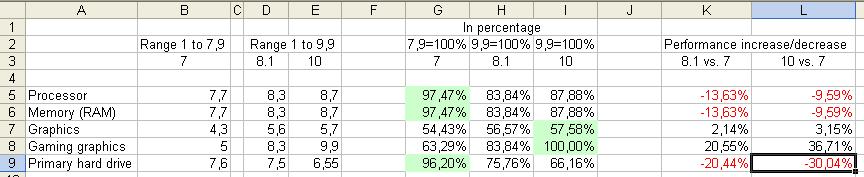
Good, some more random numbers, which are put into the attached table, with some short comments. Those numbers (just like the previous ones) simply make no sense whatever, I guess that everyone here is saying (or was saying) that overall there are some slight differences perceived in the working of the different OSes, which would be normal BTW, as there has been no particularly sensational changes introduced in the OS, just some little adjustments. Here it seems like some subsystems object of the test are like years ahead while some are centuries behind, jaclaz
-
Very handy and practical/useful, I always fire up a couple VM's and RDP on a handful of remote servers before breakfast, as I presume a large part of Windows 10 users do . jaclaz
-
Why I find Windows 8.1 more suitable than Windows 7
jaclaz replied to xpclient's topic in Windows 10
Ah well, then it's ok, we can continue the discussion using some more meaningless metrics. I feel then free to add a reference to my (completely twisted) TES or Tweaking Effort Scale : jaclaz -
Naah, it is just a coincidence. Nice joke. He should give me US$42/year (at a discounted price) to have me read his misinformation and absurdities (though witnessing his several 180 degrees turns lately has been actually entertaining). jaclaz
-
Why I find Windows 8.1 more suitable than Windows 7
jaclaz replied to xpclient's topic in Windows 10
The data you posted (created by MS own utility, remember) is saying that "Primary Hard drive" is performing VERY NOTICEABLY worse, whilst "Gaming graphics" (whatever it is) is performing VERY NOTICEABLY better. Real world experience tells us instead that they are "different" but not so dramatically so. You have to choose, you either believe yourself and your observations or the MS metrics, since results are so diverging. If you choose your own experience (as it would be logical) it is clear that the WE metrics are largely meaningless, and are not valid comparing tools between different OS's on a same (virtual or real) machine. As a matter of fact outside of "my WEI is bigger than yours" kind of discussions WEI is totally meaningless. jaclaz -
Check ei.cfg. http://www.askvg.com/how-to-choose-desired-windows-7-edition-version-during-setup/ jaclaz
-
Replaced CMOS Battery - CD/DVD Burner not Recognized
jaclaz replied to HoppaLong's topic in Hardware Hangout
As I see it, whatever you think, there is no real evidence that anything (particularly not anything "permanent") happened connected to the CMOS battery replacement. And I have had systems (BOTH desktops and laptops) running with a depleted or without a CMOS battery at all and they worked just fine (just so you know). For *whatever* reasons *something* happened to the capability of your Windows XP install to detect/install the (SATA) CD/DVD drive. While this may be connected to a malfunctioning of the PSU (it doesn't matter AT ALL if you changed it 2 months ago, it could be malfunctioning even if you changed it half an hour ago), it is possible that you are experiencing the issue only because of some OS driver/device management issue. The *normal* troubleshooting path I would follow would be: 1) try the thingy with another PSU 2) try the thingy with an alternate OS 3) try in the current OS to uninstall and re-install hardware drivers, possibly cleaning the Registry, etc. 4) try some third party tool (such as the mentioned hotswap thingy) and see if *somehow* they see the device (since hotswap runs well after the booting phase this would workaround possible issues of timing with a defective PSU that provides not enough power). If you believe that changing the CMOS battery with one touched by a holy man or after having made a voodoo rite and danced around the PC dropping on it clover leaves will solve the problem, it is ok, of course, but it is unlikely to be the appropriate cure for this non-diagnosed issue. jaclaz -
Why I find Windows 8.1 more suitable than Windows 7
jaclaz replied to xpclient's topic in Windows 10
@xpclient Those seem some different (but still largely meaningless) metrics. I quickly checked the novabench site but there is nothing there explaining how they assign those *random* points and the relative weight on the total. And they do look a lot random. Are you telling me that with Windows 8.1 hard disk is 19.5/12.5-1=56% faster than in 7 (and as well 19.5/13-1=50% faster than in 10)? Come on it is entirely possible that some optimized drivers can increase a disk speed by 5% or 10% but 50%? And NoelC experienced actually the opposite, with Windows 8.1 being slower when it comes to disk: (which is actually consistent with the WE data before) jaclaz -
Why I find Windows 8.1 more suitable than Windows 7
jaclaz replied to xpclient's topic in Windows 10
Yep , I only analyzed the data you posted, highlighting how they are - to say the least - deceiving. Besides the "change of scale" (which as seen can be easily made comparable) the striking difference in the two graphics categories is really hard to be justified. The only thing that comes to my mind is the DirectX 12 vs DirectX 11 vs DrirectX n which (not really my field of interest/knowledge) might well be "game changers" (if you pardon me the pun), but that hardly makes an impact on anything that is non-high-speed-games, and besides apart the usual MS hype on the matter, I haven't seem them praised so enthusiastically by the (admittedly few) gamers I know if not for specific games. jaclaz -
... meanwhile in Redmond ... A very well worded backtracking ... https://blogs.windows.com/business/2016/08/11/updates-to-silicon-support-policy-for-windows/ Notwithstanding the great success ... ... we are developing "plan B" ... jaclaz
-
Smart Tampon? The Internet of Every Single Thing Must Be Stopped
jaclaz replied to JorgeA's topic in Technology News
No need to actually imagine anything, the future is now. http://motherboard.vice.com/read/yes-your-smart-dildo-can-be-hacked jaclaz -
Why I find Windows 8.1 more suitable than Windows 7
jaclaz replied to xpclient's topic in Windows 10
Hmmm. Actual numbers tell a different story. The Windows Experience in Windows 7 "assesses key components on a scale of 1.0 to 7.9" The Windows Experience in Windows 8.1 (and 10) "assesses key components on a scale of 1.0 to 9.9" And of course the metrics is largely meaningless, I mean the ratio between "graphics" and "gaming graphics" is (roughly) 1:10 which should mean that the relative weight of the items is either completely random or (intentionally) altered to favour the perception of a relevant "gaming graphics" performance increase. jaclaz WE_NoelC.xls
-
What about: systeminfo>C:\sysinfo.txt jaclaz
-
Have you checked this? https://support.microsoft.com/en-us/kb/975654 jaclaz
-
Sure, post it under news jaclaz
-
Very likely it is possible to boot XP on it, once found a proper driver for the (I believe SATA) disk drive, and in any case booting from the USB (2.0) a "flat" XP or a "inside VHD" one should be perfectly possible. The issues may come from *all the other* drivers, the "specs page" (in typical HP style) provides only a small fraction of the information needed. If you have the actual laptop handy (running 7 or 8.1) you should make a detailed list of the hardware, from that - maybe - it would be possible to understand what drivers are needed and whether they exist/can be found for XP. Personally I use SIV: http://rh-software.com/ a full report would be largely overkill for just listing the hardware, a simpler "File->Save PCIdata" would be enough I believe. jaclaz
-
Replaced CMOS Battery - CD/DVD Burner not Recognized
jaclaz replied to HoppaLong's topic in Hardware Hangout
Well, then try with the old PSU. The firmware of the actual CD/DVD should be anyway irrelevant, the "basic" info for OS detection would be the same. The connection and re-connection of the power plug making it working again points towards an issue with power supply. What happens if you scan for new hardware on device manager? IF it is a power issue, then maybe it is connected to boot-time "timing" of the startup of the devices and once the system has booted the device is seen again. It is not like you have*something* in your system for hot-plugging eSATA (please read as SATA) devices? Something *like*: http://mt-naka.com/hotswap/index_enu.htm If you do not have it (or *something* similar) you could try that, it may be able to offer a temporary workaround. jaclaz -
That is called vote trading : https://en.wikipedia.org/wiki/Vote_trading And in English is often referred to in Latin as quid pro quo (what do the English know of Latin?): https://en.wikipedia.org/wiki/Quid_pro_quo instead of do ut des. jaclaz
-
Actually BOTH : You are getting old AND the process is highly accelerated by the use of Windows 10. jaclaz
-
install_wim_tweak.exe unhide option how?
jaclaz replied to linkking's topic in Unattended Windows 10/11 Installation
Most probably the DefVis is a (completely arbitrary) addition - possibly standing for "Default Visibility" - to allow to distinguish "modified" keys/packages from "untouched" ones... jaclaz