Multibooter
-
Posts
1,115 -
Joined
-
Last visited
-
Days Won
2 -
Donations
0.00 USD
Content Type
Profiles
Forums
Events
Everything posted by Multibooter
-
Wow, a 4TB ext.HDD working under Win98! My full respect! How should such a drive be partitioned/formatted, for access under Win98?I have a special Win98 opsys without nusb, for testing manufacturer-provided drivers under Win98. The enclosure does work fine under Win98 with the Win98 driver v1.04 by JMicron, with a Pioneer BD-R 203 SATA blu-ray burner inside, so a SATA HDD should work fine also. The exe installer file of the JMicron driver v1.04 has a time-stamp of 8-Dec-2006, so I am a little skeptical about its ability to "Support 4K sectors HDD command". Does nusb require an update to handle HDDs >2TB?
-
Hi rloew,Does this mean that a 4TB HDD inside this enclosure would be recognized under Win98 with your patch? How much of the 4TB would be accessible under Win98? Should nusb or the manufacturer-provided driver be used under Win98SE?
-
Thanks loblo.With a .really badly damaged DLL file MiTeC displayed "File is not in supported format". With another badly damaged file MiTeC only displayed the Hex View tab, not the other tabs like Header, Section, Directories etc. Damaged files from CDs most likely don't differ from good files by just a few bytes, but rather contain zeroed-out sector-size "holes" [about 2k, http://en.wikipedia.org/wiki/CD-ROM , multiplied by the number of contiguous bad sectors], so damaged files from a bad CD have a quite distinct look in Beyond Compare/Hex Viewer when compared to the good file, and can be immediately recognized as damaged. I am not interested in the authenticity of files (e.g. from MS), but in the integrity, there may be quite a few patched files in these 100+ .isos. Sad to hear this. I had thought that there could be a reverse-engineering tool which de-compiles, de-links or whatever and then comes up with a message like "success" or "failure" of the process, and thereby identifies the corrupt files.But let me re-phrase my question: Is there a tool which can identify a DLL as corrupt? This would help a lot, because it would tell me which isos of the 100+ would have to be re-created from the CDs. Even a tool which can identify some bad DLLs would be of help, because the flagging of just 1 bad DLL would be sufficient as a flag for a bad .iso/bad CD. Well, as I am thinking about it, maybe it's easier to extract flat all cab files (DL_, EX_, IN_) from a .iso image, and then test extract these CAB files. A bad CAB file would flag a bad .iso just as well as a bad DLL. But there must be a more elegant solution, with 100+ .isos. Maybe a CAB repair tool could flag bad cab files in a mounted .iso, I'll be checking.
-
Hi loblo, ImgBurn, for examle, displays a message when it creates a .iso file and encounters a bad sector during read-in. So creating a good .iso file with ImgBurn in the future is no problem, but what should I do with the 100+ .iso files created over the years with UltraISO? Maybe only 5% of these .iso files contain zeroed-out bad sectors, but which .iso files are the bad ones, i.e. which of my CD/DVD backups are bad? A safe way to verify that a .iso was created correctly is to mount the .iso and make a binary compare with Beyond Compare of the files on the CD vs the mounted .iso image, although this does not verify the content of the boot sector on the CD, if the CD is bootable. With old, nearly-bad CDs this compare might become a nightmare. Also, how can one know that a downloaded .iso file doesn't contain corrupt .DLL files? MiTeC EXE Explorer can somewhat analyse the integrity of a DLL, e.g. if I open a .DLL file with MiTeC EXE Explorer, and it - indicates a good .exe type, and - under the Resource tab -> BITMAP section, all entries greater 1x1 display good images in the bottom window of MiTeC the .DLL may be Ok, but there is no guarantee. Using MiTeC EXE Explorer would be feasible for checking a few individual DLL files, but not for checking 100+ .iso files. Another solution may be to re-create the 100+ iso files from the CDs with ImgBurn, but this is very time-consuming and some CDs may have gone bad since the time the previous .iso files were created with UltraISO. Any other suggestions?
-
Hi loblo,The discussion here about WinXP Search, for example, is not just about a WinXP tweak, but about issues faced when migrating from Win9x to WinXP. I think that the Win98-forum is a forum for Win98-guys, and anything reasonable which concerns Win98-guys has a place here, whether it's migrating to Linux, or installing a CP/M co-processor under DOS. Instead of being strictly subject-orientated, I would rather define the Win9x forum in a people-orientated way, as a group of people with some common interest in Win9x, who look at WinXP, Windows 7 etc from a common background. Maybe I would call it an Alumni Club of Win9x graduates .
-
I am looking for a tool to easily and quickly check the integrity of Win9x/XP DLLs. UltraISO and WinISO, for example, can quickly create a good-looking .iso from a bad CD (e.g. in UltraISO with -> Tools -> Make CD/DVD Image), without displaying a message that a bad sector was encountered on the CD during read-in. Bad sectors on the CD are usually stored in an .iso image as zeroes. As a result, files extracted from such an .iso may contain "holes" filled with zeroes, as displayed by Beyond Compare/Hex Viewer when compared against a good file. Ideally the tool should be able to go quickly thru all the dll files in a mounted .iso and flag those which are corrupt. I have 100+ .iso images, which I would like to check whether they contain corrupt DLLs. Ideally the tool should also identify corrupt CAB files (e.g. .DL_, .EX_ and .IN_) in a mounted .iso, and flag corrupt DLLs inside a CAB file in a .iso Any suggestions?
-
Looks like good old Jaclaz-style: A can of worms innocuously thrown in. Any ideas about how to search in .iso files? I currently have maybe 100+ .iso files extracted to a separate HDD partition "EXTRACTED", and search this partition with Win98 Find. It works, but it is not a good solution.
-
I don't quite remember, but the reason why I gave up on WinXP Search may have been that some time after disabling the search in zip files, WinXP Search started to search again inside of zip files, without my having done anything. Maybe there was a small system crash or a bad shutdown under WinXP, and an earlier registry was restored, who knows. One major issue with WinXP is that I have not the faintest idea what's under the hood, but maybe the problem is not WinXP, but my lack of knowledge. Here a good description of WFP: http://en.wikipedia.org/wiki/Windows_File_Protection Maybe disabling WFP is not that good an idea, WinXP seems to repair itself after a bad crash. But after some bad crashes, which have occurred already several times on my desktops, WinXP couldn't come up anymore, it was in a crashing loop after the desktop came up, and the only way I could recover was to restore with Ghost a good WinXP backup partition. This example also shows that data files should not be stored on the same partition as WinXP.
-
Hi jaclaz,I fiddled around with WinXP Search some time ago, but I wasn't happy with it, I forgot why and I didn't document it, so when I want to search my 1TB software archives, I boot into Win98SE and use Win98 Find, or I connect the external HDD to be searched to my 2nd computer on my desk, if Win98 is currently running there. I have posted below the note about WinXP Search from my personal InfoSelect v3.0 notebook, which contains my personal notes of the past 18 years, easily searchable: ----- BEGIN INFOSEL NOTE ---- *MS Search (WinXP) 10/10/2010 . is not as good as the MS Find (Win98), which can look into the Win98 root kit How to keep MS Search (WinXP) from looking into .zip archives -> Start -> Run: [without quotation marks] "regsvr32 /u I:\WINXPSP2\system32\zipfldr.dll" (this is the DLLUnregisterServer) 10/3/2010 in window RegSvr32: "DllUnregisterServer in I:\WINXPSP2\system32\zipfldr.dll succeeded" -> Ok . to reset to default again: regsvr32 I:\WINXPSP2\system32\zipfldr.dll 10/3/2010 NOTE: afterwards you have to associate .zip again with WinRAR How to remove the dog with the wagging tail . run MS TweakUI v2.10 (WinXP) -> Explorer -> select "Use Classic Search Engine in Explorer" 1/15/2010 NOTE: after disabling/enabling searching in .zip files, you may have to re-associate .zip with WinRAR 11/24/2010 ------ END INFOSEL NOTE -------- Thanks for posting the link mentioning FindOnClick, which I plan to try out eventually. I am looking for a good search utility which can also search .iso files, any suggestions? I don't want any indexing done by a search tool. One large folder, for example, with the German-language Digitale Bibliothek is 119GB and contains currently 426.729 files in 1258 sub-folders, so indexing would take a little while. Also, indexing by MS Office probably enabled the awful Tenga virus to infect most .exe files on my laptop and on an external 1 TB software archive drive, with blazing speed, 2 years ago. BTW, InfoSelect v3.0 did not get infected by Tenga, because its .exe file is an ancient "New executable (Win 3.1)", and I was able to search my notes after the infection, while most other software ceased working. One more reason to keep an instance of old Win98, with old software. I am not particularly interested in searching NTFS partitions, since nearly all my stuff is on FAT32, the NTFS Data partition on each of my external HDDs contains only a small number of huge files >2GB.
-
My system got much faster after I got rid of ZoneAlarm. I am using Kerio Personal Firewall v2.1.5 now. I have never backed up a drive or a partition to a DVD with Ghost v11.0.2.1573 standalone, only to a .gho file on a HDD. My backups with Ghost are usually partition backups, not backups of the whole HDD. I back up the WinXP partition under Win98 with Ghost.To back up my Win98 installation I do not use Ghost, but WinRAR under WinXP. I save under WinXP the \Windows\ and \Program Files\ folders of the Win98 installation as a .rar file, and the install-to folders on various partitions as separate .rar files, whenever a new software is installed. The installation of Win98SE on my laptop is nearly 9 years old and unfortunately spread out over various partitions. I am using on my old latops Netgear WPN511 wireless PC Cards, which have worked fine under Win98SE and WinXP. Netgear may have removed the Win98 drivers from their site. My Dell Inspiron 7500 laptops do not have a built-in wireless card, only an optionally built-in modem, which is quite easy to remove. Maybe the wireless card can be disabled in your hardware profile. You will need the repair/service manual for your laptop, don't try without it. It takes me about 40 minutes to take all the parts out of my laptop, including the motherboard and the PCMCIA cage, but about 2 hours to put the pile of pieces back together again. I have done it quite a few times, and damaged 2 laptops in the process. Taking apart a laptop, and putting it back together again, is much more difficult than doing the same with a desktop.
-
I stocked up on spare Asus P5PE-VM motherboards some time ago. I still have to test and then stock up on Intel Core 2 X6800 Extreme CPUs, prices have come down, but they are still not cheap.Here a potential item to stock up: The external USB enclosure http://www.ebay.com/itm/5-25-3-5-USB-Enclosure-w-Fan-for-SATA-HDD-CD-DVD-BD-/190350685036?pt=US_Drive_Enclosures_Docks&hash=item2c51c8f36c for SATA burners. So-so workmanship, noisy fan which I disconnected, but altogether highly recommended because it has a great chipset and its own manufacturer-provided Win98 driver. Eventually it will be gone, and Frys in California doesn't have any external enclosures for SATA burners.. I have put a Pioneer BDR-203 SATA blu-ray burner in it, it works fine under WinXP and Win98SE with both the manufacturer/ebay-dealer-provided Win98SE driver v1.04 and with nusb. Info about the chipset inside is at http://www.jmicron.com/Product_JM20329.htm No idea what the "Support 4K sectors HDD command" claim there would mean under Win98SE.
-
Hi dencorso,Last call to stock up on Win98-compatible hardware, the shelves will be empty next year. The pipeline of Win98-compatible hardware is about to dry up, most of the old hardware seems to have gone already to the trash/recycler. In California, for example, not much Win98-compatible computer stuff is offered at garage sales anymore.
-
Hi Fredledingue,I have 2 computers on my desk running at the same time, my Asus dual-core desktop (1600x1200 display) and my 11-year-old Inspiron 7500 laptop (1400x1050 display). Both computers are connected perfectly to each other via a wireless network, under both WinXP and Win98SE. The 2 screens on the desk make it easier to work on 2 different projects at the same time. My desktop and laptop computers are multi-booting, contain roughly the same software and have a very similar icon layout on the screen, under both Win98 and WinXP. Definitely WinXP, NOT Windows 7, at least for me: I had DOS, Win98SE, WinXP and Windows Vista installed on the same computer with System Commander. I removed Windows Vista again because it had aggressive behaviour towards the partitions of the other operating systems and I didn't want to endanger my main work horses. PartitonMagic v8.01 doesn't work with Vista partitions, neither does Partition Table Doctor v3.5 http://www.ptdd.com/features.htm , so Vista should probably be installed on another internal HDD ( I actually installed Vista on a 2nd internal HDD). So you need an extra HDD spinning all the time, for whatever additional applications Win7 offers over WinXP.Also, when you get Win7, it is quite likely that older hardware/add-ons/peripherals will NOT work with it. Here an example: You can currently get at ebay or craigslist in the US a lot of good, working scanners, which people can't use anymore after they "upgraded" to Windows 7. About a month ago I bought at a garage sale a nicely working CanoScan N1240U scanner (1200dpi, USB) for $2. The seller was kind of sad and would have kept it, it had served him well for a long time, but it didn't work with his new Windows 7 computer, no drivers. Finding CPUs, motherboards, video cards, WLAN cards, printers and scanners which are compatible with both Win98SE and Windows 7 is probably a challenge. Maybe feasible in a big market like the US, less feasible in small countries.
-
Hi duffy98, I have also migrated most of my applications from Win98SE to WinXP. I am currently using WinXP 80% of the time, Win98SE 20%. Although my use of Win98SE has decreased, Win98SE will stay on my computers indefinitely, and I still consider myself a Win98-guy. I have on all my computers a multi-booting setup, which allows me to use DOS, Win98SE and WinXP. I am still browsing quite a bit under Win98SE, mainly for better privacy and nearly always when going to dangerous sites where there is a risk to catch a trojan/virus. Win98SE on my computers is turning slowly but steadily into a special-purpose operating system, for special tasks: 1) to fix up the HDD with Norton Disk Doctor 2004, after WinXP crashes badly and before rebooting again into WinXP. WinXP, when restarting after a real bad crash, can on rare occasions auto-destroy itself by deleting/"repairing" essential files. NDD also repairs the boot area of a FAT32 drive/partition, when it contains invalid information about the drive's free space. WinXP reports such drives as Ok, but doesn't work properly anymore. 2) to partition new hard disk drives (mainly external 1TB drives) with PowerQuest PartitionMagic v8.01 Build 1274 into several logical FAT32 partitions [each up to 192GB] and one logical NTFS partition. I would not entrust my precious archived data to HDDs partitioned with other partitioning software. 3) to create and restore images, under Win98SE, of WinXP partitions with Norton Ghost v11.0.2 standalone 4) to repair file system errors on FAT32 partitions, created under WinXP [e.g. path name too long, created when copying a folder with already a long path as a subfolder into another folder with also a long path]. Files with such errors cannot be accessed or deleted under WinXP. Under Win98 such files can be accessed/deleted in a DOS window using the short DOS file name, which is not possible in a WinXP Command window. 5) as a repository of old versions of software, which can do things which newer versions can't. Under WinXP I have installed the newer version. Eventually I will have installed for many applications an especially interesting older version under Win98SE, and a more recent version under WinXP. Here an example, although a little off topic: Under Win98SE I have installed Jasc Paint Shop Pro v7.0.4, while under WinXP I have v9.0.1. The main difference between these two versions is a "trojan" module, provided by government agencies shortly after Sep.11, 2001, in the name of fighting banknote forgeries. Paint Shop Pro v7.0.4, Adobe Photoshop v7.0.1 and Adobe Photoshop Elements v2.0.2 were the last builds tested which do not check what you are scanning. Newer versions contain a "trojan" module and when scanning a banknote (e.g. $5 and higher) display a warning message and connect to the internet. The exact content of this "trojan" module has not been disclosed, no idea whether additional stuff, besides the banknote-checking, is included. BTW, the builds of Paint Shop Pro with the built-in "trojan" module require IE 6.0 or higher, and don't install if IE 6.0 or higher is not present. The last version of Paint Shop Pro which does not include this "trojan" module (i.e. v7.0.4) does not have this requirement. No idea why scanning software would all on a sudden require an Internet browser - or does the "trojan"module require IE6? Maybe spyware by the government requires IE6, the browser which shipped with WinXP. Could the government have discouraged support for Win98, so that the majority of computers in the world would have WinXP/IE6 (or higher) as a standard interface for built-in government backdoors? Win98, old software and old hardware might provide some privacy from the prying eyes of Big Brother. 6) to search for files. Win98 Find is much superior to the WinXP Search: a) WinXP Search also searches in .zip archives, making it painfully slow if big .zip files are in the search path, and occasionally it seems to be making endless loops b ) Win98 Find even finds nearly-invisible "cloaked" files. Kaspersky Anti-Virus 6, for example, hides the license key, downloaded from their registration server after entering a new activation code, until the first reboot, as a cloaked file, invisible under Win98/XP. Win98 Find, however, can find it and save it. Of course the recovered key should not be used to activate Kaspersky on other computers, or under WinXP. c) If WinXP resides on a FAT32 partition, Win98 Find can easily find anything hidden or cloaked under WinXP. Could one imagine the excellent Win98 Find being replaced with a toothless WinXP Search doggie with a wagging tail, so that it could be harder to find cloaked stuff, like government rootkits? 7) to download signature updates for Kaspersky Anti-Virus 6, and then make them available in the Update Folder. Kaspersky Anti-Virus 6 on other computers/operating system installations can update their signatures from this Update Folder. Since Kaspersky 6 was installed initially under Win98 on my computer, I also download the signature updates under Win98. Kaspersky Anti-Virus 6 under Win98SE can also scan the WinXP partition (FAT32) and other computers across the network. 8) to run GRDuw, an excellent floppy-disk software, which does not run under WinXP 9) to run Visual Basic 6/Visual Studio 6. Supposedly, but I haven't tried it yet, Visual Basic 6 applications work fine under Linux+Vine. My first programming language was BASIC, 41 years ago, and I have a piece of software written with the MS Basic Compiler 30 years ago, which I may bring over to Linux, as an exercise. Actually I have wanted to migrate from Microsoft to Unix/Linux for the past 30 years, but I never got around, there were just too many new applications on the Microsoft platform and not enough time. Eventually one migrates there where most of one's applications are. Multi-booting allows you to keep your old toolbox. duffy 98, don't give up on Win98SE, go the multi-booting route. Regarding the installation of WinXP there may be two considerations to think about: 1) WinXP works just as fine on a FAT32 partition and a FAT32 partition can be accessed under Win98 2) A registered WinXP could perhaps be compared to crippled software. When a cloned HDD, with Win98 on it, is inserted into another computer, the only technical issues may be with drivers. A cloned HDD with a not crippled WinXP could perhaps work technically fine with most computers, without the driver issues of Win98, but it is advised against here, unless the appropriate licenses are obtained.
-
Low-level formatting a de-magnetized Iomega zip disk would be a major project, and I have no idea whether it can be done. If your zip disk is not completely bad, you might try to low-level format it with the Iomega SCSI Utilities for DOS (Tools for DOS) [scsiutil.exe] under pure DOS. If that doesn't work, I would buy a new zip disk.
-
Maybe a SIM card reader helps, The MSI SIM Card Editor v4.0, which is on the mini-CD of the MSI StarReader mini II, requires WinXP or Win2000 according to the user manual, but the software installed Ok under Win98. I have not tested this software, only installed it under Win98. There may be a chance that it runs Ok under Win98 because the card reader comes with a manufacturer-provided Win98 driver.
-
In Germany a major political scandal is brewing about the German federal police apparently planting trojans, ignoring prohibitions by the highest German court. It's currently the top story (in German) of the Spiegel, "Programmed breach of the constitution" http://www.spiegel.de/netzwelt/netzpolitik/0,1518,790768,00.html The description of the Backdoor:W32/R2D2.A is at http://www.f-secure.com/weblog/archives/00002249.html No idea whether this backdoor works under Win98 Here a posting by Noob at http://www.wilderssecurity.com/showthread.php?p=1952822 : "only F-Secure, Clam AV and Kaspersky detects it". I was also a little surprised that Clam AV detected it. If Kaspersky should stop providing signature updates for v6.0 after October 2012, maybe Clam AV can continue to provide protection for Win98 against new malware. Kaspersky v6.0, with its big signature data base, could then still detect old malware. A possible solution to the looming virus scanner issue under Win98 might be to use 2 scanners, Kaspersky for pre-October-2012 malware, and Clam AV for post-October-2012 malware. Several other virus scanners can at this moment detect this Backdoor, perhaps after some decision-making. Here the constantly updated list by Virus Total: http://www.virustotal.com/file-scan/report.html?id=be36ce1e79ba6f97038a6f9198057abecf84b38f0ebb7aaa897fd5cf385d702f-1318148319
-
Kaspersky Anti-Virus 6.0 still updates Ok under Win98, my last manual signature update was about a week ago. Russian Kaspersky helping the U.S. military? Kaspersky Anti-Virus 6.0 is the best virus scanner under Win98SE. www.drudgereport.com just had as its top headline a link to http://www.wired.com/dangerroom/2011/10/virus-hits-drone-fleet/ and it looks like even the U.S. military look for Russian help: the technicians at Creech Air Force Base in Nevada "followed removal instructions posted on the website of the Kaspersky security firm. “But the virus kept coming back,” a source familiar with the infection says". The comment there by David Banes may or may not be indicative of the quality of Symantec software: "I'm sorry but I've got 20+ years experience in the anti-virus industry (some of it running virus research for Symantec) so to see the comment “We keep wiping it off, and it keeps coming back,” in the text above just tells me that the person trying to remove this virus is not qualified for the job, which is very scary given where it is!" It took the Iranians maybe a year to get the Stuxnet virus out of their nuclear and industrial sites. About 2 years ago I had a nasty infection on my laptop (i.e. a simple single-user environment) with the Tenga virus, which came back 2 times within 3 months of the initial infection.
-
LS-120 SuperDisk drive under Win98 and DOS
Multibooter replied to Multibooter's topic in Windows 9x/ME
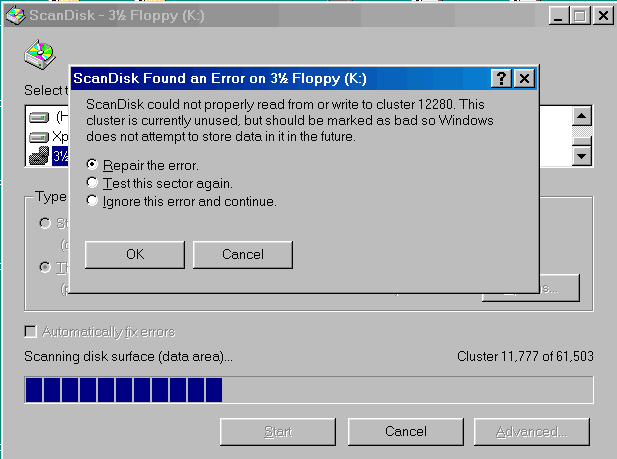
Bad sectors on re-initialized and re-formatted 120MB diskette When I ran ScanDisk with surface test on the LS-120 diskette of the preceding posting (i.e. initialized and re-formatted with SuperDisk Format Utility to 120MB), ScanDisk indicated 2 bad sectors on the 120MB diskette (see screen shot below). The 2 bad sectors in the 120MB format were apparently remnants of the 772 bad sectors (=395,264 bytes), written in wide tracks by the bad regular floppy drive. Since I had "View Results" de-selected (selecting View Results had caused issues during previous experimentation), the SuperDisk Format Utility did not display that bad sectors were encountered. After a full format with GRDuw, the 120MB diskette had no more bad sectors. After re-initializing and re-formatting a de-magnetized LS-120 diskette with SuperDisk Format Utility, one should either run ScanDisk with surface test, or make a full format with GRDuw. GRDuw indicates without issues when a bad sector is encountered and also displays the time required by the full format, which is a rough indication of the quality of the LS-120 diskette. Down-formatting to 720KB vs 1.44MB Tracks written by regular floppy drives are much wider than those written by LS-120 drives when writing in 120MB format, so some of the stuff left-over from the earlier down-formatting must have been interfering. Most likely it is better to down-format an LS-120 diskette to 720KB, instead of 1.44MB: the less stuff is written in wide tracks onto an LS-120 diskette, the less their remnants can interfere with the 120MB format.
-
LS-120 SuperDisk drive under Win98 and DOS
Multibooter replied to Multibooter's topic in Windows 9x/ME
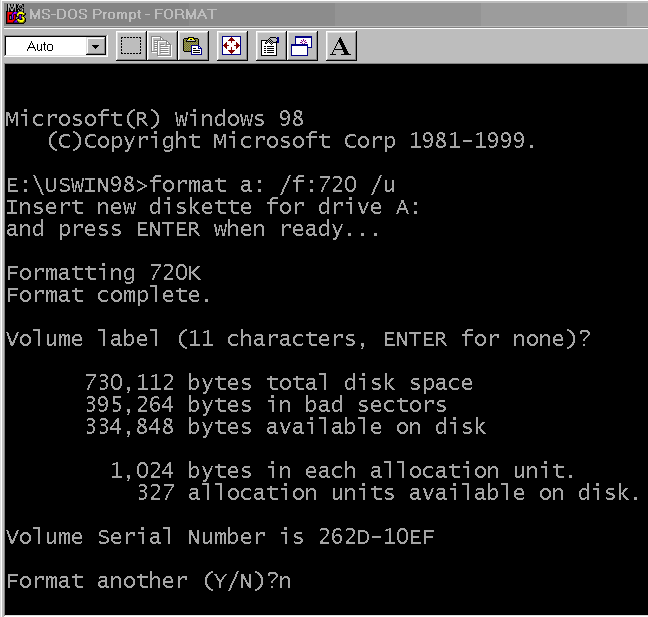
Regular floppy drives for down-formatting bulk-erased LS-120 diskettes Most of my regular floppy disk drives could NOT down-format a de-magnetized LS-120 diskette to 720KB/1.44MB, when connected to the onboard controller of my desktop. a ) The following regular floppy drives, when connected inside the desktop, COULD down-format a bulk-erased LS-120 diskette: - Teac FD-235HG C628U, P/N 193077C628, rev.A00, made in Malaysia - Sony MPF920. Z/161 MAR b ) the following regular floppy drives, when connected inside the desktop, could NOT down-format a bulk-erased LS-120 diskette: - Sony MPF920-Z Z/131 FEB2002 - Sony MPF920-E E/131 - Sony MPF920-F F/FM3 MAY 2002 - Sony MPF920-L - Samsung SFD-321J /ADNR Buslink USB floppy drive and Cubig USB floppy bridge The Buslink USB floppy drive FDD1 http://web.archive.org/web/20030802041314/http://www.buslink.com/index.cgi?view_product=yes&product_sku=677891130316 comes in a big enclosure. Inside is a regular 3.5" desktop floppy drive Mitsumi D353M3D, a "Cubig USBFD-1 © 2000" USB to floppy bridge and a small regular floppy cable, to connect the Mitsumi drive to the USB floppy bridge. This Cubig USB bridge seems to work miracles. When I connected the 5 regular floppy drives listed under b ) to this Cubig USB bridge, they could all down-format bulk-erased LS-120 diskettes to 720KB. I was down-formatting in a Win98 DOS window with the command "format j: /f:720 /u" and used nusb 3.3 instead of the manufacturer-provided Win98 driver. The Samsung SFD-321J /ADNR floppy drive in b ), when connected to the onboard controller in the desktop, could only format 1.44MB, not 720KB. When connected to the Cubig USB bridge, however, this floppy drive could also format 720K, with regular diskettes and with LS-120 diskettes. Maybe the cause for this miracle are longer time-out settings with the Cubig USB bridge, regular floppy drives when connected to the Cubig bridge seem to become slow, and slow to respond, but work fine. Or maybe the cause is that I have installed on my 11-year-old laptop (to which I connected the floppy drives plus Cubig USB bridge) the "Unofficial CD/DISK/SCSI/SMART/VOL IO Subsytem Drivers Fix", but not on my dual-core desktop. Or maybe the onboard floppy disk controller of my desktop has issues ... The Cubig USB bridge has one issue with its connector for the external power supply and the on/off switch for DC-in: When an external power supply is connected and the DC-in switch is set to on, the Buslink USB floppy drive/Cubig USB bridge is installed Ok, but upon reboot it is detected again as "Unknown device". As work-around I have not connected a power supply to the Cubig USB bridge, but instead to the power-in connector on the USB 2.0 PCCard in my laptop. In WinXP Device Manager the Buslink USB floppy drive is listed: - in class Floppy disk drives as "SMSC USB FDC USB Device", with the Device Instance Id USBSTOR\SFLOPPY&VEN_SMSC&PROD_USB_FDC&REV_1.0;\7&3498A363&0 - in class Universal Serial Bus controllers as "SMSC USB Floppy", with the Device Instance Id USB\VID_0424&PID_0FDC\6&C19F6C&0&1 ChipGenius displays for the Buslink USB floppy drive: Device Name: +[b:]+SMSC USB Floppy(SMSC USB FDC USB Device) PnP Device ID: VID = 0424 PID = 0FDC Serial Number: 6&&C19F6C&&0&&1 Revision: 1.0; Device Type: Standard USB device - USB2.0 Full-Speed (USB1.1) Chip Vendor: (No match record) Chip Part-Number: (No match record) Product Vendor: SMSC Product Model: USB FDC http://www.linux-usb.org/usb.ids lists for VID=0424: Standard Microsystems Corp., and for PID=0FDC: Floppy The Cubig USB floppy bridge can also serve as a tool to quickly test a large number of regular floppy drives. The Buslink USB floppy drive is hard to find nowadays. I have added the Cubig USB floppy bridge to my Toolbox in posting #1 Bad sectors on down-formatted LS-120 diskettes Out of 6 left-bay modules containing a regular floppy drive for my 11-year-old Inspiron 7500 laptop: - 2 were able right-away to down-format a bulk-erased LS-120 diskette, without bad sectors , - 1 only after a thorough cleaning with Cleaner http://www.clubedohardware.com.br/download/software/cleaner.zip by Rosenthal Engineering and a non-abrasive Imation Dry Head Cleaning Disk (for LS-120 and regular floppy drives). - 3 regular floppy drives, even after a repeated cleaning, down-formatted de-magnetized LS-120 diskettes to 720KB, with between 50KB and 300KB of bad sectors. The 3 regular Inspiron floppy drives which, even after cleaning, wrote bad sectors actually came from a box of old unused stuff. The down-formatting of a de-magnetized LS-120 diskette appears to be a good test of the writing capability of a regular floppy disk drive. Bad sectors, even if they don't occur in sector 0, may or may not be an obstacle to the successful re-initialization and re-formatting of bulk-erased LS-120 diskettes to 120MB. For example, a first attempt at re-initializing and re-formatting an LS-120 diskette with bad sectors failed, while a second attempt, after a repeated de-magnetization + down-formatting + transfer of sector 0, succeeded. In any case these bad sectors indicate that there are serious issues with the specific regular floppy disk drive. Bad sectors may also be displayed if the LS-120 diskette was not de-magnetized sufficiently long. Repeating the de-magnetization, but a little longer, may help. I have attached a screen shot of a down-formatted LS-120 diskette with 395,264 bytes in bad sectors. Despite of the bad sectors, WinHex could transfer a good sector 0 to the LS-120 diskette after several messages, e.g. "Error #6. Cannot read from Sector 64 of Drive A".
-
LS-120 SuperDisk drive under Win98 and DOS
Multibooter replied to Multibooter's topic in Windows 9x/ME
I have substantially updated posting #88 (review of external LS-120 drives) and added a modded PPD2 drive (parallel port, 2x speed, top DOS drive) to my Toolbox in posting #1. Notes about the bare drives An excellent listing of all Matsus***a bare LS-120/240 drives can be found here http://web.archive.org/web/20030608221432/http://www.mke.panasonic.co.jp/en/down/index.html LKM-F933-1 - good and bad versions The LKM-F933-1 bare drive comes apparently only inside Imation M2, U2, PPD2, M3 and U3 drives. The LKM-F933-1 drive exists in 2 versions: the bad first version, with the sticker on the bare drive displaying a manufacturing date of April 1999, and the good second version with manufacturing dates June thru September 1999. For both versions Win98 displays the same firmware revision. Drives of the first version (April 1999) canNOT re-initialize de-magnetized LS-120 diskettes, while drives of the 2nd version (June thru September 1999) can. No idea what other issues the first version drives have. I would not use April 1999 drives, except for experimentation. All Imation M2 and PPD2 drives seem to come with the bad first version drives of April 1999 inside. The Imation M2 is readily available at ebay, but its main components (the bare bad drive and the strange connector+USB dongle-cable) are not even useful as spare parts. The only components of an M2 drive which could serve as spare parts for other models are the external power supply, the eject button (requires dexterity to transplant into another bare drive) and the 6 screws of the enclosure. The Imation U2 drives, even if they have a dongle-cable like the M2 and the PPD2, have already the good drives of the 2nd version inside. All M3 and U3 drives come with the good second version drives. -
LS-120 SuperDisk drive under Win98 and DOS
Multibooter replied to Multibooter's topic in Windows 9x/ME
VID, PID and USB Serial Number of the M3 drive ChipGenius v3.0.0, database of 30-Nov-2010 http://www.mydigit.cn/mytool/ChipGenius.rar displays the following information for the LKM-F933-1 drive inside the M3: Device Name: +[N:]+Imation SuperDisk USB 120MB(MATs***A LS-120 VER5 00 USB Device) PnP Device ID: VID = 0718 PID = 0002 Serial Number: 6&&28FDDF17&&0&&1 Revision: F523 Device Type: Standard USB device - USB2.0 Full-Speed (USB1.1) Chip Vendor: (No match record) Chip Part-Number: (No match record) Product Vendor: MATs***A Product Model: LS-120 VER5 00 ChipGenius displays "No match record" for Vendor and Model. The vendor database at http://www.linux-usb.org/usb.ids lists for VID=0718 and PID=0002 "Imation Corp." and "SuperDisk 120MB". I have checked 6 M3 drives and the U3 Dell drive with ChipGenius, they all have the same VID, PID and Serial Number. This explains why the M2, U2 and PPD2 drives, which have the same LKM-F933-1 drive inside as the M3, have issues when they are detected when an M3 drive is already installed: Windows gets confused with 2 drives which have the same VID, PID and SN. I encountered a similar problem when I was fiddling around with SDHC card readers with the same VID, PID and SN, see "No unique USB serial number: One cannot use 2 USB card readers of the same make and model at the same time since they have the same USB serial number. I could not find a card reader model where each individual reader sold had a different unique USB serial number." In analogy to the SDHC card readers I would guess that LS-120 drives of the same make and model have all the same USB Serial Number, even if LS-120 drives have all unique serial numbers printed on stickers on the drive inside the enclosure. The serial number on the sticker on the LS-120 enclosure differs from the serial numbers on the 2 stickers on the drive inside. Actually the 2 stickers on the LS-120 drive inside have each a different serial number. So each LS-120 drive has stickers with 3 different serial numbers, no idea why. ATAPI to USB bridge of the M3 drive The VID/PID info provided by ChipGenius is actually that of the ATAPI to USB bridge inside the LS-120 USB drives, not of the bare LS-120 drive inside the enclosure. The M3 drives comes with 2 different versions of the USB bridge: a ) IMATION 52-0000-7364-4 REV 1, easily recognizable from the outside by the black USB connector b ) IMATION 52-0000-7364-4 REV 6, with a white USB connector I have not detected any differences in the performance of these 2 bridges. -
LS-120 SuperDisk drive under Win98 and DOS
Multibooter replied to Multibooter's topic in Windows 9x/ME
Review of external LS-120 drives External USB/Parallel LS-120 drives consist of basically 2 components: the LS-120 drive itself and a USB/Parallel bridge. There are slow 1x speed drives and faster 2x drives, the 2x drives seem to have a superior error correction. Whether a particular drive model can re-initialize and re-format a demagnetized LS-120 diskette depends mainly on the bridge. The Matsus***a SuperDisk Format Utility, when NoCheck is set to 01 in the registry, canNOT re-initialize and re-format demagnetized diskettes in M2, U2, USB-M, PPD2 and PCMCIA drives, only the M3 model and the older parallel model no.11795 can. The ability to re-initialize de-magnetized LS-120 diskettes is an essential feature for LS-120 drives, for experimentation and to repair eventually scare LS-120 diskettes. I can recommend three external LS-120 drive models: 1) Imation Model No. SD USB M3 - as main LS-120 drive - 2x speed - good error correction, esp. with regular 1.44MB floppy disks - can re-initialize and reformat bulk-erased/de-magnetized LS-120 diskettes - contains the good second version of the LKM-F933-1 drive and a USB bridge by Imation with VID=0718 and PID=0002 There is also a U3 OEM model (e.g. SD USB U3 DELL) which seems to be identical to the Imation M3 model, except for the color of the enclosure (the U3 Dell is black, for example) and the company name on the enclosure. 2) Imation Model No. 11795 Parallel Port Drive ("old parallel, no dongle drive") - as second LS-120 drive - 1x speed - substantiually inferior error correction than the M3, but still a much better reader of bad 1.44MB floppy disks than a regular floppy drive - because of its inferior error correction, the "parallel no dongle" drive can be used to measure the quality of LS-120 diskettes: a soso LS-120 diskette has about a 5-10 seconds longer read-time with this drive than a top quality LS-120 diskette, using GRDuw for measuring the read time. - can re-initialize and reformat bulk-erased/de-magnetized LS-120 diskettes - works under DOS 3) Modded Imation SD 120 PPD2 ("new parallel, with dongle") The SD 120 PPD2 drive can be modded into a good 2x parallel drive by replacing its original LKM-F933-1 drive (April 1999) with the LKM-F933-1 drive (June thru Sep.1999) from an M3 - as 2nd or 3rd LS-120 drive, mainly as a fast LS-120 drive for DOS - 2x speed - good error correction, esp. with regular 1.44MB floppy disks - can re-initialize and reformat bulk-erased/de-magnetized LS-120 diskettes The modded PPD2 is more expensive than the M3 or the 11795 because it requires the purchase of 2 different drives. I have added the modded PPD2 drive to the Toolbox in posting #1 and may post more info about it later on. I canNOT recommend the following drives, one may do well staying away from them: SD-USB-M2 (translucent polyethylene-type enclosure, like the M3) SD USB U2 (white enclosure, contains the bad first version of the LKM-F933-1 drive and an E-USB ATA Bridge by SCM Microsystems with VID=04E6, PID=0001) unmodded SD 120 PPD2 (=2x parallel drive, white enclosure) SD-USB-M (blue front piece) Imation/Accurite SD-PCMCIA-A (black) None of these 5 models can re-initialize de-magnetized LS-120 diskettes. If you have already installed with nusb 3.3 an LS-120 drive containing an LKM-F933-1 drive inside (M2, U2, PPD2, M3, U3) and then try to install a different model of these 5 (an M2, U2, PPD2, M3 or U3) Windows 98 freezes during the installation/detection of the second model at "New Hardware Found: USB Floppy Disk". The cause of the freezing seems to be that the LKM-F933-1 drives inside these 5 models have all the same VID, PID and SN. I would warn against ever connecting an M2, U2 or an unmodded PPD2 drive to your system, unless you can restore your system. These 3 drives are connected to the PC with protruding dongle-cables. As long as the M3 and 11795 models are still available, I can see no reason why one should buy an M2 or U2 drive, unless you are a collector of old hardware. The M2 is easily distinguishable from the M3 on a picture, e.g. at ebay: the 2 screws on the top of the M3 enclosure have a much wider distance from each other than with an M2 model. The SD-USB-M contains an older 1x speed drive LKM-F733-1. The bridge inside is the culprit that the USB-M drive cannot re-initialize de-magnetized LS-120 diskettes. When the bridge of an M3 drive is connected to the LKM-F733-1 of a USB-M drive, the SuperDisk Format Utility can re-initialize and re-format de-magnetized LS-120 diskettes. The SD-USB-M drive does not have the compatibility issue of the U2, M2 and PPD2 drives. The USB-M drive works Ok together with the M3 drive and the older parallel drive 11795. I have attached a screenshot of Win98 Device Manager with an M3 drive [VER5 00], an old parallel drive [COSM 03] and an M drive [VER4 07] connected at the same time. The PCMCIA model does not have the compatibility issue of the U2, M2 and PPD2 drives. It contains a 1x speed drive, Device Manager displays "MITBISHI LS-120 SLIM 03". You should NOT use the Accurite driver, only the driver provided by Microsoft with Windows 98SE. The PCMCIA model cannot re-initialize a de-magnetized LS-120 diskette and can only be used with a notebook computer, not with a desktop computer. I have not yet found a PCMCIA to IDE adapter card which works with the PCMCIA LS-120 drive. One of the features of the PCMCIA model is its ability to draw current from the laptop, so the LS-120 PCMCIA drive could be used on the road, away from a regular power supply, e.g. in a country with a different voltage and when you don't have a hard-to-find switchable 110/220V power supply for an LS-120 drive. I have just packed away my M, U2 and M2 LS-120 drives. The good models (9 M3 drives, 1 U3 drive, 1 old parallel, no-dongle 11795 drive, 1 modded PPD2 drive and 2 PCMCIA drives, all in top shape) I am keeping easily accessible for further experimentation..
-
It looks like the 2.88MB floppy drive has finally died. When I powered up the computer with the power supply cable connected to the 2.88MB floppy drive, the computer immediately shut down; when I powered on without the 2.88MB floppy drive connected, the computer started up fine. The 2.88MB floppy drive apparently requires a custom-made floppy cable to work with my motherboard, different from the standard floppy cable. The pin-out of 2 different IBM 2.88MB drives (PC 700 Series and PS/2) is at http://web.archive.org/web/20000612082850/http://servicepac.mainz.ibm.com/eprmhtml/eprm/h266.htm The drive which just died has a separate 4-pin power connector and was perhaps from the IBM PC 700 Series (no +5V, +12V pins in pinout) . The drive for the PS/2 apparently has no separate power connector, since the pinout indicates that it gets its power from pins 3 and 6 of the floppy cable. Does anyone in this forum have a 2.88MB floppy disk drive under Win98 or WinXP?
-
I have been toying with the idea of turning an LS-120 drive into an 2.88MB floppy drive, using special re-formatted 120MB LS-120 diskettes. In order to get some experience with real 2.88MB floppy drives, I have obtained an old internal 2.88MB floppy disk drive, Model MF356F-822MB by Mitsubishi, manufactured May 1997 for IBM Corporation. It also has a sticker on it "IBM FRU 52G3400". The floppy drive has a regular 34-pin floppy drive connector, a power connector with 4 pins and a big blue protruding eject button. I had connected the 2.88MB floppy drive via the regular floppy cable, instead of a 1.44MB floppy drive. Unfortunately I cannot get the 2.88MB Mitsubishi/IBM floppy drive to work. I had set the BIOS of the Asus P5PE-VM motherboard from 1.44MB to 2.88MB. I had tried the 2.88MB floppy drive on 2 different computers with this dual-core motherboard. The 2.88MB floppy drive powers up ok, is displayed in My Computer under Win98 and WinXP as A:, but it cannot read/write/format 720KB, 1.44MB or 2.88MB diskettes. The old DOS program VGA-Copy v5.30, in a command window under WinXP, could actually go thru the steps of writing/formating a 2.88MB ED diskette, with the drive activity lights correctly flashing, but VGA-Copy only displayed yellow bars for each track, i.e. error encountered. When I tried to boot into DOS from a 2.88MB ED boot floppy, the 2.88MB floppy drive was accessed and its green activity light lit up, but after about 10 seconds the System Commander operating systems selection menu came up instead of DOS, i.e. something went wrong while trying to boot from the 2.88MB boot floppy.. What am I doing wrong? Does this 2.88MB drive require some special tricks for connecting? Or is this 2.88MB drive just bad? Is there a chance to fix this drive? Or is the BIOS of the Asus P5PE-VM not compatible with 2.88MB floppy drives, even if it has a 2.88MB selection? I don't have another 2.88MB floppy drive to compare.