Leaderboard


Popular Content
Showing content with the highest reputation on 06/08/2026 in all areas
-
The @AstroSkipper version is still working. I created it back when nobody was maintaining the legacy version of uBO anymore. This had led to @UCyborg also working on an updated version again. I tested it for a while and actually think any further development is a good thing, but unfortunately I found incompatibilities and higher resource usage. That’s why I’ve gone back to my version. In my opinion, it’s not easy to implement features in legacy extensions that were actually developed for webextensions.3 points
-
marked for next update. but I'm still waiting for https://repo.palemoon.org/MoonchildProductions/UXP/issues/3111 to be fixed.3 points
-
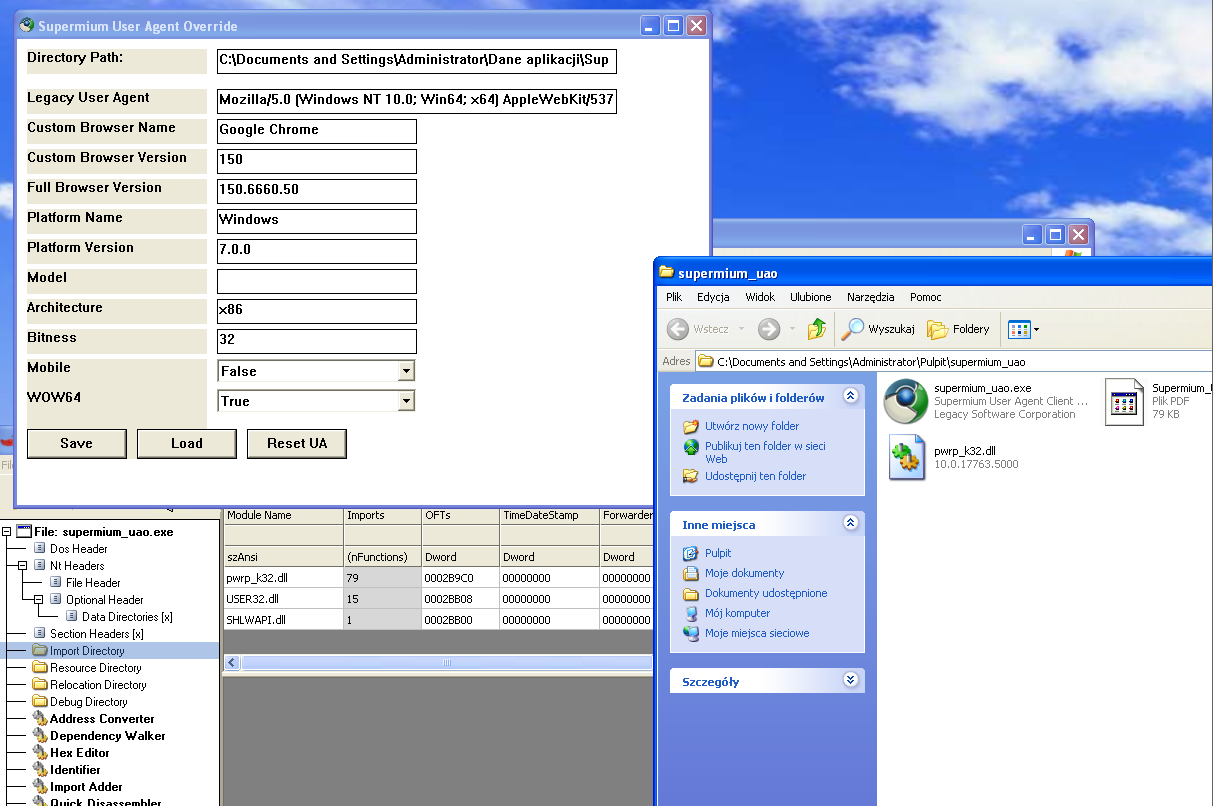
In CFF Explorer, replace the kernel32.dll import with pwrp_k32.dll and copy this file from your Supermium installation. The screenshot was taken on XP RTM
 1 point
 -
My main focus was on fixing all the obvious errors caused by a completely outdated XPI file and its incompatibility with the new format of the assets file. That is why I also changed the uBO ID in my version and created my own assets file. As I already said, it’s not easy to implement patches, and that also includes security patches, in legacy extensions that were actually developed for webextensions. So, if you are more interested in security patches of uBO itself, you should use @UCyborg's version and wait for the most recent ones if they are ever implemented. But if you are rather interested in compatibilty and better performance, you should use my version. So it’s entirely up to you.1 point
-
The error I'm actually getting on XP is - "Entry Point Not Found : The procedure entry point InitializeCriticalSectionEx could not be located in the dynamic link library KERNEL32.dll."1 point
-
You are right. I noticed it last night. I can't find where the error is. It's probably from the database upgrade. I'm working on it.1 point
-
Everything I reported earlier is already old news. The error has been back in full force for almost a week now. Views are no longer being counted at all. For example:1 point
-
Thanks, that's interesting! That's good. As you said earlier, presumably I can just make any changes I need on the 64-bit Windows 10 version, and then copy the generated file to the 32-bit Windows XP version.1 point
-
You don't "need" that tool. All it does is create ONE FILE in your profile directory and Supermium looks for that file. It is called "uao" without any dot-extension. Basically follows this format:1 point
-
https://learn.microsoft.com/en-us/windows/win32/api/winnls/nf-winnls-lcmapstringex : LCMapStringEx is a z9e. LCMapStringW is a z6e with identical first six parameters, so might work. After substituting with ImportPatcher, loads and immediately runs into an Illegal Instruction (SSE+) on my Pentium 2 / 98fe with KernelEx in XP mode.1 point
-
FWIW, this tool has existed since Oct 2024 (!), but was being offered exclusively to Patreon paid-subscription members : https://www.patreon.com/posts/supermium-uach-113234339 (... and it does work under Vista SP2 32-bit ) @NotHereToPlayGames , have you read this ?1 point
-
It needs improved. It doesn't really replace the original CH, it "appends" to them. The red arrow is the "original" (the tool DOES change the version, but not the brand). The blue arrow is the tool's "custom" entries. This THREE ENTRY brand isn't "normal", I *think* (but not sure) that most javascript that "reads" this line will only see the ORIGINAL, it will never see that THIRD "appended" entry that follows.1 point
-
That last statement has been only PARTIALLY true, or even completely FALSE (based on a user setting), since a great-many number of past Chromium versions; since the "mid-50's", shortly after XP/Vista support went away, Chromium also comes with its own Certificate Store, a la Firefox; the OS cert store can be used as a supplement, too, or completely disabled; I'm too lazy now to search for the very first Chrome version that bundled its own cert store, but as the question involves (recent) Supermium, here's some "enlightening" pictures of Supermium's own CertManager: "localcerts" are the ones imported from the OS CertStore; they can be made available to Supermium, or completely ignored, as per my setting in the picture above ... "crscerts" are Supermium's own CertStore root certificates; there's even the ability to export the store to a PEM file, but NOT import a cert from other sources... Site certs are actually "server" certs; these have to be verified against a cert-chain, possibly involving also "intermediate" certs stored transiently in the store, whose end is always a Root Certificate stored in either the browser's store or the OS store; when server certs expire, the server owner has to renew them with new ones issued by a Certificate Authority (paid-for or free, like "Let's Encrypt"); root certs have very long validity durations and when they expire, it's up to the browser or OS vendor to renew them; also, some root certs sometimes get revoked (because of them having been compromised), so the cert store, be it in a browser or the OS. has to be properly "maintained"; "legacy" WinOSes, no longer supported by MS, usually have stale OS cert stores, so these should either be manually updated somehow , or the user should, instead. turn to apps with their own, maintained, root cert stores ...1 point
-
New build of Serpent/UXP for XP! Test binary: Win32 https://o.rthost.win/basilisk/basilisk52-g4.8.win32-git-20260606-3219d2d-uxp-bfaade4306-xpmod.7z Win64 https://o.rthost.win/basilisk/basilisk52-g4.8.win64-git-20260606-3219d2d-uxp-bfaade4306-xpmod.7z source code that is comparable to my current working tree is available here: https://github.com/roytam1/UXP/commits/custom IA32 Win32 https://o.rthost.win/basilisk/basilisk52-g4.8.win32-git-20260606-3219d2d-uxp-bfaade4306-xpmod-ia32.7z source code that is comparable to my current working tree is available here: https://github.com/roytam1/UXP/commits/ia32 NM28XP build: Win32 https://o.rthost.win/palemoon/palemoon-28.10.7a1.win32-git-20260606-d849524bd-uxp-bfaade4306-xpmod.7z Win32 IA32 https://o.rthost.win/palemoon/palemoon-28.10.7a1.win32-git-20260606-d849524bd-uxp-bfaade4306-xpmod-ia32.7z Win32 SSE https://o.rthost.win/palemoon/palemoon-28.10.7a1.win32-git-20260606-d849524bd-uxp-bfaade4306-xpmod-sse.7z Win64 https://o.rthost.win/palemoon/palemoon-28.10.7a1.win64-git-20260606-d849524bd-uxp-bfaade4306-xpmod.7z Win7+ x64 AVX2 https://o.rthost.win/palemoon/palemoon-28.10.7a1.win64-git-20260606-d849524bd-uxp-bfaade4306-w7plus-avx2.7z Official UXP changes picked since my last build: - Issue #3109 - Clamp border-radius value to CSS' internal length clamp value (d47606ce8f) - Issue #2964 - Part 1: CSS Override for `uppercase` and `capitalize` (dff842a949) - Issue #2964 - Part 2a: Correctly Detect End of Buffer in `ToUpperCaseImpl` (7a933598d7) - Issue #2964 - Part 2b: Improve `ToUpperCaseLength` (b2f6fded36) - Issue #2964 - Part 3: JS Override for `ToUpperCase` (5dc2f08e29) No official Pale-Moon changes picked since my last build. No official Basilisk changes picked since my last build. My changes since my last build: - Revert "Revert "Implement FinalizationRegistry" and related commits." (1e38b5ec94) - mozapps/handling: fix application icon handling by reboot12@msfn (811b13e76c) - Revert "Revert "Revert "Implement FinalizationRegistry" and related commits."" (bfaade4306) Update Notice: - You may delete file named icudt*.dat and icu63.dll inside program folder when updating from old releases. * Notice: From now on, UXP rev will point to `custom` branch of my UXP repo instead of MCP UXP repo, while "official UXP changes" shows only `tracking` branch changes.1 point
-
That's actually reassuring. The over-time count is more important than a "real-time" count. I am suprised that it isn't "real-time". But what that does tell us is that all of our *FAKE* MEMBERS with a "0 count" for SIX MONTHS are indeed *** FAKE *** accounts - *axe 'em all !!! without prejudice*1 point
-
Toggle Restartless Add-ons The custom button Toggle Restartless Add-ons provides a drop-down menu to toggle both restartless add-ons and installed plug-ins. It was created by Infocatcher, and its version is 0.1.2.3 of 2016-08-02. Here is a screenshot of its drop-down menu: Here are additional mouse click action for convenient usage of its toolbar button: Clicking onto the toolbar button: Left-click – open drop-down menu Middle-click or left-click with any modifier – open Add-ons Manager Clicking onto the items of the drop-down menu: Left-click – toggle enabled/disabled Shift+left-click – toggle enabled/disabled and don't close menu Middle-click or left-click with any modifier (except Shift) – open add-on page Right-click – open add-on options (if any) The custom button Toggle Restartless Add-ons allows to activate or deactivate restartless extensions and plugins faster without opening the Add-ons Manager. For its installation, the extension Custom Buttons is required. Link: https://msfn.org/board/topic/183923-extensions-and-custom-buttons-for-uxp-browsers-corrections-modifications-adjustments-and-special-recommendations/?do=findComment&comment=1226328 I uploaded this custom button as an XML file. Here is the download link: https://www.mediafire.com/file/gqos7e8aj78tt7k/Toggle_Restartless_Add-ons-ID8.xml/file Cheers, AstroSkipper1 point
-
Custom Buttons - The extension for installing custom buttons The extension Custom Buttons gives a possibility to create or install custom toolbar buttons to enhance the browser's functionality or get easily access to features difficult to be reached. Here is a screenshot of Custom Buttons which is integrated in the Add-ons Manager after installation: There are different ways to install a custom button. If you have written an own custom button, you can add this code via the button 'Add new button'. Here is a screenshot of its configuration window: If you want to install an already provided one, the installation depends on the format of this button. In case it is offered as an XML file, you can install it via the browser's file menu item 'Open file' and click onto the button 'Install', or you do it via 'drag and drop' into an empty browser window. Here is an example what you'll see when you do that: In the internet and especially in the Custom Buttons forum http://custombuttons.sourceforge.net/forum/index.php, you can install custom buttons via a provided link. You see, a lot of possibilities to get and install custom buttons. The last version, you can download via the Classic Add-ons Archive, is Custom Buttons 0.0.5.8.9. The version, which I use and can recommend, is Custom Buttons 0.0.5.8.9.6-fixed8, a more recent and compatible one. It works flawlessly in New Moon 28, Serpent 52, and also in other browsers. I uploaded this version for you. Here is the download link: https://www.mediafire.com/file/wpf38lupdi4fo0s/custom_buttons-0.0.5.8.9-fixed8-signed.xpi/file Cheers, AstroSkipper1 point
-
Serpent Tester Tool The extension Serpent Tester Tool allows to install any extension in Basilisk or Serpent, regardless of target application and versions specified in its manifest. Here is a quotation from the homepage of its developer Nebula-Mechanica, who forked Serpent Tester Tool from JustOff's Moon Tester Tool: @VistaLover brought this fork of Moon Tester Tool to my attention. Until then, I was only aware of the Moon Tester Tool extension. I tested it with a few extensions, and it works as expected. Here is the link to the first version 1.0.0 of Serpent Tester Tool: https://github.com/Nebula-Mechanica/serpent-tester-tool/releases/tag/1.0.0 Cheers, AstroSkipper1 point
-
Moon Tester Tool The extension Moon Tester Tool allows to install any extension in Pale Moon or New Moon, regardless of target application and versions specified in its manifest. Here is a quotation from the homepage of its developer JustOff: Every extension that I have made compatible with Moon Tester Tool works flawlessly. Here is the link to the latest version 2.1.4 of Moon Tester Tool: https://github.com/JustOff/moon-tester-tool/releases/tag/2.1.4 Cheers, AstroSkipper1 point
-
360loader.exe with modified custom flags inside the file 360Loader.ini.1 point
-
GeoFlag customized by @AstroSkipper I used the extension FlagFox for a very long time in Firefox 52.9.0 ESR, Pale Moon, New Moon, and Serpent 52. Although this extension was abandoned for the legacy UXP browsers due to the change to the modern web extensions years ago, it could be updated by inserting its most recent database manually. I did that for a very long time. But, since I realized that there is a new extension called GeoFlag, I replaced the old extension FlagFox by this new one in my installation of New Moon 28. As described in my post about the Pale Moon extensions from Realtriple Software https://msfn.org/board/topic/183923-extensions-and-custom-buttons-for-uxp-browsers-corrections-modifications-adjustments-and-special-recommendations/?do=findComment&comment=1226249, the GeoFlag extension has to be modified to work in New Moon 28. It can be made compatible with Serpent 52, too. Here is the modified code of GeoFlag's install.rdf for Serpent 52: <?xml version="1.0"?> <RDF xmlns="http://www.w3.org/1999/02/22-rdf-syntax-ns#" xmlns:em="http://www.mozilla.org/2004/em-rdf#"> <Description about="urn:mozilla:install-manifest"> <em:name>GeoFlag</em:name> <em:id>{76843B06-C8C5-5088-90C5-679EA2F00123}</em:id> <em:version>31.0</em:version> <em:type>2</em:type> <!-- Pale Moon --> <em:targetApplication> <Description> <em:id>{8de7fcbb-c55c-4fbe-bfc5-fc555c87dbc4}</em:id> <em:minVersion>28.10.0</em:minVersion> <em:maxVersion>31.*</em:maxVersion> </Description> </em:targetApplication> <!-- Basilisk / Iceweasel-UXP / Serpent --> <em:targetApplication> <Description> <em:id>{ec8030f7-c20a-464f-9b0e-13a3a9e97384}</em:id> <em:minVersion>52.9.0</em:minVersion> <em:maxVersion>52.9.*</em:maxVersion> </Description> </em:targetApplication> <em:description>Displays a flag depicting the location of the current server</em:description> <em:optionsURL>chrome://geoflag/content/options.xul</em:optionsURL> <em:homepageURL>https://realityripple.com/Software/XUL/GeoFlag/</em:homepageURL> <em:updateURL>https://realityripple.com/Software/XUL/GeoFlag/update.rdf</em:updateURL> <em:iconURL>chrome://geoflag/skin/logo.png</em:iconURL> <em:icon64URL>chrome://geoflag/skin/logo64.png</em:icon64URL> <em:creator>RealityRipple</em:creator> <em:developer>David Garrett</em:developer> <em:developer>Joseph Birr-Pixton</em:developer> </Description> </RDF> Or, you can use the extension Serpent Tester Tool https://msfn.org/board/topic/183923-extensions-and-custom-buttons-for-uxp-browsers-corrections-modifications-adjustments-and-special-recommendations/?do=findComment&comment=1226306 to make GeoFlag compatible with Serpent. Anyway, this extension is absolutely great and much better than FlagFox. There are many additional features and all of them are working perfectly. Here is a screenshot of its context menu: There was only one feature I unfortunately missed. The menu item My info to get information about the user's external IP and their location. For that reason, I added this item by myself. And, what can I say? It works exactly as expected. Here is a screenshot with my customized settings: Download link of GeoFlag: https://realityripple.com/Software/XUL/GeoFlag/ Cheers, AstroSkipper1 point
-
Frankly, I use Chrome browsers in Windows XP very rarely, only for Googlized websites or comparisons with roytam1's browsers. More recent versions don't mean to be better. 360Chrome v11 is just about bearable in terms of its performance and resource consumption, 360Chrome v13 on the other hand is beyond good and evil in my low-resource system. And yes, the installed version of v13 is 360ChromePortable 13.0.2206 rebuild 9. This is the recommended version (actually 13.0.2107) by @NotHereToPlayGames as far as I know. Supposedly, you won't gain any benefits if upgrading to version v13.5. Yes, I trust build 2107 more. It's been more stable for my use. Mileage may vary. It's NOT a "downgrade". The build numbers seem to confuse far to many people. Halfway through v13, the original creator went to Chromium v86.4240.198. Some of the earlier v13's stem from Chromium v86.4240.112. Even v13.5 and v13.6 use the same exact v86.4240.198 - YOU GAIN NOTHING. I *distrust* v13.5 and v13.6 - I WILL NOT BE UPGRADING THEM (so don't even ask, wink wink).1 point
-
Hello @Dave-H! I have installed ArcticFoxie's not 'un-Googled' 360Chrome v11 and v13., both of them in their latest versions. I opened the Google website and had a look in my history. I can't see any problems here, though. Here are two screenshots: History of 360Chrome v11: History of 360Chrome v13: Cheers, AstroSkipper1 point
-
RealityRipple Software - Pale Moon Extensions All Pale Moon extensions, created by RealityRipple Software, can be installed in New Moon 28, although their website claims that the extensions are only compatible with Pale Moon 31.*. You just have to modify an entry in the file install.rdf inside each of their xpi files. Here is an example of their original code: <em:id>{8de7fcbb-c55c-4fbe-bfc5-fc555c87dbc4}</em:id> <em:minVersion>31.0</em:minVersion> <em:maxVersion>31.*</em:maxVersion> And here is the modification: <em:id>{8de7fcbb-c55c-4fbe-bfc5-fc555c87dbc4}</em:id> <em:minVersion>28.10.0</em:minVersion> <em:maxVersion>31.*</em:maxVersion> BTW, these extensions can also be made compatible with Serpent by using the extension Serpent Tester Tool, for example. Here is a link: https://msfn.org/board/topic/183923-extensions-and-custom-buttons-for-uxp-browsers-corrections-modifications-adjustments-and-special-recommendations/?do=findComment&comment=1226306. My recommended extensions from RealityRipple are Grabit, ExtExp, BIZARRE, uTube, MTube, GeoFlag, qrThis, and Open Registry Key. All of them can be installed in New Moon 28 with the modification above without any problems, and they are working fine as expected. Here is the link to the site with all available Pale Moon extensions by RealityRipple once again: https://realityripple.com/Software/XUL/ Cheers, AstroSkipper1 point
-
uBlock Origin Legacy modified by @AstroSkipper - Part 1 (obsolete) uBlock Origin Legacy 1.16.4.30 is the latest version you can download from GitHub. Here is the link: https://github.com/gorhill/uBlock-for-firefox-legacy/releases/tag/firefox-legacy-1.16.4.30. In the most recent versions of New Moon 28 and Serpent 52, the UI of uBlock Origin's dashboard page has been broken. The menu items at the top of the dashboard page are compressed and no longer visible. However, you can still click on them with the mouse. In previous versions of New Moon 28 and Serpent 52, everything was fine (I didn't check in which version this issue occurred first). I also tested this misbehaviour with a clean profile. Here is a screenshot of this issue: I had a deeper look inside this extension and analyzed several embedded files. I checked all code referring to stylesheets and therefore especially CSS code. After reading a bit in an online CSS reference, I started to understand how this issue might be corrected. It was a good thing that I had dealt a bit more intensively with CSS a few months ago. My idea was in fixing the wrong positioning of the dashboard's menu bar and correcting all distances. Inside the xpi archive is a file called dashboard.css. This file had to be modified. Here is the section with the problematic, original code: html, body { display: flex; flex-direction: column; height: 100vh; justify-content: stretch; overflow: hidden; position: relative; width: 100vw; } #dashboard-nav { background-color: var(--default-surface); border: 0; box-shadow: var(--dashboard-bar-shadow); display: flex; flex-shrink: 0; flex-wrap: wrap; overflow-x: hidden; padding: 0; position: sticky; top: 0; width: 100%; z-index: 10; } And, here is the same section with my modifications: html, body { display: flex; flex-direction: column; height: 100vh; justify-content: stretch; overflow: hidden; padding-top: 35px; position: sticky; width: 100vw; } #dashboard-nav { background-color: var(--default-surface); border: 0; box-shadow: var(--dashboard-bar-shadow); display: flex; flex-shrink: 0; flex-wrap: wrap; overflow-x: hidden; padding: 0; position: absolute; top: 0; width: 100%; z-index: 10; } You see, I changed very little code. I corrected in 'html, body {} the value of the property position from 'relative' to 'sticky' and added a distance to the top of the dashboard page by the property padding-top with a value of 35px. Furthermore, I changed the value of the property position in #dashboard-nav {} from 'sticky' to 'absolute'. Anyway, it was a problem of positioning and correct distances. Now, with my modifications of the file dashboard.css, the dashboard can be opened as before, and all elements are finally fully visible again. This is a screenshot after fixing the issue, to demonstrate the result of my modification: Here is the download link to my fixed version of uBlock Origin Legacy 1.16.4.30: https://www.mediafire.com/file/9lzu12rv5sczto9/uBlock0_1.16.4.30.firefox-legacy-mod-by-%40AstroSkipper.xpi/file Cheers, AstroSkipper1 point