All Activity
- Today
-
 Yes of course, although I only seemed to actually need HTTPSProxy to get my Panda account on the GUI of version 22, and not at all with version 21. There was no interaction with the Panda servers recorded at all in the proxy console with 21. The updates, and activation of the Essential upgrade, seemed to work without using the proxy even with 22.
 -
 Technically, THEY ALREADY HAVE. "We" are only able to get it installed by using programs that are not part of XP, how many of even us MSFN Geeks truly consider that route to be "supporting" XP? And the "exception error" that I was getting in LTSB 2016 indicates to me that they don't support "Win10", but rather only "new Win10".
 -
Yes. Not in LTSB 2016, but yes in 24H2. In 2016, it "installed" but attempts to open the GUI resulted in an "exception error". At what version of 10 did the "exception error" get fixed is unknown. I've already deleted the VM clones. I could reclone/reinstall if screencaps are required. Basically, I know enough at this point that my "real hardware" XP will *not* be getting Panda Dome (it may not get ANY antivirus, to be perfectly honest, it's just for out in the garage).
-
I always raid my Windows temp folder for installation files when doing an installation with an online installer. I usually do it when the first 'do you want to continue' prompt comes up, as many installers immediately delete the temporary files when the installation ends. I've got hold of many files which work as offline installers that way! Well I think that proves the theory. You can't actually install version 23 on XP, only version 22! That 'offline installation' checkbox was there when I installed version 21, the first one I installed. I wondered why later versions didn't offer it, now I know, it won't offer it on XP. I assume that you did actually get version 23 on Windows 10. I do hope this doesn't mean that Panda are soon going to drop XP support for Panda Dome. I suppose as long as the version I've got still gets the equivalent of pattern updates, unlike Malwarebytes 3.5, it's not a problem.
-
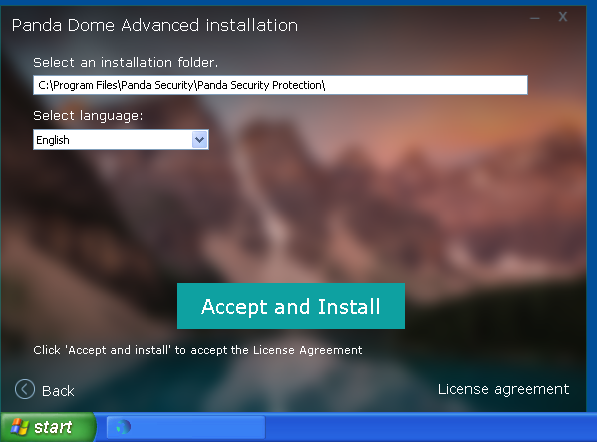
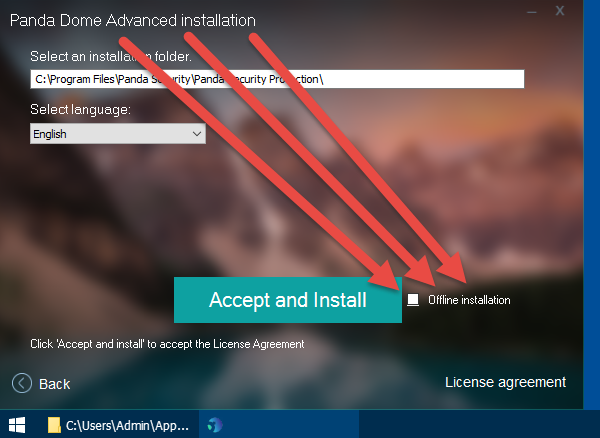
The same exact v23 *offline* installer when ran in Win10 *ALLOWS* for an OFFLINE installation. In XP, the *Offline installation* checkbox is disabled so you are forced to use the offline installer as a "stub" that downloads v22! XP: 10:

-
one moment, ran out of space to allow copy-and-paste screencaps... bad news, that means all previous screencaps will be deleted (my time is too valuable unto myself to use any image hosting services, sorry, just 'fact')...
-
The same exact v23 *offline* installer when ran in Win10 *ALLOWS* for an OFFLINE installation. In XP, the *Offline installation* checkbox is disabled so you are forced to use the offline installer as a "stub" that downloads v22! XP: 10:
-
Also, as another "teaching lesson", monitoring your TEMP folder is generally a MUST during ANY "install". It's also a great way to get (and archive) the "real" installation file(s) even if using a tiny "stub" that downloads the "real" installation files. In general, as long as you do NOT close the "stub" or pull from TEMP folder "while" it is running, then you can copy the "real" installation files from TEMP before the "stub" deletes them.
-
I'll test in a Win10 VM. It really is the *BEST* way to TEST. You can try all the "uninstaller" programs you want, you will find that installing/uninstalling "frequently" has a tendency to "F Things Up". Keep that baseline VM and only install into clones, DELETE the clone when done testing. This approach is the GUARANTEED *ONLY* approach to ***NEVER*** F anything up!
-
Glad to see that you had the same end result as me, with the file from Softpedia. I was going to try again with it myself, but I won't bother now as I know now that I will just end up with the same version 22! Although I didn't try installing without an internet connection, I too had noticed that despite the size of the 'offline' installer, it still actually downloaded the installation files, presumably the 22.03.05 ones! I suppose the next thing to try is using that 'offline' installer file on a Windows 10 installation, to see if it does the same thing. I'm speculating that maybe version 23 does not actually support Windows XP, so if the installer detects XP it installs version 22 instead. Just a thought.
-
Same here. The "original" v23 offline installer (from Softpedia) is denied installation due to you canNOT install ANY of these **OFFLINE**. You MUST be connected and those "communications" will not allow archived installers to install OFFLINE. So basically even OFFLINE installers are being used as "stubs" to download installation files. Pretty clever, actually. The 120MB install .exe is placed in your TEMP folder and THAT is what you are really installing, NOT the .exe that pulled in that TEMP .exe. Also, if you MONITOR your proxy traffic, the PNG files are being used as some sort of method to detect what installer is being executed. Again, pretty clever.
-
You simply need to install KB888111 first, and then install the existing Windows XP audio drivers from the audio manufacturer's website. If you have any problems, contact me.
-
Everything within the SOFTPEDIA download appears to be MUCH more TRUSTED as **REAL** v23.
-
According to Major Geeks, v23 should be dated mid-December of last year. (Major Geeks does not offer the OFFLINE installer.) Softpedia also indicates v23 should be dated mid-December of last year. I personally would not "trust" the files from FIVE DAYS AGO. If they came from an httpS source, I wouldn't be so skeptic. No offense, but I will **NOT** be installing that http-sourced file! It is just not the way I historically do things, don't see the need to change now.
-
As a general rule of thumb, I historically REFUSE to download "trusted" content from http, especially "security" software! The version.ini does report v23. I will install into an XP *VM* later this morning. Several extracted-retain-timestamp files are dated from only FIVE DAYS ago.
-
Hello, I am seeking productivity software and am hoping to find the following for a Windows ME laptop: - A mind mapping and flowchart software - General softwares related to mind mapping - A custom glossary or dictionary maker Is there freeware available? Thanks!
-
I can try tomorrow. Typically, my Modus Operandi is OFFLINE INSTALLER with internet DISCONNECTED during install. My XP rebuild machine is not ready yet. All I can offer is a VM install (generally 90+ percent accurate, but only "real" machine can fully state 100%).
- Yesterday
-
Well, that's puzzling, because that file is exactly the same as the one I used earlier on to install Panda Dome. I've checked its internal version.ini information, and it's exactly the same as you found. However, the version.ini in my installation contains this - [VERSION] VERSION=22.03.05.0000 LINE=4.0 TYPE=Release NINST=20250812_PandaZone BRANCH=PandaZone REV=1 BUILD_DATE=12/08/2025 17:26:32 CID=C9BE6BCA-FB59-4987-9875-D4087D53F0E6 [MODULES] INSTALLER=7.10.00.1004.b NNS=4.7.0.602 PSBOOT=1.0.34.0 RKPAVPROC=2.0.11.0 I can try installing using that file again, but I would wager good money that the end result would be exactly the same! The fact that the official download from Panda's website, albeit an online installer, produces the same result, I cannot explain either. Has anyone here actually managed to get an installation of version 23 installed?
-
 Below link, http://acs.pandasoftware.com/Panda/FREEAV/Promo_pd/FREEAV.exe will afford a relatively big offline installer, sized ca. 162 MiB, with file version 15.14.5.0 and a digital file signature (SHA2 only) of Jan 11th, 2026; I wouldn't install it, but when opening that EXE with 7-zip, file FREEAV.exe\Program Files\Panda Security\Panda Cloud Antivirus\VERSION.INI reads: [VERSION] VERSION=23.00.00.0000 LINE=4.0 TYPE=Release NINST=20251127_PandaZone BRANCH=PandaZone REV=1 BUILD_DATE=08/01/2026 23:11:41 CID=BE719E91-B06D-4263-8AB5-BF70044CC02B [MODULES] INSTALLER=7.10.00.2104 NNS=7.0.0.638 PSBOOT=1.0.34.0 RKPAVPROC=2.0.11.0 so I assume it to be of version 23 ...
 -
Well I've just updated my Panda Dome to the supposedly latest version, and it seems to be working fine, with no detrimental effects on system startup or anything else so far, which is good. Fingers crossed! I was a bit surprised to find that it's version 22.03.5 though, I thought there was a version 23? I tried with the supposedly latest offline installer, and that gave version 22. I then uninstalled that and tried with the public online installer from Panda's website, and that gave version 22 as well. Is there actually a version 23, and if so, where? It all installed fine, and works fine, the only strange thing was that it wouldn't log in to my Panda account. I immediately thought about HTTPSProxy, so I set Panda Dome up with the proxy address and port, and it came good. Not unexpected of course, but the strange thing is that the first version I had installed, version 21, did not need me to do this, it logged in fine immediately with the default settings. I can't explain that, but it's working anyway.
-
I'd be more inclined towards "betting any money" that if we keep pinging "support" that the end result will end up being the REMOVAL of said advertised XP support.
-
Which functions from the Win98 kernel32.dll do you need? It's not as simple as it may seems, many functions in kernel32.dll require certain global variables and special functions whose locations - addresses are hardcoded and they are initialized when the kernel starts, and the locations of these special variables and functions in the Win95 system are not the same as in Win98.
-
Panda Dome's support has to be also made aware that while they advertise Windows XP SP3 x86 support, some features of the application (e.g. activation, sign-in to a Panda account) on that OS require ProxHTTPSProxy (or equivalent), which is NOT part of a standard installation of that OS; perhaps they need to "relax" some of the cipher suites needed to establish those secure connections, when XP SP3 is being detected as the host OS; but given their response record so far , I'm not betting any money in them addressing the mentioned issue(s) ...
-
 I use Panda 22.03.01 and on a dual or quad core systems PSANHost upon boot up doesn't really waste any cycles, only swells to ~100MB and then goes down to ~15MB from what I observed in TaskManager. It's been a wonderful replacement for Avast and/or AVG and their treachery of the XP systems after all this data we've shared with them throughout the years.
 -
 that had to be said. And yes, you were absolutely right. At least, Adlice's support has replied quite quickly. In contrast to that I haven't heard from Panda's support for weeks. Seems to be non-existent.