All Activity
- Past hour
-

Xnview classic 2.13 full version support on windows 95
jumper replied to cov3rt's topic in Windows 9x/ME
Only the IsDebuggerPresent and IsProcessorFeaturePresent imports can be patched out. The other five would require some major code hacking to function correctly. An extender would be the best option. - Today
-
For some reason the Windows 10 Volume flyout appears and StartAllBack can't change it at all
-
Are you on stable channel? What version of SAB are you on? Mine is working fine.

- Yesterday
-
You have DirectX 9 working on 95?
-

Dual Booting XP and 7 on an NVME (non Samsung 950 Pro)?
AaronS replied to AaronS's topic in Windows XP
Okay big update, I managed to get NVMe booting on this board thanks to the latest Omores video where he talks about the NVMe INT13h Oprom project here: https://github.com/Manawyrm/nvme-int13h-optionrom I installed XP SP3 vanilla, then installed the backported Samsung driver (I also use the backported Samsung driver under Windows 7 too), then made an image file from the SATA SSD and wrote it to the NVMe drive, and it works: Trying to install directly to the NVMe drive still can't get past part 2 even with this oprom, something about a misconfigured disk, so still best to install to SATA/IDE drive first. My only issue is, it is EXTREMELY slow at actually booting the drive, once it gets into Windows its fine, I'll mess with some bios options and see if I can fix this because it literally takes like 3-4 minutes to boot lol After this I'll look into replacing the PXE boot rom in my bios with this and then not need any USB stick.
-
@Dietmar NO_OPREGION, NO_VBT and BOTH all gave same 0x50 BSOD at F000EEF3 as before. POST_ABORT_DIAG gave Code 10 in device manager with no BSOD,
-

KB2839299_2003 derived fltMgr upgrade that it is not...
modnar replied to modnar's topic in Windows XP
@Multibooter What are the results of your win2003 fltmgr testing in WinXP SP3? - Last week
-
 Hi there, I wanted to report an issue I recently discovered. If you're using StartAllBack on a Windows touchscreen device, and swipe up to reveal the taskbar, the Windows 11 start menu always appears instead of the StartAllBack one. It seems like a simple fix, if it could be looked into I would really appreciate it!
 -
@Damnation Here comes next try, good luck Dietmar https://www.upload.ee/files/19631358/DEV_0A16_5445_OpenBSD79_STRICT_v5_F000_FIRMWARE_GUARDS.zip.html
-
@Damnation Here comes next try, good luck Dietmar https://www.upload.ee/files/19631358/DEV_0A16_5445_OpenBSD79_STRICT_v5_F000_FIRMWARE_GUARDS.zip.html
-
@Dietmar Back to the same location in memory as before with the OpenBSD edits. https://ibb.co/6779ck9F I suppose I'll need your help to get intel LAN debugging setup and running to solve this.
-
@Dietmar Is it just me or is MSFN running really slow right now?
-
@Dietmar Sorry it took me so long to reply, I finally got around to testing your first set of binary patches. Here is the result with the DESKTOP patch https://ibb.co/4ZykW8pr This seems to have the BSOD occurring at the same memory address as the original. Here is the result with the FALLBACK version https://ibb.co/XxWXGvmr This still returned a 0x50 BSOD but this time pointing to igxpdv32.dll I'll try out your OpenBST STRICT patch and report back.
-
@Damnation Hi, I take the Source Code from OpenBSD 7.9 and look for the difference between the Desktop HD 4400 and the Ultra Low Power HD 4400 with DEV_0A16 in this Panasonic notebook. And I found. Here is a first try with the modded driver Intel 5445 Dietmar https://www.upload.ee/files/19629828/DEV_0A16_5445_OpenBSD79_STRICT_v4_LPTLP.zip.html
-
 Maybe you try port AHCI IA-64 driver 8086 2922 (QEMU) from Server 2008 Longhorn beta Itanium for WinXP Itanium ? I extracted working driver: https://www.mediafire.com/file/hykr33hr2vnoiey/AHCI_IA-64_srv_2008.zip/file
 -
 Yeah you're right. So, in the long run will Windows 2000 KernelEx be completely abandoned since there will be no more modern 32-bit software anymore?
 -
Not really. I tried all the suggestions to no avail. Plus, it happens with a fresh installation. Surely things couldn't get corrupt that fast? c
-
Does this help: https://www.thewindowsclub.com/pfn_list_corrupt-windows
-
This is driving me insane! After years as a holdout, I've finally decided to upgrade to Windows 10, because there was some software I wanted to use which wasn't compatible with 7 (I subsequently discovered a workaround, but I wanted to forge ahead with 10 anyway). However, no matter what I do, 10 will eventually begin crashing with the stop code "PFN LIST CORRUPT" almost constantly, to the point where it's no longer usable (this morning, it happened when I moved the mouse!) I've tried fresh installations. I've tried not installing any programs. I've tried installing to an NVMe SSD. I've tried installing to a spare SATA SSD. I've tried spare, known-good RAM, and I've tested it (it passed). I even tried rebuilding my whole d*** computer (Dell OptiPlex 7050 SFF) with all new hardware. As it happens, the motherboard died shortly after this stop code began appearing, so I thought it might've been a precursor to that, but no. The exact same thing happens with the new motherboard. What the h*** is going on? I've never had this kind of problem with Windows 7! c
-
Hello I just wanted to get some tips and tricks to be aware of when installing Windows XP onto an SSD. Things that I should be aware of? Pros or Cons? Things that I should pay attention to, to keep my machine stable? Settings to make sure to turn on or off? Newer software to install to help make the process smoother? I'm thinking of either cloning the OEM drive of my computer, to make access to all of the hardware more seamless or using one of those XP Integral images.
-
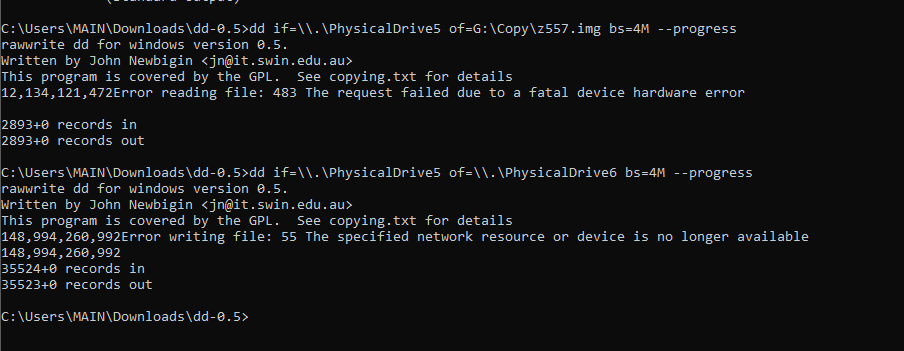
Thanks for that. I wanted to give you an update to where I'm at now... In the attachment, you can see, I first tried to backup the image and kept getting an error. It's an old Maxtor SATA drive. So I'm unsure if the issue is age or the HDD temps (it was super hot when I was doing this). Then I just F it and tried to clone it. It ran into an error, but when I went into disk management, the drive I tried cloning it to, shown as offline and the minute I made it online, it was identified the same way as the Maxtor drive. I put the drive into the computer and it basically loaded with zero issues. I got curious and put the system recovery disk in to see if it would stop me and it didn't. It imaged it as if it was the Maxtor drive. So, clearly (I'm not confident it's that clear) something is in that Maxtor drive's registry that fooled the computer into thinking my replacement drive (a WD Black Velociraptor drive) was the same thing. I'd still like to figure out what is needed to properly get the recovery disk to see the right information as I may eventually want to upgrade to an SSD. I do appreciate your help on this though. You've given me the best advice so far.
-
Clonezilla - unlike what the name suggests - doesn't really make "clones", it tries (and often - but not always - succeeds) to create a "working copy", it has internal "I know it better than you do" provisions to "adapt" the copied contents to the new disk. Not that I am familiar with latest versions, maybe this has changed and there is the possibility to make a real 1:1 copy. See: I would suggest a "pure" dd (or similar), likely this (it depends on specific OS and version) might be slower, but surely it will work. The procedure might be a little different if you are running Windows (XP or similar), what may happen is the overwriting of the Disk Signature (that instead you want to preserve/clone). Basically, the moment a NT system finds that two connected disks have the same signature, it silently changes the signature of one of the two (and which one might be "random", so you risk changing the disk signature of the "original", for newer versions some things have changed, though: To be on the safe side, you should first save (to fille) a dd-like copy of the first absolute sector (MBR) of the original disk. Then connect the new disk. Then dd directly the whole original disk to the new one. Then disconnect the original disk and re-apply to the new disk the saved MBR. On Windows, I would use Clonedisk: https://labalec.fr/erwan/?page_id=42 though nice and GUI it needs however a little bit of familiarity with the available options. Or (good ol') dd for Windows: https://reboottools.com/programs/dd-for-windows/ Otherwise, on *any* Linux the plain dd is just fine.
-
 Some info on missing exports for gom player 2.1.43.5119 on a windows 95 osr 2.5 fully updated system: . gom.exe - user32.dll - - AnimateWindow, GetMonitorInfoA, MonitorFromRect . gomx.dll - d3d9.dll - Direct3DCreate9 . libavcodec.dll - kernel32.dll - InterlockedCompareExchange, InterlockedExchangeAdd . Mpeg2DecFilter.ax - kernel32.dll - IsDebuggerPresent. USER32.dll - ChangeDisplaySettingsExA, ChangeDisplaySettingsExW
 -
Xnview classic 2.13 full version support on windows 95
cov3rt replied to cov3rt's topic in Windows 9x/ME
I decided now to try to make Irfanview 4.44 work as an alternative, but faced many unexpected results, like no fully working autohotkey 1.0.48.5 / autoit 3.1.12.1 scripts, and almost half of the plugins in the package do not work. I did mention in my other thread on patch9x that i was able to work around the SSE2 instructions problem so it will at least open regular jpeg/jpg files, but there are still many things unresolved for my purpose of using the program. I do not plan on trying to make most of the non working ones work, i did several attempts with ghidra with chatgpt but was not able to get anything to work yet. My main focus is webp.dll which currently does not work. You can use some older versions for some of the plugins and they'll work, like jpeg2000.dll version 4.3.3.0, but a good remainder of plugins still do not work. Here is what's missing for unpacked webp.dll checked on a fully updated windows 95 osr 2.5 system: kernel32.dll missing exports ( implicitly dependent modules ): EncodePointer DecodePointer GetModuleHandleExW IsDebuggerPresent IsProcessorFeaturePresent SetFilePointerEx InitializeCriticalSectionAndSpinCount -
@Damnation I just bought this Panasonic at Ebay, but from Germany. It will be here in coming week and then fun starts Dietmar Comparison: Damnation's CF-53 Mk4 vs. my CF-53 Mk4 DAMNATION MINE MODEL CF-53 Mk4 CF-53 Mk4 CPU Intel Core i5-4310U Intel Core i5-4310U 2.0 GHz / 3.0 GHz Turbo 2.0 GHz / 3.0 GHz Turbo PLATFORM Haswell-U / ULT Haswell-U / ULT GRAPHICS Intel HD Graphics 4400 Intel HD Graphics 4400 GPU DEVICE ID DEV_0A16 DEV_0A16 DISPLAY 14" 14" 1366 × 768 1366 × 768 RAM 16 GB DDR3 4 GB DDR3 STORAGE 256 GB SSD 320 GB HDD WEBCAM No Yes / offered DVD Yes DVD Multi WLAN Yes Yes BLUETOOTH — Yes LAN Gigabit Ethernet Ethernet USB 3.0 2 2 USB 2.0 2 2 VGA Yes Yes HDMI Yes Yes RS-232 Yes Yes SELLER OS Windows 10 Pro Windows 10 Pro / Win 7 MARKET Canada Germany KEYBOARD North American German EBAY ITEM 256347295953 144515309431