All Activity
- Past hour
-

released: bug fix for win32k.sys/fsg_RunPreProgram
Start Me Up replied to Start Me Up's topic in Windows 2000/2003/NT4
I am looking for updates that I haven't listed, yet. There should be something like 10 or 20 different versions of win32k.sys. But I know only 3. -

released: bug fix for win32k.sys/fsg_RunPreProgram
NotHereToPlayGames replied to Start Me Up's topic in Windows 2000/2003/NT4
ie, will the win32k.sys file get you what you need? or is the KB....... that it was pulled from required? -
released: bug fix for win32k.sys/fsg_RunPreProgram
NotHereToPlayGames replied to Start Me Up's topic in Windows 2000/2003/NT4
I have at least ONE in your list. BUT please note that I did not do XP Updates in the past by way of KB....... files. I slipstreamed from well-known Update Packs so I technically have this/these as a "WIN32K.SY_" file inside an XP install disk's "I386" folder. It's just a zip-compressed "win32k.sys" so 'inside' is the untouched file embedded inside an Update Pack.
-
Looks like their compatibility claims are bogus. I have a few older versions than you listed and also 3.70 (last good: with normal AltGr function for key shortcuts), but never ran any on WinNT 4.0, only Win2000...
- Today
-
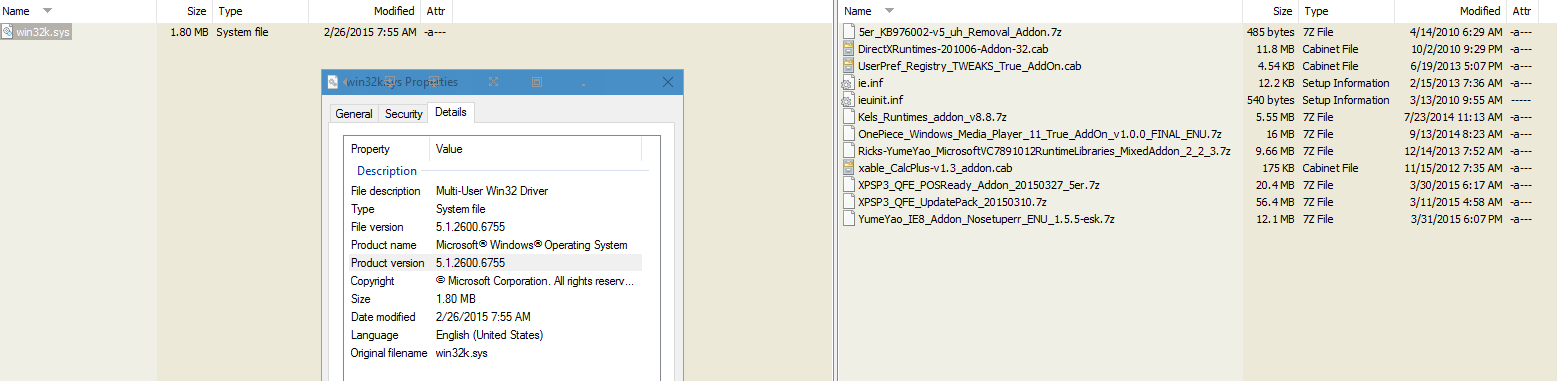
Hello Windows 2000 fans, when using vanilla Windows 2000 with a rather new version of win32k.sys, there is a bug in the function "fsg_RunPreProgram" which reduces that drawing quality of some fonts. This bug was fixed with the version 5.00.2195.7610 by Microsoft. However, it was reintroduced into the operating system shortly afterwards, so it still exists in the newest version of win32k.sys (5.00.2195.7640). To fix this bug there are 2 ways: Use Extended Kernel 3.1H or newer. Blackwingcat fixed this bug. If you don't like or can't install Extended Kernel, there is now a second option available: WINDOWS2000-OTSKB3037639-V1-X86-INTL.exe There is an article in the knowledge database available with more information on the nature of this bug. There is some more auxilliary information available, which I do not plan to distribute among end users: code.htm --- If someone likes to help with an upcoming Windows 2000 update: I am looking for Windows XP updates which contain a version of win32k.sys. My list of known updates is currently pretty short: KB3013455 contains version 5.1.2600.6712 KB3034344 contains version 5.1.2600.6755 KB4039384 contains version 5.1.2600.7334 Thank you.
-

Flash 9 not working on NT 4.0? (consolidated thread)
reboot12 replied to ironman14's topic in Windows 2000/2003/NT4
What flash sites work in WinNT 4.0? - Yesterday
-
After December 2025 Patch Tuesday, Windows Defender on 1607 can't download definition update when WU is disabled. But offline update still works.
-

Experimenting with GPT and Hard Disks >2TB under WinXP
user57 replied to Multibooter's topic in Windows XP
the same discussions where around in the past from what the xbox solution was just to increase the sector size from 512 to 4096 - also there is some information about that this has problems either a problem with system based buffers or with user buffers also the one core api is saying to have that problem solved having current informations would be fine -
 OK will try that, thanks.
 -
Go to your Windows Updates settings and set your ACTIVE HOURS to the hours that you do not want machine reboots to occur during. Reboots due to updates will only occur OUTSIDE of the "active hours".
-
I'm installing a fresh copy of Windows 11 pro on remote workers laptops and MS surfaces. I would like to run the OS updates overnight so the machine reboots and carries on until all the updates have been applied. Is there anyway I can set this up to work automatically please? TIA
-

Experimenting with GPT and Hard Disks >2TB under WinXP
pcalvert replied to Multibooter's topic in Windows XP
If you can't use the entire disk, try using multiple partitions. -
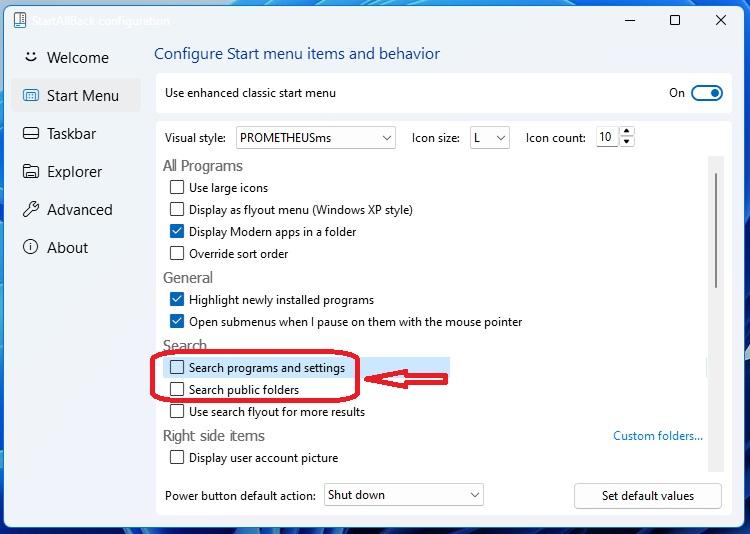
hi can you bring back the option to remove search programs and setting?
-

Flash 9 not working on NT 4.0? (consolidated thread)
Leokids123 replied to ironman14's topic in Windows 2000/2003/NT4
I'll deal with this later,but anyways,i've sucessfully backported Flash 9.0.289.0 to 95 and NT 4.0,i've tested on NT 4.0,i might one day test it on 95... -
Flash 9 not working on NT 4.0? (consolidated thread)
Leokids123 replied to ironman14's topic in Windows 2000/2003/NT4
Is this decimal,hexadecimal or anything? I use HxD... -
Flash 9 not working on NT 4.0? (consolidated thread)
Start Me Up replied to ironman14's topic in Windows 2000/2003/NT4
I think you are facing the problem that there is a specific version as a minimum requirement in the exe file. exe files, dll files and sys files are in the portable executable 32 file format. Open the file with a hex editor. The first byte (at the offset 0x0) should have the value "0x4d" ("M"). The second byte (at the offset 0x1) should have the value "0x5a" ("Z"). The 4 bytes at the offset 0x3c should contain a little endian encoded integer. Something like "12 34 56 78" which is 0x78563412. Use the integer as an offset in the file. The offset should point to a byte with the value "0x50" ("P"). The next byte should have the value "0x45" ("E"). The next byte should have the value "0x00". The next byte should also have the value "0x00". Check the 4 bytes starting at the offset from the integer + 0x40. If the file is for Windows 2000, then it should have the value "05 00 00 00". If the file is for Windows XP, then it should have the value "05 00 01 00". Reduce it to "04 00 00 00" to reduce the requirement to Windows NT 4.0. Check the 4 bytes starting at the offset from the integer + 0x48. Reduce it to "04 00 00 00". Save the file. Do not reduce the value below "03 00 01 00". --- Description of the file format: http://ontheserver.de/Downloads/entpackt/Dokumentationen/Programmierung/Betriebssystem-spezifische/Windows/Dateiformate/ausführbare Dateien und Bibliotheken/deutsch.htm -
Flash 9 not working on NT 4.0? (consolidated thread)
Leokids123 replied to ironman14's topic in Windows 2000/2003/NT4
I give up,no versions of Flash 10 actually worked...The Helper when i try to open it throws a incompatible with NT 4.0 error that typically happens if it's a Windows 2000 app linked dynamically (and not statistically,it would be easier for me) so i'm assuming it requires Windows 2000 and there's nothing i can do to fix this... -
Flash 9 not working on NT 4.0? (consolidated thread)
Leokids123 replied to ironman14's topic in Windows 2000/2003/NT4
I've tried 10.0.45.2 and while it succeded to install,it seems to have failed to run with Retrozilla... I'll try the older versions,and if any of them work or don't work,i'll tell you,but...if it doesn't work,i'll give up... - Last week
-
Flash 9 not working on NT 4.0? (consolidated thread)
Leokids123 replied to ironman14's topic in Windows 2000/2003/NT4
As for Flash 10 and potentially even 11,what's the last version of Flash that has the old installer? I want to find the last version of Flash that potentially works without having to deal with the installer throwing the error "is not a valid Windows NT application"... Besides,extracting the 9.0.289.0 installer turned out to be rather easy... -
Flash 9 not working on NT 4.0? (consolidated thread)
Leokids123 replied to ironman14's topic in Windows 2000/2003/NT4
Sorry if this is necropost but... https://drive.google.com/file/d/174IHPJVd2AshHT0atFRC7e1mIfT3lqxz/view?usp=drive_link I've taken the last 98/ME version of 9.0.289.0 and patched out the MonitorFromWindow... Here's the zip above this. Make sure you copy to the folder where it installed to... -
some old versions of nitroPDF work correctly on XP.
-
.thumb.jpg.3380977fbb279297b3f0d0291cc82d01.jpg)
Language Bar Is Not There And Won't Switch Between Languages!
tweak replied to trancer03's topic in Windows Vista
It has always been so. This problem is exactly the same age as the Extended Kernel for Vista has existed. No one knows where this came from or what the reason is, including the young creator of the Extended Kernel himself, because this development was abandoned by him a long time ago. Back in the days when I was still trying to use the Extended Kernel for Vista, I found the only solution - to use a third-party application to switch the language. So, since I am a cosmopolitan, I have no political prejudices, and I am not burdened with a complex of historical inferiority, I eventually came to the conclusion that the Punto Switcher would be the best choice. It is multilingual, has a hotkeys and a bunch of other settings, and is displayed in the taskbar in both alphabetic characters and more pleasing-to-the-eye flags. Just try this, and you'll forever forget that Windows ever had a language bar. However, you can also try something else. Good luck ;) -
After installing KB5071546, StartIsBack causes Explorer to crash. Uninstalling StartIsBack fixes the problem.
-
https://w7revived.chefkiss.dev/steam/SteamDec42025Win8.7z Steam December 4 Build Windows 8/8.1
-
Experimenting with GPT and Hard Disks >2TB under WinXP
user57 replied to Multibooter's topic in Windows XP
well then just move enough files on that harddrive until it extends the 2 TB limit, better would be to use the entire disc if the files are then corrupted or the checksum test has different value´s it dont work