All Activity
- Today
-
 It’s best not to celebrate just yet; wait until the PSANHost.exe process has been running stably again over the next few days or weeks. It may be stubbornly refusing to crash, but as we’ve learnt the hard way, this monster is capable of behaving quite differently. Please report here if it crashes again!
 -
 @AstroSkipper Panda 21 is working without any problems what so ever, so far so good. I reckon it is the best choice ever. I do have Avast 18.5 but I would never go back to it. Kind of dodgy. Thank you very much indeed !
 -

MyPal 68
NotHereToPlayGames replied to Jody Thornton's topic in Browsers working on Older NT-Family OSes
Define "properly"? XP (ie, most of you) has different "smooth edges" font settings and not all of you are using the same OS SETTINGS. Are you smoothing the edges of fonts? If so, are you using Standard or ClearType? Even if the browser is denied that "Bitter" font, it still has to fall back to something, and if that font isn't even installed, then it falls back to something else entirely. Then there is also GDI versus DirectWrite. There are a lot of factors at play here. -
@Tangy Perhaps you can try Panda Dome 21.01.00. I am under the impression that this version is working better on Windows XP. It's definitely worth a try. @Dave-H That's what I replied to @Tangy.
-
 Panda 22 is still warning me about dodgy website links embedded in other sites, so I guess the protection is still OK at the moment. Do you have a link to the offline installer for 21, should I need to use it?
 -
I assume that these updates are for offline protection. So blocking them may lead to fail detecting malicoius threads when disconnected to the internet. But as long as you are connected to the internet, Panda Dome should actually use the cloud engine for scanning files. That's the right attitude.
-
Oh I'll certainly give it a try if I can't rescue my present installation. I still have an open support case about it! If nothing comes of that, trying version 21 will be my next move. Strange that an older version would apparently be happy with the same update files which apparently crash the later version, though.
-
That’s, of course, the ultimate way to block incompatible updates. But that wasn’t what I suggested. Not keen on Panda Dome 21.01.00? It’s running without any problems for me at the moment.
-
I've now tried as a test removing the cache folder completely from my Panda installation. Rather unexpectedly, the program has not recreated it. It's been running for ages now like that with no crashes, but it's not updating, presumably because it has nowhere to put the files! Doing a manual update from the option in the settings does nothing. I guess I could leave it like that, but of course, like the version of Malwarebytes I used on XP for years, it will eventually become useless for protection because of no updates. I tried Avast on my system a few years ago and never got it to work on my desktop system. Even the supposedly compatible version for XP would not run, its core service obstinately refused to start, reason unknown. I even worked with Avast's technical support people about it, and even they couldn't determine what the problem was. I tried a test install on my netbook under XP, and that worked perfectly, so what the problem was with the desktop remains a mystery.
-
Long time ago, I used COMODO Antivirus for a short time. It didn't convince me even back then and I uninstalled it. But COMODO Internet Security Premium 12.0.0.6818 was, in fact, the last version that was claimed in some forums to run flawlessly on Windows XP. So if this version doesn't work properly anymore, you can forget about COMODO as antivirus protection. P.S.: I found this one here advertising the use under Windows XP: https://antivirus.comodo.com/security/free-antivirus-xp.php
-
 COMODO Internet Security Premium 12.0.0.6818 Download link: https://web.archive.org/web/20190502052352/http://cdn.download.comodo.com/cis/download/installs/1000/standalone/cispremium_only_installer.exe I was curious to test this COMODO Antivirus, so here are my test results: Day of testing: 5th of July 2026, few days ago I didn't install Comodo Firewall from installer Asks me to reboot before using the program hmm, OK I rebooted With Internet OFF, all scans don't work hmm, all say 'Scan Aborted' after 1 second hmm; if I try any type of Scan it says 'STATUS: Updating' and then 'STATUS: Scan Aborted' after 1 second hmm. With Internet ON, all scans don't work hmm, all say 'Scan Aborted' after 3 seconds hmm; if I try any type of Scan it says 'STATUS: Virus Database Update (1.7 %): Checking for updates...' and then 'STATUS: Scan Aborted' after 3 seconds hmm. So my conclusion with this COMODO Antivirus for now is: All scans don't work hmm, all scans abort after 1-3 sec hmm There are few places in the Options where you can 'disable Virus database Update before Scan', I disabled all of them (I think) and all other similar options, but I still couldn't get it to work, I couldn't get 1 proper Scan hmm. Has anyone tried this COMODO Antivirus? Does the Scan work properly for you, or you also get 'STATUS: Scan Aborted'?
 -
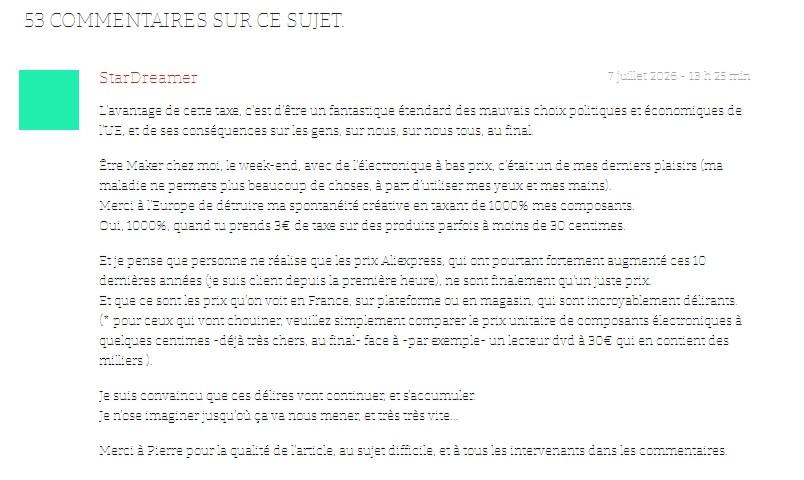
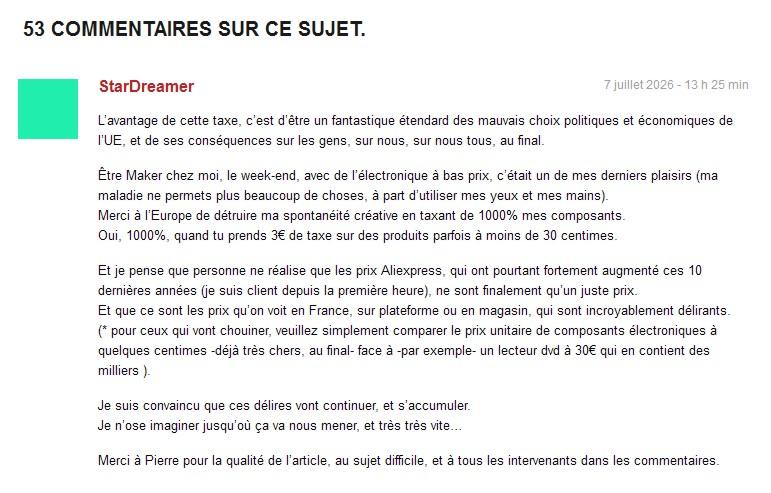
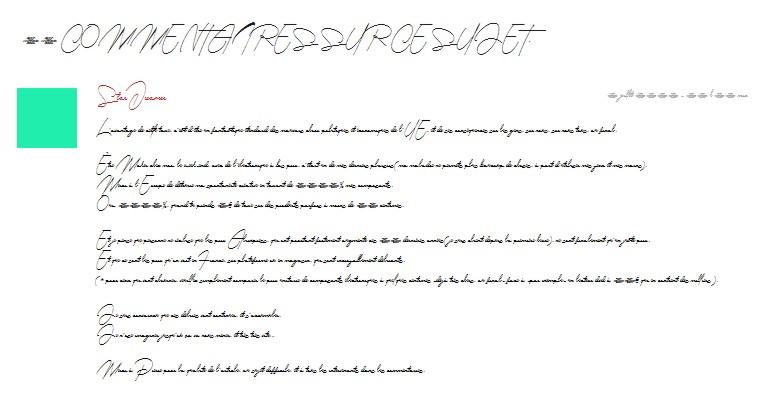
This is the font being used by https://www.minimachines.net/actu/taxe-petits-colis-double-peine-142239 https://fonts.googleapis.com/css?family=Bitter I agree, it doesn't render well... Now, lets block fonts.googleapis.com (which I usually do) . . . . . . but that doesn't prove anything because that just corresponds to my settings. We could do this all day . . . The question remains. Why doesn't the Bitter font render properly? . . . and no more pictures of people's own font setting. Ben.

-
You have to download the last XP-compatible version 11.4.0. Here is the original website with this version: https://web.archive.org/web/20240830175125/https://www.iobit.com/de/malware-fighter.php Download link: https://www.filepuma.com/de/download/iobit_malware_fighter_free_11.4.0.1360-40845/download/ Please test this version to find out how it works and whether it still receives definition updates or not!
-
And that's one more reason to avoid Avast, at least on Windows XP. I’ve had so much trouble with Avast in the past that I’ll probably never use it again, even on other operating systems. Even though I’m not a fan of Avast, it’s quite possible that the lack of an internet connection is the reason why your attempt failed. Try again with an active internet connection!
-
 You know, Avast 18.5.2342 is a non-starter, offline installation (without internet conncted) starts and installs everything, at the end where it's the option to restart, it also says it failed. Upon restarting it's as if nothing was installed. Idi0t bit Malware fighter is also a doesn'tworkstation. It's for vista and up, as if you can't run a stupid AV program with minifilters in XP. Must be a conspiracy against XP. Nasty!
 -
If I wanted to, I could switch to other fonts that look much nicer and more professional in a matter of seconds. It’s really simple to do this in the Mypal 78 settings or using a CSS stylesheet, which I can load on the fly at any time via my forked UserCSSLoader script. But as long as I can read everything clearly, I couldn’t care less about the font used.
-
MyPal 68
NotHereToPlayGames replied to Jody Thornton's topic in Browsers working on Older NT-Family OSes
Agreed !!! I'm only pointing out that the "discussion" here probably should be about "tuning" cleartype font rendering on the machines that display such UGLY A$$ fonts. Mypal isn't really doing the font rendering, the OS is, and how that OS is "tuned" will have a HUGE difference in what fonts "look like". -
My screenshot is a PNG file. The text can be well read, and therefore the sceenshot is ok. It’s not about winning a rendering prize. And as for Mypal 78 on Windows 10, it makes absolutely no sense to use that browser there. There are plenty of up-to-date browsers available for Windows 10. Mypal 78 was designed for older operating systems such as Windows XP. On those systems, more modern browsers are urgently needed – particularly on low-spec computers where, for example, Supermium isn’t an option.
-
MyPal 68
NotHereToPlayGames replied to Jody Thornton's topic in Browsers working on Older NT-Family OSes
These types of "issues" can **ALWAYS** be fixed by the end user !!! Just replace the "Bitter" font defined by that page's CSS to a different font, whoala, problem solved. ie, the below is from that page, just replace Bitter with the font of your liking. body, .small-title, .widget-title, .tv-featured-title { font-family: Bitter; -
MyPal 68
NotHereToPlayGames replied to Jody Thornton's topic in Browsers working on Older NT-Family OSes
Serious question - are SUBPIXEL RENDERINGS "captured" differently via bmp, jpg, png? And are SUBPIXEL RENDERINGS screencaps rendered differently from one computer to the next? ALL of the font ugliness in this discussion all seems tied to SUBPIXEL RENDERINGS and "antialias fonts". Edit: every OS and every graphics card and every driver for that graphics card will effect the rendering differently. So maybe, just maybe, this isn't really a Mypal discussion but a graphics card and/or driver problem. I know some people go through GREAT LENGTHS to find "exact" drivers for SUBPIXEL FONT problems. The way that Mypal uses DIRECTWRITE or GDI in XP will vary greatly from one XP setup to the next. Not all XP machines will render them the same. -
MyPal 68
NotHereToPlayGames replied to Jody Thornton's topic in Browsers working on Older NT-Family OSes
Zero problems here. "Bias" against me aside. @genieautravail's is definitely the UGLIEST. But then @AstroSkipper's. And @Skorpios's being the least ugliest. Okay, those two are close enough to be a tie. But here on Win7 strictly for testing, all three are UGLY. This thread and Mypal is NOT strictly for XP. But no, even the author's Github cites "Win10 never checked, its specific bugs wont fix.", so I did test in Win7. Sometimes I forget how 80% of MSFN is all XP users and the rest of us aren't really supposed to be here. So carry on, I simply thought screencapping could be PART OF the problem. -
In that case, your computer must have a problem. On my Windows XP computer and my Android tablet, everything looks fine apart from the screenshot that @genieautravail posted.
-
MyPal 68
NotHereToPlayGames replied to Jody Thornton's topic in Browsers working on Older NT-Family OSes
I think that part of the issue in this discussion is the "it's all relative" nature of the posted screencaps. ALL of the screencaps ( @AstroSkipper's and @Skorpios's and @genieautravail's ) look like total CRAP on my computer. But when I visit the website directly, my computer looks like NONE of those screencaps and the fonts (default settings, no extensions) look fine and no blur. It seems to me that whatever your system is doing on your own systems is affecting the screencaps on your own systems also. -
.thumb.jpg.e861836bb05fe824ad8ec1930061ee43.jpg)
MyPal 68
genieautravail replied to Jody Thornton's topic in Browsers working on Older NT-Family OSes
@AstroSkipper Strange, as I explain in the previous post, I must do the reverse (not use the default settings). On your screenshot, it seems that the font isn't the default font of the website... Regards -
MyPal 68
genieautravail replied to Jody Thornton's topic in Browsers working on Older NT-Family OSes
@Skorpios Thank you for the tip! For me, I must do the reverse. If I disable the option << Allow pages to choose their own fonts >> the font is again readable even if it is not the default font of the website. But with the option enable by default, I get the blured font display. Regards