




Everything posted by ivanbuto
-
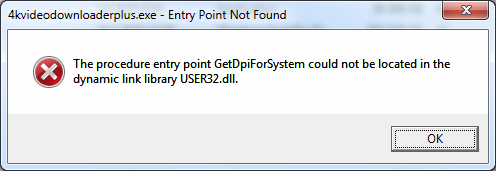
The latest version of 4K Video Downloader Plus (25.3) no longer works on Windows 7. https://www.4kdownload.com/downloads/34# Version 25.2 still worked (although officially 4K Video Downloader+ was declared not to work on Windows 7 from the beginning).
-
So Teams auto-updated itself to version 1.8.00.6262 on my computer. However, this version will no longer launch on Windows 7. I re-installed the previous version 1.8.00.1362.
-
Can you tell more details about Googe Drive? I still have v68 installed. Was thinking about installing a newer version, but haven't experimented with VxKex yet.
-
An update regarding Teams classic on Windows 7. The latest version that can be installed on Windows 7 is 1.8.00.1362: https://microsoft-teams.en.uptodown.com/windows/versions As can be read on the Microsoft Teams Version update history page, this is the last versions that uses Electron 22. From version 1.8.00.4966, Electron 31 is used and the installer won't run. Nonetheless, one cannot use Teams anyway, since it's artificially blocked. It can still be used to connect to meetings.
-
For anyone using Signal Messenger and wishing to install a desktop version, this website offers one that works on Windows 7: https://exfiltrated.com/ I have tested it and seems to work fine.
-
Thanks, but I have pretty much no idea how to go about it. The files are stored here: D:\Users\***\AppData\Local\Microsoft\Teams\current The user files here: D:\Users\***\AppData\Roaming\Microsoft\Teams I found no .css files in either of those directories. If you have a more detailed procedure what, where and how to modify, please write. I just actually managed to get into Teams by clicking a meeting link from a different organization and then switching organizations to my "home" organization. Somehow, the pop-up disappeared when during this procedure. But I would prefer a more elegant way to get in.
-
Getting back to this... any advice on how to block the overlay pop-up? It's quite absurd that the application still works, but is being blocked. On Windows 10, they declare it to be usable until July 2025.
-
Hmm, interesting... how could you block it, any advice? Via recent web browsers that support Windows 7 (such as r3dfox), it's possible to use also the new Teams. However, I prefer the desktop application if possible. And thus far, I actually like the classic client better. The other question is whether the new client could be made to work on Windows 7 with some patches... but seeing as VxKex is not developed further, it probably won't happen.
-
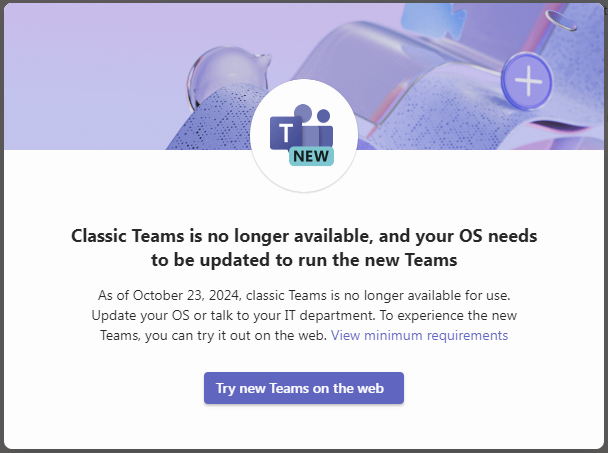
Beginning today, the classic Teams client no longer works on Windows 7. It seems like an artificial block from Microsoft. I can still see all current conversations in the background, I cannot get rid of this pop-up and access the application. The classic client is still supposed to work on Windows 10 until July 2025.
-
Microsoft Teams on Windows 7 has about one more month to go before being terminated: https://learn.microsoft.com/en-us/MicrosoftTeams/teams-classic-client-end-of-availability "Starting October 23, 2024, classic Teams won't be available on Windows 7, 8, and 8.1; and macOS Sierra (10.12), High Sierra (10.13) and Mojave (10.14). If you use classic Teams on these systems, you'll see warning messages starting in August. On October 23, 2024, you won't be able to use the classic Teams app anymore. If you can't update your Windows to a supported browser, you can use the new Teams web app in a supported browser instead." For some reason on Windows 10 it will be possible to use classic Teams until July 2025. I was wondering whether the new Teams client could be made to work with VxKex (it's possible to download the .msix installer and extract the files), but I have not examined this more.
-
And how did you manage to install v2007? Did you download setup files via command line and did the installer work? I think version 2007 probably doesn't have much added value compared to 2002 at this point?
-
Would definitely be curious to try this out! But how to go about installing it? I am still on version 2002...
-
Just tested VidCoder 10 now, it installs, but no longer launches on Windows 7. Version 9.20 is the last one that works.
-
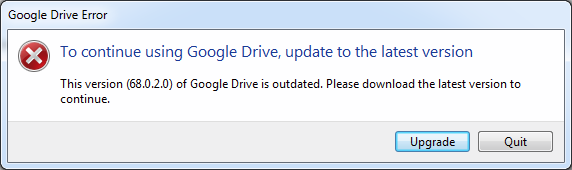
Google just seems to have blocked out version 68.0.2 of Google Drive, which was the last to support Windows 7 (dated December 2022) from running. The following error message appears upon launching: Previously, there was a message that this version of Google Drive is no longer supported. A few weeks ago, the message changed to say that this version is deprecated and may soon be disconnected or something in that sense. Wondering if this is just an artificial block and if there is any way around it.
-
Latest stable version of Vidcoder (9.17) still seems to work on Windows 7. https://github.com/RandomEngy/VidCoder/releases/tag/v9.17
-
-
Yes, version 68.0.2.0 still works fine, although annoying notifications are shown when clicking on the taskbar icon.
-
On the other hand, it seems to me that win 7 would be more capable to run modern software if development/support was not cut, and that XP had more limitations in this regard.
-
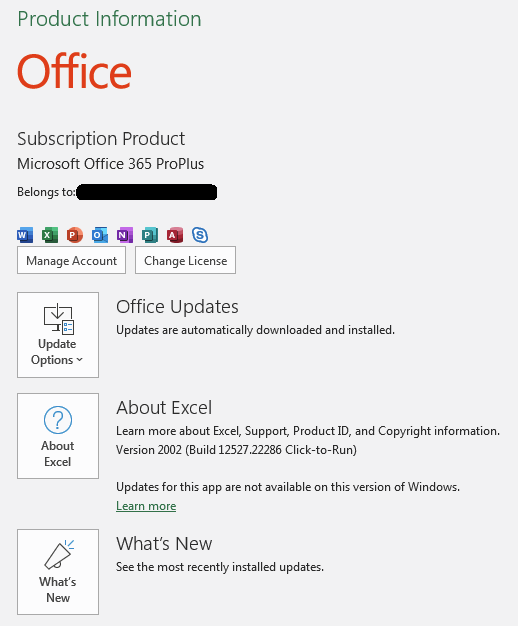
Last update for Office 365, version 2002 on Windows 7, is build 12527.22286: https://learn.microsoft.com/en-us/officeupdates/update-history-office-win7 This is how the Account section in Offce applications looks currently (previously, there was a notification that only security updates are installed):
-
Current version is 69, attempting to install gives an error message: "This version of Windows is not supported"
-
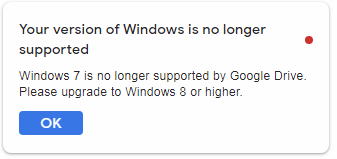
Google Drive (have version 68 installed) started displaying a nag message that Windows 7 is not supported.
-
I am well familiar with that article.
-
Thanks for the info. Again wondering if there is any way to port these newer versions back to Windows 7, for example if the missing APIs/DLLs were covered by VxKex in the future. Although according to this Microsoft article, "as of January 2022, attempting to do a new installation of Version 2002 will fail." I actually installed version 2002 in February 2022 successfully. I used a custom "Configuration.xml" file to download files for version 16.0.12527.22100 (latest at the time) and then installed locally. Don't know what would happen if one attempted to install in a new setup in the future.
-
BTW, would there by any way to get this version of Office, which still works for Windows 8.1, to install on Windows 7? I am using the latest supported version 2002.
-
Obviously, I am aware of all of that. I was asking if anyone else here is able to test, not whether I can share it online... Update: It's again working, confirmed also by a Win8.1 user on MS Community forums.