




Skip to content
View in the app

A better way to browse. Learn more.

MSFN

A full-screen app on your home screen with push notifications, badges and more.

To install this app on iOS and iPadOS
  1. Tap the Share icon in Safari
  2. Scroll the menu and tap Add to Home Screen.
  3. Tap Add in the top-right corner.
To install this app on Android
  1. Tap the 3-dot menu (⋮) in the top-right corner of the browser.
  2. Tap Add to Home screen or Install app.
  3. Confirm by tapping Install.

Semtex

Member
  • Joined

  • Last visited

  • Country

    Germany

Everything posted by Semtex

  1. Looks like new build fix also my problem, without need to enabling classic menus, Thanks.
  2. OK, thanks, this worked, at least as workaround. Good to know there is some solution. After enabling I need to restart. After disabling not.
  3. Sorry for quoting my self, but I need some confirmation, or any info about this. Like on screen, I marked OneNote, clicked with RMB and nothing happen, I can't pin programs, since there is no menu...
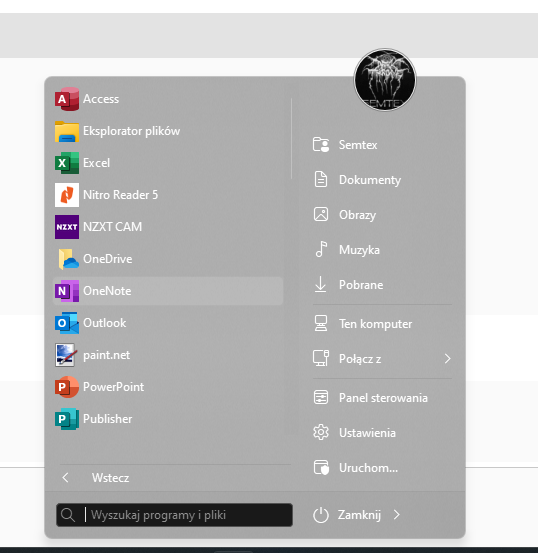
  4. I'm still facing potential bug with right click menu STR: Enable Start Menu in SAB options. Restart OS Go to "more programs" Try to click with right mouse button on some program/app Nothing happen. Anyone or just me?
  5. I see some problem with latest Win 11 Beta (22598.200) Classic Start menu -> go to More Programs -> right click not working, no right click menu popup. Any one?
  6. It's possible to keep Windows 11 original Taskbar and turn on Win 10 panels? I think original taskbar looks OK, but I miss volume control option out of flayout.
  7. Got it, 1$ is fair deal. More for Us than for You, but thanks!
  8. I've question about upgrade, would be our license upgradable or we need new one?
  9. AWESOME. Thanks, working fine, at least since 10 minutes
  10. Not for me, was disabled after second OS restart after update from 10 to 11
  11. Semtex replied to Tihiy's topic in StartIsBack+
    Thanks, but I like to keep icons centered on taskbar and i like Windows 7 like menu start Poza tym śwat jest mniejszy niż nam się wydaje Pozdrawiam.
  12. Semtex replied to Tihiy's topic in StartIsBack+
    @Tihiy HI, simply question, do You have plans to update for Windows 11? This Win 11 Start Menu is kind useless
  13. @SkyySX You need to flip: gfx.webrender.dcomp-win.enabled to false in about:config, after this Yuo need piece of code in userchrome.css which enables aero support for Firefox. Ypu can find right code in Google in few secs.
  14. Thanks, but I'm Nightly tester since few years, I know about that I found solution, there is small entry in about:config need to flipped to enable Mozglass working again in userchrome. My Nightly Firefox have glass again since few weeks
  15. Thanks, working perfect fine, have nice day/evening
  16. Awesome @sbkw1983 Thank You!
  17. Nice one! Maybe You can reconsider to make version with full black caption buttons, and blue on hoover on close button?
  18. Everything fine, for a minute I hoped that You found some better solution and this will works, but since Firefox 68 glass will be gone.
  19. Nope, this ends with black tabbar without window control buttons, it is already described in this and other threads on this forum. Not Your fault
  20. It is working on 1903 without problem, just hit cancel in error window after start> https://imgur.com/a/HW9H621
  21. Thanks... You can't know this but I did try all this methods (and more) and nothing is working, I can Aris from Mozillazine since years In Firefox Beta and Nightly no glass at all since it is removed direct from code or locked.
  22. Since it is experimental version it is normal, wait for stable.
  23. @bigmuscle I tested lot of hacks in Nightly and Windows 10, nothing works for me, no proper CSS, also tested with third party themes, no luck, I found mockup of Firefox in dark with acrylic glass, since then I try to get it on my machine, no luck I voted on Your bug, also other guy ask for support for glass, He also didn't have more feedback, I i find this bug I will post it here.

Account

Navigation

Configure browser push notifications

Chrome (Android)
  1. Tap the lock icon next to the address bar.
  2. Tap Permissions → Notifications.
  3. Adjust your preference.
Chrome (Desktop)
  1. Click the padlock icon in the address bar.
  2. Select Site settings.
  3. Find Notifications and adjust your preference.