Skip to content
View in the app

A better way to browse. Learn more.

MSFN

A full-screen app on your home screen with push notifications, badges and more.

To install this app on iOS and iPadOS
  1. Tap the Share icon in Safari
  2. Scroll the menu and tap Add to Home Screen.
  3. Tap Add in the top-right corner.
To install this app on Android
  1. Tap the 3-dot menu (⋮) in the top-right corner of the browser.
  2. Tap Add to Home screen or Install app.
  3. Confirm by tapping Install.

carlitosoo555

Member
  • Joined

  • Last visited

  • Country

    Colombia
  1. Can I ask why different threads are created with regard to this? IMHO all these questions and requests should be put together in a single thread, one that has already been created for some time: aero glass for version 1803
  2. That looks awful!!! definitely everyone has their tastes, what horror!!! The "creator" confirmed it: Obviously, if you apply the workaround, it's compatible.
  3. Yes, it still seems absolutely fair, nothing you write will change my mind and nothing you write will change the fact that you are offering a cracked version of Aeroglass ¯\_(ツ)_/¯
  4. Yes, free, but with a watermark if you don't donate... which seems completely fair to the developer. Racist? I only mentioned the country where the page in which you uploaded the cracked version comes from, If the word "Russian" is racist, I apologize, I had no idea, English is not my first language.
  5. Really? You offer a cracked version of Aeroglass on a Russian page and have the nerve to come and criticize @bigmuscle work? come on men
  6. Thank you very much, it worked, I've noticed that when the blur is activated half of the taskbar looks different, maybe it's Acrylic that is interfering with that blur?
  7. Starlsback is not compatible with build 17063
  8. Just Aeroglass, nothing else, and if you mean the transparency in the app that appears in the image, that is called "Acrylic" and is one of the 4 components of Fluent Design, modern apps of Microsoft such as Calculator, Groove, People etc have such transparency.
  9. This problem was solved with the new version 1.5.6, at least in my case, Aeroglass no longer interferes with those applications that use Acrylic like People or Calculator.
  10. In my case, version 1.5.5 of Aeroglass was interfering with the transparency of those applications that use Acrylic, even when it was disabled in modern apps, this problem was solved with the new version 1.5.6. Aeroglass can now be used for traditional programs without interfering with applications using Fluent Design elements 1.5.6: 1.5.5:
  11. This topic is about Aeroglass, you can express your opinions about Windows 10 in either of these two topics, both are practically the same:
  12. This is the version I have: https://1drv.ms/f/s!AhDT-WcKG-ai-VatVZZ7TYOITe4v
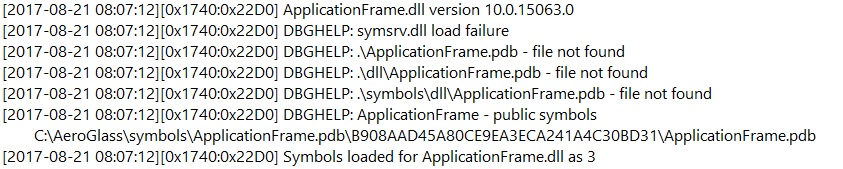
  13. Download Applicationframe.pdb with this method: It seems that this method has worked for several people, I used another method that involves using a third-party tool to activate Aeroglass on those apps. P.S. I tried downloading Aplicationframe.dll and it also works.

Account

Navigation

Configure browser push notifications

Chrome (Android)
  1. Tap the lock icon next to the address bar.
  2. Tap Permissions → Notifications.
  3. Adjust your preference.
Chrome (Desktop)
  1. Click the padlock icon in the address bar.
  2. Select Site settings.
  3. Find Notifications and adjust your preference.