Everything posted by Zxian
-
Hrm... I need to work on getting a third computer to use as a Linux test box... I've always wanted to get one going, I've just never had the hardware... Looks really good though! That wall is a classic!
-
You can find themes that use the native theme service built into XP. Look for "Visual Styles" and a UXTheme.dll patch for more info. And yes, you do have to pay for WindowBlinds, but it's just like any other software that you purchase...
-
You're probably going to get better answers to this in the Unattended section of the forum. We just like to show off our stuff here...
-
@Nanaki: Ah... that would probably do it. My friend was probably running the stock Safari - not updated.
-
If you've got the settings in VMWare properly configured, all the rest of it should be done for you. VMWare automatically sets up two new network adaptors on your computer for the purpose of connecting your virtual computer to your physical network. I've found that Bridging is the easiest connection to use, since there's no work to be done on your part at all.
-
Wow... that's pretty... Happy Father's Day indeed!
-
Looks pretty good so far. The only thing about the site itself is that the Service and TOS pages won't load. I'm not sure if that's a temporary thing, or a WIP, but something that should probably be taken care of. Otherwise, good job! EDITJust wondering... how long with the images be hosted for? Automatic deletion after 1 month or so?
-
5400K is meant to simulate the light emitted by a standard incandecent (I can't spell...) light bulb, while 9300K represents the light from the sun (since the surface of the sun is ~9300K). 9300K is a much "whiter" white, while, 5400K tends to be a bit more yellow. If you want to understand a bit more on how this works, read up on Blackbody radiation and emission. As things get hotter, they emit more light at higher frequencies (lower wavelengths = bluer -> purple). That's why a relatively "cool" electric stove element looks red - it's not hot enough to emit the shorter wavelengths, which would mix to give you white light.
-
Are you using a firewall with browser masking? I remember having this problem with Sygate. Windows Update needs to know that you're using IE and a Windows-based machine.
-
I think it's because of the shutdown event tracker. Some of the switches there need the "-" key.
-
Yeah, there are other ways of doing this with more expensive devices (like PDA/Cellphone) but if you're using a standard MP3 or CD player then this is the way to go... I've had these for 3 days now and they're absolutely fantastic... worth every penny.
-
Well, if you get decent reception in your backyard, then go for it. It's the easier way of doing things, and you don't have to worry about copying files n such... you can just use the sharing part of iTunes (I forget what it's called) on your Mac.
-
Wow... that's crazy powerful... it's like a built in C interpreter...
-
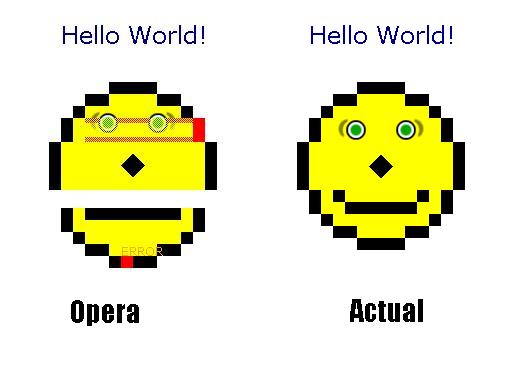
Safari does? My friend just rendered it on his computer and it came out looking like garbage...everything red and errors in the face...I'd like to see a screenshot... Here's what it looks like in Opera 8.01:
-
Hey Bold, I'm not sure if this helps at all, but I found a command for removing the WMP entries in the context menus. regsvr32 /u wmpshell.dll This will completely remove all WMP related entries in the context menus. Hope this helps!
-
Thanks for the info. Looks very promising...
-
Link? I'd like to try it out. Or do you have to sign up as an official beta tester?
-
If you've got a 802.11g wireless network, then go for the second option. You'll have plenty of bandwidth to handle the music. 802.11b will do the trick, but if there's any other traffic on the network you may get problems. So... in short: 802.11b - Option 1 802.11g - Option 2 Cheers!
-
Check under the Sounds and Audio Devices in the Control Panel.
-
Lingon Berries... only the real kind from Sweden... SO GOOD!!! Not that modified version of the cranberry that they try to pass for Lingon here in North America... that's just crap.
-
I ran into London Drugs today to pick up some cough candy and ran across this great product... Skullcandy:LINK Basically what it allows you to do is connect to both your cellphone and audio player at the same time. When you want to answer a call, either set it to auto-answer or use the button on the mic piece. You'll never have to take your headphones off to answer a call again! I've tested it out this morning and it's great! The sound quality is quite good music wise, and the mic is very good in terms of sensitivity. If you're like me who likes to listen to music a lot, then this is a great product for you. If you have any questions about how it works/how good it is, feel free to ask. Cheers!
-
702MB isn't a small amount of RAM to have free if you've got 1GB. After a usual days work, that's what I'm left with after I've closed all my programs. Windows keeps parts of closed programs in memory in case they'll be opened again later. This caching takes a bit of memory, but makes your computer run faster. In short... you probably don't have any problems.
-
Moving the pagefile to a separate hard drive shouldn't lead to more fragmentation on the system drive. Could it be that you or your programs have been writing more to C Drive since you moved your pagefile? The percentage of fragmentation will be more noticable if you've moved the pagefile, since the pagefile ususally doesn't become fragmented that easily and takes up a lot of space. Moving it away would remove that non-fragmented section of your drive, thus increasing the percentage of fragmented files/space listed. Unless it's an excessive amount of fragmentation, I wouldn't worry about it.
-
There are several rendering issues covered as well. It's the browser that does the best at completing the Acid2 Test. Can't stop progress!
-
Nullsoft Winamp is a fast, flexible, high-fidelity music player for Windows. Winamp supports MP3, CD, Audiosoft, Audio Explosion, MOD, WAV and other audio formats, custom appearances called skins, plus audio visualization and audio effect plug-ins. additional features including free-form skins, a new decoder, built-in cross fade, and an advanced Media Library.Winamp 2 + Winamp 3 = Winamp 5 ! Winamp 5.093 * Fixed: OSD stays onscreen in DirectDraw Mode * Fixed: Fullscreen video OSD doesn't reappear after using Pause * Fixed: ML Playlist > Select all (no delete key) * Fixed: Vis data for in_mod (and possibly other input plugins) * Fixed: msvcp60.dll now linked static * Fixed: Small intermittent bugs in gen_ml and gen_ff * Fixed: Greater than 2 channel vis data now works * Fixed: Media Library problems with parentheses/brackets in artist or album names * Fixed: Ripping CDs with trailing ellipses (...) in artist or album name * Fixed: Better video flipping for YUV colorspace videos * Fixed: Saved mute settings with modern skin. * Fixed: Drag and Drop from external applications * Fixed: Open File Dialog always-on-top * Fixed: Crossfade on start * Fixed: Freeze when switching audio tracks in a multi-audio stream. * Fixed: Fullscreen switching with scaled video window. * Update: Dynamic Online Media can now alert users to live events(can disable). Source Download Full Download Lite Download Pro (Requires a valid user key)