




Everything posted by idbirch2
-
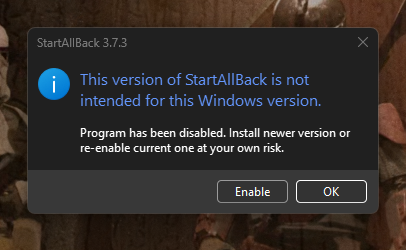
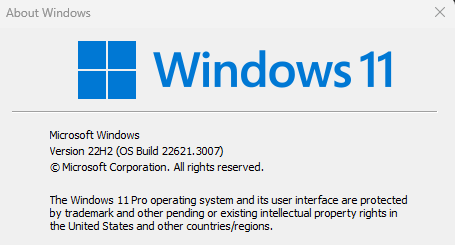
"This version of StartAllBack is not intended for this Windows version" Just had this popup twice in quick succession. Think I was typing the first time so unintentionally hit Enter on 'OK' which resulted in something horrific I haven't seen in more than a year (the native Win11 start menu!). I reinstalled 3.7.3 and once it enabled itself, I got the same message again. I clicked "Enable" and everything seems ok but thought I'd report it. Have attached the error and output of winver.
-
This looks very similar to the problem caused by the "windows 11 command bar" option, doesn't it? I reported that here, is it related?
-
Ah OK, yes switching to "Win10 Ribbon UI" has cured that problem, thanks.
-
I'm not sure if its the latest update for StartAllBack or the latest cumulative Win11 update (or both) but when navigating around in explorer now, there's lot of flickering going on in the top area. Video showing problem: https://drive.google.com/file/d/1JSXgxsucyKbQnKQjoSlHVrpjSnHf3Eiy/view?usp=sharing I'm on SaB 3.1.2 and Win11 Pro with November's cumulative applied.
-
We really could do with an option to deactivate licenses. I know from past experience that reinstalling Windows and re-activating SiB consumes an additional "activation" each time. I had to email support a couple of years ago to request my licenses be reset as they'd reached their limit of 15. I've just requested my license info from the Support tab on the home page and I can see my primary key has only 1 activation left again (and I'm about to do another clean install for Win10 2004).
-
Thanks Bioruebe for your efforts on this, they are very much appreciated. I found this page after hitting an Inno Setup exe that was packed with a newer version of Inno that the original UniExtract couldn't handle. I installed your beta3 and it extracted perfectly. Thanks again!
-
I upgraded to 1.1.0 from 1.0.4 earlier today and now I'm finding the default Win 10 Start Menu sometimes appearing when I click Start. This never happened with 1.0.4. It's fairly easy to reproduce by clicking Start, clicking 'This PC' and then as quickly as possible clicking Start again.
-
I've just noticed after upgrading to 1.0.3 (think I was on 1.0.1 before) that I'm not getting results from PC Settings now either. The main one I use is "Windows Update". If I Ctrl+Win and type "Windows Update", the 'Check for Updates' option does appear but only once the entire string is tpyed. With SIB, only 'View Installed Updates' is returned no matter how much of the string is typed. What's going on here and is it fixable? edit: This seems to have been fixed by another cumulative update for Win10, after installing that and rebooting, search in SIB seems to be working properly again.
-
OK, I created a new Library called Documents and added the My Docs path to it - checked it in Explorer and working OK. I toggled the Documents link off and on again in SIB+ and there's now a blank entry at the top of my Start Menu which doesn't do anything Also, the Documents library is no longer visible in Explorer and if I go into the 'Libraries' one of the library icons is a plain white with no name. If I try to create 'Documents' again, it says it already exists. There's no option on the right-click menu of this broken library to delete it. Help. edit: I don't know how I did it but after trying to create 'Documents' again (and again being told it already exists) and then searching for *.library-ms the first library I recreated appeared again and seems to be working. SIB+ now shows 'Documents' and it opens the library correctly. That was a bit hairy.
-
Hm, I have Libraries enabled but I removed the Documents one. Does it need to exist for the SIB+ link to work then?
-
I can't get the Documents link to appear in my SIB Start Menu. I had one of the 1.5+ RCs from a few days ago and that had the same problem. I tried setting Documents to [Don't Display] -> [Apply] -> [Link] -> [Apply] but it still doesn't show. All other links seem to work. I'm on 8.1 Pro w/MC x64. If it's relevant, I have remapped my Documents folder using the [Location] tab -> [Move] but this never caused any problems on 8.0 with SIB.
-
OK, so once we've established we have this problem, is there a way to fix it or do I have to send it off to Seagate?
-
OK, so we've established that some people don't see a need to remove the feedback links and some do, maybe we can stop with the pointless replies now. I'm sure the OP was simply trying to point out something that some of us might find useful, if you don't, great, move along.
-
Like I already said, you can still send feedback quickly and easily from the desktop or the start menu. There really is no need to put it at the top of every window. I don't want to supply feedback on every single window I open. If I did, maybe that would make me a "serious beta tester"?
-
I've removed the feedback text, there's already a desktop shortcut and start menu shortcut to launch feedback. I don't want it plastered onto every single window.
-
Read the thread I already linked to, people are having this problem who have completely disabled the "Turn off hard disks after" option in Power Options.
-
Join the queue.
-
I'd like to know if there's a fix for this too. It's so annoying how Vista can't manage a simple task like remembering a folder's view setting. I also prefer the list view, some folders keep it, others don't. And the "Navigation Bar"! Urghh! Go away!! I'm always having to manually disable it, is there any way to permanently disable it? I found a few explorer options in gpedit.msc but these were only to disable the status bar.
-
Not really a side note as Ripken already said exactly that. What's with your avatar and motto anyway? "I stab pedestrians"? That's pretty lame, go see a therapist.
-
The RAID drive would contain the Windows installation and lots of high definition movies ranging from 10-30GB each. The demands on the HDD when straming 40Mbit/s video is quite high I think so I assumed RAID-0 would help with this. Won't the Vista operating system benefit from the RAID too though?
-
Hi all, I'm after a bit of advice and hope someone here can help. I'm running Vista Ultimate which is installed on a 20GB partition of a 500GB SATA drive. The rest of the drive is consumed by a second partition used to store HD movies. I have just ordered another 500GB SATA drive (same make/model) which I will receive on Friday. I want to merge the the two 500GB drives into dynamic disks to get all my movies on 1 drive. If possible, I'd like to enable RAID-0 and have the O/S benefit from the increase in I/O throughput. There's a few things I'm not sure about: 1) My BIOS has a utility for setting up RAID-0 but warns that all data will be wiped on both drives. Do I have to use the BIOS utility or can Windows' own Disk Management do this for me? I know that I can convert the disks to dynamic using Disk Management but will this simply span the volumes or enable RAID-0? 2) If I use the BIOS utility and wipe everything, can I still partition off 20GB on one of the drives for the O/S or does a new RAID-0 array not allow any partitions to be created? 3) Is there any way I can enable RAID-0 on the two 500GB drives and keep windows installed on the 20GB partition of the original 500GB drive? i.e. no loss of data? Thanks for any help.
-
Hi Martin, this is a really great guide, I would have been completely lost without it. Maybe I need to get used to it but it seems to me that the WAIK is way more complicated than it should be, the principle of mounting an image and adding modules is not that complex but Microsoft have somehow managed to make it feel incredibly complicated. Anyway, back on topic, I'm stuck! I'm trying to integrate Windows Updates into my install and I'm up to "Step 5: Importing update packages to WSIM". Where is the distribution folder that I'm meant to select? What is BDD? The guide says I can make any new folder but if I do this, I get "The selected folder is not a valid distribution share". Any tips?
-
Cool, I don't use RunOnceEx but I was in need of a silent insaller for Windows Defender and yours came up at the top of a search. It works great, thank you for your work on this.
-
This is exactly what I have been looking for, I have some icon resource patching exe's that only work in Safe Mode due to WFP. I ended up having to make a shortcut called "Run me in Safe Mode" as a workaround but if this works (I will try when I get home), its genius! Thank you to everyone who contributed.
-
Yes, thank you Shark007, someone with some common sense. It is of course a request for an unattended solution. @cluberti - combining the thread topic with the forum it is posted in is your friend....