schwups
Content Type
Profiles
Forums
Events
Everything posted by schwups
-
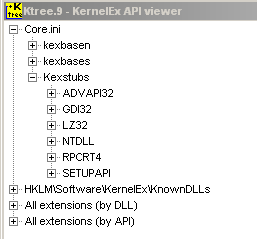
Which dll's are missing? Files in the KernelEx folder must be registered [HKEY_LOCAL_MACHINE\SOFTWARE\KernelEx\KnownDLLs]. Otherwise these have no function. Does FF 24 - 35 work on your machine? My recommendation: Paste all dll's (XPSP2 or 3) in the Firefox program folder first and then you can open the DW again to see, if you are missing one. You also can copy uxtheme.dll, userenv.dll, pdh.dll, wtsapi32.dll, psapi.dll (Kex Known dll's) in the FF folder for a better troubleshooting with DW. And what about Kext - Kstub823.dll / ini file / core.ini entry. Verify it with Ktree.
-
In the case that there is something to it. My current controllers are Realtek RTL8111DL, RTL8201CL, RTL8110SC and a Marvell 8053. I don't have this "JS Problem" with my machines. I can't reproduce the problem so far.
-
nVidia Forceware driver 77.72 patch for 512MB VGAs
schwups replied to xrayer's topic in Windows 9x/ME
I'd bought a 7900GT 512 some years ago. But I never tested it. It's in a box. I have little hope for 7 series and 77.72, because 81.98 is not compatible either. AFAIK only the driver 82.69 is compatible with the complete 7 series. 82.16 is compatible with GF7800xx. -
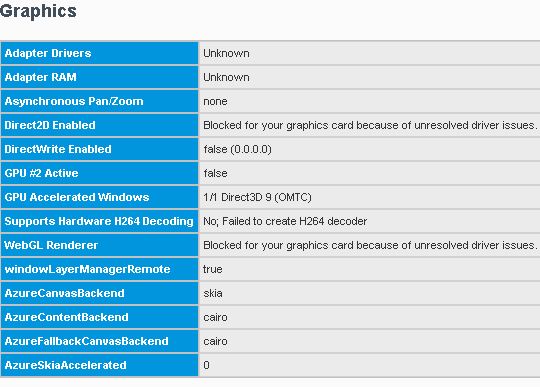
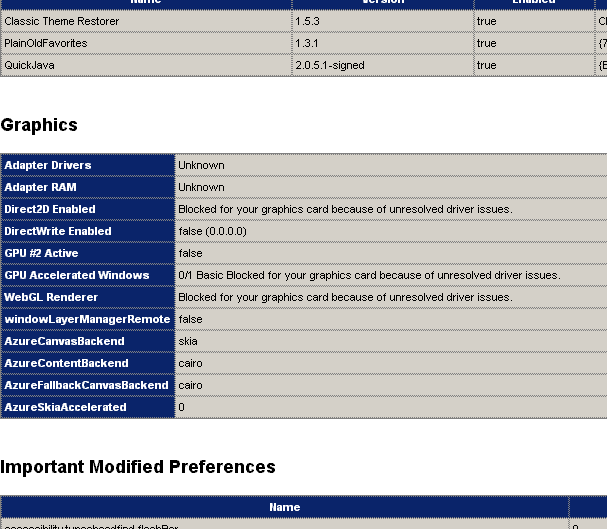
1. I don't believe that FF Safe Mode helps, but did you already tried that? firefox.exe -safe-mode 2. The page about:support may provide a hint of the problem. Error messages can be under the Graphics section. 3. Try to open the web console. Probably for you not possible with JS enabled.

-
I didn't state to use KernelEx 4.5.2016.19 (only)! Please note latest Core Updates are eight files and some of these have different version numbers: KernelEx.dll 4.5.2016.19, Kexbasen.dll 4.5.2016.24, Kexbases.dll 24, Kexcom.dll 18, Sheet.dll 19, verify.exe 18, VKrnlEx.vxd of 18, Core.ini 20i Download exact these files from topic Kernelex 4.5 Core Updates. The files are not on the first page. Then copy the files over these of version 4.5.2 (C:\WINDOWS\KernelEx) in safe mode or if you like from DOS OS or use a (Linux) "Live CD". There are many possibilities to do this. Thats all.
-
Make a bootable backup of your system if possible to get back to that point quickly. First try to run Firefox before installing all the updates and patches. FF 24 - 32 should need latest KernelEx only. @athlonxpuser, you didn't say what graphics drivers you installed.
-
My Asus P4V800D-X has a AGP 8x and a PCIE 4x slot. So I changed the NV5900XT for a NV7800GT PCIE to see what happens. I enabled hardware acceleration in Firefox. The result is video basically works with this configuration, so the problem seem to be due of the older 5900XT. In other words "hardware acceleration" doesn't get along with the 5900XT on Win ME. Another result is the Pentium 4C is too weak. YT is very sluggish. It's just not fun. Some Vidoes might work with very low resolution. The CPU consumption is too high and it gets too warm.
-
Yes video works , when I turn hardware acceleration off on this machine. Then of course the ui glitch is back. The driver makes no difference (NV81.98/82.16/82.69). I have been using 82.16 for more than ten years. It is as good as 81.98. 82.69 has a known bug in nvopengl.dll. But as I said, the driver doesn't matter in this case. The Firefox.exe CPU consumption at times reaches over 90 percent on YT playback. In contrast, the consumption of the Core2Duo E8400 Wolfsdale processor is only 30 - 40 percent.
-
New Test: Now I run FF48 on a noticeable slower machine also with the view to YouTube: Asus P4V800D-X, VIA PT880Ultra, Pentium 4 C Northwood - SSE2, NV5900XT AGP8x + driver NV82.16 / Win ME. YT: I don't have video here, only audio. The player remains black or turns white and disappears. Apart from that the YT page loads completely. ME isn't fresh, it is an old installation. It is quite possible that I've something wrong in that system.
-
Thanks for testing. The Celeron 450 should be good, but it isn't in the CPU Support List of your board.? Maybe the Integrated Intel® Extreme Graphics 2 82865G is too weak. A good AGP card is worth a try. 2GB Ram must be enough. Ok, it is a real machine and not a VM.
-
It could be hardware related. What's your CPU (instruction set - SSE?, SSE2?, SSE3? ..., chipset and graphics card (VRAM?). How much Ram do you have fitted? Or is it a VM? Did you have disabled the "NewTabPage"? Make sure that have choosen WinXPSP2 and not legacy WinXPSP2. We still have far too few tests!!! Try to install QuickJava and check with CS or JS disabled.
-
I tried it on the fast, so only superficially. 35.01 and 33.1.1=> good 32.0.3 => useful, no audio after moving forward 28 and 31.8 => rather useless - different errors occurred: sluggish, only Audio or only video or stucks, only the player is loaded 27.0.1 => no playback
-
I checked "media.mediasource.webm.enabled";true successfully with FF42.
-
YouTube still works with default media prefs on FF 43+ here. So far I haven't dealt intensively with this item.
-
Congratulations! Thanks for testing. Do you have hardware acceleration and OMTC enabled? What's your hardware and OS??
-
1. Make sure you have latest KernelEx Core Updates (24) installed. 2. Verify Kexstubs with jumpers Ktree. Latest is Kstub823.dll The Kexstubs entry must be in the core.ini: --- No OS override --- [BASE] contents=Kexstubs,std,kexbasen,kexbases Kstub824 desc=Base enhancements (api fixes + extensions) --- Legacy modes for older registry settings and Ktree9 --- [DCFG1] inherit=BASE contents=Kexstubs,std,kexbasen,kexbases desc=Legacy Base enhancements 3. Does FF 35 work on your machine? 4. Try FF 45.9 or 47.02. FF48 starts without UI first. Can you see it in the taskbar? 5. Check with the DependencyWalker, if you caught all dll's.
-
Backporting newer browsers to Win9X with KernelEx
schwups replied to roytam1's topic in Windows 9x Member Projects
I can open almost any site. This isn't the problem. Ok, YouTube doesn't work anymore with it. It's not about browsing, but the setting avoids the runtime error with the following crash for example after adding a bookmark. The bookmark plugins Netscape and IE Favorites become useful here. -
Backporting newer browsers to Win9X with KernelEx
schwups replied to roytam1's topic in Windows 9x Member Projects
KM74G: I no longer have runtime errors when I set msvcr80.dll in the KM Program Folder to Base (Kexbases,Kexbasen). -
What about Burp 1.7.36 on Java 7?
-
Maybe this (Opera via Burp - page 26 -30 ...) is useful for you. I can run Burp as HTTPS proxy, but on ME. I don't have Win 2000 to test that. Burp runs on Java. You have to export the certificate (portswigger ca) on Burp and afterwards you can import it to Opera.
-
Try to connect via proxy.
-
Note: I can't enable hardware acceleration for KM76. That is possible with FF only.
-
Additional requirements for FF 42 - 48 and KM 76: Dll's from XPSP2 or SP3 (or ReactOS) (Activeds.dll, adsldpc.dll, apphelp.dll, authz.dll, dbghlp.dll, dnsapi.dll, mprapi.dll, netrap.dll, netui0.dll, netui1.dll, ntdsapi.dll, ntlanman.dll, rasdlg.dll, rasman.dll, regapi.dll, rtutils.dll, samlib.dll, utildll.dll, w32topl.dll, winscard.dll, winsta.dll), MDAC2.8SP1 (Odbc32.dll, Odbcbcp.dll), GDIPlus.dll (for KM76) and Kext (latest Kstub823, ini file here). The names of all missing files were found with the DependencyWalker (DW). To do this open the Xul.dll with the DW. Missing modules are marked with a question mark in yellow circle. To get all names you must refresh or restart DW after adding files. New (missing) files will appear. The new files bring up new dependencies. You have to repeat the procedure several times. I have these files, XPSP2/SP3 and some from ReactOS 0.4.0, in the system folder. You also can try to paste them in the KernelEx folder, or KernelEx Subfolders like ROS, as KernelEx-KnownDll's. In this case (KernelEx-KnownDll's) is the registry entry in the Key [HKEY_LOCAL_MACHINE\SOFTWARE\KernelEx\KnownDLLs] necessary. Or paste them into the program folder, when you're afraid. To bear in mind pdh.dll, psapi.dll, userenv.dll, uxtheme.dll and wtsapi32.dll are already supported by KernelEX (KernelEX-KnownDll's). Don't merge LZDLL_ME.reg or LZDLL.reg for Win98 of KernelEx update18 into the registry! Firefox will crash immediately on start . The portable Installer requires the apphelp.dll. It make sense to install the WindowsInstaller 12.0.2600.2, but I haven't testet it as requirement. Direct3D9 (OMTC): 1. Install DirectX 9c 2. "layers.acceleration.force-enabled" => true - OMTC requires hardware acceleration! 3. "layers.offmainthreadcomposition.enabled" => true (default value) I did all the tests with the portable versions and I only testet with NV7800GT and NV7900GS cards and drivers 82.16 and 82.69 on WinME This may not work with other hardware.
-
FF48: I dared to go one step further. I set "layers.acceleration.force-enabled" to true, "layers.offmainthreadcomposition.force-basic" to false and "layers.offmainthreadcomposition.enabled" to true. It completely solved the main UI glitch now, and surprisingly FF seems to run stable. Now the troubleshooting page "about:support" gives "Compositing = Direct3D 9" instead of Basic. What remains are common icon glitches and here and there slightly shifted or coloured edges. But that was already the case before.
-
The old bool "layers.offmainthreadcomposition.force-basic" = true is better than "layers.offmainthreadcomposition.force-disabled" = false. Thereby it's possible to start and run Firefox 48 with a slightly reduced window size without this UI glitch. Besides that all pages are usually displayed correctly and there aren't any blank ones.