Everything posted by gamehead200
-
Hmmm... You have two options: First, you can use that code and output an error to the user if the inputted characters are more than your limit using an if statement. Otherwise, you can just truncate the inputted text using another PHP function I'll let you look up.
-
You can always limit the number of characters someone submits. See an example here: http://www.webmasterworld.com/forum88/7649.htm
-
That's the only way I ever did it. The trick is to find the correct limit for the number of characters you want on a single line.
-
The problem's not with your code, it's with your images. Only sample_card.png is a valid PNG file; the others are just JPEG files with a PNG file extension. You have to convert them to valid PNG files in order to avoid having to edit the code at this point. The GD library in PHP expects a PNG image when you call imagecreatefrompng, otherwise it spits out a useless "error" like the one you're getting.
-
Can you post a screenshot of what it's giving you? I don't really understand what you mean by it giving you a "link to the page as an image."
-
The easiest way to find the full path is to create a PHP file with the following in it and browsing to it: <?php phpinfo(); ?> Look under SCRIPT_FILENAME for the full path to your sig.php file and you'll be able to figure everything else out from there.
-
OK, first of all, /full/path/to should be replaced with the actual full path to the file. This also applies to your font file as I'm pretty sure you don't have a fonts directory in the root of your filesystem (most likely a subdirectory of some other directory). For example, the full path to the font file on my server is: /home/username/website/sigs/verdana.ttf The same thing applies to your images (e.g., /home/username/website/sigs/background.png). Remember, this is specific to the server YOU are on, so you have to find this information (assuming you're running this script on a Linux server); the path would of course be different on a Windows server.
-
I use http://www.php.net to read up on PHP. As for your problem, what types of images are you using (i.e., JPEG, PNG, GIF, etc.)? Did you use my exact code or only make changes to yours? Can you post all of your code if it's different than mine so I can check to see what the problem is?
-
Your syntax is incorrect. I highly suggest you do a little background reading on basic programming, specifically PHP, before going any further. The reason it's not working is because you're not doing any comparison on $location. Here's the complete code with a drop-down list to choose your location: <?php $name = $_REQUEST['name']; $age = $_REQUEST['age']; $sports = $_REQUEST['sports']; $location = $_REQUEST['location']; // check to see if someone's hit generate already if( isset($name) == true && isset($age) == true && isset($sports) == true && isset($location) == true ) { Header('Content-type: image/png'); Header('Cache-Control: no-store, no-cache, must-revalidate, post-check=0, pre-check=0'); Header('Expires: Thu, 19 Nov 1981 08:52:00 GMT'); Header('Pragma: no-cache'); // check the location if($location == "School") { $image = imagecreatefrompng('/full/path/to/images/school.png'); } elseif($location == "Work") { $image = imagecreatefrompng('/full/path/to/images/work.png'); } elseif($location == "Mall") { $image = imagecreatefrompng('/full/path/to/images/mall.png'); } elseif($location == "Library") { $image = imagecreatefrompng('/full/path/to/images/library.png'); } elseif($location == "Market") { $image = imagecreatefrompng('/full/path/to/images/market.png'); } else { // we'll just set the default image to home $image = imagecreatefrompng('/full/path/to/images/home.png'); } // set colours $white = imagecolorallocate($image, 255, 255, 255); $black = imagecolorallocate($image, 0, 0, 0); // text ImageTTFText($image, 8, 0, 10, 17, $black, '/full/path/to/verdana.ttf', "Name: " . $name . "\nAge: " . $age . "\nSports: " . $sports); // output and destroy imagepng($image); imagedestroy($image); } // if not, go ahead and show the form else { print ("<!DOCTYPE html PUBLIC \"-//W3C//DTD XHTML 1.0 Transitional//EN\" \"http://www.w3.org/TR/xhtml1/DTD/xhtml1-transitional.dtd\"> <html xmlns=\"http://www.w3.org/1999/xhtml\" lang=\"en\" xml:lang=\"en\"> <head> <title>Dynamic Signature Generator</title> <meta http-equiv=\"Content-type\" content=\"text/html; charset=ISO-8859-1\" /> <style type=\"text/css\"> body { font-family: tahoma, verdana, arial; } img { verical-align: middle; border-style: none; } </style> </head> <body> <h1>Dynamic Signature Generator</h1> <form method=\"post\" name=\"sig\" action=\"sig.php\"> <small> Name: <input type=\"text\" name=\"name\" value=\"\" /><br /> Age: <input type=\"text\" name=\"age\" value=\"\" /><br /> Sports: <input type=\"text\" name=\"sports\" value=\"\" /><br /> Location: <select name=\"location\"> <option value=\"Home\">Home</option> <option value=\"School\">School</option> <option value=\"Work\">Work</option> <option value=\"Mall\">Mall</option> <option value=\"Library\">Library</option> <option value=\"Market\">Market</option> </select><br /> <input type=\"submit\" value=\"Generate\" /> </small> </form> </body> </html>"); } ?> Also, be sure to use the full path to your image and font files. It'll save you time debugging if it ever causes problems otherwise.
-
I'm not quite sure what you want to know about arrays... But to answer your other questions... Read up on ImageTTFText here to manipulate the text: http://ca.php.net/manual/en/function.imagettftext.php Note that you can call ImageTTFText more than once to play in case you want to manipulate each line differently, for example: ImageTTFTextt($image, 8, 0, 10, 17, $black, '/path/to/font/file.ttf', "Name: " . $name); ImageTTFTextt($image, 8, 0, 20, 34, $black, '/path/to/font/file.ttf', "Age: " . $age); ImageTTFTextt($image, 10, 0, 30, 65, $black, '/path/to/font/file.ttf', "Sports: " . $sports); First off, this will not change the appearance of the first line. Secondly, it will shift the second line over further to the right by 10 pixels. Finally, the third line will be shifted downwards a bit more and will appear in size 10pt font instead of size 8pt.
-
Post here and I'll do as best as I can.
-
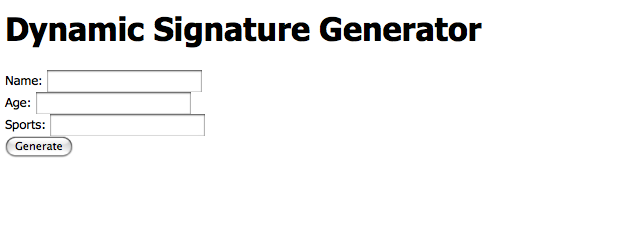
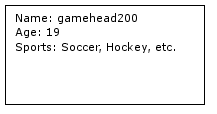
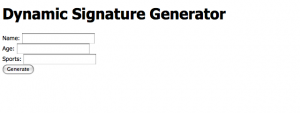
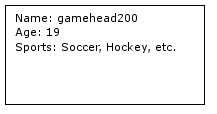
I think I remember making one of these a while back... But mine actually created a new file for each newly generated image to lessen the stress on the server. Anyways, here's my 15 minutes at it assuming the file name is sig.php: <?php $name = $_REQUEST['name']; $age = $_REQUEST['age']; $sports = $_REQUEST['sports']; // check to see if someone's hit generate already if( isset($name) == true && isset($age) == true && isset($sports) == true ) { Header('Content-type: image/png'); Header('Cache-Control: no-store, no-cache, must-revalidate, post-check=0, pre-check=0'); Header('Expires: Thu, 19 Nov 1981 08:52:00 GMT'); Header('Pragma: no-cache'); // create image w/ dimensions $img_width = 200; $img_height = 100; $image = imagecreate($img_width, $img_height); // set bg colour $white = imagecolorallocate($image, 255, 255, 255); $black = imagecolorallocate($image, 0, 0, 0); imagefilledrectangle($image, 0, 0, $img_width, $img_height, $white); // border imagefilledrectangle($image, 0, 0, $img_width, 0, $black); imagefilledrectangle($image, 0, $img_height-1, $img_width, $img_height-1, $black); imagefilledrectangle($image, 0, 0, 0, $img_height, $black); imagefilledrectangle($image, $img_width-1, 0, $img_width-1, $img_height, $black); // text ImageTTFText($image, 8, 0, 10, 17, $black, '/path/to/font/file.ttf', "Name: " . $name . "\nAge: " . $age . "\nSports: " . $sports); // output and destroy imagepng($image); imagedestroy($image); } // if not, go ahead and show the form else { print ("<!DOCTYPE html PUBLIC \"-//W3C//DTD XHTML 1.0 Transitional//EN\" \"http://www.w3.org/TR/xhtml1/DTD/xhtml1-transitional.dtd\"> <html xmlns=\"http://www.w3.org/1999/xhtml\" lang=\"en\" xml:lang=\"en\"> <head> <title>Dynamic Signature Generator</title> <meta http-equiv=\"Content-type\" content=\"text/html; charset=ISO-8859-1\" /> <style type=\"text/css\"> body { font-family: tahoma, verdana, arial; } img { verical-align: middle; border-style: none; } </style> </head> <body> <h1>Dynamic Signature Generator</h1> <form method=\"post\" name=\"sig\" action=\"sig.php\"> <small> Name: <input type=\"text\" name=\"name\" value=\"\" /><br /> Age: <input type=\"text\" name=\"age\" value=\"\" /><br /> Sports: <input type=\"text\" name=\"sports\" value=\"\" /><br /> <input type=\"submit\" value=\"Generate\" /> </small> </form> </body> </html>"); } ?> WARNING: this is a VERY BASIC and slightly INSECURE method of doing it (because I'm not running any checks on what the user is inputting), but it gets the job done. This code should at least give you some insight as to what to expect. Here is the form: And the output of the form: Hope this helps. Cheers,
-
nLite's EULA states that it cannot, I repeat, CANNOT be used for commercial purposes.
-
During peak hours:
-
[ Moved. ]
-
There is no need to post this twice in the same forum. I have removed your other topic.
-
My calculus professor.
-
LOL @ "Norton 2003 Purchased Online" [ Moved. ]
-
Works fine here.
-
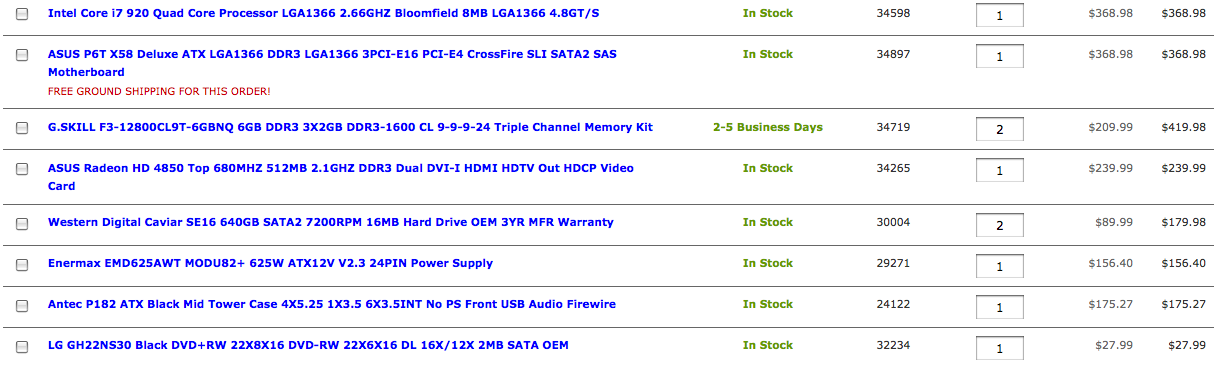
Thanks for the suggestions. As for the optical drive, well, I went for the cheap one because I don't find myself burning all that many DVDs/CDs as I used to (maybe 1 or 2 per month nowadays) and I didn't want to bother looking through all of them.
-
When I have the time and money to build it: Thanks to Zxian for the part suggestions.
-
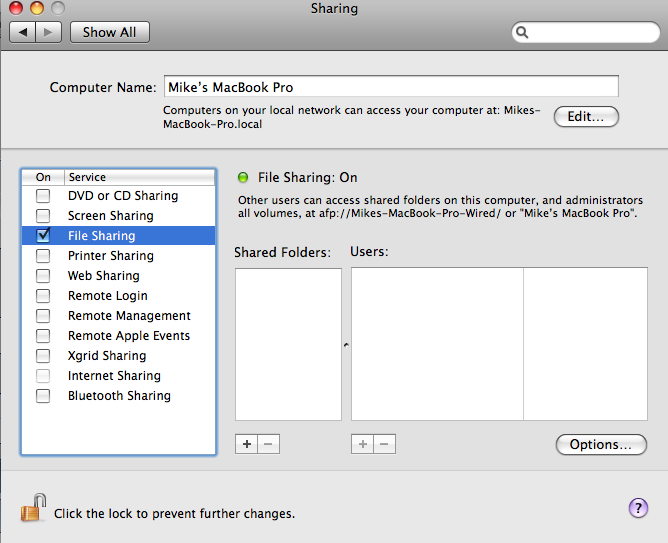
Also, forgot to mention... The computer *might only* show up if File Sharing is enabled. I can't confirm this right now as I don't have a Windows computer/virtual machine that's powered up right now as I'm on my way to bed. Either way, it's still worth checking the "WORKGROUP" workgroup.
-
Hmmm... If they haven't set the default workgroup name to something else (which is pretty likely), then you'll probably find it in the workgroup named "WORKGROUP" as "Someone's MacBook." You can give it a shot, but I'm not too sure if you'll come up with anything.
-
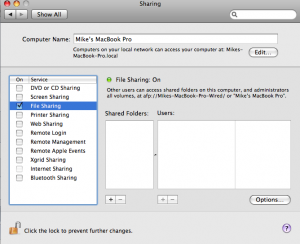
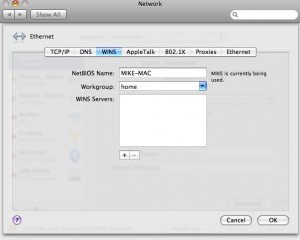
First off, File Sharing needs to be turned on and the NetBIOS name has to be set. If the user's running Mac OS 10.4 or higher, he/she will have to enable File Sharing on his/her Mac by going to the Apple menu > System Preferences > Sharing, and then checking off the "File Sharing" service and adding folders he/she would like to share. I don't remember how to do it under 10.4, but in 10.5, you have to set the NetBIOS name on a per-NIC basis (the "Computer Name" field above is for the Bonjour network). To do so, go back to System Preferences, select the correct NIC, click on "Advanced...", select the "WINS" tab, and set the NetBIOS name and Workgroup there. You can then access the Mac by browsing to \\<NetBIOS Name>\<Share Name> on a Windows computer. Hope this helps. [ Moved. ]
-
[ Moved. ] Please be sure to post in the correct forum next time!