Everything posted by SlimShady
-
Allright, it works when booting the CD. Only when I run it from the command line the behavior is different.
-
Yes, the new username was selected. After it failed a couple of times I set it to 'None' so it won't even try. But can you verify that it works on your setup (rename and autologon) ?
-
Sorting the used sessions on Date doesn't put 'Last Session' at the bottom (or top).
-
When I rename the admin account the autologon feature doesn't work. It still tries to log in with 'Administrator' and fails.
-
Is there an update coming soon? That would be great.
-
nuhi, can you comment on this, please? thanks.
-
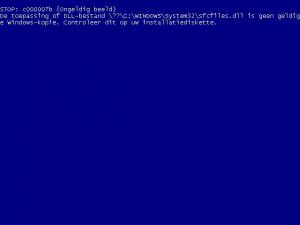
I believe it's tampered here too . Because I get this message saying sfcfiles.dll is not a valid Windows copy. That happens after textmode and upon booting the GUI mode. I haven't seen this before edit: I compared the SFCfiles.dll from the original source, regular install and nLited source. The first screen is from 1.4 RC2. It seems there is no file version. It's been patched silently and got corrupted somehow or am I wrong? Last_Session.ini
-
are you gonna update to the new version?
-
nLiting and applying the Dutch Feb Update Pack on Windows XP with SP2 integrated, I get above error message. After pressing OK, nLite continues but the installation of the resulting image is half-baked. I went searching and found a section and a MS KB page Last Session.ini what to do?
-
Works! Thanks man
-
Hi, The Notepad2 addons I've found don't work nicely. One installs in the program files folder. And another one doesn't replace the original. The original Notepad has version 5.1.xxx and Notepad2 has version 1.0.12. So nLite asks during the process 'Would you like to keep the newer file?'. No, I don't. What I would like is to change the addon so Notepad2 is copied. The current contents of the entries file are: [general] builddate=23/12/2006 description=Notepad2 language=English version=1.0.12 website=http://www.flos-freeware.ch/notepad2.html I know you can manually hack the executable and change the version, but is there another way? Maybe with obsolete_files or something? Could you give me some info? Thanks.
-
I gave up for the moment. I have no idea what to do.
-
I have it too and it's causing problems with my connection. I have tried the steps as shown on the FAQ page. http://www.nliteos.com/faq.html#Q26 Last_Session.ini
-
and it won't ever? that sucks
-
Can you tell me how you copied the file? Its not working here and I believe the file (policy.dat) is locked. Ill try some things but I really want to know how you did it.
-
Do you really think "Greenmachine" wouldn't mind seeing 100 new e-mails?
-
Great idea. We will be able to specify multiple commands, right?
-
Documentation is included in the package.
-
And what graphics you expected to see?
-
Is it laziness or stupidness?
-
He wants to see XML examples in the package. Specifically the ones that are used for the screenshots.
-
I just read the agreement and I can tell you it is very clear. Read it again, carefully.
-
On the website, I saw this info:
-
What are you talking about?
-
@ECHO OFF CHDIR C:\WINXP SET XPSOURCE=C:\WINXP\nLite\Data\NewCD ECHO Press a key to start... PAUSE > NUL CDIMAGE.EXE -lWINXPSP2 -t12/31/2002,12:00:00 -h -j1 -m -bXPBOOT.IMG %XPSOURCE% H:\WINXPSP2.ISO PAUSE