Leaderboard




Popular Content
Showing content with the highest reputation on 03/19/2026 in all areas
-
This is not the place to discuss and argue over disputes which are now ancient history. Please stay on-topic discussing current issues.2 points
-
A registry editor of WinXP, booting from a Linux boot CD, is a security program, permitting the cleaning of ransomware affecting the registry. As I mentioned above, AVG Rescue CD, Kaspersky Rescue Disk 10 and Norton Bootable Recovery Tool are included in the respective security programs for WinXP.2 points
-
" I want to make it very clear I did not support the Pale Moon team's actions at that time and I had absolutely nothing to do with that. " For those who were there, we remember, and thank you for your continuous presence and collaboration in this forum. It's highly appreciated. For those who weren't there (ola), you can read about it in github and elsewhere. Do not bring here stuff that doesn't belong here (obrigado).1 point
-
Kaspersky Registry Editor is a Linux program able to edit the WinXP etc registry. It is not intended to be used as a normal registry editor under WinXP, but during infections when the registry is infected by ransomware and when you cannot use a normal registry editor under Windows to clean the registry. An example of the use of Kaspersky Registry Editor for the removal of ransomware is shown at https://www.malwareremovalguides.info/pum-userwload-trojan-ransom-removal-instructions/ "PUM.UserWLoad is a difficult to remove remnant of the Trojan.Ransom infection. PUM.UserWLoad is a register [=registry] reference [in] which the permissions are modified so that they can not be removed in the normal way." PUM.UserWLoad is the malicious registry entry belonging to one of the ransomware variants" In the above example Kaspersky Registry Editor made the use of Windows safer by removing infected stuff from the registry. Kaspersky Registry Editor was used to clean ransomware detected by Malwarebytes, which Malwarebytes could not remove from the registry. The ransomware article at www.malwareremovalguides.info includes screenshots of Kaspersky Rescue Disk 10, Kaspersky Registry Editor and Malwarebytes, all three working together. Kaspersky Registry Editor is not available as a separate program, only as a component of Kaspersky Rescue Disk, together with Kaspersky Anti-Virus. For my earlier posting about Kaspersky Registry Editor I had created a locked-up WinXP by setting the permission of the CurrentVersion key to DENY. I did not want to actually infect my computer with ransomware for my experiment, creating a locked-up WinXP was good enough. Both the locked-up WinXP in my experiment and the ransomware example about "PUM.UserWLoad TrojanRansom removal" have modified permissions in the registry.1 point
-
I have checked Hiren's Boot CD 15.2 Restored v1.1 (Proteus) January 2013, actually a DVD with 2.76GB, but I didn't see Registry Editor PE. There are several versions 15.2, e.g. https://www.hirensbootcd.org/hbcd-v152/ [592MB], which lists Registry Editor PE 0.9c. is this the one? I booted with the 2.76GB version of Hiren's Boot CD 15.2, clicked on Antivirus - and surprise, surprise: it showed Kaspersky Rescue Disk 10 as only virus checker. The Kaspersky Rescue Disk 10 program on the Hiren 15.2 DVD was v10.0.31.4 of 7Feb2012, the signatures were of 9Jan2013, probably updated OK by Hiren for another 11 days because BASES.ID indicates 29Dec2012. Kaspersky Lab released several .isos of v10.0.31.4 with freshly updated signatures for about a year, between 3Mar2012 and 29Dec2012. The updated CD I described in my posting of 8Mar2026 is the final build v10.0.32.17 of 28Feb2013 of Kaspersky Rescue Disk 10, with signatures updated to 7Mar2026. The final build v10.0.32.17 must have been quite satisfactory to Kaspersky Lab because they updated the .isos of this final build with new signatures for over 4 years, from 22Feb2013 thru 30Aug2017. Both builds v10.0.31.4 and v10.0.32.17 of Kaspersky Rescue Disk contain the same build of Kaspersky Registry Editor.1 point
-
there is no need for me to merge if upstream is good enough, just use upstream version.1 point
-
Software can be open source software while not meeting the definition of free software. For example Unreal Engine and the unrar CLI tool on Linux match this description. I want to make it very clear I did not support the Pale Moon team's actions at that time and I had absolutely nothing to do with that.1 point
-
Basilisk supports all of these. We started supporting PowerPC Mac OS X in the last release. We have released GTK2 binaries since I took over the project.1 point
-
I understand that, but there are many important things on GitHub. So, unfortunately, it is important to fix it in Mypal 78. BTW, thanks for fixing Internationalization & Localization after all these years. Is it finished? If so, you can close the corresponding issue #96.1 point
-
@feodor2 I am in the process of thoroughly testing Mypal 78.0.2. Do you have any idea why GitHub is no longer running smoothly? I can't see any error messages in the browser console but I get the following in the web console: Content Security Policy: The page’s settings blocked the loading of a resource at inline (“script-src”). 2 content.js:71:182 Uncaught DOMException: An invalid or illegal string was specified react-core-1b7e0e8bea30ae82.js:2 connectedCallback ReactBaseElement.tsx:120 connectedCallback ReactAppElement.tsx:63 connectedCallback core.js:45 connectedCallback core.js:13 O register.js:12 O core.js:34 T controller.js:5 o tslib.es6.mjs:58 227527 react-core-1b7e0e8bea30ae82.js:3 b wp-runtime-20909bf7227a153b.js:2 122684 code-view-d1ce18268b0bf560.js:2 b wp-runtime-20909bf7227a153b.js:2 <anonymous> code-view-d1ce18268b0bf560.js:2 O on_chunk_loaded:27 <anonymous> code-view-d1ce18268b0bf560.js:2 a jsonp_chunk_loading:71 a self-hosted:1402 <anonymous> code-view-d1ce18268b0bf560.js:2 The latter I even got five times on your GitHub site.1 point
-
Why do you say that ??? @NotHereToPlayGames Good question! And I’ll go one step further. It’s always the same people who don’t really have anything meaningful to contribute, but when it comes to hurling insults, they’re always first in line.1 point
-
... Hence my previous comment you quoted : ... and I was strictly referring to "Moonchild Productions", are you officially part of that team now? Joking here , of course, but my comment was made on Feb 22nd, your fix landed on the official UXP repo on Mar 10th (and has yet to land on a roytam1-compiled binary), so yes, I wouldn't have survived had I held my breath... Jokes aside, my contribution was just to identify the missing JS feature; the report was made here by a UXP-fork user (on an unsupported OS), so the proper way to tackle that would've been: 1. Get access to a machine with an official UXP sanctioned OS 2. Get hold of official UXP-based browser binary/binaries 3. Reproduce the "bug" (rather the platform's deficiency) there 4. Register an account in the official PM forum 5. Report the problem in their WebCompat subforum (few fork users on XP/Vista can/are willing to go through the above ...) ... and then hope one member of the under-staffed MCP team takes it upon themselves to attempt a "fix"; given that the problem, as reported, affected a Polish government web site (relevant probably only to Polish citizens), MCP staff would have little incentive to spend time on fixing that, when other major/more popular sites are broken... So yes, over the years, I've become somewhat pessimistic ... Thanks again for implementing "object.GroupBy" . Regards.1 point
-
Eventually I will look into it if no one else on the UXP dev team steps up to try to look into it. I did read last week on the Pale Moon forum that someone was writing a XUL extension that un-nests nested CSS, but I can't find the post right now. Right now my priorities are: * Full ES2023 compliance (eventually 2024/2025 but now ES2023 is priority) * Make Tailwind v4 playground render correctly (this will fix a lot of sites not just sites using Tailwind) * Performance improvements * Make WebRTC actually work with modern services * Fix any other sites that I find that are broken If I am being completely honest with you, I have been a bit frustrated because I have felt that the other UXP developers have prioritized things other than site compatibility, and that those other things they are prioritizing are the wrong things to prioritize. I frequently see forum posts where users are told that the CSS or JS feature a site uses is bad and that the user should email the site asking them not to use those features because they are bad. Users don't and shouldn't have to do that. People don't care about what CSS or JS a site uses, all they care about is that the site they want to use is broken. They'll just go use another browser instead. Due to that I've been learning C++, learning how our JS and CSS engines work, and I'm doing what I can to change that in order to keep UXP/Basilisk/Pale Moon/roytam's forks relevant.1 point
-
Which operating system are you asking about? Windows or Linux? I have not looked into this for Windows, as I am not a modern Windows user(I do use roytam1's Serpent builds on a Ryzen 3600X running Windows 2000 though). I was already looking into doing this for Linux last week. I had to patch some code but I was able to get a successful build that works on a Pentium MMX and newer. The oldest hardware I have is a Pentium 3, it ran fine on that machine. http://dl.basilisk-browser.org/basilisk-20260305163630.linux-i586-gtk3.tar.xz I want to start making our x86 releases support 10.5+, right now we are stuck at 10.7. The contributor who does the Mac builds has an issue with his build environment where he was not able to do a build targeting OS X 10.5 or 10.6. It was producing SSE related errors which is strange because even the oldest CPU that can run OS X 10.5 has SSE support. We did introduce PowerPC builds in the last release if that's something that interests you. You could run them in Rosetta, you might get Google.com to load after 1-2 years of waiting for Rosetta to run the browser.1 point
-
Implemented "that support". https://repo.palemoon.org/MoonchildProductions/UXP/pulls/2991 Maybe you should hold your breath next time.1 point
-
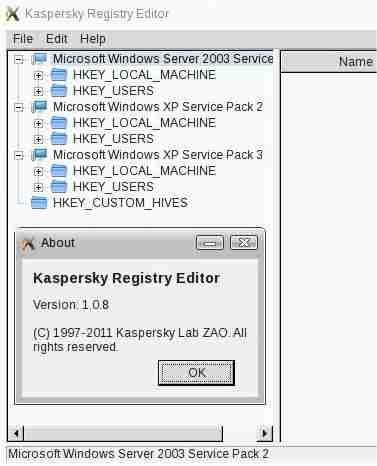
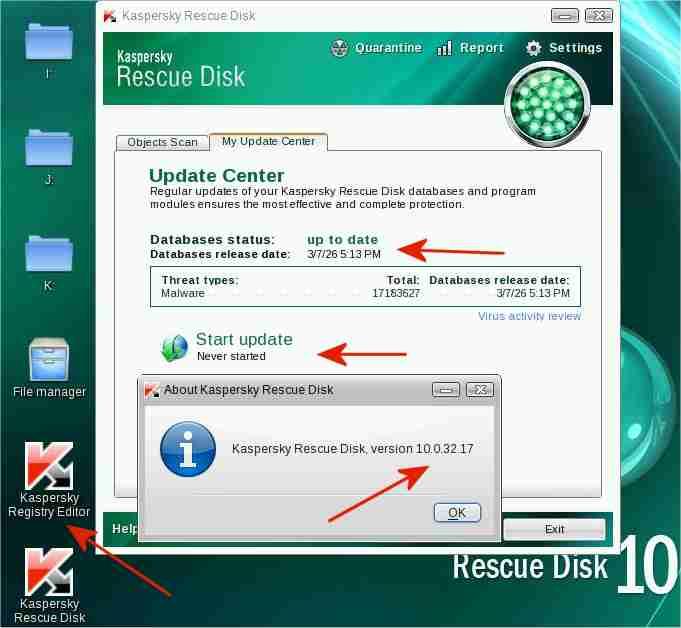
Kaspersky Rescue Disk 10 CD of 22Feb2013 with signatures updated to 7Mar2026 I have created an updated Kaspersky Rescue Disk 10 CD from: - a Kaspersky Rescue Disk 10 .iso of 22Feb2013 - signature updates of 7Mar2026. The signature updates were obtained under Windows XP from an update folder, updated by Kaspersky Updater (separate program). In my case, the update folder for My Ancient Version of Kaspersky was used. Creating such an updated CD is a little tricky. Updates of Kaspersky Rescue Disk 10 are usually stored separately on a HDD etc of the computer, not on the burnt CD. The updated Kaspersky Rescue Disk 10 CD has worked fine for me. The 4 red arrows in the screenshot above point to the following: - "Start update: Never started" indicates that all signatures are on the bootable CD, not on a HDD etc of the computer - "Database release date: 3/7/26"[=7Mar2026, with 17,183,627 signatures] indicates that the current signatures, obtained with Kaspersky Updater, were correctly incorporated into the updated .iso/CD - "Kaspersky Rescue Disk version 10.0.32.17" in the About screeen indicates that the program components were correctly incorporated into the updated .iso/CD - "Kaspersky Registry Editor" is a Linux-based registry editor to view or edit WinXP, Win2003, etc registries simultaneously, as when multiple operating systems are installed on a computer (multi-booting) Kaspersky Rescue Disk 10 of 22Feb2013 is safe to use The Russo-Ukrainian war started on 27Feb2014 https://en.wikipedia.org/wiki/Russian_occupation_of_Crimea Kaspersky software released before this date (27Feb2014) is most likely safe, Kaspersky software released after that date may or may not be safe. "These are not new concerns; going back to 2015 Kaspersky has been at odds with the US government" https://www.majorgeeks.com/news/story/kaspersky_banned_in_the_usa_what_you_need_to_know.html The program components of the updated Kaspersky Rescue Disk 10 CD were created more than a year BEFORE 27Feb2014 and are therefore, in my opinion, safe to use. The screenshot above of the Kaspersky Registry Editor, also on the Kaspersky Rescue Disk, shows the registries of the Win2003, WinXP SP2 and WinXP SP3 operating systems installed on my 25-year-old, 650MHz Pentium III Inspiron 7500 laptop. The Kaspersky Registry Editor cannot access or display the registry of the Windows 98SE operating system, also installed on the laptop. Kaspersky Rescue Disk 10 is freeware. Feel free to contact me in case of interest, as for testing or reviewing the updated CD, without having to access the Kaspersky Lab servers.
 1 point
 -
As @maile3241 already said opening of ProxHTTPSProxy.exe generates automatically a new CA.crt if none is in its program folder. But first you have to delete all certificates in certs subfolder and update your cacert.pem as described in document file.1 point
-
You're absolutely right! Talking and philosophizing about a problem you haven't got in your own system is contraproductive. So I produced the problem you all had got and could analyze what was going on. The best way someone can have. Btw I installed ProxHTTPSProxy 3e (you can remember!) for testing purpose and it is working perfectly.1 point
-
Final fix of error code 0x80072f8f while accessing WU or MU web site @Dave-H, @RainyShadow, @maile3241 and all other interested people, I have definitely solved the problem getting error code 0x80072f8f. I've done a second ProxHTTPSProxy installation just due to testing purpose. I let ProxHTTPSProxy generate a new CA.crt valid until 2032 by deleting old CA.cert file in ProxHTTPSProxy's program folder and opening ProxHTTPSProxy.exe afterwards. Then I installed this root certificate. But it didn't work either. I got error code 0x80072f8f too. I analyzed what had happened and found out it was installed in Trusted Root Certification Authority but for current user only. And that's the cause of the problem. It has to be installed in Trusted Root Certification Authority of local computer anyway. How is it done? Open console by typing mmc, add a snap-in for certificates, then choose for local computer and import your recently generated ProxHTTPSProxy CA certificate to Trusted Root Certification Authority. Finished. First a screenshot of MU using ProxHTTPSProxy along with recently generated ProxHTTPSProxy CA certificate valid until 2032: And here is a screenshot of my Trusted Root Certification Authority - local computer: Hope this will be the final solution to get rid of error code 0x80072f8f forever! PS: More detailed information relating to ProxHTTPSProxy and HTTPSProxy you can find in this article: Kind regards, AstroSkipper1 point
-
Ok, on the one hand you solved your connection problem using HTTPSProxy and that's fine, but on the other hand 2025 is your deadline of accessing to MU web site. @Dave-H won't help that either because the original provided ProxHTTPSProxy root certificate doesn't work for him accessing to MU web site.1 point
-
And this is just the problem. Some of your statements are confusing. Please clarify! And I know you are running HTTPSProxy in your XP vm but that wasn't what I suggested. Please take time to read and understand what I' ve written and tried to suggest!1 point
-
If you want my opinion then take a screenshot of folders WINDOWS\SoftwareDistribution\SelfUpdate\Default\ and WINDOWS\SoftwareDistribution\WebSetup\ in your Windows 7 system using a file manager like Total Commander with hidden system files and extensions enabled. Windows Explorer is pants. PS I think you really shouldn't spoof your user agent. MU has to know which system is yours to provide the suitable updates for it.1 point
-
@Dave-H Ok, here is a final solution. If that doesn't work too I'll be out of ideas related to error code 0x80072f8f. You can't find any other solutions in the World Wide Web, nay, despite a very deep research I couldn't find any other reasonable solutions related to this error code except those I've already posted. Before performing this backup the registry key HKLM\SOFTWARE\Microsoft\Windows\CurrentVersion\WindowsUpdate and the folder WINDOWS\SoftwareDistribution completely or better create an image of your system partition! Here it is: This is a fix if client machines are not reporting to WSUS properly: Client-Side Script: From an administrative command prompt on your system, run: net stop bits net stop wuauserv reg delete "HKLM\SOFTWARE\Microsoft\Windows\CurrentVersion\WindowsUpdate" /v AccountDomainSid /f reg delete "HKLM\SOFTWARE\Microsoft\Windows\CurrentVersion\WindowsUpdate" /v PingID /f reg delete "HKLM\SOFTWARE\Microsoft\Windows\CurrentVersion\WindowsUpdate" /v SusClientId /f reg delete "HKLM\SOFTWARE\Microsoft\Windows\CurrentVersion\WindowsUpdate" /v SusClientIDValidation /f rd /s /q "%SystemRoot%\SoftwareDistribution" net start bits net start wuauserv wuauclt /resetauthorization /detectnow PowerShell.exe (New-Object -ComObject Microsoft.Update.AutoUpdate).DetectNow() Explanation: What is this Doing? Should I be Afraid of Running this? This client-side script is something you should not be afraid of. Let’s walk through what is happening and why we’re doing it. We stop the Background Intelligent Transfer Service (BITS), and the Windows Update Service (wuauserv) services because we’re working with items that are in use by these services. We remove the following registry keys if they exist: HKLM:\SOFTWARE\Microsoft\Windows\CurrentVersion\WindowsUpdate\AccountDomainSid (usually errors out but is included to be totally inclusive but I haven’t seen this since before 2005) HKLM:\SOFTWARE\Microsoft\Windows\CurrentVersion\WindowsUpdate\PingID (usually errors out but is included to be totally inclusive but I haven’t seen this since before 2005) HKLM:\SOFTWARE\Microsoft\Windows\CurrentVersion\WindowsUpdate\SusClientId (This is what is responsible for most issues – duplicate SusClientId entries across multiple clients) HKLM:\SOFTWARE\Microsoft\Windows\CurrentVersion\WindowsUpdate\SusClientIDValidation (This also is responsible with SusClientId) We remove the SoftwareDistribution folder from the Windows folder on the system drive – represented using a dynamic variable. This folder contains the history of Windows Update locally on the machine, but it also includes things like the cache of the downloads and temporary files that Windows Update uses. We remove this folder so that it will be recreated by the Windows Update Agent the next time it checks for updates, creating a corruption-free cache. We start the Background Intelligent Transfer Service (BITS), and the Windows Update Service (wuauserv) services. We run the Windows Update Client (wuauclt) and tell it to reset the authorization to re-create the SusClientId and SusClientIDValidation registry keys. We’ve also stuck on the /detectnow switch on the end of that command to initiate a detection for updates for Windows 8.1 systems and lower. We’ve run the PowerShell equivalent of /detectnow for Windows 10 systems and Server 2016+ systems as they no longer use /detectnow as it has been deprecated. (We can also use UsoClient.exe StartScan instead of the PowerShell line however, Microsoft never intended UsoClient.exe to be used by anything other than the system itself through the orchestrator so your mileage may vary. The correct way is the PowerShell API). Background: What is SusClientId and What Symptoms Does Having Duplicate SusClientId Entries have? WSUS servers use the SusClientId to identify unique devices and then associate the computer’s hostname to the unique identifier for easy recognizable display purposes. Because more than 1 system has the exact same SusClientId, the WSUS server replaces the computer object’s hostname with the latest hostname that communicated with the server. This gives the appearance of a magician’s disappearing act with computers objects. More than 75% of the time that clients have issues, it is due to cloning or imaging computers. Systems that are the ‘golden’ image are often created in an environment that allows the system to communicate with any WSUS server, including Microsoft’s Windows Update. The moment a client system communicates with a Windows Update server, it creates 2 registry keys that are essentially a security identifier (SID) [SusClientId] and a validation key [SusClientIDValidation] that gives a unique hardware identifier in a binary form. The Windows Update Agent is supposed to use a hardware validation routine to determine whether the current client hardware has changed since the SusClientId value was created, and if it has, it is “supposed to” regenerate both the SusClientId and the SusClientIDValidation. “Supposed to” doesn’t always equate to “does” and this is where the problem lies. Note: In my system the subkeys AccountDomainSid and PingID don't exist probably due to the fact that my computer is a stand-alone one. In your system I could see in a screenshot that the subkeys PingID, SusClientId and SusClientIDValidation are present. Therefore I've crossed out all unnecessary steps and explanations including steps for Operation Systems except Windows XP.1 point