Leaderboard




Popular Content
Showing content with the highest reputation on 03/09/2026 in all areas
-
@reboot12 I set a lot of things, even ME enabled and Jumper on Board for ME flash enabled and Bios Lock Disabled. And voila, I can flash! Then comes 1 min of being crazy afraid.. I cant believe, ALL my settings work and board is alive !!!!!!!!!!!!!!!!! I set Jumper for Clear CMOS. And after this I have Hidden Bios settings are now all visible ME State = Disabled CSM = Enabled ohhh..nice.. Dietmar5 points
-
are the registry files oddly big ? https://en.wikipedia.org/wiki/Windows_Registry to free some resources is a idea, even if they are not much but actually i never heared the registry being to small a good idea useally is to show a reconstructable error for the other people to try and see the german description you posted in one of the links dont show a error, rather it shows how to change a registry setting, and specific names the pagefile (Auslagerungsspeichers) the same thing with the page to microsoft - there they dont describe a error - they rather describe differences between windows versions and 32 and 64 bit modes and the last one from microsoft tells you to install KB2567018 - what fixes a problem if that registry PagedPoolSize is wrongly set (common is 0 - probaly means system controlled)1 point
-
It was a perfectly reasonable suggestion to you, to consider whether your issue might be being caused by trying to run too much simultaneously on an underresourced machine. Please respect this.1 point
-
im not certain what you even want to accomplish, so lets give it a try the area you opened dont seems to have anything to do with the registy for example PAE (physicaladdressextension) that has nothing to do with the registry there are some info already in this forum about the 4GB limit and the PAE discussion the registry dont store files into the RAM the registry is made to store data to the harddrive this is why the size in registry have some limits for example the data that can be stored per "key value entry" https://learn.microsoft.com/en-us/windows/win32/sysinfo/registry-element-size-limits these limits however dont show what the software that sets these are limited to unlike a other myth going around PAE has nothing to do with the HDD (now often SSD drive) limit of around 2 TB (512*4GB) this is because even a 64 bit system cant just move 100 MB or something - at beast 64 bit - what is a very small amount thanks to the TLB and other harddrive stuff the hardware such as the CPU can detect if this is coming - and translate these to bigger transfers like 512 bit or even more the 4 GB ram limit or PAE where already often discussted here in this forum, here are a few: https://msfn.org/board/topic/186531-winxp-pagefile-with-16gb-ram/#comment-1274484 https://msfn.org/board/topic/176356-simple-xp-32bit-64gb-ram-true-pae-guide/page/8/#comment-1280589 https://msfn.org/board/topic/129999-32bit-windows-not-usingseeing-all-4gb-ram/ to make it smaller, there are no 4 GB moves there are theoreical not even 32 bit or 64 bit moves this is because the the ram is made of at least 4096 (4k) (the common mode) chucks currently XP can pass that 4 GB ram limit with certain patches, but only over multiple executables (it can have then 4 GB RAM for each running executable/app/module) if you want to do that with 1 executable a must say is that a compiler would not know how to do this noone have done this before, its certainly some work to bring it to work and most importantly all builded executables (such as games, apps, webbrowsers, chattools) are limited to their compiler (and these dont know how to do that) a pagefile is the harddrive being used as memory storage, it can store data at the harddrive and pull it in or out on demand (pagefile.sys) this is a piece wise method, but so you can also go beyond 4 GB writes transfers as said are made in chucks - they are never like "move 1 GB" - that is not possible the compiler transfer a such code to 32 bit moves (4 bytes per tick(in theory)) - for 64 bit it would be 64 bit (8 byte) but that problem has been solved by the hardware long ago - thus 64 bit or 32 bit have the same performance the FSB for example there was a nice story with QUADPUMPED what it actually did ? it just pumped the data 4 times1 point
-
1 point
-
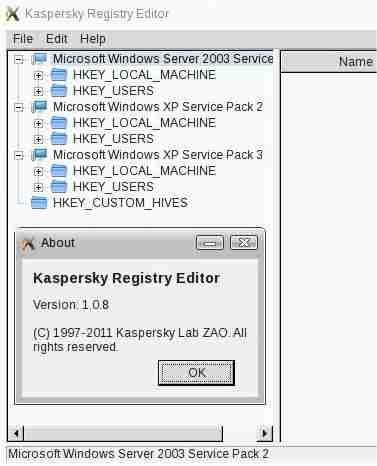
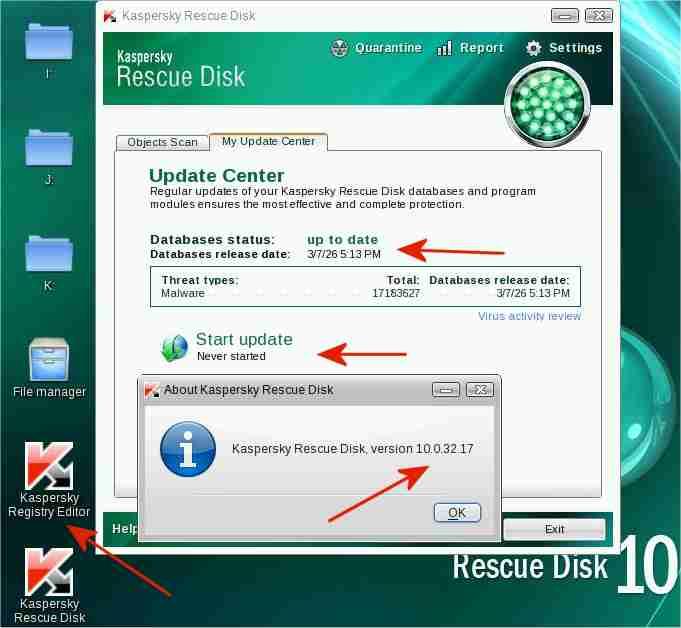
Kaspersky Rescue Disk 10 CD of 22Feb2013 with signatures updated to 7Mar2026 I have created an updated Kaspersky Rescue Disk 10 CD from: - a Kaspersky Rescue Disk 10 .iso of 22Feb2013 - signature updates of 7Mar2026. The signature updates were obtained under Windows XP from an update folder, updated by Kaspersky Updater (separate program). In my case, the update folder for My Ancient Version of Kaspersky was used. Creating such an updated CD is a little tricky. Updates of Kaspersky Rescue Disk 10 are usually stored separately on a HDD etc of the computer, not on the burnt CD. The updated Kaspersky Rescue Disk 10 CD has worked fine for me. The 4 red arrows in the screenshot above point to the following: - "Start update: Never started" indicates that all signatures are on the bootable CD, not on a HDD etc of the computer - "Database release date: 3/7/26"[=7Mar2026, with 17,183,627 signatures] indicates that the current signatures, obtained with Kaspersky Updater, were correctly incorporated into the updated .iso/CD - "Kaspersky Rescue Disk version 10.0.32.17" in the About screeen indicates that the program components were correctly incorporated into the updated .iso/CD - "Kaspersky Registry Editor" is a Linux-based registry editor to view or edit WinXP, Win2003, etc registries simultaneously, as when multiple operating systems are installed on a computer (multi-booting) Kaspersky Rescue Disk 10 of 22Feb2013 is safe to use The Russo-Ukrainian war started on 27Feb2014 https://en.wikipedia.org/wiki/Russian_occupation_of_Crimea Kaspersky software released before this date (27Feb2014) is most likely safe, Kaspersky software released after that date may or may not be safe. "These are not new concerns; going back to 2015 Kaspersky has been at odds with the US government" https://www.majorgeeks.com/news/story/kaspersky_banned_in_the_usa_what_you_need_to_know.html The program components of the updated Kaspersky Rescue Disk 10 CD were created more than a year BEFORE 27Feb2014 and are therefore, in my opinion, safe to use. The screenshot above of the Kaspersky Registry Editor, also on the Kaspersky Rescue Disk, shows the registries of the Win2003, WinXP SP2 and WinXP SP3 operating systems installed on my 25-year-old, 650MHz Pentium III Inspiron 7500 laptop. The Kaspersky Registry Editor cannot access or display the registry of the Windows 98SE operating system, also installed on the laptop. Kaspersky Rescue Disk 10 is freeware. Feel free to contact me in case of interest, as for testing or reviewing the updated CD, without having to access the Kaspersky Lab servers.
 1 point
 -
@Dietmar Yeeeeeeeeeeeeeeeeeeeeeeeaaaaaaaaaaaaaaaaaaaaaaaaaaa !!!! - WOOOOOORKS - Tested i219P0 but also work i219DRIVERXPSP3moreDevicesInf: Yes, you were right that it causes ME but ME Enable/Disable settings is hidden in BIOS. I need Disable like this: format USB in FAT32 then unpack archive ME_disable.zip to stick go to BIOS and set UEFI and Legacy option in Advanced > CSM Configuration > Boot option filter then press F4 to Save and Exit Setup while PC reboot, press Del, go to Save & Exit and boot select USB stick - UEFI: name your stick enter to USB stick - mine is fs2: then run sceefi64.efi /o /s settings.txt to save all available BIOS options to file settings.txt display the beginning of the file type settings.txt -b and check offset number for Setup Item Hidden - mine is 1330 // Script File Name : settings.txt // Created on 04/16/24 at 07:16:1 // Copyright (c)2018 American Megatrends, Inc. // AMISCE Utility. Ver 5.03.1115 HIICrc32= 76071511 Setup Question = System Language Token =07 // Do NOT change this line Offset =00 Width =02 Options =*[00]en-US Setup Question = Setup Item Hidden Token =08 // Do NOT change this line Offset =1330 Width =01 BIOS Default =[01]Enabled Options =*[01]Enabled // Move "*" to the desired Option [00]Disabled do it asw.efi 0x1330 0x0 to Disable Setup Item Hidden option then reboot PC e.g. using reset command after reboot go to BIOS using Del and now you have all available options in BIOS go to menu Advanced > PCH-FW Configuration > ME State and Disable it then press F4 to Save & Exit - PC maybe not reboot so force power off presssing and hold for some seconds Power button on case @Dietmar It turns out that sometimes the AMISCE application may not find the HII database in NVRAM - then you can obtain data this way: using UEFITool open bios.bin, search System Language string in Text tab select Unicode double click searched data: Unicode text "System Language" found in PE32 image section at offset ... right click on PE image section then select Extract body... and save to file setup.bin now using IFRExtractor-RS 1.5.1 extract settings from setup.bin to txt file: ifrextractor setup.bin tool extract data to file setup.bin.0.0.en-US.ifr.txt open file in WordPad then search string Setup Item Hidden and read VarOffset: 0x data - mine is 1330 OneOf Prompt: "Setup Item Hidden", Help: "Hidden Setup Item.", QuestionFlags: 0x10, QuestionId: 0x8, VarStoreId: 0x1, VarOffset: 0x1330, Flags: 0x10, Size: 8, Min: 0x0, Max: 0x1, Step: 0x01 point