Leaderboard




Popular Content
Showing content with the highest reputation on 02/08/2026 in Posts
-
Unapplicable legal snippets. msfn.org is an international forum, not a USA forum. My Ancient Version of Kaspersky is definitely not an unlawful program for me or for the great majority here at msfn.org. Why don't you wear a head scarf in your msfn.org picture, to obey Iranian Islamic Law, to avoid offending strict Moslems? Maybe you should tell your fellow Canadians to stop travelling to Cuba in winter, because U.S. laws declare tourism to Cuba as illegal. There are good laws and bad laws. Would you have obeyed in 1935, as a good Canadian, the German Nuremburg Laws https://en.wikipedia.org/wiki/Nuremberg_Laws and betrayed Jews to German concentration camps? Would you have obeyed in 1964, as a good Canadian, the United States Jim Crow laws https://en.wikipedia.org/wiki/Jim_Crow_laws ordaining racial segregation and racial discrimination? There is no need to commiserate here with the lack of freedom of U.S. subjects. This is an international technical forum. Hopefully, U.S. subjects will eventually get their freedom back. And no more unapplicable legal advice from a U.S. fifth column in Canada.3 points
-
I agree as a general off-topic observation that while you do, of course, need to have a general awareness of security and privacy issues when working online, there's really no need to be paranoid about it.2 points
-
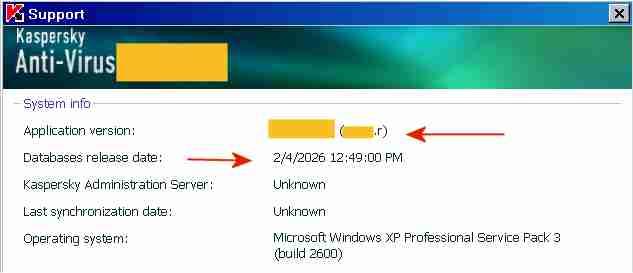
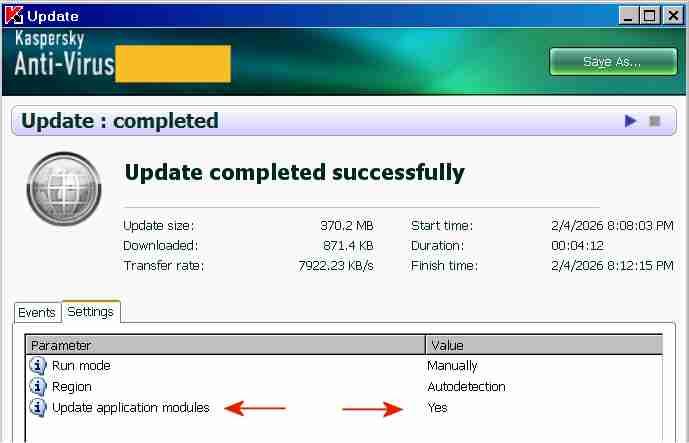
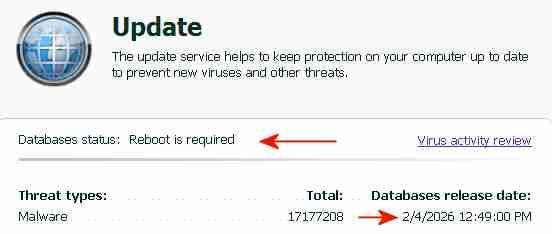
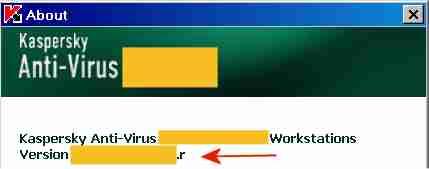
The "AutoPatches" for My Ancient Version of Kaspersky I succeeded in updating both the application modules and the signatures of My Ancient Version of Kaspersky with a single combined update, without a license key and without activation. By installing the final AutoPatches, My Ancient Version of Kaspersky has been updated to the ultimate final version, with the most recent program file digitally signed OK 26May2014. The screenshot above indicates the final AutoPatch "r" next to "Application version" and the Database release date "2/4/2026". Once knowing how-to, preparing future combined updates will be quite easy. The term "AutoPatches" by Kaspersky corresponds roughly to the term "Hotfix" by Microsoft. The screenshot above indicates "Update completed successfully" and "Update application modules: Yes". The signature updates were from a Kaspersky Lab update server, the application updates ("AutoPatches") were from my personal archive. Signature updates and application updates ("AutoPatches") were combined into a single update folder. The screenshot above indicates signatures of 2/4/2026 and the message: "Database status: Reboot is required". This message "Database status: Reboot is required" is displayed by My Ancient Version of Kaspersky when the update of the application modules via AutoPatches is pending. A tiny red square is added to the Kaspersky icon in the System Tray, indicating that AutoPatches are pending. During the reboot after the update, the Kaspersky driver updates and installs the program files contained in the AutoPatches and updates the registry, completely hidden and invisible to the user. StartUp Organizer, for example, which I use as a watch dog, does NOT notice any changes before, during and after the reboot. After rebooting and AutoPatching, the Kaspersky icon in the System Tray looks normal again, without a tiny red square. The successful installation of the AutoPatches is indicated in the About screen above by the display of "r" [=version of the AutoPatches] next to the Version (Note: the About screen is displayed by right-clicking on the Kaspersky icon in the System Tray -> About) and in the Support window (1st screenshot, at the top of this posting). Also, LastSuccessfulUpdate in the registry contains a hex value (Unix timestamp), which confirms that the update was successful. Furthermore, virus-checking with the updated application module and the new signatures works fine. The installation of the final AutoPatches plus a signature update of My Ancient Version of Kaspersky had faced three challenges: 1) The files of the final AutoPatches were removed from the Kaspersky Lab update servers and are most likely not available anywhere in the internet. 2) Kaspersky Lab does not provide license keys for My Ancient Version of Kaspersky anymore, which would permit multiple updates. My Ancient Version of Kaspersky is an unexpiring trial version and can only be updated once. An initial update with the final AutoPatches followed by a second update with current signatures is therefore not possible. Only one update is possible, either an update of the signatures from the Kaspersky Lab server or an update of the application module from my personal archive, but not both.. 3) The digital signature of the .xml file in the subfolder \index\ in the update folder impedes the combining of AutoPatches and current signatures into a single update folder. Before August 2019 the online updates from Kaspersky Lab of My Ancient Version of Kaspersky had consisted of three sub-folders: \AutoPatches\, \bases\ and \index\. After August 2019 no sub-folder \AutoPatches\ is created when downloading updates. The sub-folder \AutoPatches\ contained updates of the installed application modules, \bases\ contained the signature updates and \index\ contained only a .xml file validating \AutoPatches\ and \bases\. The .xml file in \index\ contains at the end a string which is an encoded digital signature generated using the private signing key of Kaspersky Lab. Changing text in the .xml file without updating the signature at the bottom will result in the error message "Invalid file signature" when trying to update. The final release of December 2012 of My Ancient Version of Kaspersky had been updated by several sets of "AutoPatches" supported by Kaspersky until 2017, identified by a letter of the alphabet appended to the build number of Kaspersky Anti-Virus. The last AutoPatch for My Ancient Version of Kaspersky is "r" and contains for example an updated basegui.dll, digitally signed OK 26May2014. The AutoPatches for My Ancient Version of Kaspersky were available from the Kaspersky Lab update servers until about 2018. When I tried to update in August 2019, all files of the AutoPatches for My Ancient Version of Kaspersky had been removed from the Kaspersky Lab update servers and My Ancient Version of Kaspersky could not be updated to release "r" (about 26May2014) anymore. The application modules of My Ancient Version of Kaspersky consequently remained those of the final release of December 2012, without any AutoPatches applied.. In addition Kaspersky Lab removed the text string which identified My Ancient Version of Kaspersky, from the digitally signed .xml file in \index\ downloaded from Kaspersky. Kaspersky Lab must have decided by August 2019 to definitely stop supporting My Ancient Version of Kaspersky, because they removed the application update files from their update servers and made it generally impossible to update the program with AutoPatches by removing the string permitting updates of My Ancient Version of Kaspersky from the digitally signed .xml in \index\. The final AutoPatches, including "r", probably also improve the Protection Components of My Ancient Version of Kaspersky. I have used My Ancient Version of Kaspersky only as an on-demand scanner, I have no need for the Protection Components. Nevertheless, I may eventually add the Protection Components to the installation, for further testing and to see whether activation is required to get the Protection Components to work. According to the User Guide of My Ancient Version of Kaspersky, if you select "Activate later" after installation, "you will have access to all the application's features, except for updates (only one application update will be available)".
 2 points
 -
I think inserting the brackets is logical and correct.2 points
-
I did find a site which had links to many downloads of AutoPatches: https://filemood.com/result?q=autopatches Unfortunately, there were no AutoPatches for my Ancient Version of Kaspersky and the download links are dead bittorrent magnet links. Kaspersky Lab has 30+ products with signature updates, with different versions etc, so the chance is exceedingly small that the relevant AutoPatches are still available anywhere in the internet. Maybe in archives of corporate users of Kaspersky of 10+ years ago, although I doubt that corporations archive old stuff that long. OT: When I looked into my own personal archive I have found an AutoPatch containing avp.exe v6.0.3.851 for the last version of Kaspersky Anti-Virus for Windows 98. klif.sys in this newly-found AutoPatch is digitally signed OK 1Apr2009. I had previously thought that Kaspersky Anti-Virus v6.0.3.844 (28Apr2008) was the last version for Windows 98, but this newly-found AutoPatch may update the last Win98-compatible build of Kaspersky Anti-Virus even further. This AutoPatch seems to be a major final update, it contains 27 files. What confuses the matter is that this newly-found AutoPatch was in a sub-folder \6.0.3.830\ with a lower version number than Kaspersky Anti-Virus v6.0.3.844 (28Apr2008) for Windows 98. Eventually I will have to check whether this newly-found AutoPatch can be installed under Win98 and whether the resulting ultimate final build for Win98 can be updated with current signatures.1 point
-
We all know where this is going to go. Please get back on topic.1 point
-
re: r3dfox and it being LibreWolf-ified, there is a way to PREVENT it from ramrodding most-recent uBO. I personally love uBO, but I also prefer the user to be in FULL CONTROL of what extensions they opt to run. You'll notice that the LibreWolf-ified r3dfox does not allow a uBO uninstall, and it reinstalls itself if you delete uBO from your profile. Again, nothing against uBO, but I'm no fan of The Nanny State, and that includes r3dfox deciding for itself that I have to run uBO because that is "them looking out for me". Long story short... (too late...) You can PREVENT that uBO from reinstalling itself "against your preference". Look for r3dfox's "policies.json" and remove the following, now you can remove uBO from the profile and it won't return without your consent. "ExtensionSettings": { "uBlock0@raymondhill.net": { "install_url": "https://addons.mozilla.org/firefox/downloads/latest/uBlock0@raymondhill.net/latest.xpi", "installation_mode": "normal_installed", "private_browsing": true } },1 point
-
I understand you weren't addressing me specifically, and your general observations may well be correct. Yet, I think it's rather telling of a person's character when they let something little like "Micro$oft" get them riled up. To be clear, I use many Micro$oft products, and I actually like some of them! But I haven't found much to like in Windows versions beyond 7 (well, 8.1 wasn't too bad). Unfortunately, neither 7 nor 8.1 is supported any longer. I have no problem with that - few companies can afford to support decades-old products - but M$'s business model depends on them not giving me the choice to remain on an unsupported OS, even though I knowingly accept any security risks from doing so. Thus, I choose both to visit sites like MSFN, in order to keep Win 7 going; and to mildly protest M$'s attempts to force me to pay them for an OS I strongly dislike, with that little dollar sign.1 point
-
I have updated my old guide about compiling Chromium. Now it only applies to compiling clear Chromium. A new one will be created for building with e3kskoy7wqk patches.1 point
-
Of course it is! They are different sessions, different cookies. I'm failing to understand the obsession. I'm done here, I really do not need the obsession.1 point
-
And that (D3D9!) was all it took to return my water sewer bill to an infinite unsolveable Cloudflare captcha loop! Even as high as Chrome v144. D3D9 flag is working in Chrome v143. No video stutters in v143 *when using* D3D9. What a d@mn F'in Nightmare all of this Cloudflare sh#t is evolving into !!!1 point
-
https://github.com/e3kskoy7wqk/Chromium-for-windows-7-REWORK/issues/71 point
-
https://github.com/e3kskoy7wqk/Chromium-for-windows-7-REWORK He made few reworked versions. It also can support XP and Vista without extended kernels1 point
-
I see that there is a need for a more detailed explanation. You need: Vista SP2 x64 (you may need to upgrade it to 2017 EOL) kernel33.dll from Vista extended kernel v2023-03-09. p_advp32, p_ole, pwp_shl, p_user from Supermium 132 R4. (for convenience you can name them advapi33, ole33, shell33, user33 etc) In the chrome.exe file, change kernel32.dll to kernel33.dll in the import table using CFF Explorer In the chrome.dll file, change the same import. Then open this file in HxD and search for advapi32, ole32, shell32, user32 - they may be in several places, change the ones that are full import table looking like below: In the chrome_elf.dll file, as you rightly pointed out, change NtOpenKeyEx to the NtOpenKey version.1 point
-
I used kernel33 from extended kernel and advapi32, ole32, shell32, user32 wrappers from Supermium 132. As you can see, for example, ublock works. I didn't need a platform upgrade or an extended kernel installation for this1 point
-
Alex313031: "I have fixed GDI fonts being askew by rolling a newer version of Skia and then using a patch that win32ss created. " https://github.com/Alex313031/Thorium-Win/issues/210#issuecomment-20813361041 point
-
1 point
-
This thread is about Root Certificates and Revoked Certificates for Windows XP. You can update your Root Certificates automatically by using the Certificate Updater 1.6 or manually by using the Root Certificate and Revoked Certificate Updater of 02/24/2022 created by me in section Downloads It works perfectly and is intended to keep your system as recent as possible regarding your Root Certificates. Kind regards, AstroSkipper1 point
-
Thank you for providing a download link of ProxHTTPSProxy REV3e! I have added your link to my article above in section Downloads so that the reader has a better overview.1 point
-
@WULover This thread is a support thread about Microsoft Update (MU) or Windows Update (WU). So we have reached a point where everything regarding hardware extensions is unfortunately off-topic. If you have further questions relating to your hardware, you must open your own thread with a topic of your choice. Here we can only discuss problems accessing MU. I hope I could help you and if so, I would be pleased about any reactions. Kind regards1 point
-
Of course, if you can change it, do it! It should be a SSE2 capable CPU But more RAM would be important too. But be aware, your mainboard meaning the onboard socket and the current BIOS have to support the new CPU! Does the WSUS method work in your system?1 point
-
@Dave-H You have got a PM just now.1 point
-
@maile3241 Fine but is your folder male? :)1 point
-
Hi , first off , I'm sorry to remind : this top is : Share your Windows >Vista< experience! and not about "the look of 7". There's too much to write about the differencies . Some of the ugliest things about Win 7 are : fonts (yes that "true" type ones) - washed out and blurry , oversaturated UI colours , like for ravers at the acid party. I always had the best monitors available , so I can tell. Also , sound , oh boy. It's nowhere near Vista's punchy and sharp audio quality . I have Asus D2 , so I can also tell the difference . Win 7 has fat , thick , flat , ugly taskbar . etc , etc , etc . P.S. Compare Vista's wonderful orb and Win 7 (I don't even know how to name that "acid something").1 point
-
I suspect that it is for creating registry entries with "HD" capable device strings under [HKEY_LOCAL_MACHINE\SOFTWARE\Microsoft\Windows\CurrentVersion\MMDevices\Audio\Render\{my receiver auto generated id}\Properties] This one is interesting too , notice different "oem" for win7 and Vista. oem9.inf:NVIDIA.NTamd64.6.0:NVHDA64V:1.3.34.3:hdaudio\func_01&ven_10de&dev_0044 oem3.inf:NVIDIA.NTamd64.6.1:NVHDA64V:1.3.34.3:hdaudio\\func_01&ven_10de&dev_0044 If drivers gets 6.1 or anything higher , it will create those missing and/or different entries I was talking about earlier . They are auto generated and couldn't be added manually to stay forever , they will get erased and replaced with the non-HD strings. Nvidia forbids HD audio on Vista , even if you have HD capable device. By the way , this "issue" could be a lawsuit since Nvidia claims GTX780 full support on Vista , including HD audio. How to put it polite - customer misleading. In the meantime, I use that Chinese player with that pleasant "glitch", now I know how to replicate the glitch . It's not the best solution , I hope to get a fully working driver.1 point
-
Opera 72 with these latest files "SHAssocEnumHandlersForProtocolByApplication not found in SHELL32.dll".1 point
-
It's from 2013 or so . Acer Aspire E5-731-P3ZW (EU) - 17.3" - Nvidia 830m (V1), Intel Pentium 3556U , 8 GB DDR3L 1600Mhz (only in European model) , 1TB HDD . It's a rare EU version with Nvidia GPU , it's hard to find any info on that model . Almost all websites show that it doesn't have a discrete GPU , but mine has .1 point
-
I have a laptop with the dreaded optimus and don't know how to disable it via bios edit. The thing is , it has a fully supported (by Vista) Nvidia GPU and that "famous" dreaded Intel which has no drivers (Haswell). I had tried drivers for XP , but they BSOD , even with XP installed.1 point