Leaderboard




Popular Content
Showing content with the highest reputation on 12/15/2025 in Posts
-
That seems to be related to A/B switch 41356296. Check if it's enabled with vivetool1 point
-
I have an FM Transmitter that I've modified to "jam" any radio within 50 feet. Overrides a local FM radio station and plays DEAD SILENCE instead. Not sure if I'm breaking any FCC rules or not. BUT it is a GODSEND for my SANITY! Why? Because I do not (and will not!) listen to COUNTRY MUSIC !!! :)1 point
-
I would certainly recommend that over any "AI-generated" list! We are YEARS away from "AI" being a trusted and reputable source! In my not-so-humble opinion. AI, for now, is nothing but "Junk in, junk out". I get some reasonably good STARTING POINT javascript code from AI, but it is NEVER perfect or good-to-go without HUMAN intervention.1 point
-
https://github.com/e3kskoy7wqk/Chromium-for-windows-7-REWORK/issues/71 point
-
Actually I restored it to IE6 (what it came with pre-installed in XP Pro SP2). Had to do this from scratch I had originally installed IE7 and then IE8 and deleted the IE7 and IE8 uninstall folders in Windows because at that time, why would I want to go back to IE6. right? IE6 doesn't support HTTPS or HTML5 which is what the internet switched to. At this point IE is dead anyway and all I need is an installed Internet Explorer for the files that other Windows apps use and share with it. However over the past 2 months I was discovering several issues with some Windows apps. Help and Support Center would not let me type text into the search box (not even a blinking cursor), I wouldn't get the Index when clicking on the Index button, and clicking on any of the Related Topics links would get me the "There is an error in this dialog" message. Also, when opening Computer Management from the Control Panel and selecting Services I would get the same message. Also, with the Indexing Service, Query the Catalog, the box that you type your search query into had no blinking cursor and the Sort By and Order By drop down boxes had only question marks in them. Also, User Accounts in the Control Panel failed to display the little question mark icons "?" And after getting IE6 back up I was getting that same error message when I would click on "About Internet Explorer" from the Help tab. It wouldn't display the information (ie. version number, cypher strength, product ID and updates). So after several weeks of trying to figure it out, and Google searches, I realized it had something to do with Internet Explorer. So I re-registered all the dll's that have to do with displaying HTML etc and voila, everything is now back to how it should be. The unusual folder behaviour was the last thing to fix. So before I used your suggestion I thought what if I just rename the Local Service folder and see what happens. So I did, from the parallel installation, and re-booted back into the system that had that problem. I was expecting Windows to either complain about it missing or even hang up but it didn't. The boot was as smooth as always. So I opened Explorer and chose Folder view and opened the Documents and Setting folder and there was a fresh new copy of the Local Service folder with everything in it. So it must be built into Windows to repair that. There was only one difference between it and the original Local Settings folder. The NTUser.dat file was 740Kb whereas the original one was 240Kb. So it would seem that it was corrupted somehow and caused that strange behaviour because it didn't create those extra folders in the wrong place after doing this. So everything is working correctly now and thanks to everyone who replied with suggestions.1 point
-
Jody, Vista is the same 6.x as Win8, as soon as he retires Vista, Win8 will follow the same road. Win10 is another story though.1 point
-
Thank you, @MilkChan, but it seems kind of overkill to a noob like me. @jumper patched and made available a single file (for the 32-bit version of MSO 2010), hope he can do this for the 64-bit version too and save the hassle :-)1 point
-
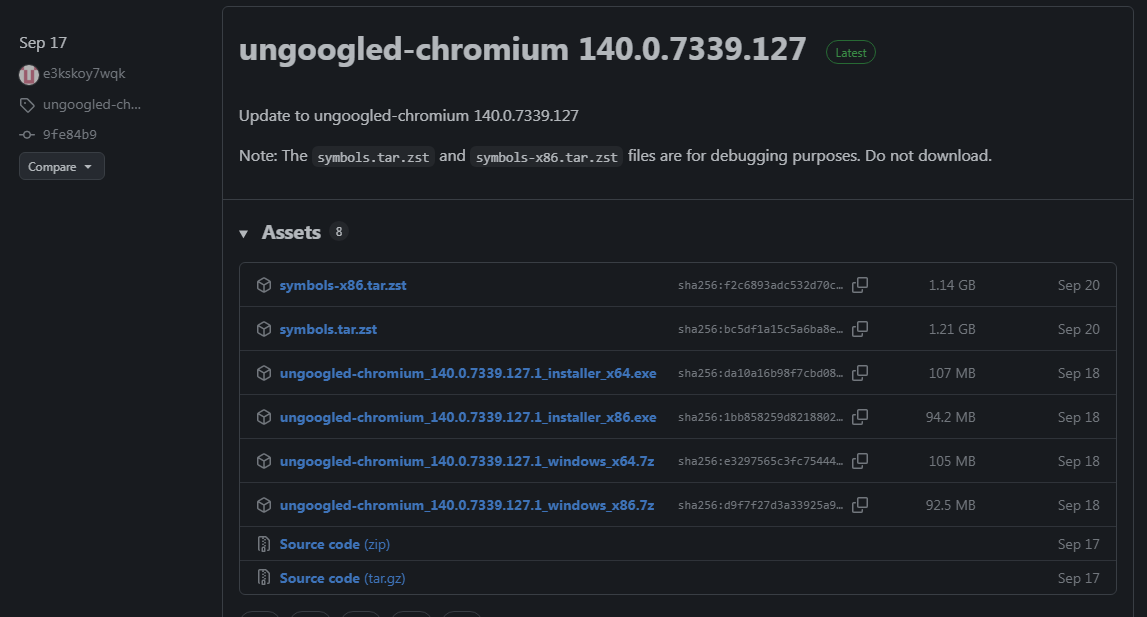
I am on-topic. The topic name is "Firefox and Chromium running on Windows 7 by e3kskoy7wqk" It references the generic Chromium. Ungoogled is also Chromium, and more to the point, the author e3kskoy7wqk releases it. Let me help you find it. https://github.com/e3kskoy7wqk/Chromium-for-windows-7/releases/tag/ungoogled-chromium_140.0.7339.127 So please stay on-topic.
 1 point
 -
I'll look into it.1 point
-
Hello @R1600 I do t want to be a bother but did you ever finish that script you posted about or am I just stupid and can’t find it? sry for the bother :31 point