Leaderboard
The search index is currently processing. Leaderboard results may not be complete.




Popular Content
Showing content with the highest reputation on 11/30/2023 in all areas
-
Thanks for the information! Then the chances are quite good that after @feodor2's switch to JS Engine 91, some things will work again.2 points
-
@feodor2 The website https://www.camp-firefox.de/ works no longer correctly in Mypal 68 for a few days. Especially the site search function https://www.camp-firefox.de/suche/ is broken. Here is the output of the Web Console: SyntaxError: private fields are not currently supported WebComponent.min.js:58:1408 ReferenceError: WoltLabLanguage is not defined de.preload.js:2:1 SyntaxError: private fields are not currently supported WoltLabSuite.Core.tiny.min.js:1:33256 ReferenceError: requirejs is not defined suche:49:1 ReferenceError: define is not defined WoltLabSuite.Forum.tiny.min.js:1:1 ReferenceError: require is not defined suche:531:2 ReferenceError: define is not defined suche:561:2 ReferenceError: define is not defined suche:566:2 ReferenceError: require is not defined suche:607:3 ReferenceError: require is not defined suche:612:2 jQuery.Deferred exception: SECURITY_TOKEN is not defined init@https://www.camp-firefox.de/js/WCF.Combined.tiny.min.js?v=1701002591:19:8603 i@https://www.camp-firefox.de/js/WCF.Combined.tiny.min.js?v=1701002591:16:191 init@https://www.camp-firefox.de/js/WCF.Combined.tiny.min.js?v=1701002591:43:226 @https://www.camp-firefox.de/suche/:577:38 f@https://www.camp-firefox.de/js/WCF.Combined.tiny.min.js?v=1701002591:4:38929 o/</p<@https://www.camp-firefox.de/js/WCF.Combined.tiny.min.js?v=1701002591:4:39232 undefined WCF.Combined.tiny.min.js:4:40512 jQuery.Deferred exception: require is not defined addObject@https://www.camp-firefox.de/js/WCF.Combined.tiny.min.js?v=1701002591:19:13911 @https://www.camp-firefox.de/suche/:592:17 f@https://www.camp-firefox.de/js/WCF.Combined.tiny.min.js?v=1701002591:4:38929 o/</p<@https://www.camp-firefox.de/js/WCF.Combined.tiny.min.js?v=1701002591:4:39232 undefined WCF.Combined.tiny.min.js:4:40512 ReferenceError: SECURITY_TOKEN is not defined WCF.Combined.tiny.min.js:19:8603 ReferenceError: require is not defined WCF.Combined.tiny.min.js:19:13911 This site appears to use a scroll-linked positioning effect. This may not work well with asynchronous panning; see https://developer.mozilla.org/docs/Mozilla/Performance/ScrollLinkedEffects for further details and to join the discussion on related tools and features! suche There is a lot not defined. Have a look above! The admins of this websites must have recently performed changes. In New Moon 28 and Serpent 52, the site search surprisingly works.2 points
-
@dmiranda The solution to let the custom button aboutbutton recognise by the CSS stylesheet buttons_on_navbar_button_roundness.css is a bit more complicated than I thought. You have indeed to change the code of the script aboutbutton.uc.js. It seems to be a class issue. This is the first part of the original script code from line 1 to 26: (function() { if (location != 'chrome://browser/content/browser.xul') return; try { CustomizableUI.createWidget({ id: 'about-toolbarbutton', type: 'custom', defaultArea: CustomizableUI.AREA_NAVBAR, onBuild: function(aDocument) { var toolbaritem = aDocument.createElementNS('http://www.mozilla.org/keymaster/gatekeeper/there.is.only.xul', 'toolbarbutton'); var attrs = { id: 'about-toolbarbutton', class: 'chromeclass-toolbar-additional', type: 'menu', removable: true, label: 'about Seiten öffnen', tooltiptext: 'about Seiten öffnen' }; for (var a in attrs) toolbaritem.setAttribute(a, attrs[a]); return toolbaritem; } }); } catch(e) { }; I changed the class of this button in line 15 from 'chromeclass-toolbar-additional' to 'toolbarbutton-1 chromeclass-toolbar-additional': (function() { if (location != 'chrome://browser/content/browser.xul') return; try { CustomizableUI.createWidget({ id: 'about-toolbarbutton', type: 'custom', defaultArea: CustomizableUI.AREA_NAVBAR, onBuild: function(aDocument) { var toolbaritem = aDocument.createElementNS('http://www.mozilla.org/keymaster/gatekeeper/there.is.only.xul', 'toolbarbutton'); var attrs = { id: 'about-toolbarbutton', class: 'toolbarbutton-1 chromeclass-toolbar-additional', type: 'menu', removable: true, label: 'about Seiten öffnen', tooltiptext: 'about Seiten öffnen' }; for (var a in attrs) toolbaritem.setAttribute(a, attrs[a]); return toolbaritem; } }); } catch(e) { }; This change seems to be enough to let the CSS stylesheet buttons_on_navbar_button_roundness.css recognise the custom button aboutbuttuon as a standard toolbar button. Thus, the button can be rounded by this CSS stylesheet. Here is a screenshot to show the result of my change (I added borders around the buttons via CSS code for better visibility ): The positive side effect of this modification is that the custom button aboutbuttuon behaves as a normal toolbar button from now on, even if it is not rounded off by such a CSS stylesheet. Cheers, AstroSkipper2 points
-
ClearType is easily switched off in Vista, so you will see identical fonts as if you were on XP, this is not the case with Windows 7, the fonts will still be blurry no matter what you do. Windows 7 renders everything blurry and bluish, mp4 videos, any film you watch on windows 7 looks awful. I don't know about Win10, I guess your driver there is different?2 points
-
It's the case with all software. I don't know if you knew, even MKVToollnix changes gamma and brightness! As a rule of thumb, I'd say everything newer is brighter 1030>2044, be it browsers or video codecs, (AV1 is very bright, as the example)1 point
-
Browser diversity!1 point
-
I told you many times about 1030 being superior. What can I say, we all learn something, I guess, I spent several years before I found the right driver for me, But hey, no one stops you from those topics getting deleted.1 point
-
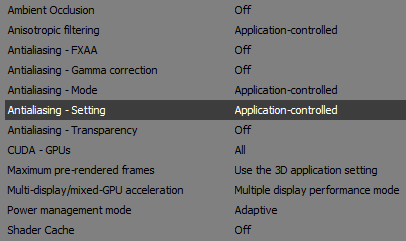
I use 13.5.1030, and the fonts look very good, maybe 13.5.2044 isn't for your system after all. The fonts look like here. The settings I use is in the image I already sent (here). Sorry, can't send BMP - the limit is up.1 point
-
The aboutbuttuon is a special custom button coded quite unusually. It is generated in JavaScript by the var variable and is a menu button. When hovering on all buttons, you will notice that this button renders differenly from all the others. I think the code imported by the stylesheet buttons_on_navbar_button_roundness.css can't target this kind of custom button. It is simply not recognised as a standard toolbar button by the stylesheet. To change the appearance of this button in a toolbar (e.g. nav-bar) itself, you have to change the code inside the aboutbutton.uc.js file directly. Cheers, AstroSkipper1 point
-
anti-aliasing gamma korrektur = aus1 point
-
Never heard of those, AstroSkipper thank you for letting us know!1 point
-
Yes, I know about browser not being 3D, still nVidia driver seems to apply these settings and render it as if it was a 3D app. It even suggests to choose those options for each of my browsers individually.1 point
-
You're not the only one who is not satisfied with chromium/windows7 fonts, look here. ""So the year is 2023 and MS Edge still seems to be the only Chromium-based browser that follows Windows settings for font-rendering..."" https://msfn.org/board/topic/185877-changing-sk_gamma_contrast-without-recompiling-chromium/1 point
-
That confirms what I've been saying about different levels of brightness/contrast in different versions.1 point
-
Go to Manage 3D settings, it's there for me.
 1 point
 -
@Anbima, is this what it looks like for you? If no, then switch to disabled - to get the fonts smoothing. Though, from what I know, it should have no effect on XP. chrome://flags/#disable-direct-write
1 point
-
Honestly, I didn't like both. You may try to play with nVidia settings. For example, try to turn off anti-aliasing gamma correction, not sure if it will make a huge improvement in a browser, but fonts in games look less blurry with this setting off.1 point
-
This one is too bright and contrast, heavy on ones eyes when staring at it for a long time, anti-aliasing is obviously off, direct write is OFF in this case, too. 360Chrome uses this setting by default.1 point
-
This picture is far less bright than the one with 13.5, it's blurry and has less contrast, it is heavily aliased, also looks like the driver applies AA gamma correction.1 point
-
What about iOS?1 point
-
New build of Serpent/UXP for XP! Test binary: Win32 https://o.rthost.win/basilisk/basilisk52-g4.8.win32-git-20231125-3219d2d-uxp-b47d46219f-xpmod.7z Win64 https://o.rthost.win/basilisk/basilisk52-g4.8.win64-git-20231125-3219d2d-uxp-b47d46219f-xpmod.7z source code that is comparable to my current working tree is available here: https://github.com/roytam1/UXP/commits/custom IA32 Win32 https://o.rthost.win/basilisk/basilisk52-g4.8.win32-git-20231125-3219d2d-uxp-b47d46219f-xpmod-ia32.7z source code that is comparable to my current working tree is available here: https://github.com/roytam1/UXP/commits/ia32 NM28XP build: Win32 https://o.rthost.win/palemoon/palemoon-28.10.7a1.win32-git-20231125-d849524bd-uxp-b47d46219f-xpmod.7z Win32 IA32 https://o.rthost.win/palemoon/palemoon-28.10.7a1.win32-git-20231125-d849524bd-uxp-b47d46219f-xpmod-ia32.7z Win32 SSE https://o.rthost.win/palemoon/palemoon-28.10.7a1.win32-git-20231125-d849524bd-uxp-b47d46219f-xpmod-sse.7z Win64 https://o.rthost.win/palemoon/palemoon-28.10.7a1.win64-git-20231125-d849524bd-uxp-b47d46219f-xpmod.7z Official UXP changes picked since my last build: - Issue #2361 - Base implementation of Navigator.Clipboard (3478c01fc8) - Issue #2361 - Remove clipboard-read code (e0a7c35dcc) - Bug 1332825 - Use move semantics in MozPromise::All() and AllPromiseHolder. (543e41f3ac) - Issue #2361 - Enable Navigator.clipboard by default. (7fce3acfa9) - [WebGL] Turn on more validation/error checking in webgl (when not on Win) (acd204e85e) - [DOM] Check if rootDoc is secure context for web compat (71ce058b03) - [Network] Fix relative URL path starting with multiple slashes (d55111c4fd) - [DOM] Improve MessagePort state machine. (114daae894) - [WebGL] Flip the validation state for gl_KHR_no_validation. (56bcdf7ca0) No official Pale-Moon changes picked since my last build. No official Basilisk changes picked since my last build. Update Notice: - You may delete file named icudt*.dat inside program folder when updating from old releases. * Notice: From now on, UXP rev will point to `custom` branch of my UXP repo instead of MCP UXP repo, while "official UXP changes" shows only `tracking` branch changes.1 point
-
Hello @a8s! Cookie Quick Manager 0.5rc2 (and probably most of the others as well) works in Mypal 68.13.5b. No problems here. Maybe, your profile or your Mypal installation is corrupt or misconfigured. First, you should create a fresh profile and try to install the extensions again. If this doesn't help, you can perform a fresh installation of Mypal 68.13.5b. Here is a proof in the form of a screenshot: Cheers, AstroSkipper1 point
-
Compared to legacy extensions I unfortunately do. Legacy extensions are able to change the browser interface and web pages. The so called "web" extensions are not.1 point
-
And here is an alternative solution without modifying the IP Geolocator xpi file. Just install the extension Classic Theme Restorer and set the navigation toolbar attribute 'iconsize' to large icons! Here is a screenshot: I could imagine that this solution could also help with other toolbar icons (especially provided by webextensions) that are too large. Cheers, AstroSkipper1 point
-
@VistaLover Here is a fixed version of IP Geolocator when using the Photonic theme in Serpent 52. I resized all flag images from 48 x 48 to 24 x 24 and saved them in a new folder img/flags/24/. Then I changed the code inside the file main.js in the folder js/: Original code: function setIcon(country_code) { var showFlags = lp.isSet(KEY_SETTINGS_SHOW_FLAGS) ? lp.get(KEY_SETTINGS_SHOW_FLAGS) : true; if (country_code == "ERR" || !showFlags || !(countriesSupported.includes(country_code))) { chrome.browserAction.setIcon({ path: "img/icon48.png" }); } else { chrome.browserAction.setIcon({ path: "img/flags/48/" + country_code + ".png" }); } } Modified code: function setIcon(country_code) { var showFlags = lp.isSet(KEY_SETTINGS_SHOW_FLAGS) ? lp.get(KEY_SETTINGS_SHOW_FLAGS) : true; if (country_code == "ERR" || !showFlags || !(countriesSupported.includes(country_code))) { chrome.browserAction.setIcon({ path: "img/icon.png" }); } else { chrome.browserAction.setIcon({ path: "img/flags/24/" + country_code + ".png" }); } } Screenshot: Now, the toolbar icon and the flag images are shown in a suitable size. Here is the download link of my mod: https://www.mediafire.com/file/xkha44rjidj5maw/ip_geolocator-2.1.0-Photonic-mod.xpi/file Greetings from Germany, AstroSkipper1 point
-
Inside the xpi file of IP Geolocator, one could restrict the size of the toolbar icon to a certain, desired value. I did that several times in terms of legacy extensions, and I assume it could be similar when it comes to webextensions. My credo: What doesn't fit, is made to fit. @VistaLover I had a look inside the IP Geolocator xpi file. I think I have an idea how the problem with the size of the the toolbar flag might be fixed when using the Photonic theme in Serpent 52. If the standard theme is selected, the flag is sized correctly. So, it seems to be a problem caused by the Photonic theme. Anyway! Interested in fixing it?1 point
-
Inside the xpi file of IP Geolocator, one could restrict the size of the toolbar icon to a certain, desired value. I did that several times in terms of legacy extensions, and I assume it could be similar when it comes to webextensions. My credo: What doesn't fit, is made to fit. PS: And thanks for noticing my "typo"! TBH, it wasn't a typo but German spelling. Suddenly, and for no reason at all, I was of the opinion that the word interval is spelled the same in English as in German. Stuff happens! Dementia?1 point
-
And many thanks for pointing me to IP Geolocator! I will have a look at it. At the moment, I am writing from my Android tablet, but later, back at my desktop computer, I will check this extension immediately.1 point
-
A good choice! I used Avast Premier for many years. I personally had a lot of trouble with the version 18.8, though. But as long as it works for you, it will protect you in any case. And its dedection rate is good. I already wrote about Avast here: Kind regards, AstroSkipper1 point
-
First of all, and as I already said, I appreciate your contributions here very much. You provide facts as objectively as possible. You are really interested in collecting security programmes which still work under Windows XP. And you are very helpful here. Thank you for that! All of this is not a matter of course! According to Spybot - Search & Destroy, I used it in times of Windows ME and some years under Windows XP. Therefore, I know it very well. Great to hear that the database is still updated for the old, abandoned version 1.6.2 which is indeed the last version targeting Windows XP. For a long time, I liked it very much. Unfortunately, I had stability issues and problems with updating the database. That was one reason I stopped using it. But nevertheless, this programme was already on my list. And due to the fact that the database updating still works as you reported, it is an option for Windows XP, of course.1 point
-
Fantastic French Hamster ! Thank you for the pictures ! I also had an article about the beautiful pink French Iguana, need to find it.1 point
-
1 - You're welcome ! 2 - Not sure I understood what you meant, is it some form of weird patronising ? I think I already wrote, I was there voluntarily, no one forced me to. 3 - Not sure I understand, again.1 point
-
2022 pictire is not a "fake", it's damn real , very real , I was there myself.1 point
-
7. Kingston KC600 Available Capacities: 256GB – 2TB Interface: SATA 6Gbps1 point
-
with SATA https://www.gamingpcbuilder.com/ssd-ranking-the-fastest-solid-state-drives/1 point
-
Kingston KC3000Fastest SSD, I'd choose it for myself. https://www.tomshardware.com/reviews/best-ssds,3891.html1 point
-
Sorry not sure I understood correctly, your new (?) computer needs to be fixed already ? And it hasn't even arrived ? I'd better save up for a decent GPU than SSD.1 point
-
Perhaps it has something to do with MSFN being a technical forum, no ? And what do you think ?1 point
-
Update: Version 2.0.3.32 added more GUI tooltips fixed FolderBrowse not working in default WinPE 3.x fixed possible duplicates in boot menu fixed drive letter assignment cause error message on empty cardreader drives avoid possible installation on same drive as currently running Windows avoid possible installation of WinPE avoid NativeVHDBoot of not supported Windows Editions added VHDHelper (diskpart wrapper) to create, attach and detach VHD's (reserved for Windows 7 users only ) new commandline options -DisableVHDChecks, -VHDHelper (Hotkey: Ctrl + Shift + V) know issue: - Under WinPE 3.x diskpart may fail to detach a vdisk (blame Microsoft, not me.)1 point