Leaderboard




Popular Content
Showing content with the highest reputation on 11/27/2023 in Posts
-
You're welcome! Glad it is working for you as it should. If you want to change to a light theme one day, you have of course to reinstall the original version of User Agent Status then. The modded version is only for dark themes.3 points
-
I did a proper research before the posting, but you - obviously not, it's especially funny because it's on your linked pages. The issue was fixed in v28, more than 10 years and confirmed by the developers and checked by the testers. Proof at the end of the page. https://bugs.chromium.org/p/chromium/issues/detail?id=234318 "Confirmed that floppy is not accessed when chrome is launched." Verified in 28.0.1500.95 (Official Build 213514) You're not agree with the obvious facts? Then I'd like to hear your version on why the "bug" is there in the browsers that originate from the same place. EDIT: but please without fighting and accusing me of something I didn't do. Stick to the facts. So far, the facts point out to one place you're not happy to hear about.3 points
-
More to the point, if you insist it's purely Chrome related, then it can be switched off in the flags, yet it doesn't work. For me it looks like an old bug is there for a purpose, but you're free to not agree with my opinion. Besides, judging by the comments in your multiple 360topics, you didn't solve it in (not saying which country) Chrome360. Why? I mean, if it's not a spying feature, but rather a well documented bug. Care to expand? thanks3 points
-
How's Chrome from 10 years ago is relevant to this discussion? I too noticed the same spinning disks and floppy scanning with CatsXP (iit's from the same the country you prefer not to name). How would you explain that? Why do we not notice it in Supermium v115? Actually, it would've been reported immediately because Supermium is quite popular already. How would you explain that?3 points
-
I also remember I observed similar behaviour with Opera (spinning up/scanning even sleeping HDDs) back in 2017, soon after the Norwegians sold Opera to the new owners in Asia. https://msfn.org/board/topic/184135-arcticfoxienotheretoplaygames-360chrome-v1352022-rebuild-3/page/20/#comment-12323073 points
-
It's nothing new, all browsers from that country scan your files, already discussed here, found by @XP4ever https://msfn.org/board/topic/184135-arcticfoxienotheretoplaygames-360chrome-v1352022-rebuild-3/?do=findComment&comment=12320793 points
-
Thanks for the tip! But it's been in my local archive for a long time. You know I am a fan of good and working extensions.3 points
-
I am quite sure Decentraleyes was just an example to show that there is no problem with downloading extensions from the website addons.mozilla.org by Serpent 55. Nothing else. I assume @VistaLover chose this example to show the yellow banner and yet the possibility of downloading the extension.3 points
-
Glad to be of help, yes it's SRWare Iron on Vista x64, right.2 points
-
Ok, can we count it as your version of those events then? The browser turns on the lights and spins up the disks, then the chirping sounds follows, and all that just because the browsers from that place are simply bored?2 points
-
Type, then hit @ and wait, it supposed to trigger, then start by typing the first letter of the profile you want to tag, right after @ without spaces. It will not work on old browsers, the minimum would be Chrome 99 (not sure exactly about the min. version). I'm currently on Iron 99.2 points
-
Argument is when both sides have valid facts, we haven't read any from you. Also, it's not "heresay", it's been confirmed by at least several members and Chrome developers, including the comments in your topic with 360Chrome. It's not only Floppy disks, it's basically any storage, HDD, USB stick, I actually read it is also DVD. The goal is not to "win". The goal would be to defeat the spying "features" coming from that dubious place. It's not only linked to XP, I can reproduce even on Win 7. Example, an external WD 8TB storage with "green" saving features sleeps, then it turns on and spins up when the browser starts. I have the same behaviour with 360Chrome and CatsXP.2 points
-
No such flag in M115.1 point
-
You're very welcome! It would an interesting topic since my experience with Windows 7 was nothing but annoyances and grievances.1 point
-
You're "done" because you have nothing to contradict to the facts scientifically (which is an expected behaviour on a technical forum), nor you can find any reports of the same behaviour in Chrome 115 Official Build.1 point
-
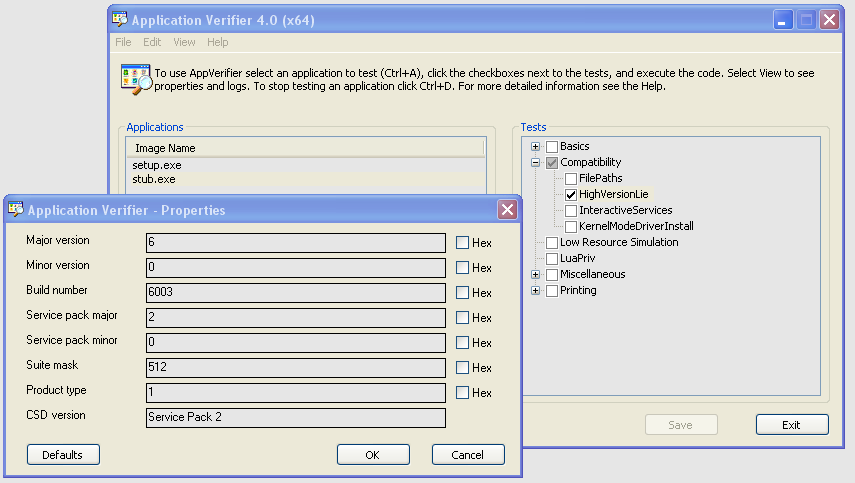
I'm afraid I have had no luck with this in trying to get Panda installed on XP 64-bit. As promised some weeks ago, I decided to try out all @UCyborg hard work that he put into getting this going. I started on a bare-bones install of XP 64-bit and installed .NET Framework 4.0. Then installed all the 16 KB updates for .NET Framework 4.0 that are listed on Windows Update as well as KB2600211. Rebooted. Installed Application Verifier 4.0 and applied the instruction for stub.exe and setup.exe Ran the Panda installer FREEAV.exe It still will not get past the Panda windows that states: .NET Framework 4.0 is needed. I have double checked and .NET Framework 4.0 Client is Version 4.0.30319 The same with .NET Framework 4.0 Extended. All the KB updates for .NET 4 are all there and listed in Add Remove Programs. The only thing I can think of is the rest of the 200 Windows Updates are not installed yet. I can not see the point in installing these as they have nothing to do with .NET.
 1 point
 -
It may fail to start due to the broken dependencies. Did you disable any other services?1 point
-
What does your event log say? Did you read it?1 point
-
@Mathwiz You can change the background and text colour as you prefer. The text can also be formatted in bold type. Here is another screenshot with bold text in the status bar panel: And here is the code: #ua-status-toggle {width: 24px; height: 24px;} toolbar[iconsize="small"] #ua-status-toggle {width: 16px; height: 16px;} #ua-status-main, #ua-status-label, #ua-status-main-input, #ua-status-button-setua, #ua-status-button-resetua { background-color: black !important; color: yellow !important; font-weight: 700 !important;} Just edit the overlay.css file to your liking exactly where I added the code! Greetings from Germany, AstroSkipper1 point
-
Right! The overlay.css file inside the folder /chrome/skin is the one you have to modify. I have installed the theme FT DeepDark 14.3 theme and the extension User Agent Status 1.7.2 in Serpent 52. No problems here. The text in the status bar panel is readable. Here is a screenshot: At next, I added a bit CSS code to change the appearance of the status panel. I decided to keep the background colour which is obviously black and changed the text colour to yellow for better visibility. Here is a screenshot: Here is the download link to the modded version I made for you just for fun: https://www.mediafire.com/file/v4wa5byn6vgzeu4/ua-status-1.7.2-FT-DeepDark-mod.xpi/file Cheers, AstroSkipper1 point
-
I don't use dark themes. Thus, it is working perfectly for me. But one thing is clear. You can change or modify extensions in every conceivable way, especially the legacy extensions for our beloved UXP browsers. I assume there is CSS code inside the extension which might be adapted for dark themes. Unpack the extension and have a look inside!1 point
-
adding the date and day is brilliant - many thanks for that - can i be picky or add a request - which ever way you see it the format is - time - day - date is it possible to make the order configurable or at least have the time as the last item on the right and another thought - is 12/24 hour format possible1 point
-
New build of BOC/UXP for XP! Test binary: MailNews Win32 https://o.rthost.win/boc-uxp/mailnews.win32-20231125-d0fd16ed-uxp-b47d46219f-xpmod.7z BNavigator Win32 https://o.rthost.win/boc-uxp/bnavigator.win32-20231125-d0fd16ed-uxp-b47d46219f-xpmod.7z source repo (excluding UXP): https://github.com/roytam1/boc-uxp/tree/custom * Notice: the profile prefix (i.e. parent folder names) are also changed since 2020-08-15 build, you may rename their names before using new binaries when updating from builds before 2020-08-15. -- New build of HBL-UXP for XP! Test binary: IceDove-UXP(mail) https://o.rthost.win/hbl-uxp/icedove.win32-20231125-id-656ea98-uxp-b47d46219f-xpmod.7z IceApe-UXP(suite) https://o.rthost.win/hbl-uxp/iceape.win32-20231125-id-656ea98-ia-93af9a0-uxp-b47d46219f-xpmod.7z source repo (excluding UXP): https://github.com/roytam1/icedove-uxp/tree/winbuild https://github.com/roytam1/iceape-uxp/tree/winbuild for UXP changes please see above.1 point
-
New build of Serpent/UXP for XP! Test binary: Win32 https://o.rthost.win/basilisk/basilisk52-g4.8.win32-git-20231125-3219d2d-uxp-b47d46219f-xpmod.7z Win64 https://o.rthost.win/basilisk/basilisk52-g4.8.win64-git-20231125-3219d2d-uxp-b47d46219f-xpmod.7z source code that is comparable to my current working tree is available here: https://github.com/roytam1/UXP/commits/custom IA32 Win32 https://o.rthost.win/basilisk/basilisk52-g4.8.win32-git-20231125-3219d2d-uxp-b47d46219f-xpmod-ia32.7z source code that is comparable to my current working tree is available here: https://github.com/roytam1/UXP/commits/ia32 NM28XP build: Win32 https://o.rthost.win/palemoon/palemoon-28.10.7a1.win32-git-20231125-d849524bd-uxp-b47d46219f-xpmod.7z Win32 IA32 https://o.rthost.win/palemoon/palemoon-28.10.7a1.win32-git-20231125-d849524bd-uxp-b47d46219f-xpmod-ia32.7z Win32 SSE https://o.rthost.win/palemoon/palemoon-28.10.7a1.win32-git-20231125-d849524bd-uxp-b47d46219f-xpmod-sse.7z Win64 https://o.rthost.win/palemoon/palemoon-28.10.7a1.win64-git-20231125-d849524bd-uxp-b47d46219f-xpmod.7z Official UXP changes picked since my last build: - Issue #2361 - Base implementation of Navigator.Clipboard (3478c01fc8) - Issue #2361 - Remove clipboard-read code (e0a7c35dcc) - Bug 1332825 - Use move semantics in MozPromise::All() and AllPromiseHolder. (543e41f3ac) - Issue #2361 - Enable Navigator.clipboard by default. (7fce3acfa9) - [WebGL] Turn on more validation/error checking in webgl (when not on Win) (acd204e85e) - [DOM] Check if rootDoc is secure context for web compat (71ce058b03) - [Network] Fix relative URL path starting with multiple slashes (d55111c4fd) - [DOM] Improve MessagePort state machine. (114daae894) - [WebGL] Flip the validation state for gl_KHR_no_validation. (56bcdf7ca0) No official Pale-Moon changes picked since my last build. No official Basilisk changes picked since my last build. Update Notice: - You may delete file named icudt*.dat inside program folder when updating from old releases. * Notice: From now on, UXP rev will point to `custom` branch of my UXP repo instead of MCP UXP repo, while "official UXP changes" shows only `tracking` branch changes.1 point
-
this make all more perfect, it should be a on-off switch within GUI.1 point
-
FYI, I already listed many sources for extensions together with corresponding links in the first post of this thread: Cheers, AstroSkipper1 point
-
@VistaLover I have linked your post about Add to Search Bar https://msfn.org/board/topic/183923-extensions-and-custom-buttons-for-uxp-browsers-corrections-modifications-adjustments-and-special-recommendations/?do=findComment&comment=1254575 to my second post Alphabetical list of all posted extensions. I think that such an extension should get its due attention and not be lost. Best regards, AstroSkipper1 point
-
Totally agreed! For older (not as old as mine) hardware, Windows 7 is a very good choice.1 point
-
@roytam1! Do you know if there are or were any attempts to localize MailNews? Binary Outcast seems to provide Interlink Mail & News in English only. Same for your release of MailNews. New Moon can be localized by existing language packs after some modifications in terms of dev tools. I already did that for the German language pack, and it works great which can be found here: My German language pack for New Moon 28 For Serpent, there is a project on board.eclipse.cx. But in the case of MailNews, I found absolutely nothing. All existing language packs for Thunderbird don't work anymore as expected due to all changes that have been made. I should still mention at this point that I am currently in the process of developing a German language pack for MailNews from scratch to use this great email client in my native language. I do that in form of a private project at the moment. Greetings from Germany, AstroSkipper1 point
-
if you want to help others do it otherwise get a life and move on if you bring nothing to this thread. I was unaware that the PAE patch was made by geek minds for nerds only.....1 point