All Activity
- Past hour
-
 Okay, that explains it. I *never* use a REAL email address for these types of things. *NEVER* v23 would CONNECT (through HTTPSProxy) but then fail account creation saying the email account was unreachable. I tried EIGHT different "temporary email" services, Panda could not "reach" any of them. ie, has them all blacklisted, not uncommon [MSFN accounts can also not be created with temp emails, something that *ticks me off* but "is what it is"]). v21 would not even try to connect to the "temporary email" services [direct, no proxy] (which is inline with your statements). Just the way I do things, Panda will *NOT* get my email address. But I could create a "throwaway" Gmail and activate that way if I opt to keep Panda.
 - Today
-
 You must have misunderstood something. Panda only needs ProxHTTPSProxy to activate the Panda account. After that, the proxy settings in Panda can be deleted and the proxy closed.
 -
 I'm pretty sure that my Panda Dome 21 did activate without using HTTPSProxy, even though I have it installed, and it accessed my Panda account fine too. Version 22 again activated fine as a free version, and updated fine when my Essentials activation code was put in. The only thing it would not do until I put the proxy settings into it was access my Panda account, which 21 had done fine apparently without the proxy.
 -
 Here -> https://web.archive.org/web/*/www.microsoft.com/windows/downloads/bin/W95setup.exe https://web.archive.org/web/*/www.microsoft.com/windows/downloads/bin/W95DISK2.EXE https://web.archive.org/web/*/www.microsoft.com/windows/downloads/bin/W95DISK3.EXE https://web.archive.org/web/*/www.microsoft.com/windows/downloads/bin/W95DISK4.EXE https://web.archive.org/web/*/www.microsoft.com/windows/downloads/bin/W95DISK5.EXE https://web.archive.org/web/*/www.microsoft.com/windows/downloads/bin/W95DISK6.EXE https://web.archive.org/web/*/www.microsoft.com/windows/downloads/bin/W95DISK7.EXE https://web.archive.org/web/*/www.microsoft.com/windows/downloads/bin/W95DISK8.EXE https://web.archive.org/web/*/www.microsoft.com/windows/downloads/bin/W95DISK9.EXE https://web.archive.org/web/*/www.microsoft.com/windows/downloads/bin/W95DISK10.EXE https://web.archive.org/web/*/www.microsoft.com/windows/downloads/bin/W95DISK11.EXE https://web.archive.org/web/*/www.microsoft.com/windows/downloads/bin/W95DISK12.EXE https://web.archive.org/web/*/www.microsoft.com/windows/downloads/bin/W95DISK13.EXE https://web.archive.org/web/*/www.microsoft.com/windows/downloads/bin/W95DISK14.EXE But you will probably have to try the files and try from snapshots of different dates because it usually happens that not all files are archived well...
 -
Here is a quotation from my main article: And I should add that it is very important to delete all dummy cerificates in the Certs folder when the cacert.pem file has been updated. And you won't lose anything. The dummy certificates will be generated the next time when connecting to servers. BTW, you are using the proxy system-wide. That was what I asked you in an earlier post. I personally do not.
-
I can't get it to ACTIVATE on 100% Native XP+POS. The ACTIVATION may be where HTTPSProxy becomes a must.
-
I do that, it's just a suggestion.
-
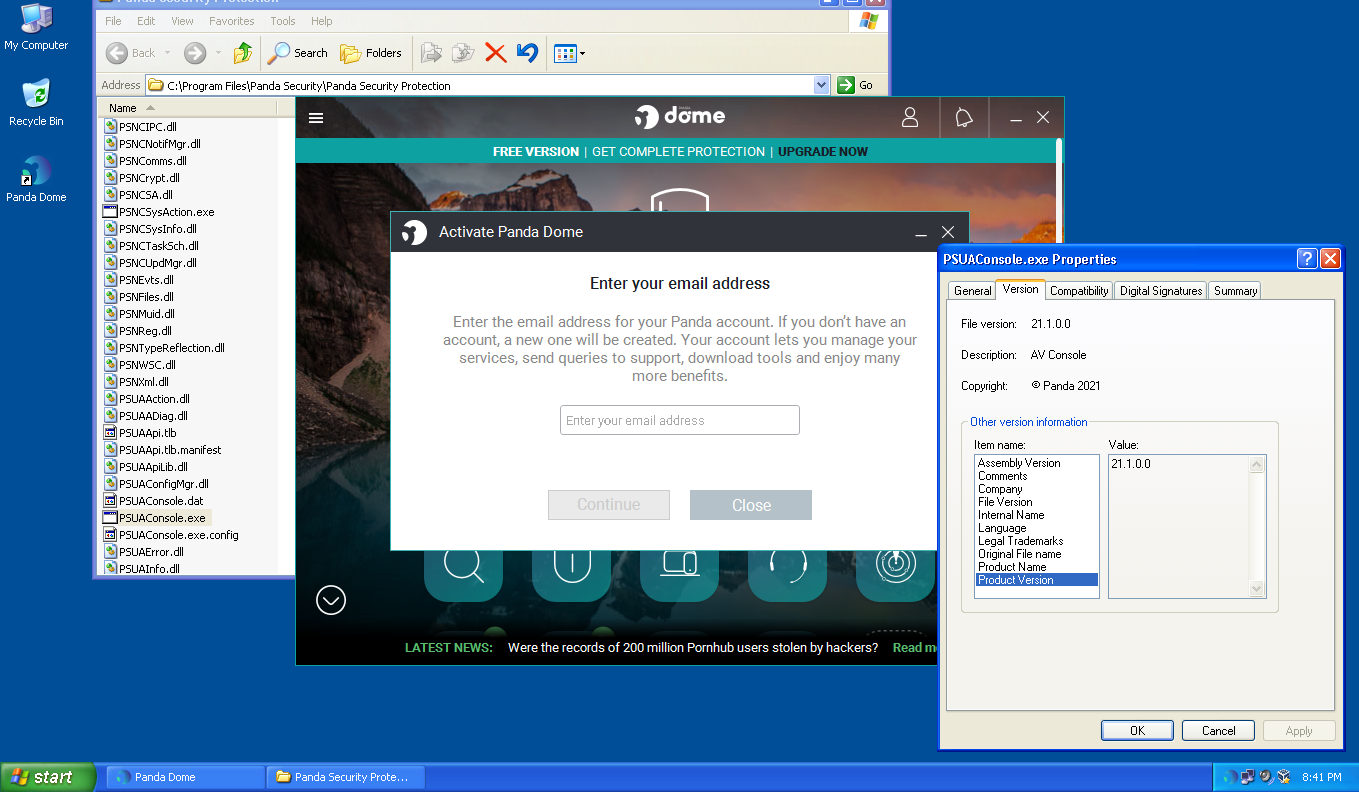
I can report that Panda Dome 21 does indeed install on a 100% Native XP+POSReady2009 (ie, *no* HTTPSProxy, *no* ProxHTTPSProxy, *no* Proxomitron, *no* Cert Updates of any kind, IE never even launched until the Panda installer launched it!). And it also offered the OFFLINE installation checkbox (which I selected during install). This is a completely updated XP+POS, immediately after install of OS (plus all OS updates/hotfixes) *only*. Completely virgin XP+POS. It did not get a different version of Panda that needed uninstalled first in order to install v21.

-
When I first said that I'd installed Panda Dome 21, and you mentioned HTTPSProxy as being necessary for it to connect on XP, the first thing I did was to look at the proxy console. There were no entries for Panda servers at all, and the program seemed to be working perfectly, connected to my account and activated. How it worked without it, I have no idea. The Panda Dome proxy settings were still on their defaults, whatever they are. I have the proxy set to work system-wide, but it would surely have recorded something in the console if Panda Dome had used it. I have never emptied my Certs folder, or updated cacert.pem, and I've been using the proxy now for several years, as you know! It seems to still be working perfectly. What would be the symptoms if it wasn't because I hadn't done all that. My Certs folder has 4,145 files in it BTW!
-
@Dave-H Do you regularly maintain your proxy? For ProxHTTPSProxy to function properly, it must be maintained. From time to time, the Certs folder must be emptied, and the cacert.pem file must be updated. Only then will it function properly and can connect to the Panda servers. Then you will finally see the connections established to their servers.
-
Glad you like Supermium, I've been using it for ages now on XP, and it's become my standard browser even on Windows 10. To answer your questions - 1. Unfortunately, Supermium has no internal mechanism to set itself as the default browser on XP. It can be done with a lot of tedious registry editing, or by using a utility like PortableRegistrator. https://www.majorgeeks.com/files/details/portable_registrator.html 2. This one is easy! Just type chrome://flags/#custom-ntp into the address bar, enable it, and fill in the URL that you want your new tabs to display. Restart the browser and there you are! 3. All I can suggest for that is to try different themes. Hopefully one of them will make things more readable for you. I'm sure that almost everything can probably be customised if you know how, but I don't have that level of knowledge of Chromium customisation I'm afraid. Cheers, Dave.
-
I can't confirm this statement. When I installed Panda Dome 21.01.00, I was only able to activate the Panda account with the help of ProxHTTPSProxy, using the necessary proxy settings in Panda. Connections to Panda's servers were immediately visible in the proxy console.
-
Pixeldrain's file expiry rules are changing!
-
I don't think it'll be, but why not just add folders to the items on the right side?
-
Been running Supermium Version 138.0.7204.298 (Official Build) (32-bit) on win XP SP3 on Dell Dimension 4700 3.5 Gb for a week; pretty much 'box stock,' ungoogled. It's all but flawless. I've run most of (all?) the popular browsers for XP at one time or another in the last few years; this is the only one that will reach every site and renders all of them useably. I no longer have trouble with Cloudflare even though my ISP is considered a red light district. I don't do banking online. I have AdBlocker Ultimate and UblockOrigin installed. Performance is perfectly adequate; even the one YouTube I tried was okay. The Mars landscape photo jerked at about 1/4-1/2 second intervals when panned. GeForce GTX 645 card. Twitch and British Gas sites looked okay to me. The 'don't autostart videos' setting does indeed work only sometimes. It takes ten tasks running to see one tab which is -WOW!- but probably makes for better use of limited memory. Overall a stunning piece of work! Three questions/issues: 1. Is there a way to set Luxxle as default browser? As far as I can tell the default browser must be chosen from a very short built-in list. 2. Is there a way to set a URL that opens in each new tab? Even AI flails on trying to answer this question. 3. My eyes are not the best and the three icons at the upper right corner are basically just a gray blur. Either whte on a dark backbround or black on a lighter background would be fine but I cannot find a way to get either one. Or extending the mouseover color change of the 'X' icon would also work. But the other two get lighter which is no help at all No other browser I've used had any of those three issues so it's surprising to see them here. But still a fantastic piece of work. Any help appreciated!
-
 Hi guys, I suck at finding things on the Internets, hence my humble request for a pointer to where I can download this goody: Microsoft Windows 95 Service Pack 1 Please note that I am interested only in the full English stand-alone version that was available on CD-ROM (order from Microsoft) or the 14 floppy disks set that could be downloaded from here: https://web.archive.org/web/20010811133428/http://www.microsoft.com/windows95/downloads/contents/common/servicepack1/svcpk1diskset.asp?site=95 Thanks a lot in advance! Stay well :-)
 -
Hi guys, I suck at finding things on the Internets, hence my humble request for a pointer to where I can download this goody: Microsoft Windows 95 Service Pack 1 Please note that I am interested only in the full English stand-alone version that was available on CD-ROM (order from Microsoft) or the 14 floppy disks set that could be downloaded from here: https://web.archive.org/web/20010811133428/http://www.microsoft.com/windows95/downloads/contents/common/servicepack1/svcpk1diskset.asp?site=95 Thanks a lot in advance! Stay well :-)
-
Hi guys, I suck at finding things on the Internets, hence my humble request for a pointer to where I can download this goody: Microsoft Windows 95 Service Pack 1 Please note that I am interested only in the full English stand-alone version that was available on CD-ROM (order from Microsoft) or the 14 floppy disks set that could be downloaded from here: https://web.archive.org/web/20010811133428/http://www.microsoft.com/windows95/downloads/contents/common/servicepack1/svcpk1diskset.asp?site=95 Thanks a lot in advance! Stay well :-)
-
Yes of course, although I only seemed to actually need HTTPSProxy to get my Panda account on the GUI of version 22, and not at all with version 21. There was no interaction with the Panda servers recorded at all in the proxy console with 21. The updates, and activation of the Essential upgrade, seemed to work without using the proxy even with 22.
-
Technically, THEY ALREADY HAVE. "We" are only able to get it installed by using programs that are not part of XP, how many of even us MSFN Geeks truly consider that route to be "supporting" XP? And the "exception error" that I was getting in LTSB 2016 indicates to me that they don't support "Win10", but rather only "new Win10".
-
Yes. Not in LTSB 2016, but yes in 24H2. In 2016, it "installed" but attempts to open the GUI resulted in an "exception error". At what version of 10 did the "exception error" get fixed is unknown. I've already deleted the VM clones. I could reclone/reinstall if screencaps are required. Basically, I know enough at this point that my "real hardware" XP will *not* be getting Panda Dome (it may not get ANY antivirus, to be perfectly honest, it's just for out in the garage).
-
I always raid my Windows temp folder for installation files when doing an installation with an online installer. I usually do it when the first 'do you want to continue' prompt comes up, as many installers immediately delete the temporary files when the installation ends. I've got hold of many files which work as offline installers that way! Well I think that proves the theory. You can't actually install version 23 on XP, only version 22! That 'offline installation' checkbox was there when I installed version 21, the first one I installed. I wondered why later versions didn't offer it, now I know, it won't offer it on XP. I assume that you did actually get version 23 on Windows 10. I do hope this doesn't mean that Panda are soon going to drop XP support for Panda Dome. I suppose as long as the version I've got still gets the equivalent of pattern updates, unlike Malwarebytes 3.5, it's not a problem.
-
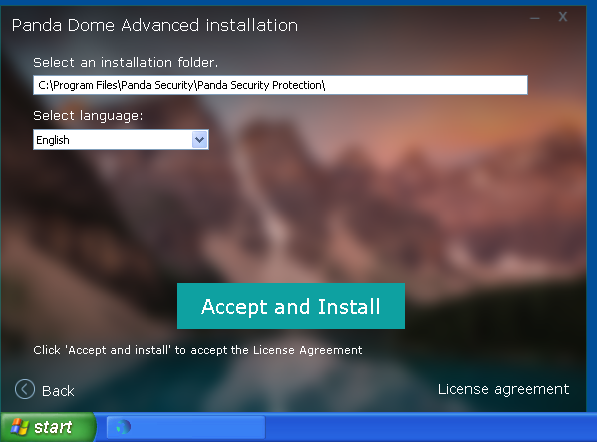
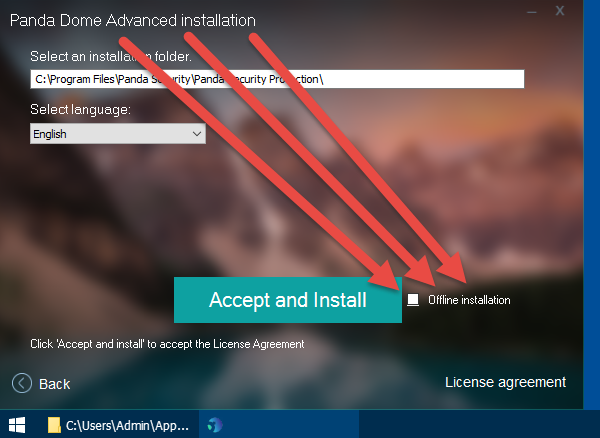
The same exact v23 *offline* installer when ran in Win10 *ALLOWS* for an OFFLINE installation. In XP, the *Offline installation* checkbox is disabled so you are forced to use the offline installer as a "stub" that downloads v22! XP: 10:
-
one moment, ran out of space to allow copy-and-paste screencaps... bad news, that means all previous screencaps will be deleted (my time is too valuable unto myself to use any image hosting services, sorry, just 'fact')...
-
The same exact v23 *offline* installer when ran in Win10 *ALLOWS* for an OFFLINE installation. In XP, the *Offline installation* checkbox is disabled so you are forced to use the offline installer as a "stub" that downloads v22! XP: 10: