All Activity
- Today
-

Last Version of Software for Windows 8.1
NotHereToPlayGames replied to xedakide's topic in Windows 8
Wow! That was even more OT, random, and out-of-nowhere than even a lot of my posts! -
 @isolar I looked into it, up to a certain extent for now. About 1: My initial idea was you can make print-screens to compare register 8086:0F04 without and with HDA.SYS from @Drew Hoffman but today I searched for the appropriate PCI-registers and couldn't find them. It seems your system has a SoC (System on Chip), not a 'classic' design. In some 4274 pages long Intel Datasheet I found things are different, seems have to do with separate PCI Configuration Registers (probably XT_SNP). So I expect no results. I had some conversations with Copilot during traffic, and it seems it is even possible to damage your hardware in this case. 'While less common, repeatedly writing unsupported values to hardware registers could stress the hardware or violate electrical timing constraints, leading to permanent damage in extreme circumstances.' Normally I use a disclaimer like 'writing to PCI registers is at your own risk, if any' but for now I strongly suggest NOT to write to your PCI registers and NOT try to use pcipatchB (unless you are knowing what you are doing). About 2: I Googled ALC280, so far GPIO not found mentioned in Linux sources! About 3: '$00C3B000 - Unmute Audio Mixer': this is a verb ment for OUTPUT's (3B000). For inputs use: Begin ;;node 0xC:Analog_Mixer $00CB0000;AC_VERB_GET_AMP_GAIN_MUTE;Channel0_R $00CB2000;AC_VERB_GET_AMP_GAIN_MUTE;Channel0_L $00C37000;AC_VERB_SET_AMP_GAIN_MUTE;Channel0_R+L;Unmute ;$00C37080;AC_VERB_SET_AMP_GAIN_MUTE;Channel0_R+L;Mute $00CB0000;AC_VERB_GET_AMP_GAIN_MUTE;Channel0_R $00CB2000;AC_VERB_GET_AMP_GAIN_MUTE;Channel0_L $00CB0001;AC_VERB_GET_AMP_GAIN_MUTE;Channel1_R $00CB2001;AC_VERB_GET_AMP_GAIN_MUTE;Channel1_L $00C37100;AC_VERB_SET_AMP_GAIN_MUTE;Channel1_R+L;Unmute ;$00C37180;AC_VERB_SET_AMP_GAIN_MUTE;Channel1_R+L;Mute $00CB0001;AC_VERB_GET_AMP_GAIN_MUTE;Channel1_R $00CB2001;AC_VERB_GET_AMP_GAIN_MUTE;Channel1_L End Mixer: '$00C70100 - Audio Mixer connected to DAC': as such okay, but I don't expect Selector Widgets before a Mixer. If wanted, better test with GET verbs too: $00CF0100;AC_VERB_GET_CONNECT_SEL;Channel0 $00C70100;AC_VERB_SET_CONNECT_SEL;Channel0 $00CF0100;AC_VERB_GET_CONNECT_SEL;Channel0 $00CF0101;AC_VERB_GET_CONNECT_SEL;Channel1 $00C70101;AC_VERB_SET_CONNECT_SEL;Channel1 $00CF0101;AC_VERB_GET_CONNECT_SEL;Channel1 Note for interested readers: a GET-VERB returns a meaningful payload, can be read-out in HDAICIN.TXT. SleepingWidget: I would set 'SleepingWidget=$02' in HDACFG.INI. Volume: If Volume is set to '00' I am afraid it's minimal volume. Please correct me if I am wrong! Better try a moderate value like '3F'. Next example Verbs are without Node/ Widget address: B8000;AC_VERB_GET_AMP_GAIN_MUTE;status_ch0_R BA000;AC_VERB_GET_AMP_GAIN_MUTE;status_ch0_L 3B000;AC_VERB_SET_AMP_GAIN_MUTE;unmute_ch0_L+R B8000;AC_VERB_GET_AMP_GAIN_MUTE;status_ch0_R BA000;AC_VERB_GET_AMP_GAIN_MUTE;status_ch0_L 3B03F;AC_VERB_SET_AMP_GAIN_MUTE;set_volume_ch0_L+R B8000;AC_VERB_GET_AMP_GAIN_MUTE;status_ch0_R BA000;AC_VERB_GET_AMP_GAIN_MUTE;status_ch0_L Power Verbs: I do not understand what you said about your Power States, please explain in (much) more detail. Further: Looks all good to me. Do not forget I have at home only about four different (desktop) High Definition Audio Controllers/ Codecs, all working with my quasi-universal HDAICOUT.HDA and only one HDA controller needed pcipatchB (or set already by Watler's HDA2.DLL, like on my SB710 chipset). I have one laptop from work, but I can not even open a command-line. Booting from USB is out of the question. So I can not run any tests on machines like yours....
 -
What you mean with penguins!!!!? Tux from the Linux operating system?
-

My Browser Builds (Part 5)
j7n replied to roytam1's topic in Browsers working on Older NT-Family OSes
Something happened to Reddit literally just now. Loading has become slow on an old PC, it fetches about 800 requests and 30 MB to display 100 subscriptions. This is not a problem specifically with New Moon, as Opera 12 is also affected, but I have no other place to discuss old PC and old browser behavior. Seems like they have modernized "Old" reddit. https://i.imgur.com/9xL6uJh.png -
I know, that's why I bought it. But... It did not come with the motherboard on this cheap budget-market eMachine. It was just the *BEST* replacement CPU that I could throw at it to get some life out of it when a piece-of-junk freebie was given to me. I got several years out of it, only for the cost of a CPU that would have been at least a decade old and was pennies to the dollar of what it cost in 2007.
-
On second thought, and not interested in digging up reviews and whatnot, but I should probably put Acer as "more junky" then eMachine. Both are "budget markets" and both were so JUNKY that the owners that bought them HATED them so much that they GAVE THEM AWAY FOR FREE. One of the Acer's I did buy (WORST MISTAKE I'VE EVER MADE), the other was given to me, this eMachine was also given to me.
-
Yes, SAME HERE, *flawless, butter, blah-blah*. But no, NOT if I'm doing nine things at once and one of those nine is 1080p. Not a Dell. Two Acer's went to Goodwill. This one is an "eMachine" (far FAR worse than Dell and far FAR worse than Acer).
-
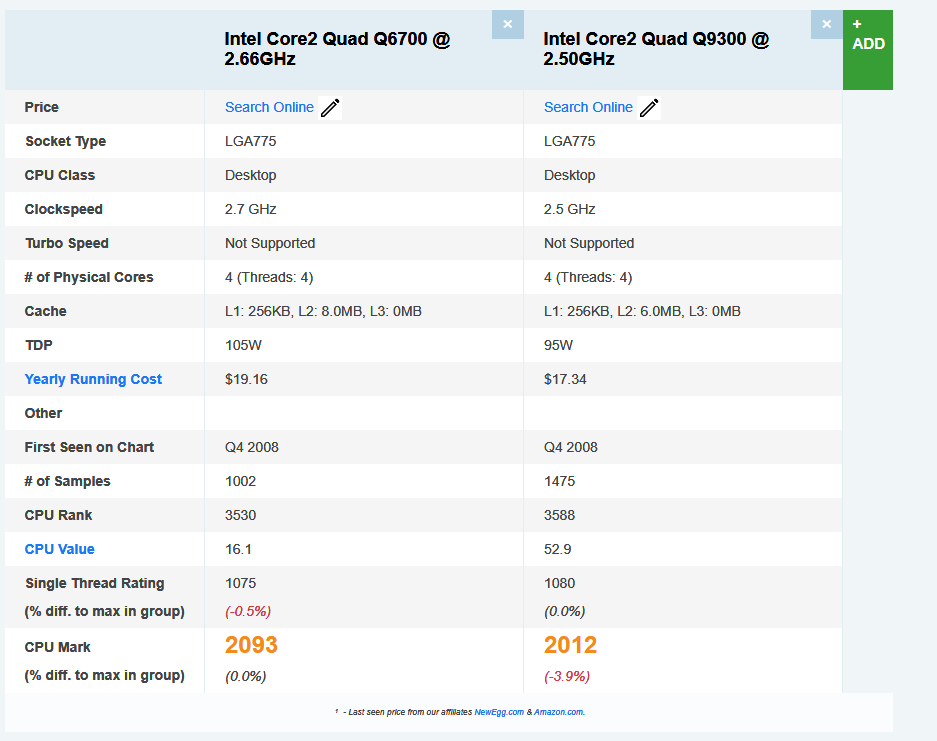
 Yes, I do! Q6700 was Hi-end, top of the line in 2007, q9300 was a severely reduced, budget version. Q6700 is 19yo btw,
 -
Struggles a bit, probably varies depending on the video bitrate, probably when the Adblocker kicks in. But I'm logged into MSFN from this old PC, adds load, too.
-
No, I didn't. Can and flawless. Feel the difference? Butter smooth! On the other hand, your mobo is a cheaply made Dell (?sorry, missed). could be failing along with the PSU.
-
4.3% with what margin of error ??? Because a different web site reports 3.9%. At any rate, do you really think 4.1 +/- 0.2 is really anything at all ??? And if single thread is more important (some cite it is!), then were talking 0.5%.

-
And yes, AV1 is the key. Try VP9 and report your findings. :)
-
You misread. I *can* do 1080p. Screencaps are above. I'm just saying that having the CPU running between 60% and 80% doesn't leave much room for multi-tasking. So everybody's level of on-the-side multi-tasking will affect the performance of their 1080p. Try 3D CAD while streaming 1080p and report your findings. :) Again, I *can* (and often *do*) 1080p.
-
Oh, yours is even faster by 4.3 percent! https://technical.city/en/cpu/Core-2-Quad-Q6700-vs-Core-2-Quad-Q9300
-
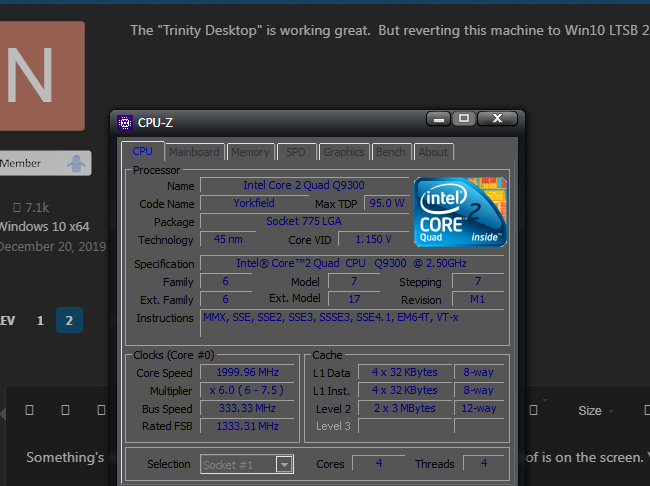
Something's not right. I have an ancient, identical performance CPU Q9300. Proof is on the screen. You could probably wonder where such a young woman could get it, so I'll tell, it's my grandpa's PC we store in the basement. 1080p browsing an AV1, H265 codec is flawless.
-
Important to note, I got a severe eye strain by just staring at the desktop! It's simply fatiguing. Watching photos via Nero 9 isn't, but looks like it bypasses the rendering to DX9, therefore they look somewhat similar to Vista's and not fatiguing.
-
Well, following the suggestion, I tried to use Windows 7 on a Kaby lake system, and Windows 7 renders everything much blurrier than Vista. Films and texts look like over-blurred hell! Those that are going to argue, you just forgot the crispiness of Vista and even XP! So not useful even for such simple tasks for me.
-
The "Trinity Desktop" is working great. But reverting this machine to Win10 LTSB 2016.
-
*Mistake*. Running the "Desktop Profiler" rendered this install UNUSABLE. CPU pegged at 100%. Mouse movement skips (ie, disappears then reappears offset in the direction you attempted to move). Motherboard fan locked at noisy-fast. et cetera... Reinstalling and SKIPPING the "Desktop Profiler" (which, yeah, I kind of knew but did anyway).
-
Yes, apparently it has to do with the switch from icu63 to 78. I wrote on December 25th: "Latest RT's releases 20251225: These can't start anymore with the roll back of only XUL.dll 20250531 and mozsqlite3.dll (nss3.dll) 20250531. Now ICU78 and mozjs.dll have to be swapped to previous version 20251220, too. So this procedure makes less and less sense in the future." More in-depth investigations are pending.
-
The Desktop Profiler is taking FOREVER. Way way *way* longer than it did on another computer. So reading while I wait. And this seems like a NO-BRAINER to me (though I read OFTEN, even here at MSFN, on [unrealistic] expectations of 1080p on these older machines).
-
Annoying as H#LL !!! I really HATE screensavers kicking in at only 6 minutes !!! but anywhooo...
-
Although Q4OS is needing to use an OLDER wireless USB adaptor.
-
Q4OS - inline with expectations as far as under 800 MB RAM but this is *BEFORE* running the "Desktop Profiler".
-

Native (WDM) HD Audio driver for Windows 98se/Me
isolar replied to Drew Hoffman's topic in Windows 9x/ME
Thanks Drew, more than happy to provide any info that can help. What you suggest is happening seems logical here, i'm not 100% sure how the HDA.SYS driver functions and what verbs it sends on enumeration (could you please advise?), but definitely when I rename HDA.SYS to HDA.BAK then sound stops. Renaming back to HDA.SYS - sound returns again. Deomsh has advised possibly your driver enumerates GPIO pins which I am not touching in the HDAICOUT file.. yet.. but currently investigating. And/Or nosnoop bit set on audio controller.. also under investigation but this is brand new info for me . The main mystery is how HDACfg.ini maps codec $2 instead of $0 (Codec $2 is HDMI audio out.. so Watler's should be doing nothing to get sound possible here). Chipset I am struggling to identify due to the nature of this motherboard (without installing Win8+ that has drivers to identify).. it is a Lenovo S20-30 with Lenovo Edonis 2A1 motherboard, Baytrail-M CPU Intel Celeron N2840 and Valleyview integrated graphics. The audio controller is Intel 8086 0F04. Codec is Realtek HD Audio 10EC 0280. For chipset if you know any hardware identifier progs that work on win98SE and can identify newer chipsets then I will be happy to try. Currently HWInfo32 shows 'unknown' chipset. Wishing you a speedy recovery and hope to hear from you soon!