All Activity
- Today
-
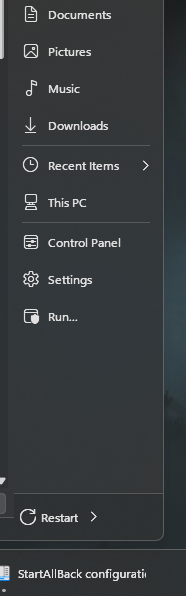
Ahoy, I've had two minor issues for a few versions now, I believe since the 25H2 shenannigans. the first issue is: the restart button no longer seems to do anything. i have it set as the default button in the start menu. the second issue is: when set to the classic task bar, and turning on auto-hide in the windows taskbar settings, there's a weird issue where the icons flash up mid screen when unhiding the bar, rather than uh, being constrained to the bar. I can get video of that if you like, but i'm hoping it's simple to reproduce. thank you

- Yesterday
-
@nicolaasjan I have attempted to make compatible 64-bit OpenSSL shared libraries using MSYS2. If you would like to test them.
-
 Per abbodi1406, https://github.com/abbodi1406/vcredist#windows-xp-notice Direct link: https://download.visualstudio.microsoft.com/download/pr/566435ac-4e1c-434b-b93f-aecc71e8cffc/0D59EC7FDBF05DE813736BF875CEA5C894FFF4769F60E32E87BD48406BBF0A3A/VC_redist.x86.exe MDL forums reference: https://forums.mydigitallife.net/threads/repack-visual-c-redistributable-runtimes-2020-11-10.76588/page-27#post-1630817 I can confirm that the installer is dual-signed (both SHA1+SHA256), thus it can be verified on XP SP3 (which ONLY supports SHA1 file signatures). As for the installer of version 14.29.30139.0 referenced in the "community.pcgamingwiki.com" site, this has the direct link below (courtesy of abbodi1406): https://download.visualstudio.microsoft.com/download/pr/b929b7fe-5c89-4553-9abe-6324631dcc3a/4C6C420CF4CBF2C9C9ED476E96580AE92A97B2822C21329A2E49E8439AC5AD30/VC_redist.x86.exe but it is only SHA256-signed, so I'm not sure if its signature can be verified under XP SP3 : Just my 2c ...
 -
 As far as I noticed, Panda seems to automatically update the programme only if it is too old. The version 21.01.00 wasn't updated on my system. OTH, the version 18.07.04 was updated to 20.02.01 which, however, isn't the most recent.
 -
Just running the proxy in the background doesn't mean it is also used by a programme. What I meant is whether you're running ProxHTTPSProxy system-wide or not. In any case, Panda Dome has to use the proxy. Thats why I had to configure Panda Dome to use it, however, for activation only.
-
 Well I did install it using a file I downloaded some time ago! I will download it again and see what version the new file is. I would have thought it would have updated itself, but perhaps not.
 -
I asked that as the most recent version of Panda Dome is actually 23.00.00.
-
I'm not sure what mode it's in, how can I tell? I certainly have it always running in the background, as my ancient e-mail client won't display images without it. It's version 21.01.00. The 'About' page says copyright 2021, I guess they never got round to updating it!
-
Are you running ProxHTTPSProxy in the background by default? And if so, in which mode? I had to configure Panda Dome to use the proxy. Which version is your Panda Dome Essential of?
-
Well I certainly didn't have to do anything special, it just worked, but I guess it wouldn't have done without the proxy being there. I've now upgraded to Panda Dome Essential, and finally uninstalled Malwarebytes! I was almost sad to see it go, but as it hadn't been receiving any updates for more than a year, I guess it was time. All looking good so far.
-
Of course, I know. Did you also have to use ProxHTTPSProxy for the activation of Panda Dome?
-
Well I don't need a firewall or VPN either, but I would like to have website malware scanning, as Malwarebytes has always provided. I will try the Essentials version I think, it's not expensive. I do have ProxHTTPSProxy of course BTW, as you well know!
-
I think for a free version Panda Dome is ok. If it is running correctly, the impact is low on RAM and CPU compared with Avast or other security suites in the past. And once again, it is free of charge in the basic version. BTW, I do not need a firewall or VPN. I have already been using the best firewall, Windows 10 Firewall Control Plus XP. And I have several paid VPN services.
-

Native (WDM) HD Audio driver for Windows 98se/Me
Drew Hoffman replied to Drew Hoffman's topic in Windows 9x/ME
Fixed the page fault crash (and probably the hang on Atom systems?) https://github.com/andrew-hoffman/WDMHDA/releases/tag/Alpha-014-1 The problem I'm having installing Win98se without QuickInstall on newer hardware is not the resources crash that SweetLow mentioned and running JHRobotics' Patcher9x does not fix it. I think it is an ACPI related issue with Configmg as installing with setup /p I will allow me to at least boot in to the OS after setup, but it seems to do so in a fallback mode where no PCI devices are detected or enumerated and that is not very useful for testing a PCI device driver. I get somewhat better results copying an image of an existing install, after including the new ICH8+ machine.inf files and NUSB. As long as the machine has PS/2 ports anyway. If it's a laptop I end up with the Catch-22 of needing to install the USB drivers and being unable to click Next on the dialog box. -
I'm actually very impressed so far with Panda Dome, despite my misgivings about it being an online scanner. I would only ever use it on my main desktop, which always has an internet connection, barring occasional outages, so I don't think it's really an issue that it doesn't scan locally. That being the case, I think I'm going to pay out for the 'Essential' version, the lowest paid tier, as that offers website monitoring (I think) and a firewall and VPN. Mind you, the usage allowance on the VPN is so miserly it's pretty useless as far as I can see! I was pleased to find that even the free version has a scheduled scan facility, BTW, I just hadn't found it in the settings!
-
I have already provided a solution to activate Panda Dome under Windows XP. Read this post: and this one:
-
Native (WDM) HD Audio driver for Windows 98se/Me
Drew Hoffman replied to Drew Hoffman's topic in Windows 9x/ME
OK I think I figured out that problem. It's a page fault, I'm zeroing some memory that doesn't need to be zeroed. Will fix today. -
Do you have tips how to troubleshoot potential other cause then? Note that the issue doesn't trigger immediately. I keep my machine always on and at some point a misclick lets me see that the glitch is back. At the moment I can't unfortunately do any debugging about it as I just logged out and back in and that seems to clear the issue, at least temporarily. But I had StartAllBack disabled for the last two weeks as a test and during that time I didn't see this glitch at all. But the native taskbar is intolerable.
-
No offence meant, really, but I don't see the point of your query ; you want a comparison between apples and oranges, when, in practice, the XUL ("legacy") and the WE (MV2) CAN'T be really compared, due to them targeting different platforms/web engines; this thread here is about the XUL variant, which is the only one supported by the (official) UXP-based browsers; actually, roytam1's St52/St55 have retained some rudimentary support for fx-52 level Web Extension APIs, but if you plan on installing there the WE-variant(s) of uBO from ca. 10yrs ago, then you should ditch that idea right away; those ancient WE versions are no match for the web of 2026... TL;DR: UXP-based browsers don't support at all the what you called "newer version Gorhill works on now" ; you are limited to installing the XUL variant; any "academic" comparison is totally moot in this context (similarly, recent Firefox, and its forks, do not support the XUL-variant, only the WE-variant; and currently, that requires fx-115esr and later) ...
-
 yeah with me its weird says it can't connect and such and thus never activates anything
 -
I was surprised to find that I already had a Panda account, it must be from when I tried one of their programs years ago! FWIW, my new installation signed into it with no problem.
-
I don't know if this has been discussed but me personally with panda dome i can never get it to sign into my account always fails w/ xp sp3
-
Looks like Visual C++ 2015-2022 (14.44.35211.0) is the version to keep for Win7 installs then It can still be downloaded from here : https://www.techpowerup.com/download/visual-c-redistributable-runtime-package-all-in-one/ -> Below the "Download" button, there is "Show older versions" -> Download Visual C++ Redistributable Runtimes All-in-One Jul 2025
-
Not sure what you mean. What error do you get?
-
Getting back to Panda Dome, I was slightly disappointed to find that it's an online cloud scanner, not something with works locally. However, for something which is supposedly lightweight, it seems to have installed a lot of things on the machine! When I ran the installer, I was offered to tick an 'offline installation' option. This I did, thinking it would be a good idea. When I checked after installation, there seemed to be three new services added 'Panda Cloud Antivirus Service', 'Panda Devices Agent', and 'Panda Product Services'. So far, so good. What I then found though was that there were now no less than 19 (!) new .sys driver files in the System32\Drivers folder. All relating to Panda Dome. What they all do, I do not know. I'm now wondering if they are something to do with the 'offline installation' option, and they're something to do with keeping the protection working if the machine is offline. The other thing which disappointed me is that there seems to be no automatic scheduled scanning option, which I've always used on Malwarebytes. Perhaps it's in one of the paid versions, I will have to investigate.